Runtime Mosaic-Style Assembly of Modular 3D Pieces

Hello everyone,

I’m planning to create something like this at runtime:
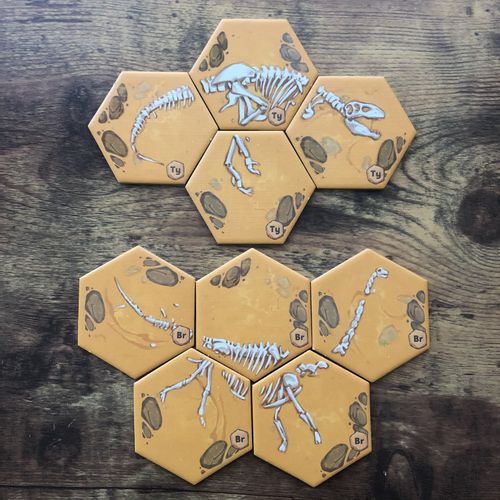

My goal is to assemble multiple 3D pieces next to each other dynamically at runtime, in a mosaic-style arrangement.

Doing this directly inside the editor was a bit difficult for me. I couldn’t reliably get the exact size of each piece, although I managed to place them next to each other manually.
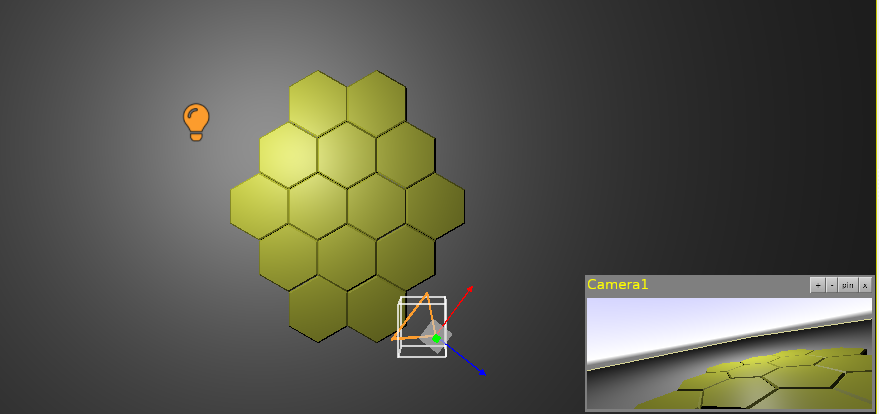
The easiest workflow I found so far was using Blender’s snapping (magnet) feature, which helped a lot to avoid precise manual coordinate adjustments.

However, what I really want is to generate and expand this structure at runtime, not pre-assemble it in the editor. I’m currently looking for a good approach or best practice for this.

I searched the forum using these terms but didn’t find relevant results:

Mosaic arrangement

Mosaic-style layout

Mosaic

I also found one post using “Assembling pieces” as a keyword, but it wasn’t very relevant to this case.

Any suggestions, keywords, or examples for runtime modular assembly would be greatly appreciated.

Thanks in advance.

Hello there!

If you look at the mosaic you may notice that corners (or centres) alternate between odd and even rows. If you make the 3d model, then you also know its exact Size. So you just put the pieces at the Sizeintervals for the top row, then the next row starts at Size+0.5(or - 0.5 depending of desired spread direction) . The next row starts again at full Size distance, then again at 0.5, and so on.

If you want equal spaces between the pieces, you can do it in Blender at the design time, or programmatically just add an Offset which you add to the X position - you just multiply it by the piece number (in the row).

For that you can use 1 model, just change the textures - either in Blender, or programmatically in CGE.

Creating the mosaic at runtime can be easily done:

Create a TCastleScene, set the model URL, change Translation.X (position) according to the above odd/even scheme. Y position always increases by the Size.

Alternatively you could use a “Mask” array, then put true/false for each cell. In that way you can achieve any shape, not just hexagonal. It could look like (pseudocode):

Mask: Array [0..3, 0..4] of Boolean
[  0, 1, 1, 0 ]
[ 0, 1, 1, 1  ]
[  1, 1, 1, 1 ]
[ 0, 1, 1, 1  ]
[  0, 1, 1, 0 ]

This pseudocode shows exactly the same pattern as your second picture. For clarity of the presentation, rows and columns are swapped. By changing the 0s and 1s (false and true) and the size of the array you can create any shape. The mask could be per puzzle if you offer many different puzzles - i.e. each puzzle has its own mask - instead of just 1 general.

If you want all puzzles to be always hexagonal, kind of “round”, it’s also possible programmatically, just less universal.

I didn’t test the above ideas. However I hope that answers your question well enough.

1 Like