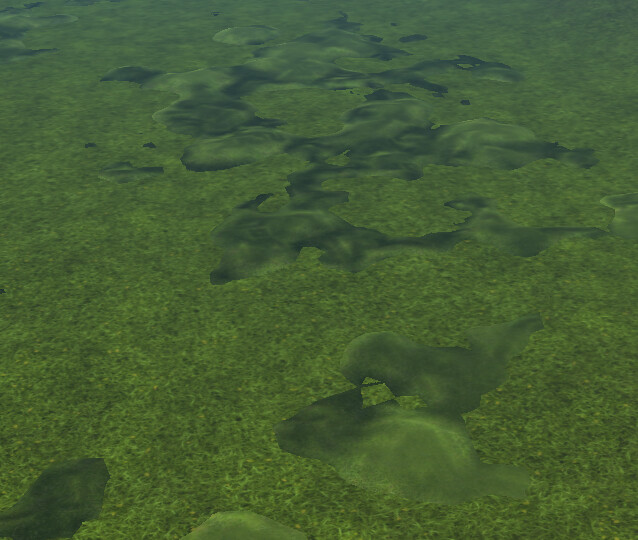
I’m attempting to make multitextured terrain, ideally with smooth blending one texture into another.
for now I tried simple thing - two different terrains with a bit different noises/heightmaps and textures are placed nearby (on screenshot). And there is clear border as you see, and also I need additional transforms. maybe more customisable Layers in CastleTerrain could have something like this, like blend by noise or by bitmap
The way I plan to address it in future Castle Game Engine’s upgraded terrain support is to use “splatmap”, see the description and links there. Basically, one texture (“splatmaps”) has channels RGBA that determine weights of 4 textures.
Sounds cool , I’ve read the page and looked briefly into PR (however, didn’t find mention of splatmaps, it is more about editor, but I understand that it is not something achievable soon+easily)
From a quick look (I’m tied up with another project at the moment), here are some possible approaches. Since you’re an experienced programmer, I’ll allow myself a few shortcuts in the explanation:
Pre‑made blended models
For a turn‑based strategy with a limited-size battlefield (not open world), you could prepare a few 3D models with pre‑blended textures and place them using CGE’s Stick to ground behaviour, with random rotations for variation. If you know the average ground height, you can skip Stick to ground and randomize the Y position slightly to break repetition. Many games use similar tricks — ironically, open worlds often hide repetition more easily than small battlefields, where patterns are spotted quickly. This is a quick compromise between your “two terrains” idea and blend‑ability.
Shader‑based blending
To simulate mud or snow, a GPU shader can mix a base texture (e.g. grass) with one or more overlays (mud, dirt, snow) using alpha channels and a factor. A random alpha/factor generated from an fbm function (commonly used for realistic clouds) gives natural variation. You can even alter the alpha/factor to include footprints or tracks, since the fragment shader provides XY coordinates. It’s efficient, though it will make the GPU work harder.
CPU‑side blending
If shaders aren’t an option, the same trick can be done on CPU with GetPixel/ScanLine, though performance drops significantly. You could use 2–3 procedurally generated grayscale images as alpha masks. On large terrains (e.g. 16k × 16k), this becomes heavy - in my tests, a single quick-made Voronoi at 16k resolution + Manhattan distance + Jump flooding, took ~28 seconds with parallel threads on a mid‑range rig, and ~159 seconds single‑threaded. For a newer computer it’s 17 seconds parallel. Reducing the texture size to 4k took 3 sec parallel vs 8s single thread on mid-range, and on a newer machine 1 sec parallel.
Splatmaps
As mentioned by @michalis, splatmaps are a good solution, and I generally agree. But in a turn‑based strategy, detail scale may matter. Distant features (mountains, rivers, lakes) work fine with splatmaps, but close‑up battlefield details - mud, soil variation, tracks from troops and siege engines - may suffer due to low height variation. It’s still a quick fix and often “good enough,” but remember you’re limited to four distinct levels (RGBA), and blending can be tricky when height differences are subtle.
Grass
You could use grass patches to conceal the imperfections. However, grass will most probably use transparency - not a big hit on the performance, but considerable. Human eyes are good at ignoring stuff, so it may act in your advantage. In that way you could still use the second CastleTerrain without making it look like “displaced”.
You might look into my efforts playing with terrain in my client/server terrain. I implemented low res splat maps. In the past I played with trying to have different terrain parameters tiled next to each other and to smooth between them but never had good effect. But now I think the way I smooth the splatmap colors next to each other will work to smooth the terrain and I want to revisit that. That way a mountainous region can be next to a plains region without gaps. https://github.com/xistext/terrainserver is my repo. It is two programs… client and server. You run the server then run the client and it will connect and display terrain. The current state has pretty poor use of shadow maps in the hope that @michalis will revisit those soon.
(my terrain is not TCastleTerrain but uses the same noise functions. my terrain can be deformed in realtime and tiles to make large worlds)