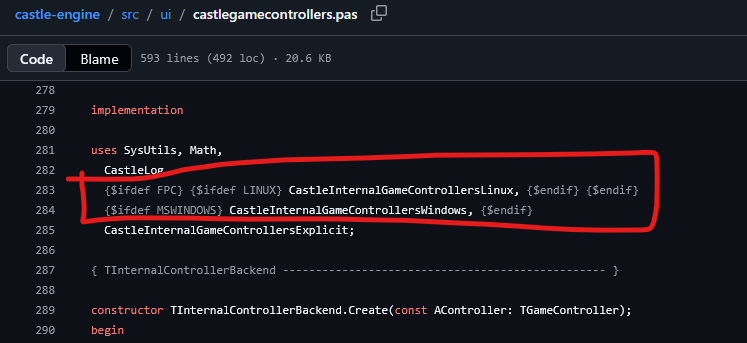
I’m using the same game controller (Logitech Gaming F310 Controller Gamepad) in Windows11 and LinuxMint. In Windows all Buttons ar handled, but in LinuxMint some Buttons are not.
Looking into CGE code I can see, that ther are different units for win and linux.
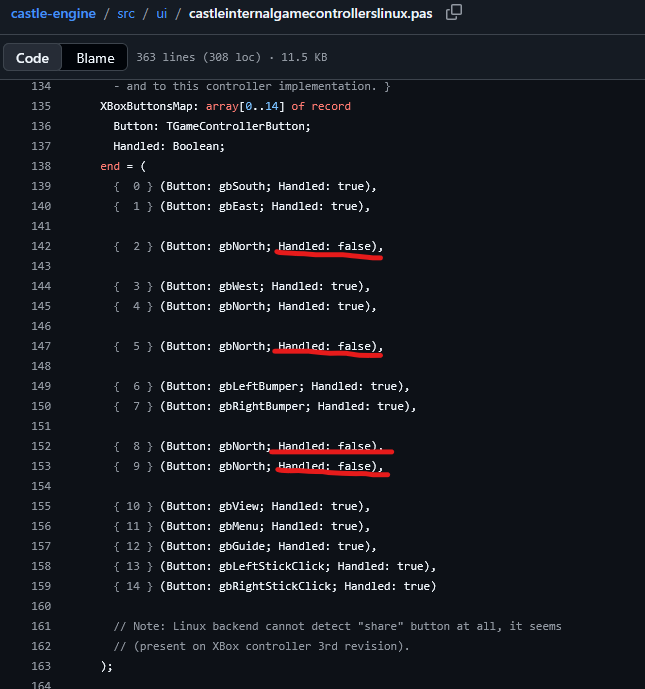
On my test XBox gamepads, these numbers were not possible to produce. I.e. I didn’t find any button that would actually make these numbers. That’s why they are marked Handled:false.
I suspect “Logitech Gaming F310 Controller Gamepad” is not compatible with what “XBox controller” does, which is unfortunately common. Each controller’s manufacturer tends to do something a bit different. Maybe on Windows, by chance, they are compatible but not on Linux.
One solution is to detect Logitech controllers, and have a different mapping for them, not XBoxButtonsMap. This is unfortunately both Logitech-specific and Linux-specific, and no way around it, when controllers are so incompatible.
We explored in the past using SDL for such mapping, but their mapping was also incorrect in our tests.
There is “Godot’s game controller database” linked there which would possibly be better.
But it’s probably simplest to just make our own detection + new mapping. We plan to do this anyway at least for PlayStation controllers, that are probably most popular controllers after the Xbox.
It is also possible to define different “controllers backends”, and in particular define a backend relying on Steam. They had to solve this in Steam too, and they probably have the best “controller database” now, and there should also be a Steam UI to configure your gamepad.
So this, in some, “clean” solution (cross-platform code that will make ~all gamepads work) but it is useful only for Steam games.