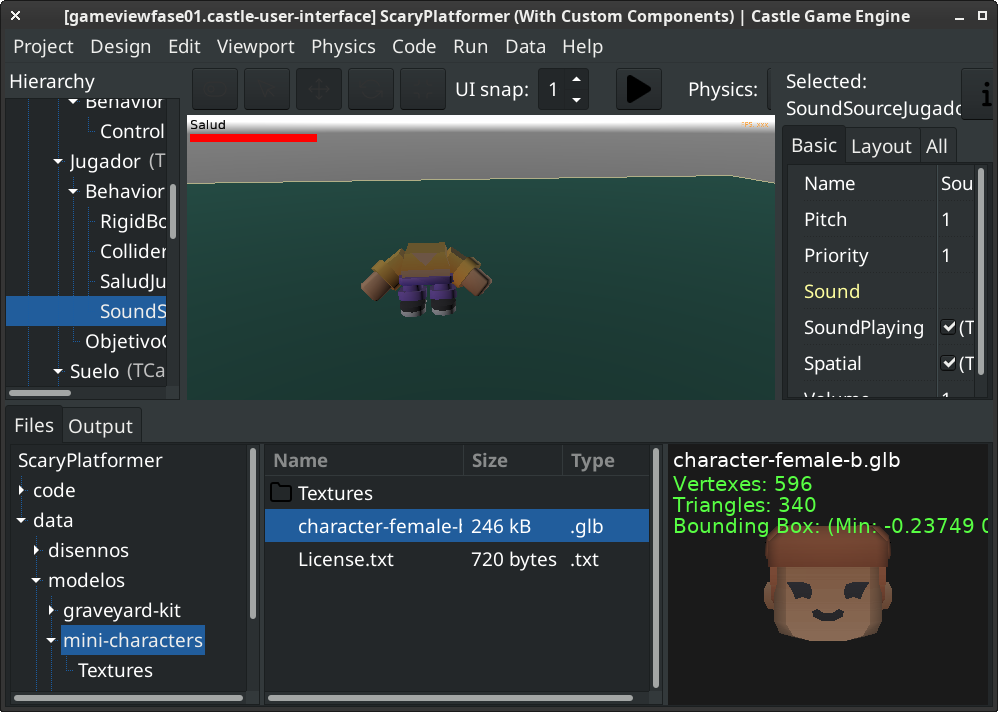
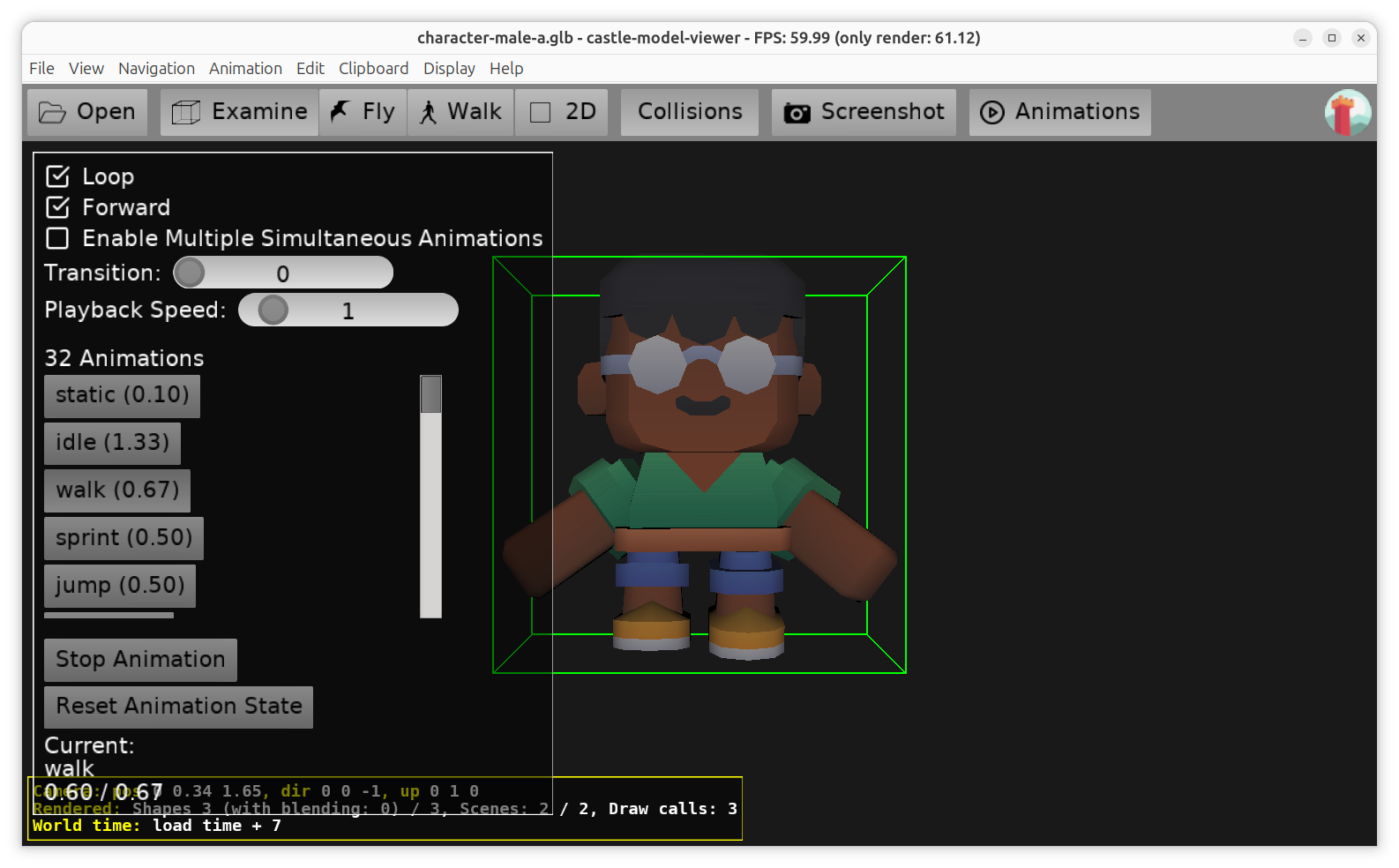
I’ve found that CGE doesn’t load some models. These models are Kenney’s mini character 1. I’ve attached them for convenience at the end of this post. In some cases it gets only the head, other times it gets only the body. Some times it identifies the animations, some times it doesn’t. I can’t see a pattern (the same model in the same project have different behaviors at different times [moon phases?]).
To replicate just create a new project with a 3D viewport and insert any of the models. An example of what I see:
I downloaded the engine again one or two weeks ago, so it’s pretty new. Older versions did work well using the same models (I’ve found this thread and in that time I remember it worked).
A friend tested the models in Unreal and they work flawlessly.
None of these models work in CGE: mini-characters.tar.gz (235.4 KB)
2 Likes
Hello there!
When I opened the file with Blender I see the head and the body are 2 separate objects.
If they were part of the same object tree, like Person (the root) → Head (first child) → Body (second child), then it’d load with no problems. I often use models with dozens of child objects without issues.
The designer’s choice was to make 2 objects, but both share all the same stuff and have only different mesh. And here’s the good news.
- You can import the model to Blender, selecting option “Import scene as collection”. Then select all (head and body) and export to gltf / glb with “Selected objects” option. You save few kilobytes, too. See:
kenny_fem_b_2.glb (207.7 KB)
- You can also join the 2 meshes into single 1. Just select both: head and body, right-click and select “Join”. Then export “Selected objects” back to glb. It preserves the skeleton, because it’s shared, and you can still animate / pose things. This way you clean up the model, and the file size is considerably smaller, but it’s absolutely optional. See:
kenny_fem_b.glb (66.2 KB)
I think that the problem arise only because CGE expects one object, or precisely 1 object’s tree. When 2 or more trees are present, the first to load is the one that CGE picks - that explains why you randomly see either the head or the body. Vast majority of models I’ve seen are 1 tree, so I doubt it’ll be worth hacking the gltf loader for the few exceptions.
Anyway, I hope my answer helped a bit.
2 Likes
I’ve looked into the raw data of the file. The file was originally exported with UnityGLTF, and has one scene root "scenes":[{"nodes":[0],"name":"character-female-b"}]so it’s not a multi-root model. The real problem is skinning: there are 2 mesh node that reference different skin indices:
{"skin":0,"mesh":0,"name":"body-mesh"}
{"skin":1,"mesh":1,"name":"head-mesh"}
but both skins refer to the same identical joints list
{“inverseBindMatrices”:420,
“joints”:[1,2,3,4,5,6,7]
},
{“inverseBindMatrices”:423,
“joints”:[1,2,3,4,5,6,7]
}
The solutions that I suggested earlier still apply: you either join the meshes or make them use the same skin. I have confirmed it on few models, and all re-exported ones exhibit lack of repeated identical joints.
I think @michalis is the best person to decide if CGE should merge identical joints. In my humble opinion, the Unity’s exporter produces valid glTF, and their ways are possibly not so unique.
2 Likes
Thank you a ton @NiunioMartinez for the precise bugreport and then for analysis from @DiggiDoggi . You both made my work easy 
In short: fixed in the latest engine version!
As usual, the downloads will contain the fix after it passes a few automatic tests. You can observe this page, when it will no longer show the commit “Handle glTF files containing multiple equivalent skins…” then the fix is part of the downloads.
Details, if you’re curious what / how / why:
-
The limitation on the CGE side (only partially “lifted” now), causing this, is that we cannot have 1 joint affected by 2 different skins. And this is what these models use, as investigation from @DiggiDoggi shows – 2 skins, and their “joints” list are equal. They actually share the whole “skeleton” which equals to “root joint” in our terminology.
While in principle our Skin node could express such joint usage (using DEF/USE to refer to the same skeleton root from 2 skins), our logic is not ready for this yet. But it’s possible to be solved one day in a general way in our engine, please report if you encounter the need for this “in the wild”, i.e. on models you want to use.
Our previous approach with “precalculation” (as you mentioned it worked in early 2025) indeed allowed this, by precalculating all animations without much of the assumptions.
E.g. this testcase will not work correctly with latest CGE: glTF-Sample-Assets/Models/RecursiveSkeletons at main · KhronosGroup/glTF-Sample-Assets · GitHub
( To be clear, you can have multiple skins, they just need to work on different joints and shapes. And you can have multiple shapes (so multiple geometries) in one skin. The problem only starts if multiple skins try to operate on same joints. )
-
There was a talk at glTF whether such models should be allowed, see here for all the details and discussion that I followed to some extent: Stricter Skinning Requirements · Issue #1665 · KhronosGroup/glTF · GitHub
In the end, the more flexible / complicated approach remains possible in glTF.
To make it easier for some importers, there was a plan for an “extension” called KHR_skin_strict that when used, declares that glTF model actually confirms to a stricter version of spec (so it relies only on a subset of features), in particular “A joint node must belong only to a single skin”. See KHR_skin_strict by donmccurdy · Pull Request #1747 · KhronosGroup/glTF · GitHub for discussion and the proposed extension text on KHR_skin_strict by donmccurdy · Pull Request #1747 · KhronosGroup/glTF · GitHub . This was proposed in 2020, so I’m not sure if there’s hope it will be really available one day, but the GitHub issues remain open.
-
The 2 GitHub issues linked above contain claims that other game engines also don’t support complicated skins (see e.g. statement “No game engine supports binding a mesh to multiple skins. If an exporter wants to do this, it needs to join both skeletons.”). So, I believe Castle Game Engine is not alone in this limitation… but I didn’t check in practice how does it look. Information in this thread suggests that Unity and Unreal support it at least to some extent (maybe using a similar hack to only support specific cases, like we just did, read on ).
-
What did we do now?
First of all, this cannot be random (the “moon phases” you mentioned were caused by an undefined order when iterating over TObjectDictionary, used during glTF skins loading), And it cannot just hide some model part. At the very least, we should reject an extra skin information with clear warning “sorry, not supported” and at least show remaining shapes as non-animated.
Done in In case of multiple skins using the same skeleton, make clear warning… · castle-engine/castle-engine@c908e31 · GitHub
You will see for such cases a warning like Warning: glTF: Skeleton "Group" is a root of more than one skin (named: "" and ""). This is not supported (see KHR_skin_strict discussion). And only the shapes from one skin will animate (but all shapes will be visible). It’s better than it was.
-
For this specific case, we can do more, since actually the 2 skins are exactly the same. They use the same joints with the same “inverse bind matrices”. We can just put all affected shapes in one skin, and we’re good.
Done in Handle glTF files containing multiple equivalent skins affecting the … · castle-engine/castle-engine@2060280 · GitHub
No warning will be shown in this case and everything just works out-of-the-box.
Disclosure: Claude Code suggested a workaround along the lines of 2nd commit, thought in the end I threw it away and made my own more efficient and robust version. So, I’m still useful:) but Claude’s guess wasn’t that terrible either.
Have fun making games!
4 Likes