To make it (relatively) short, I’m doing a simulation of structural elements of a furniture, and for that one of the important aspects are ergonomics. I have 3d models of humans so I can simulate the person e.g. taking off the ladder in a bunk bed, as pictured. However, I’d like to make it using CGE. The CGE’s rendering offers good quality, it’s real-time, and it’s Pascal!
But now… Every bone has their min/max angle constraints, obviously. Also, I want to simulate them at optimal angle ranges, people are lazy and easy to injure Let’s say the angle between the upper and lower arm should be somewhere between 90-100 deg for an average person, so every bone needs to have an additional “soft” constraint.
I need to know / control the angles from my code, so I can simulate different options. CGE as a Game Engine is more that suitable for that! In some way my approach is similar to Inverse Kinematics (IK).
My question is: what’s the best option to achieve it in CGE.
I know I can expose the bones inside the editor, which is a really powerful option in CGE - even the smallest bone can be animated. However, the thing is that my skeletons have quite a few bones and iterating would be easier than manually selecting them in the editor. I don’t have the time to experiment much now - I understand that if the CGE editor knows the nodes then I could fetch them too. Is there any simple way to achieve that? Any drawbacks, or better options?
As a side question, my models (including human face expressions, windows size, or rungs distance) are parametric. In Blender, for example, I use Shape Keys to make life easier. Thanks to @michalis I know they’re called Morph Targets in glTF and their support is planned, I refer to Animating 3D meshes without “skeleton” (armature) - Animation - Castle Game Engine Forum. Is there a progress in that area?
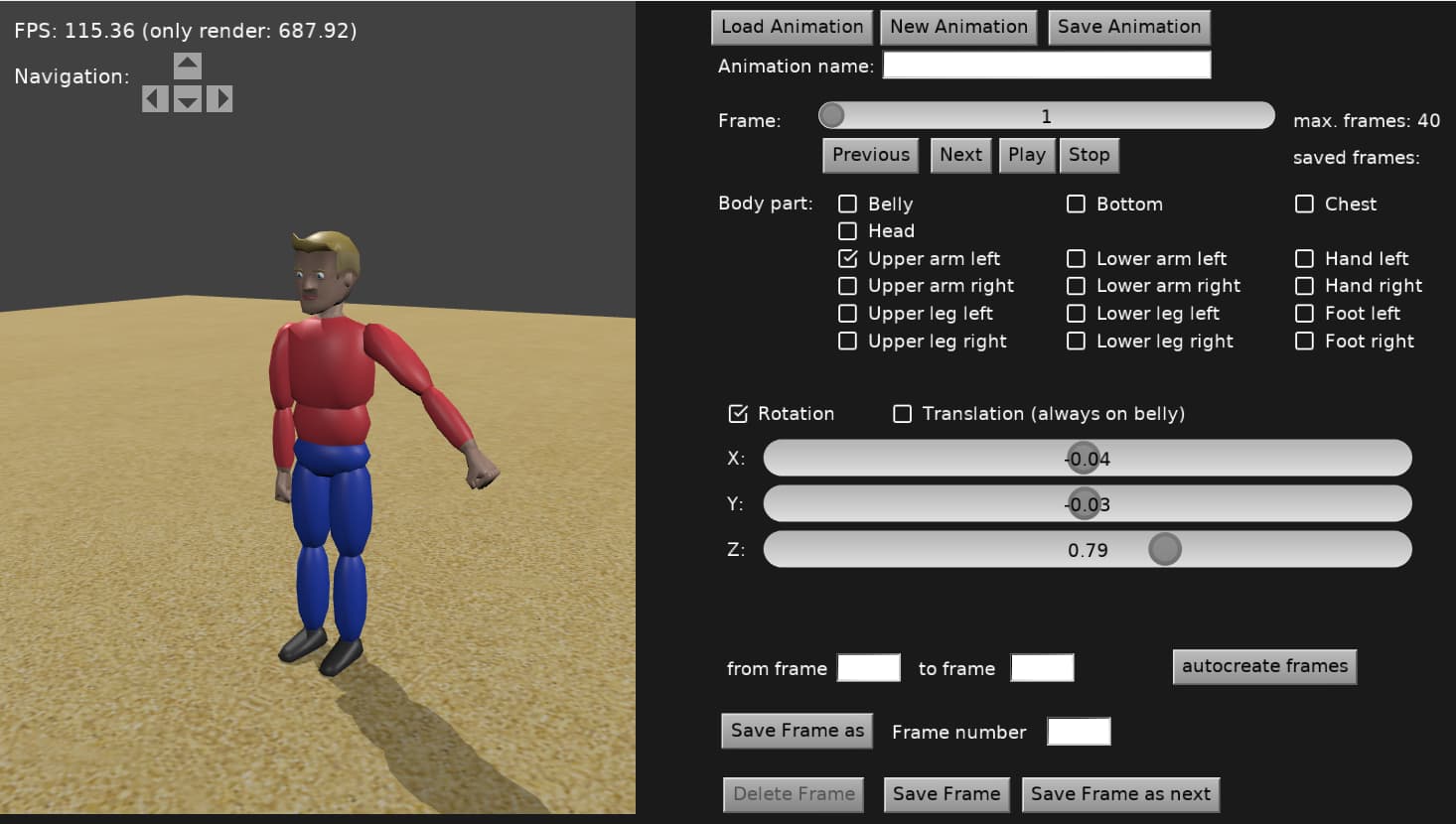
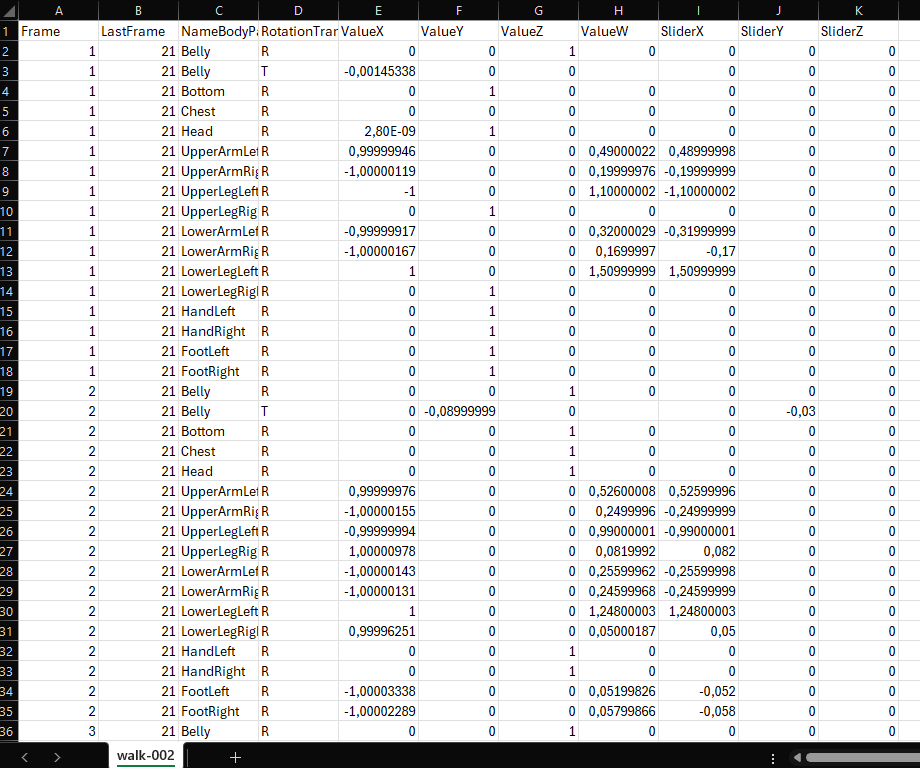
I created an animation editor a while ago. It allows me to assign rotation or translation to individual body parts. The values are saved in a CSV file and read into an array when the program starts. When the animation is run, the value from the array is simply set. I didn’t pursue the project any further, as the performance doesn’t seem to be that great.
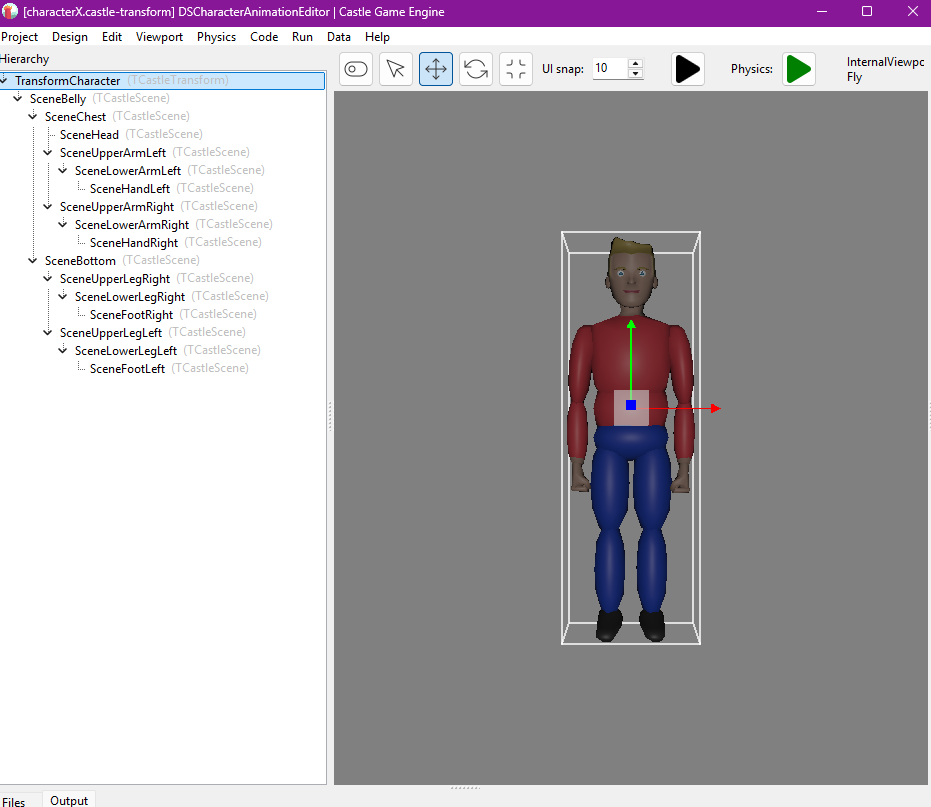
I see you have used separate scenes for the body parts, so programmatically it’ll be easy to implement. My brain cells didn’t consider that approach. But I worry about outfit clipping.
My rigs have at least 41 bones. With skinned animation, and hopefully morphs, I could avoid the clipping and use just 1 whole model.
Another complication is that the models have different shapes - male, female, from thin to obese, high, different age as well. All that would inflate the amount of scenes required. Internally I use morphs - my characters are parametric - so maybe I’d reduce the scenes amount, but it’s really much easier to use some pre-shaped models.
I was thinking about pre-made animations for every part of the body, and then just choose the part-at-frame which would correspond to an angle. It’s conceptually simple, but implementation is complex. Most of the bones have 3 degrees of freedom and can move in a wide range so I’d need a massive animation library, even with binary records instead of CSV. It’s a tedious task too, but would provide best visuals.
Today I’ve done initial tests with ExposeTransform. I could set angles, but the model didn’t respond. I’m now testing different rig formats (MHX and Rigify). I hope to either confirm it or rule out soon.
I’ll keep your solution in my mind, Didi. I think I’ll go with something similar if working directly on bones doesn’t work. Most probably I’ll need to use some mesh corrections based on angles but that’s manageable. “Sticking” a hand to the rail or foot to the floor should be easy that way, too.
Most importantly the animation is baked on load, and ExposeTransforms - although very useable in game development - can’t be used to affect the mesh. Which means direct use of Rotation or manipulating the underlying x3d node will not work.
My understanding is that for most games the animations are recorded at the design time, then just played at runtime. But apart from obvious ability to control the skeleton, Can Copy Animation from SceneA to SceneB - Castle Game Engine Forum could also be done much easier.
Anyway, I’m going to try few more ideas and hopefully I’ll be able to share some good news Have nice weekend everyone!
Yes, I’m using the skinned-animation-gpu branch together with ExposeTransforms, and with that you can have full control over the bones.
This approach works great — it’s actually what most modern games use, especially FPS games.
Usually, animations are pre-baked in tools like Blender and then simply played back during runtime.
You can also control or blend only specific parts of the body depending on the situation in the game.
For example:
Use an animation for the upper body only when the player is aiming, firing, or idle.
Play a separate animation for the lower body while moving forward, backward, left, right, or jumping.
Adjust only the hands or fingers to match different weapon sizes or types.
Note: The Hips bone needs special handling when extracting its values from Blender, since it’s the root bone and behaves differently from its child bones.
Thank you all for the answers above, let me just recap (and confirm what you all already concluded ):
If you want “skinned animation” (so the body is not composed from multiple “rigid” pieces, instead it’s a mesh that bends according to the transformations of invisible joint hierarchy), then admittedly current engine “master” doesn’t have this feature. Skinned animation loaded from glTF is “baked” at the loading time – which makes IK not possible.
Workarounds, like using H-Anim or performing skinned animation calculation yourself, are cumbersome and not really recommended.
A good news is that I’m already working on a much better solution We have the Skin node and skinned-animation-gpu branch, with the example animate_bones_by_code on skinned-animation-gpu branch already pointed above, which are doing+showing exactly what you need
That is, you can then transform the joints (they are just TTransformNode nodes inside TCastleScene X3D nodes), you can change their Translation, Rotation at run-time freely, and they will change the mesh properly.
It is also very efficient (the skinned animation is applied on the mesh using GPU). So it’s very fast to animate, whether the animation was “pre-designed” (like in Blender) or is “calculated at runtime” (like IK), all approaches are fast.
Loading time is also quick and doesn’t use significant memory, since we don’t “precalculate” anything.
Why is this not in master yet?
A few small details – I need to test/fix some testcases I found.
And I need to implement “bounding box calculation for the animation”. Currently you need to assign proper bounding box explicitly, but that’s not good for “general” usage I think, since most models “in the wild” don’t have such information (glTF models also don’t have it).
The issue is that the final vertexes positions are only calculated on GPU (so not known by CPU, in our normal memory). This makes it problematic to use frustum culling – a model could disappear from the view when it should not, because CPU code would think that bounding box of the model is not visible.
But I need to fix it, without “bringing back” the animation processing at loading-time, which would kind of bring back some of the problems of current “master” approach (slow loading time).
I devised a solution to this, to be able to sample animation (some frames, some vertexes) fast on CPU. I even extended the idea, to allow something more in the future – to enable to have one TCastleScene visible multiple times in the world with different animations throughout (so it would be almost as efficient as using TCastleTransformReference, but at the same time allow different animations on characters, so it can be used e.g. to render realistic crowds).
Alas, it takes time to finish it
Long story short: if you’re brave, and familiar with CGE enough (which I know all 3 people in this thread are!) I would say to “try to use skinned-animation-gpu branch already, and let me know if there are problems”.
I’m nearly done with work on the skinned-animation-gpu branch, I hope to merge it in 1-2 days to master (as soon as I catch some sleep to do final tests with a clear head ).
If you use this branch, please again update, and reports of any regressions are most welcome. This is a huge improvement to how animations work in the engine, not only to make skin animation on GPU, but also incorporating 2 animation optimizations (OptimizeExtensiveTransformations and InternalFastTransformUpdate, documented in examples/animations/optimize_animations_test README ) to be just done automatically and always (as they have no drawbacks now) for all animations in the engine.
Details of things done since last post in this thread:
Optimized animating transformation hierarchies to recalculate only the necessary sub-trees. This replaces previous OptimizeExtensiveTransformations, with a more efficient algorithm that has no drawbacks, so it’s just active always. Value of OptimizeExtensiveTransformations is now ignored, it’s a deprecated global variable now.
Fixed animating tangents (to have bump mapping look 100% correct) when doing skinned animation using shaders.
Improved deprecated specular-glossiness material import from glTF. It’s still a deprecated glTF option (deprecated by Khronos too), but such old models now look better in CGE.
Better detection and customization of maximum number of joints available.
Animation bounding box is automatically calculated by sampling some frames when loading model from glTF. This makes frustum culling correct, out of the box, and glTF loading fast. See for details TSkinNode.AnimationSamplingForBox .
( Note that I’ve done the last point in a simpler way than originally planned. I dropped the idea of TCastleTransformReference for now. For now the bbox calculation is only done at glTF import using a simple code. I want to get back to the TCastleTransformReference idea, but that’s for later, I need to “limit the scope” of this branch at some point For the practical purpose of playing skinned animation loaded from glTF the current solution for bbox calculation is enough. )
The skinned-animation-gpu branch is no more, because it was merged fully to CGE master!
I did a couple of minor fixes at the end, testing everything.
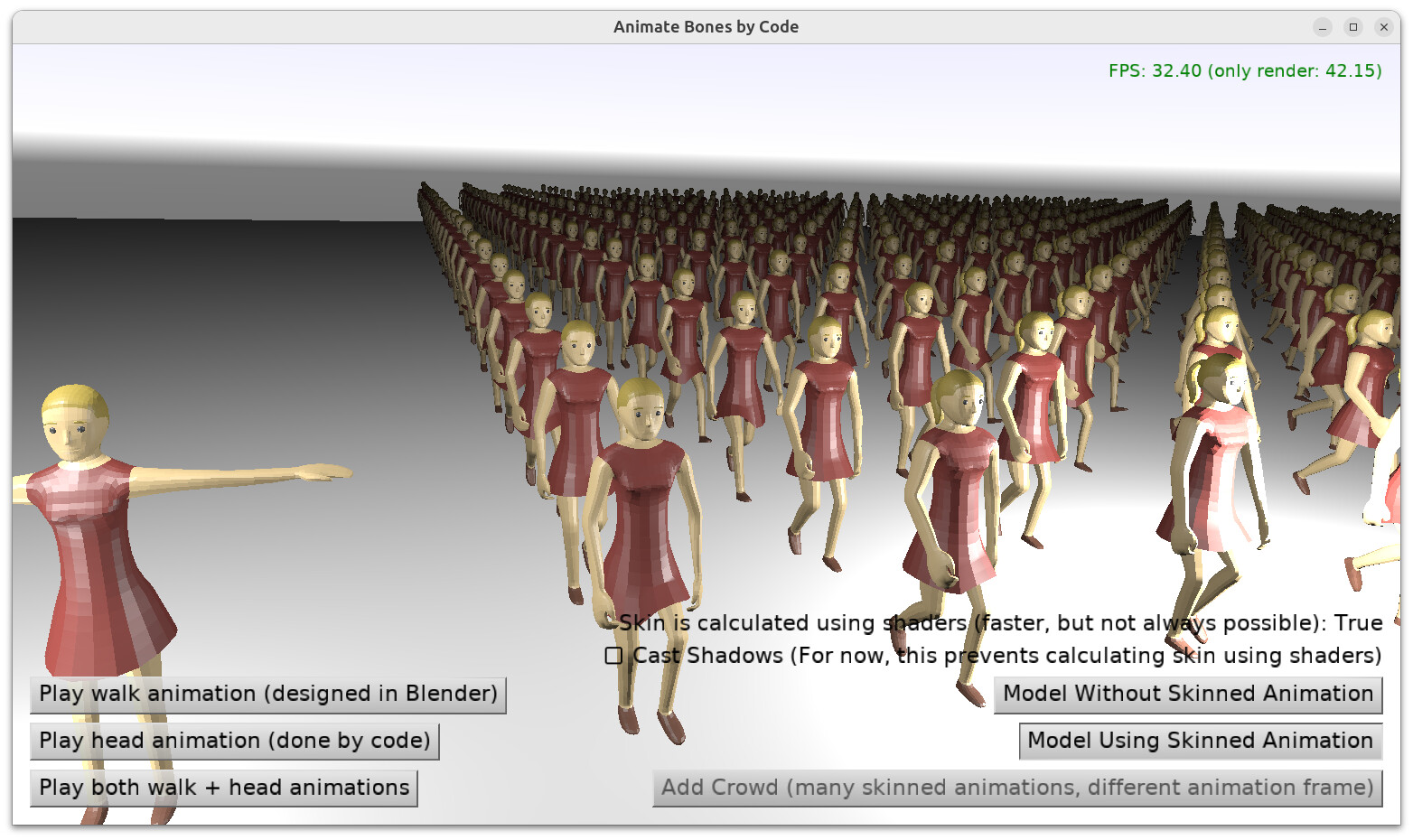
And added “Add Crowd” button to the animate_bones_by_code to show that we can now have a huge crowd of animated characters, without killing memory and without killing FPS
This is wonderful news! I really appreciate your effort, and fast progress. 25 days ago it was
now it’s already finished
I understand that “cast shadows” can hit the performance, and shadow volumes are not going to work. From what I know, generating shadow maps is also not a simple solution either, because the shadow map must use the output from the anim shader (displaced vertices instead of the original model). This affects the whole rendering pipeline. It’ll be great if GPUs were intelligent enough to know we need shadows and calculate them without asking
Your work on GPU-based skinned animations solved my issue with controlling bones through code. I’m very thankful for that.
The shadow volumes indeed are going to force the skinned animation to be performed on CPU. They “work” but in the sense that “everything will be correct”, just FPS will not be as good, unfortunately. I did some tests before merging, and the overall speed is at least as good as before merging. It’s just that, with shadow volumes, benefits to FPS can be ~zero (but you still gain much lower loading speed and memory usage). Without shadow volumes, everything including the speed (FPS) can be better
Shadow maps do not have this issue.
Reason:
While both shadow algorithms need to “know” the positions of the displaced vertexes…
…but shadow maps do not need to know them in normal memory (for Pascal code, running on CPU). When rendering shadow maps, we just render the world as usual (including doing skinned animation on GPU), and the shadow map will account for the animated object correctly.
This is in contrast to shadow volumes, when we build the “shadow quads” on CPU, i.e. using Pascal code, and then we need to known on CPU code the positions of the displaced vertexes. This is a difference that unfortunately makes shadow volumes + skinned animation on GPU not play well together.
To be clear, there are solutions to make shadow volumes + skinned animation on GPU work efficiently.
We could use “transform feedback” to get data from GPU.
Or build shadow quads on GPU using geometry shaders.
However, both these solutions also come with some complexity, and “ancient” GPUs do not support “transform feedback” or geometry shaders. So before we “attack” that task, it will be more efficient to just improve the shadow maps support, which we wanted to do anyway
If the error is on our side: It is possible your IP address was classified as spam (maybe someone using the same IP was using it for abuse), either by our forum review system (automatic or manual from me) or Cloudflare (which is sort-of automatic).
Let’s continue this please in another thread – you can make another thread or just write Private Message to me. I’ll need
A detailed screenshot how it fails if you don’t use VPN (does it just timeout? or some screen is displayed like “cannot access…”? a screenshot will be best),
your public IP address (you can check it e.g. using https://ip.me/ ),
it will be helpful to know whether our main website, https://castle-engine.io/ , remains accessible without VPN or not.
Is it possible your ISP (Internet Service Provider) does something non-standard? Are you in a country / area where some non-standard blocking may happen, e.g. blocking any forums using Discourse?
Some of the above information is private - so feel free to answer me in a Private Message, not a public forum thread

 Let’s say the angle between the upper and lower arm should be somewhere between 90-100 deg for an average person, so every bone needs to have an additional “soft” constraint.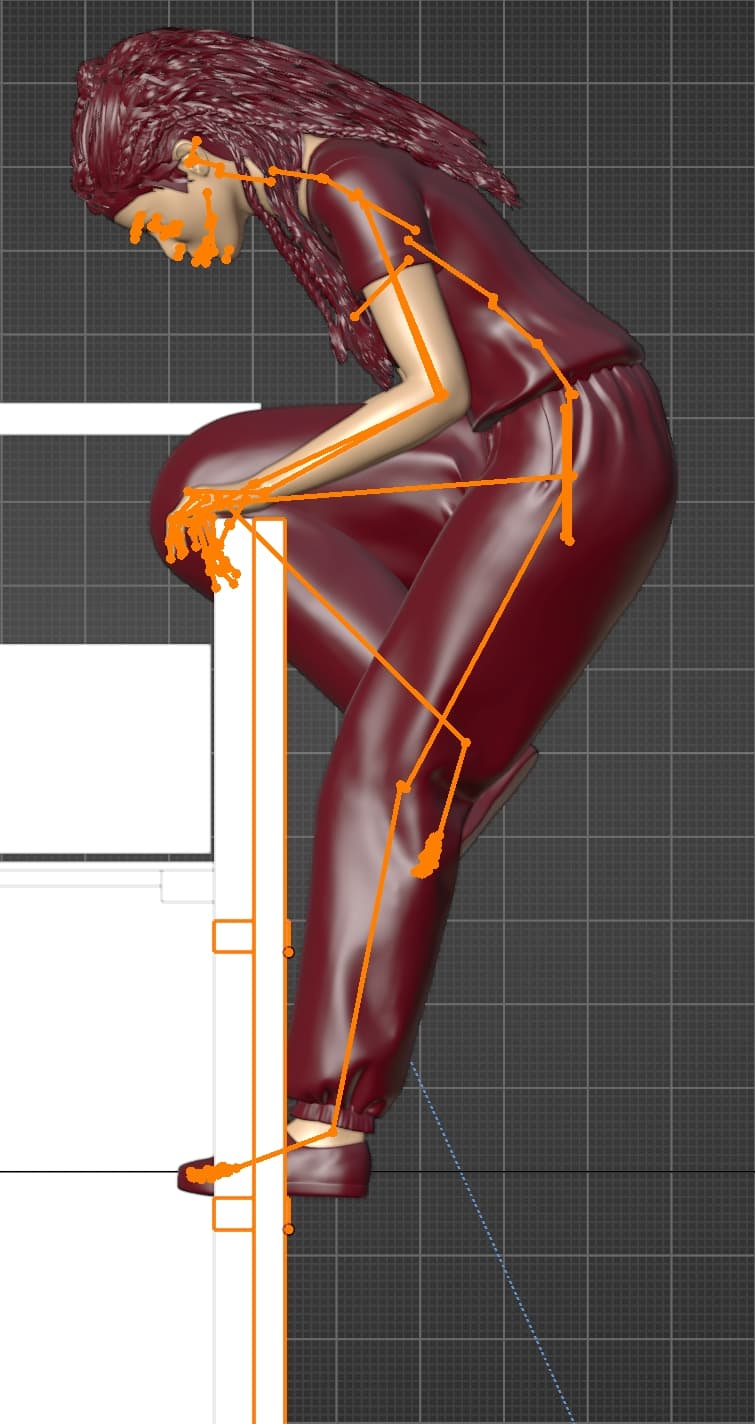
 Have nice weekend everyone!
 ).
).