Problems at installing Lazarus with fpcupdeluxe on Linux Mint

Hi, I need help. Since one week my notebook is running on linux mint. Now I try to install FPC and Lazarus with the help of fpcupdeluxe.

The installation of FPC (3.2.2.zip) was successful.

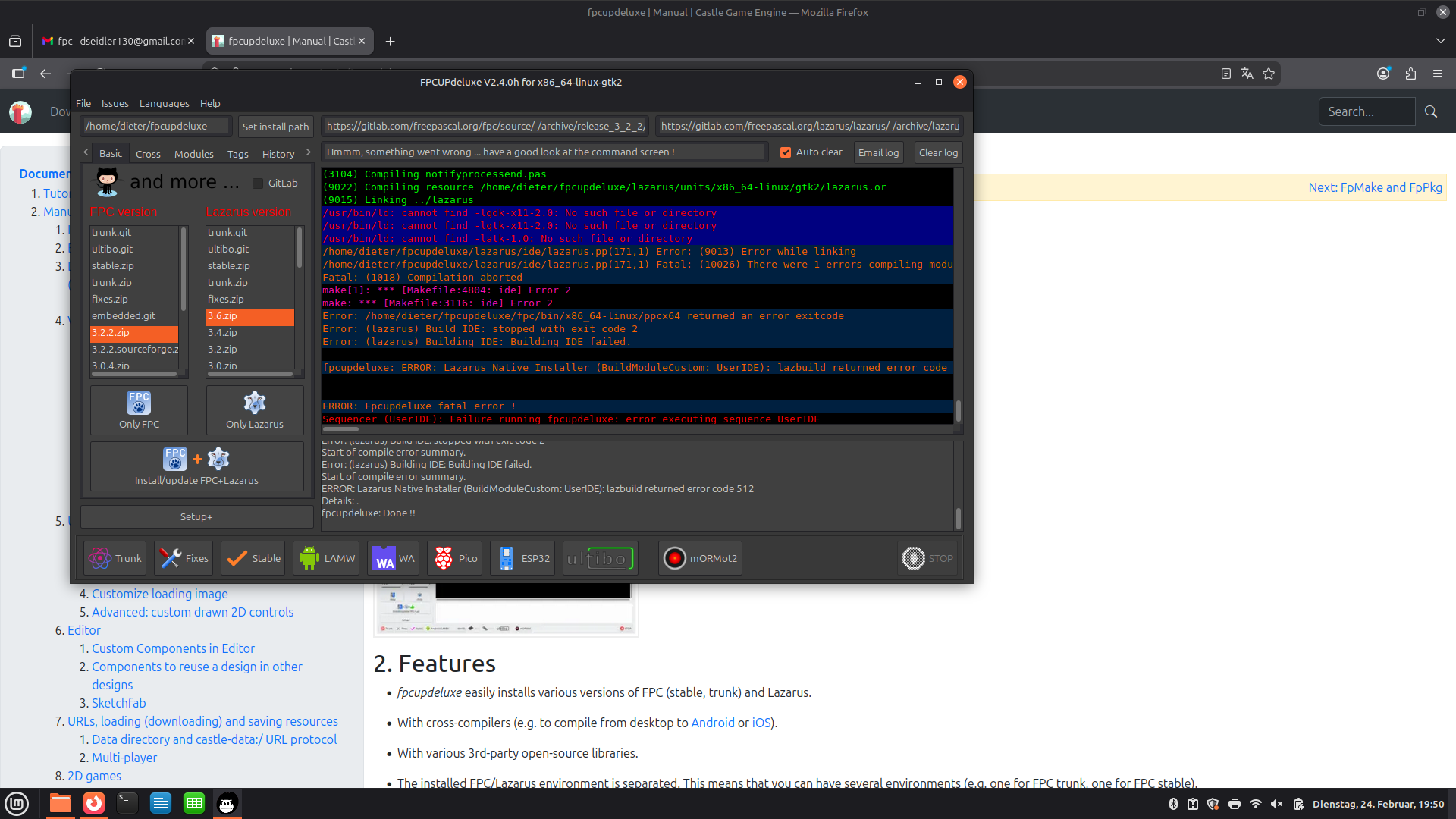
The installation of Lazarus gives me some errors:

I tried stable.zip and 3.6.zip but with the same result.

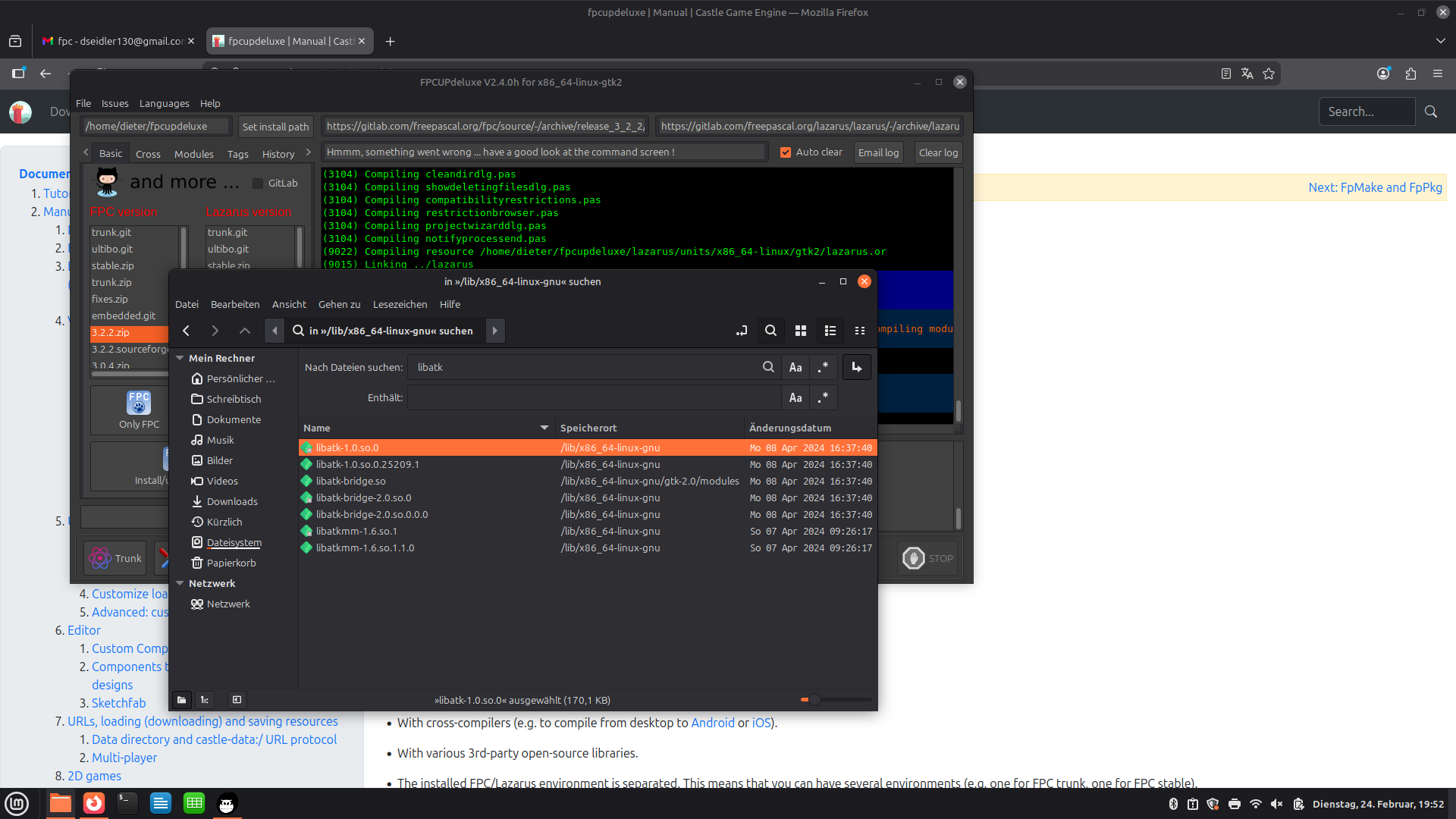
I think that this 3 files are in an other folder:

Besides I can not find the folder /usr/bin/ld there is only /usr/bin.

many thanks in advance

In short: you need sudo apt install libgtk2.0-dev.

Longer explanation: when linking applications that use GTK 2, the Unix linker needs a file libgtk-x11-2.0.so (just .so extension, no extra numbers afterwards). This file is installed on Debian-based Linux distros by package libgtk2.0-dev, and it is a symlink to the actual GTK library.

This is how it should look once you install libgtk2.0-dev:

$ cd /usr/lib/x86_64-linux-gnu
$ ls -Flah libgtk-x11-2.0.so*
lrwxrwxrwx 1 root root   27 lip 15  2024 libgtk-x11-2.0.so -> libgtk-x11-2.0.so.0.2400.33
lrwxrwxrwx 1 root root   27 lip 15  2024 libgtk-x11-2.0.so.0 -> libgtk-x11-2.0.so.0.2400.33
-rw-r--r-- 1 root root 4,5M lip 15  2024 libgtk-x11-2.0.so.0.2400.33

When linking, the linker actually records in the Linux exe the information that it is linked with /usr/lib/x86_64-linux-gnu/libgdk-x11-2.0.so.0. That is, linker looks at where the symlink points to, and records the version of file with one extra number .0, which in theory can be incremented on incompatible GTK changes (in practice, GTK 3 has a different naming altogether). You can confirm it by inspecting the build lazarus executable file (once you successfully make it) with ldd, like

$ ldd lazarus
....
        libgtk-x11-2.0.so.0 => /lib/x86_64-linux-gnu/libgtk-x11-2.0.so.0 (...)
...

The libgtk-x11-2.0.so.0 is provided by other package that is almost for sure already installed on your system (esp. since you run fpcupdeluxe which itself uses GTK 2). On Ubuntu it is libgtk2.0-0t64, in general it’s called like libgtk2.0* but without any -dev suffix.

So regular users (that just run applications using GTK 2, don’t link such applications) don’t need the libgtk2.0-dev package. They only need the version of the file with .0 suffix, from package like libgtk2.0-0t64 (installed by default on ~most Linux distros I guess). You need to install libgtk2.0-dev to be able to link applications using GTK 2, not only execute them.

Note that Castle Game Engine requirements also mention this package: Compiling from source | Manual | Castle Game Engine . Although we also recommend libgtk-3-dev since we migrated to GTK 3 so your typical CGE applications will use GTK 3, not GTK 2.
2 Likes

Heureka, Lazarus install was successful. :grinning_face: Thanks a lot.

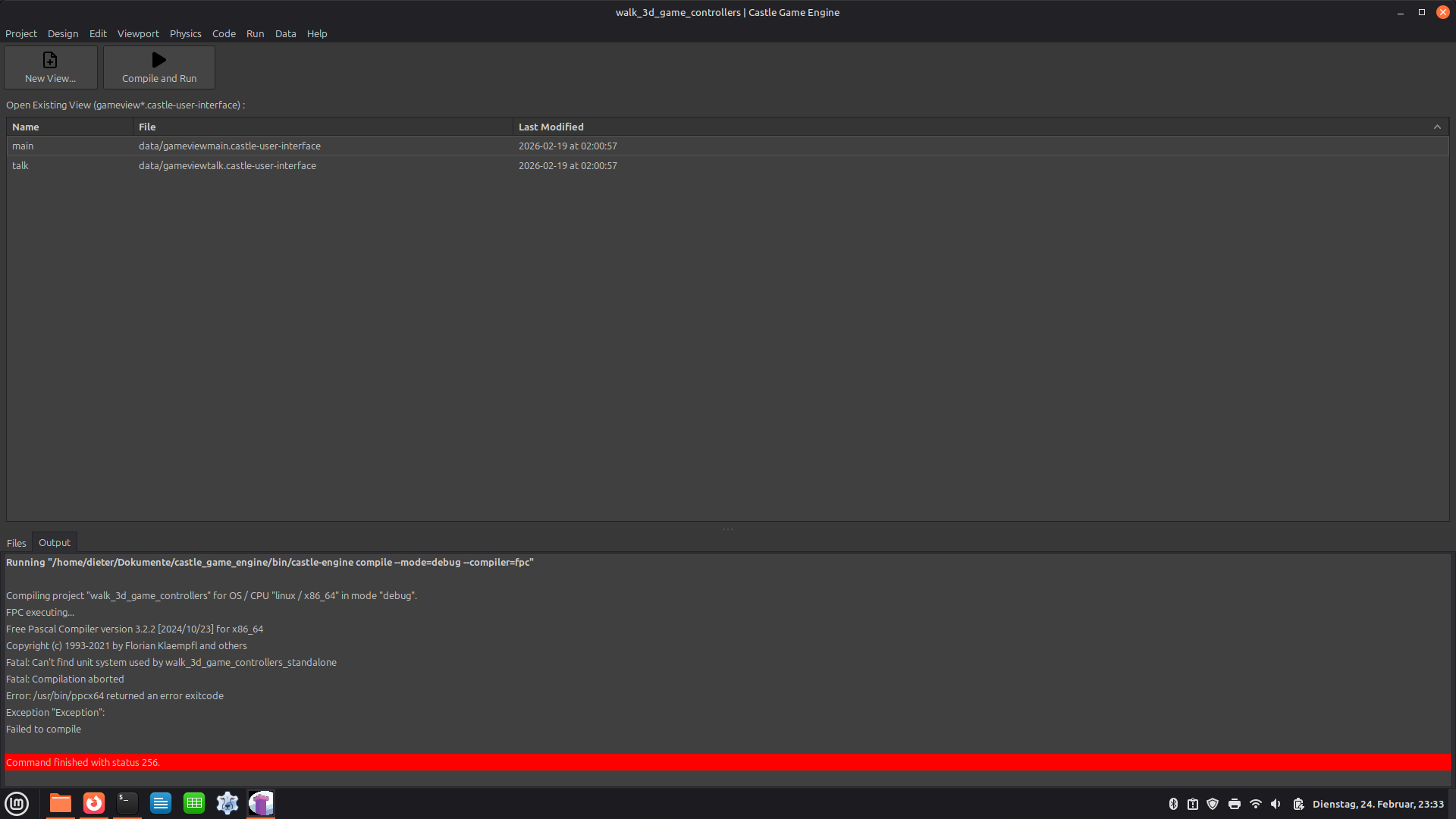
And now I tried to compile a project. Every project gives the same error.

Fatal: Can’t find unit system used by walk_3d_game_controllers_standalone

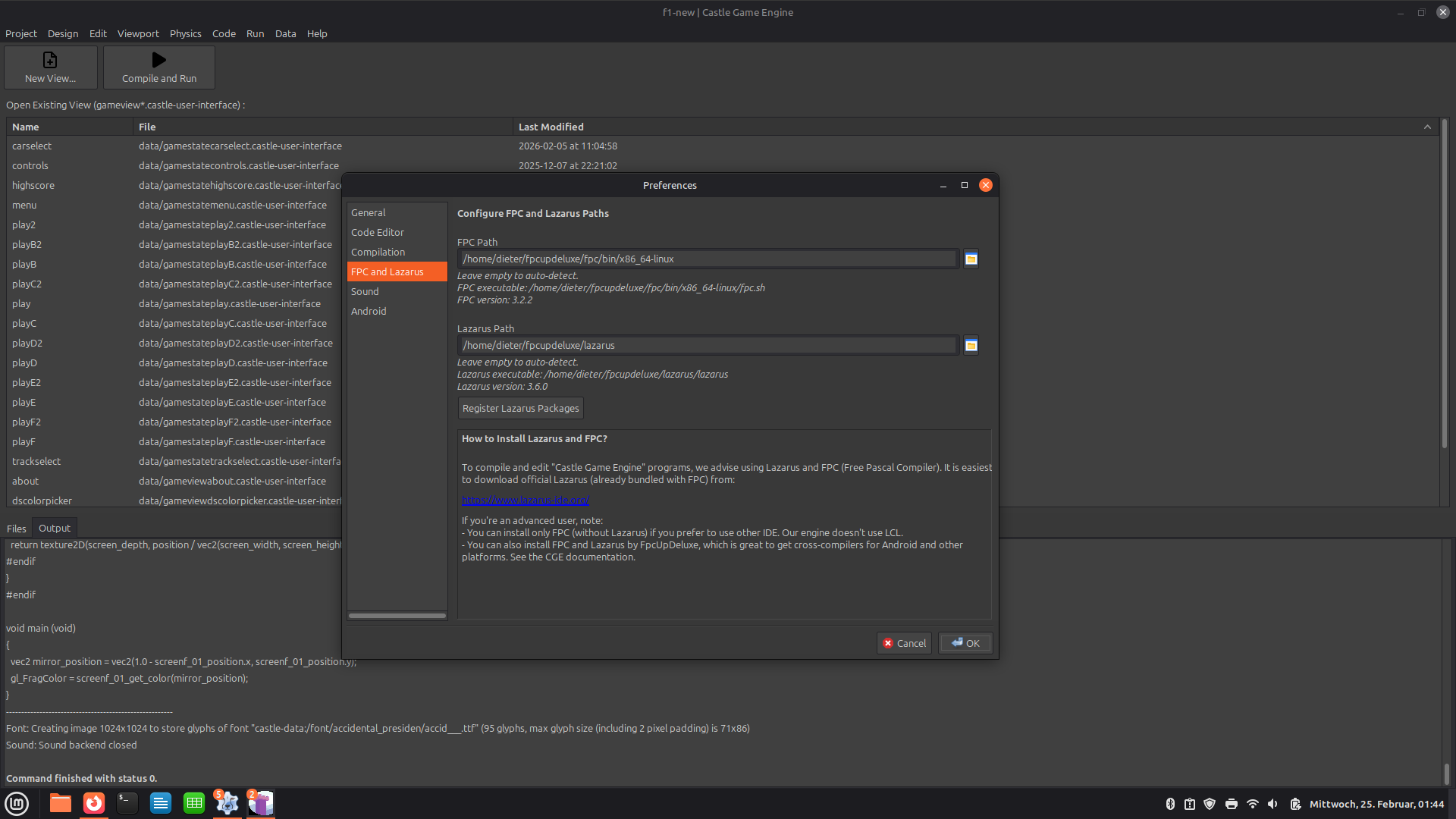
Preferences look good, Lazarus packages are registered.

hmmm…. :thinking:

1 Like

Today was my first experience with Linux ever– zero experience :slight_smile:
This morning I installed Debian 13 on a virtual machine, then set up Lazarus 4.99 + FPC 3.3.1.
I tested everything it’s great!
So I saved these commands — maybe they will be useful for anyone trying Linux for the first time:

-1 Update package lists
sudo apt update

-2 Install essential development tools
sudo apt install -y build-essential fpc git wget curl

-3 Download GTK2 libraries required by FPCUpDeluxe
cd ~/Downloads
wget -nc http://snapshot.debian.org/archive/debian/20210412T000000Z/pool/main/g/gtk+2.0/libgtk2.0-0_2.24.32-3_amd64.deb
wget -nc http://snapshot.debian.org/archive/debian/20210412T000000Z/pool/main/g/gtk+2.0/libgtk2.0-dev_2.24.32-3_amd64.deb

4-Install GTK2 packages
sudo dpkg -i libgtk2.0-0_2.24.32-3_amd64.deb libgtk2.0-dev_2.24.32-3_amd64.deb || true

5-Fix broken dependencies if any
sudo apt --fix-broken install -y

6-Update shared library cache
sudo ldconfig

7-Verify libgdk-x11-2.0.so.0 is available
ldconfig -p | grep libgdk-x11-2.0.so.0

Run FPCUpDeluxe to install FPC and Lazarus

It’s also a good idea to set up a shared folder between Windows and Linux inside the virtual machine –this makes testing and transferring files much easier. :+1:

Linux first day… and I already like it :blush:

2 Likes

The error message says it’s trying to execute system-wide FPC (/usr/bin/ppcx64) which for some reason cannot find it’s packages (is /etc/fpc.cfg valid?).

You mentioned in thread above that you install FPC using fpcupdeluxe, so this is also weird. We’re not using FPC from fpcupdeluxe here.

Troubleshooting, outside of Castle Game Engine:

  • What system-wide FPC packages do you have installed? Do you have fpc? Do you have fp-compiler? What packages whose names start with fp-units-* you have? Use any GUI / command-line application that reliably shows all Debian-style packages, like Synaptic.
  • What does fpc helloworld.lpr do on your system, if you create trivial file like
begin
  Writeln('hello');
end.
  • What does which fpc say?
  • Do you want to use system-wide FPC at all? :slight_smile: If not, remove all packages related to it. Right now it seems you have half-broken installation of it, with fp-compiler but without any fp-units-*.
  • Did you configure editor preferences to point CGE to use the FPC version from fpcupdeluxe? How do the “Preferences → FPC and Lazarus” look like?
1 Like

You should not download .deb packages like this – it will break as soon as their version changes. Above you assume very specific package files versions are “the right ones”, but the URLs and the assumption may be invalid next week.

Instead of above, use this to install GTK 2, along with their development files:

sudo apt update
sudo apt install libgtk2.0-dev 

This will reliably install the packages, with version suitable for your system, and will work on any version of Debian/Ubuntu/Mint etc., and will work in the future :slight_smile: We also mention this in our instructions here.

You should not need to do this :slight_smile: Install packages by simple sudo apt install <package-name>, and there should be no need to do post-fixes like above.

You should not need to do this. Installing packages should do any refresh (like done by ldconfig) automatically.

In total, I would recommend to shorten your script to do just this:

-1 Update package lists
sudo apt update

-2 Install essential development tools
sudo apt install -y build-essential fpc git wget curl libgtk2.0-dev 

This will really do the same thing (install the same packages as you have in your script), and be simpler :slight_smile:

Also note that our engine downloads already contain FPC and we will automatically use it. So there’s no need to have system-wide fpc, unless of course you use it for other development. (You can point our engine to use system-wide FPC, instead of the “bundled” version, by “Preferences → FPC and Lazarus”; or just brutally remove the subdirectory tools/contrib/fpc from the unpacked engine version, that will also work :slight_smile: ).

1 Like

Yes you are right, the FPC and Lazarus path was wrong.

It was /usr/bin/, changing to /fpcupdeluxe/… and the project can be compiled.

Thanks!

1 Like