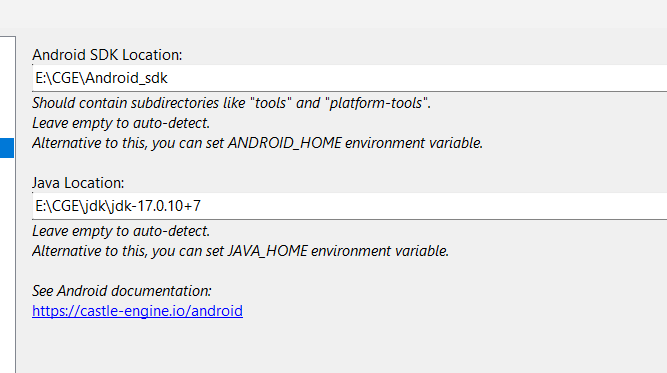
Today I wanted to try compiling a CGE project for Android. I’m following this guide.
However, I can’t figure out how to tell the engine where my Android SDK is. I downloaded “Android Studio Panda 2” and even “Android Command Line Tools,” but I can’t find inside it any subdirectories like “tools“ and “platform-tools”. I’m completely at a loss as to what to do.
I have’t used Android SDK for a long time but from what I remember after you install “android command line tools” you have to run sdkmanager and pick a SDK version to install (depend on your target android version there’re a lot to choose)
You should choose one or the other – either install the full “Android Studio” (which is our recommendation for some time now), or install only the “Android Command-line Tools” (which was our recommendation few years ago, but I changed it, as Android Studio has a few nice things above the cli tools, and makes the process easier for most people).
Once you have Android Studio, run it and it will get latest Android SDK automatically. You should see the SDK location in “File → Settings → Languages & Frameworks → Android SDK” . See the " Install Android SDK (optionally: along with Android Studio)" section on the docs Android | Manual | Castle Game Engine .
So, to further troubleshoot, I recommend:
Get “Android Studio”. Don’t get “Android Command-line Tools”, remove them if you have them – they will confuse things You only need Android Studio, and it will install the rest.
Run Android Studio, it should prompt to install Android SDK.
Take a look at the screenshot in section " Install Android SDK (optionally: along with Android Studio)" of the docs and see how it looks on your side If all goes well, this should contain Android SDK directory, with subdirs like “tools“ and “platform-tools”. If it does not, show us
what this dialog, “File → Settings → Languages & Frameworks → Android SDK”, shows for you
if it shows any directory, show the contents of that directory.
fpc 3.3.1
I couldn’t build either, but the project was created, I have to manually set the path to the sdk in local.properties and build manually through android studio. Maybe I’m doing something wrong
Make a separate forum thread This may be an unrelated issue, so having it mixed here could make the resolution harder.
Give us details what you did, and how it doesn’t work. Describe did you do all steps from Android | Manual | Castle Game Engine , did you use “Android Command-Line Tools” or “Android Studio”, did you set Android SDK path, and in the end how do you try to build for Android and how it doesn’t work. Please attach screenshots and copy-paste error messages where possible → the more precise information I get, the better I can help
Hey i was going through the same problem. what worked for me is downloading the SDK directly. and pointing to the SDK directly through the preferences. Had an AI like Chatgpt or Gemini help set up SDK since you need to alter location of some file i can’t remember what. I remember asking the AI to help download NDK 25 using cli and it suggested changes. Hope you too figure it out
Indeed, any way of getting “Android SDK” will work.
I still recommend everyone to:
just get “Android Studio”, which will then get Android SDK and take care of additional things (license questions, updating the SDK, connecting to devices over wifi).
Follow our docs and if something fails – please report exactly what you did, at which step you’re stuck, what error message you get Then we can improve the docs to make everything better.
For everyone who has a problem with Android requisites installation: I feel you, and I want to help!, but for this I need to know the details: did you do all steps from our docs and if something failed in this process → how it failed, with what error message.
I regularly build CGE applications for Android, following our docs I setup Android environment on Windows and Linux, so I’m certain the process should work
Note that if you use AI for help with modifying your system, at least:
make it provide justification for commands it runs,
double-check the commands makes sense,
keep a log of commands executed, and how in effect your resulting installation differs from “normal installation”.
Basically, just like before AI it was a bad idea to “execute random commands from StackOverflow”, it is now a bad a idea to “just let AI execute random commands” The result may work, but may also contain random missing pieces, making it harder to debug what’s wrong.
As for “help download NDK 25 using cli” – note that this is not something you should ever need to do. Proper NDK, with proper version, should be downloaded automatically when building the CGE application (by Gradle, Android build process, which is called by CGE build tool). If it was not, we should debug why it was not (what did you do, what error messages did you get).
Thank you so much for the clarification.
I made two mistakes:
I didn’t even try to launch Android Studio before.
I didn’t know that this whole thing only works with an active internet connection. Which, by the way, is very inconvenient when I’m working on a completely offline computer.
Now I’ve compiled my Android app, and I even able to make a release target. It works right on my phone. This is very cool
PS: Now I’ll have tons of stupid questions about how to do this and that on Android. Heheh
I’m happy this is solved, and I can improve docs then: I added “Run it and it will automatically install the Android SDK for you.” to Android | Manual | Castle Game Engine .
Downloading Android SDK (through any means), with necessary components in necessary versions, requires an Internet connection
Once it’s all downloaded, no Internet connection is necessary and you can be offline. I routinely work offline when traveling. That is, you can build Android applications (using CGE, which underneath uses Android tools) offline then.
If you want to be sure you have everything downloaded before going offline, just build any CGE application for Android first. Note that future CGE versions may bump the required Android version, so if you want to work offline → do this always after upgrading CGE too.
If I disconnect from the Internet, I get an error during compilation:
BUILD FAILED in 34m 35s
Exception "Exception":
Process "D:\boxing\TrainingTimer2\castle-engine-output\android\project\gradlew.bat" (absolute path "D:\boxing\TrainingTimer2\castle-engine-output\android\project\gradlew.bat") failed with exit status 1
This “gradlew.bat” initiates downloading something every time during compilation
I tested it now, on Windows, and it definitely works when being offline on my system.
That is, I can build Android applications:
from CGE editor,
and from Android Studio (just a sample Android Java app)
when I’m completely offline. I tested building both APK and AAB.
Works when I’m definitely offline, as long as I already have prerequisites (Gradle, proper Android SDK version, NDK version…) which are all downloaded automatically when I build any Android application using CGE. I.e. after building any CGE application, with the same CGE version, everything should be “in place” and work offline for future building (of any CGE application).
Troubleshooting:
Is it possible you have some anti-virus installed, that insists on sending the data over the Internet (and kills the process when offline)? Can you disable it?
What happens if you try to build outside from Castle Game Engine. Just run Android Studio, create a new Java project following any template, and hit “build” there – does this work offline?
Of note is also that it should show something more, what exactly did it try to download, why did it fail. Can you post full error output, lines above BUILD FAILED in 34m 35s? If there’s nothing useful, then also it could indicate that Gradle process is just killed by some anti-virus mechanism.
Note: If you’re building in CGE editor, you can right-click in “Output” and do “Copy All” to easily copy to clipaboard all the lines
However, at the moment I can’t reproduce this error. This Thing suddenly started working normally without an internet connection after a dozen more compilations with an internet connected.
 You only need Android Studio, and it will install the rest.