Insert the instance into the var section? That sounds a little weird cause an instance of a class usually has more types of data than just a var, which is true in Pascal too from what I can tell, but I will try and see what it gives me.
ViewMain: TViewMain;
isn’t it an instance of a class?
Okay, that is taken care of.
I need help next understanding how to use the AssignAvatar procedure rather than just simply defining it; I know from doing the research you usually do “procedurename(arguments here)”, but AssignAvatar is weird in that it doesn’t seem to have any arguments. In that case do I simply call it by typing “TMyThirdPersonNavigation.AssignAvatar”?
If yes, then do you know where exactly I should type it, like maybe just below the declaration is most logical, or should it go elsewhere?
You got a point there, it’s just still really weird it goes under the “var” section when a class technically has more data to it than just vars, like it can contain strings of text as well for example.
I’m not familiar with CGE, there might be better places to call AssignAvatar, but maybe in the “Initialization” section? In Unity it could go to the Start procedure, why don’t you try?
ps. AssignAvatar procedure isn’t “strange”, it just has no arguments.
{
  Copyright 2023-2023 Michalis Kamburelis.

  This file is part of "Castle Game Engine".

  "Castle Game Engine" is free software; see the file COPYING.txt,
  included in this distribution, for details about the copyright.

  "Castle Game Engine" is distributed in the hope that it will be useful,
  but WITHOUT ANY WARRANTY; without even the implied warranty of
  MERCHANTABILITY or FITNESS FOR A PARTICULAR PURPOSE.

  ----------------------------------------------------------------------------
}

{ Main view, where most of the application logic takes place. }
unit GameViewMain;

interface

uses Classes,
  CastleVectors, CastleComponentSerialize,
  CastleUIControls, CastleControls, CastleKeysMouse,
  CastleThirdPersonNavigation, CastleViewport, CastleScene,
  CastleCameras, CastleTransform, CastleInputs,
  CastleSceneCore, CastleDebugTransform;

type
  TMyThirdPersonNavigation = class(TCastleThirdPersonNavigation)
  protected
  procedure AssignAvatar;
  published
    SceneHumanLegs1, SceneHumanBase: TCastleScene;
    HumanBase1: TCastleTransform;
  end;

  { Main view, where most of the application logic takes place. }
  TViewMain = class(TCastleView)
  published
    { Components designed using CGE editor.
      These fields will be automatically initialized at Start. }
    LabelFps: TCastleLabel;
  public
    constructor Create(AOwner: TComponent); override;
    procedure Start; override;
    procedure Update(const SecondsPassed: Single; var HandleInput: Boolean); override;
    function Press(const Event: TInputPressRelease): Boolean; override;
  end;

var
  ViewMain: TViewMain;
  ThirdPersonNavigation: TMyThirdPersonNavigation;

implementation

uses SysUtils;

procedure TMyThirdPersonNavigation.AssignAvatar;
begin
  ThirdPersonNavigation.AvatarHierarchy := HumanBase1;
end;

{ TViewMain ----------------------------------------------------------------- }

constructor TViewMain.Create(AOwner: TComponent);
begin
  inherited;
  DesignUrl := 'castle-data:/gameviewmain.castle-user-interface';
end;

procedure TViewMain.Start;
begin
  TMyThirdPersonNavigation.AssignAvatar;
  inherited;
end;

procedure TViewMain.Update(const SecondsPassed: Single; var HandleInput: Boolean);
begin
  inherited;
  { This virtual method is executed every frame (many times per second). }
  Assert(LabelFps <> nil, 'If you remove LabelFps from the design, remember to remove also the assignment "LabelFps.Caption := ..." from code');
  LabelFps.Caption := 'FPS: ' + Container.Fps.ToString;
end;

function TViewMain.Press(const Event: TInputPressRelease): Boolean;
begin
  Result := inherited;
  if Result then Exit; // allow the ancestor to handle keys

  { This virtual method is executed when user presses
    a key, a mouse button, or touches a touch-screen.

    Note that each UI control has also events like OnPress and OnClick.
    These events can be used to handle the "press", if it should do something
    specific when used in that UI control.
    The TViewMain.Press method should be used to handle keys
    not handled in children controls.
  }

  // Use this to handle keys:
  {
  if Event.IsKey(keyXxx) then
  begin
    // DoSomething;
    Exit(true); // key was handled
  end;
  }
end;

end.
I made a well-educated guess that the most logical place to put the usage of the procedure was at the start of the main game/main view, but unfortunately I still get the same error about only class variables, class methods and class properties can be accessed in class methods, even though I am using a class method, in particular a procedure of TCastleMyThirdPersonNavigation.
This is where I get stuck, because If I am using a well defined procedure of a well defined class using the correct syntax of “classinstance.procedure”, why the heck is it getting rejected?
It’s like saying 1 + 1 doesn’t equal 2 because 1 isn’t a recognized number, even though all numbers are - makes no sense at all.
Okay, looking at the examples I can see that I should use the instance’s property and not the class directly’s property (like in the examples they used Fruit.Eat and not TFruit.Eat even though TFruit was the class declaration word for word), so I did exactly that, but unfortunately I got the same exact crashing error as earlier, even though I have the procss actually used correctly as far as I know (otherwise I would get a compiler error), as well as everything else set up perfectly.
What the actual heck?
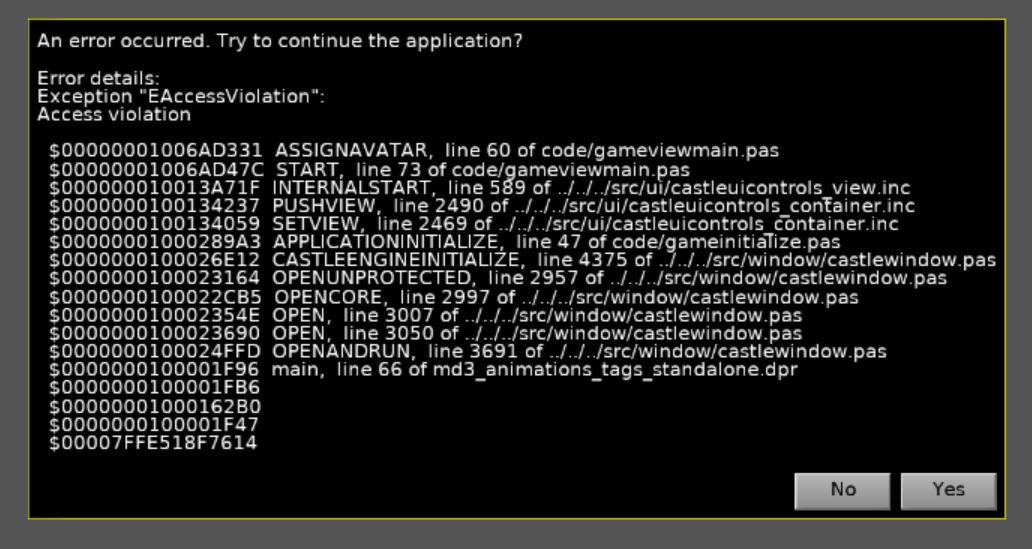
In particular, this is what it looks like, and I have zero clue what is wrong with this code because I make sure to be meticulous about following every direction to the T:
{
  Copyright 2023-2023 Michalis Kamburelis.

  This file is part of "Castle Game Engine".

  "Castle Game Engine" is free software; see the file COPYING.txt,
  included in this distribution, for details about the copyright.

  "Castle Game Engine" is distributed in the hope that it will be useful,
  but WITHOUT ANY WARRANTY; without even the implied warranty of
  MERCHANTABILITY or FITNESS FOR A PARTICULAR PURPOSE.

  ----------------------------------------------------------------------------
}

{ Main view, where most of the application logic takes place. }
unit GameViewMain;

interface

uses Classes,
  CastleVectors, CastleComponentSerialize,
  CastleUIControls, CastleControls, CastleKeysMouse,
  CastleThirdPersonNavigation, CastleViewport, CastleScene,
  CastleCameras, CastleTransform, CastleInputs,
  CastleSceneCore, CastleDebugTransform;

type
  TMyThirdPersonNavigation = class(TCastleThirdPersonNavigation)
  protected
  procedure AssignAvatar;
  published
    SceneHumanLegs1, SceneHumanBase: TCastleScene;
    HumanBase1: TCastleTransform;
  end;

  { Main view, where most of the application logic takes place. }
  TViewMain = class(TCastleView)
  published
    { Components designed using CGE editor.
      These fields will be automatically initialized at Start. }
    LabelFps: TCastleLabel;
  public
    constructor Create(AOwner: TComponent); override;
    procedure Start; override;
    procedure Update(const SecondsPassed: Single; var HandleInput: Boolean); override;
    function Press(const Event: TInputPressRelease): Boolean; override;
  end;

var
  ViewMain: TViewMain;
  ThirdPersonNavigation: TMyThirdPersonNavigation;

implementation

uses SysUtils;

procedure TMyThirdPersonNavigation.AssignAvatar;
begin
  ThirdPersonNavigation.AvatarHierarchy := HumanBase1;
end;

{ TViewMain ----------------------------------------------------------------- }

constructor TViewMain.Create(AOwner: TComponent);
begin
  inherited;
  DesignUrl := 'castle-data:/gameviewmain.castle-user-interface';
end;

procedure TViewMain.Start;
begin
  ThirdPersonNavigation.AssignAvatar;
  inherited;
end;

procedure TViewMain.Update(const SecondsPassed: Single; var HandleInput: Boolean);
begin
  inherited;
  { This virtual method is executed every frame (many times per second). }
  Assert(LabelFps <> nil, 'If you remove LabelFps from the design, remember to remove also the assignment "LabelFps.Caption := ..." from code');
  LabelFps.Caption := 'FPS: ' + Container.Fps.ToString;
end;

function TViewMain.Press(const Event: TInputPressRelease): Boolean;
begin
  Result := inherited;
  if Result then Exit; // allow the ancestor to handle keys

  { This virtual method is executed when user presses
    a key, a mouse button, or touches a touch-screen.

    Note that each UI control has also events like OnPress and OnClick.
    These events can be used to handle the "press", if it should do something
    specific when used in that UI control.
    The TViewMain.Press method should be used to handle keys
    not handled in children controls.
  }

  // Use this to handle keys:
  {
  if Event.IsKey(keyXxx) then
  begin
    // DoSomething;
    Exit(true); // key was handled
  end;
  }
end;

end.
Have you tried reversing them?
In any case, it would be a good idea to close this thread as @michalis says because it has become unreadable. Open another one with a title suited to its content.
I said yesterday already that it will crash and why. You didn’t initialize ThirdPersonNavigation instance.
And I will repeat again:
You lack basic knowledge how to use Pascal, or at least how to use classes in Pascal. Read resources linked from More Resources to Learn Pascal | Castle Game Engine . Stop trying to solve this particular task by “trial and error”. Read about how to use classes, create simple applications, declare some simple example classes that use each other.
The resources I pointed are absolutely full of explanations about the terms we use, including what is an “instance”. You just really need to read them (and, as I suggested, write some simple applications independent of CGE to test your knowledge). I just checked the first resource linked there, “Free Object Pascal Handbook by Marco Cantu”, it explains this and much more (e.g. “”“In Object Pascal, to create an instance of an object, we can call its special Create method, which is a constructor or another custom constructor defined by the class itself.”“”).
Moreover, the term “instance” and “class” are not actually specific to Pascal at all – they work and mean more-or-less exactly the same in C++, Java, C# and other OOP languages. In all of those you have classes, and their instances, and you need to initialize a variable by creating a class to actually get an instance.
At this point, I really have to see that you started to follow my advise and actually read that resources we linked about Pascal and did some simple tests. This thread will not go anywhere otherwise, you do not have enough understanding of Pascal (or basic OOP concepts) to write the solution to your task. And it’s really all explained in references I linked, and it is also mostly the same as in other OOP languages.