(Because it’s not like you have to code an avatar if you’re using a single model avatar, you can just drag and drop it)
And this time, if I still have to code it, I would greatly prefer not having to figure out every last detail for myself, but have you actually spell out the instructions for me (again, because even in the latest download none of the examples use third person navigation with a multi-part model as an avatar, so it’s not obvious as to how you should code it as the manual doesn’t mention it either as far as I can tell. RTFM doesn’t solve everything you know!)
So even though I can figure out things like classes inherit properties from higher classs, or you use the period in the syntax to access class properties in general, I can only do that - in general.
I can not figure out for myself something highly specific like how to control a multi-part model as a third person navigation avatar, because as I mentioned none of the examples actually do that - the only third person navigations I can find use single model avatars, and the multi-part demo (md3 tags demo) doesn’t have any navigation objects in it at all, third person or otherwise.
And I’m fine having to resarch/Google how procedures actually work in order to actually learn and understand it better - that’s how I should learn the concepts by actually doing them myself, but again the details of very specific examples aren’t explained in Pascal tutorials or the manual, which is what I keep pointing out.
Yes, as we said above already, AvatarHierarchy can contain TCastleTransform instance.
In general:
Sorry, I cannot spell out the instructions down to every last detail. We tried, in this thread, to help — but it is evidently not enough. But I don’t have capacity to give you a ready solution, esp. as the solution involves logic specific to your project: you know what parts (TCastleScene) you have in your avatar, you know how your animations are named, you know when to run them.
At some point, we expect you have a basic experience with CGE and Pascal, and expect you can connect the dots using existing documentation and examples. You got a lot of links to documentation and sample code snippets above.
If that sounds too difficult, please follow the recommendations and documentation we pointed out in this thread – create simple CGE applications, write some basic programs, see how TCastleScene works etc. Then get back to this problem.
facepalm I know what your point is, that if I read the docs there will be examples that I can practice in general, but again it’s not in the docs about how to code a third person navigation using multi part models specifically, only how to code a third person navigation in general, and same deal with the example projects; initially it would literally not let me use the transform as an avatar, but that is fixed now?
And it’s still true in the latest version that you can’t select the transforms from the drop down menu for the Avatar in a Third Person Navigation object, which is what I am saying you should fix if you really can’t or just don’t want to give a step by step guide on how to actually freaking implement it!
Again, reading the docs is zero help here, as there are no tutorials on how to implement a multi-part model as a third person navigation avatar, which has been my goal the entire time we have been going back and forth over it.
I will just re-try what we figured out already, and again yes it is true that the AutoAnimation property is a property of the ThirdPersonNavigation, because it’s given to you word for word that you type “TMyThirdPersonNavigation.AutoAnimation” in one of your examples above, and I know for a fact that “class.property” is what that kind of syntax actually means.
You’ve been stuck on this point for weeks, maybe months. Let me ask you something: is your game complete? That is, do you only need to know how to control a multipart model to be able to say you’re done?
If you have been programming for a long time you will also know that once one problem is solved there is another one immediately waiting for you.
What we’ve been suggesting for a while is to put this issue aside and move on. I’m telling you from experience, because if you decide to do so you will probably need another clarification very soon.
If I were in your place, I would have already written half a game by now using any avatar, as what matters is the logic of your programming, not the avatar that turns its head or raises an arm. These are things you can add later.
I don’t know how to help you, but if those who could don’t write you line by line how to do it, it means it’s not trivial.
It is also not to be excluded that over time, while you proceed with your work temporarily ignoring the multi-part avatar, someone else posts a similar topic from which to gain inspiration, or perhaps even that michalis adds some demos of this type to CGE.
At that point you will have half the game, if not more, completed and you will have learned a lot more CGE knowledge.
The reason I’ve been stuck is that I need the multi-part model for the game to actually work, which I thought I might have clarified but am not sure.
Because I’m basing it off a game that is already well known and has a specific mechanic, I want the mechanics of it to be exactly like the original game with no alterations, and I am pretty sure a single model avatar cannot run the legs and shoot the arms at the same time, which is what I want.
{
  Copyright 2023-2023 Michalis Kamburelis.

  This file is part of "Castle Game Engine".

  "Castle Game Engine" is free software; see the file COPYING.txt,
  included in this distribution, for details about the copyright.

  "Castle Game Engine" is distributed in the hope that it will be useful,
  but WITHOUT ANY WARRANTY; without even the implied warranty of
  MERCHANTABILITY or FITNESS FOR A PARTICULAR PURPOSE.

  ----------------------------------------------------------------------------
}

{ Main view, where most of the application logic takes place. }
unit GameViewMain;

interface

uses Classes,
  CastleVectors, CastleComponentSerialize,
  CastleUIControls, CastleControls, CastleKeysMouse,
  CastleThirdPersonNavigation, CastleViewport, CastleScene,
  CastleCameras, CastleTransform, CastleInputs,
  CastleSceneCore, CastleDebugTransform;

type
  TMyThirdPersonNavigation = class(TCastleThirdPersonNavigation)
  protected

  published
    SceneHumanLegs1, SceneHumanBase: TCastleScene;
    HumanBase1: TCastleTransform;
    ThirdPersonNavigation: TCastleThirdPersonNavigation;
  end;

  { Main view, where most of the application logic takes place. }
  TViewMain = class(TCastleView)
  published
    { Components designed using CGE editor.
      These fields will be automatically initialized at Start. }
    LabelFps: TCastleLabel;
  public
    constructor Create(AOwner: TComponent); override;
    procedure Start; override;
    procedure Update(const SecondsPassed: Single; var HandleInput: Boolean); override;
    function Press(const Event: TInputPressRelease): Boolean; override;
  end;

var
  ViewMain: TViewMain;

implementation

uses SysUtils;

{ TViewMain ----------------------------------------------------------------- }

constructor TViewMain.Create(AOwner: TComponent);
begin
  inherited;
  DesignUrl := 'castle-data:/gameviewmain.castle-user-interface';
end;

procedure TViewMain.Start;
begin
  inherited;
end;

procedure TViewMain.Update(const SecondsPassed: Single; var HandleInput: Boolean);
begin
  inherited;
  { This virtual method is executed every frame (many times per second). }
  Assert(LabelFps <> nil, 'If you remove LabelFps from the design, remember to remove also the assignment "LabelFps.Caption := ..." from code');
  LabelFps.Caption := 'FPS: ' + Container.Fps.ToString;
end;

function TViewMain.Press(const Event: TInputPressRelease): Boolean;
begin
  Result := inherited;
  if Result then Exit; // allow the ancestor to handle keys

  { This virtual method is executed when user presses
    a key, a mouse button, or touches a touch-screen.

    Note that each UI control has also events like OnPress and OnClick.
    These events can be used to handle the "press", if it should do something
    specific when used in that UI control.
    The TViewMain.Press method should be used to handle keys
    not handled in children controls.
  }

  // Use this to handle keys:
  {
  if Event.IsKey(keyXxx) then
  begin
    // DoSomething;
    Exit(true); // key was handled
  end;
  }
end;

end.
Here is the code that I modified at the beginning with the code for the ThirdPersonNavigation implementation; as mentioned earlier I know I need to think about the actual animations only after I import the model.
Unfortunately I am getting errors like this, even though it seems to be done perfectly the same as earlier. Does anyone know why?
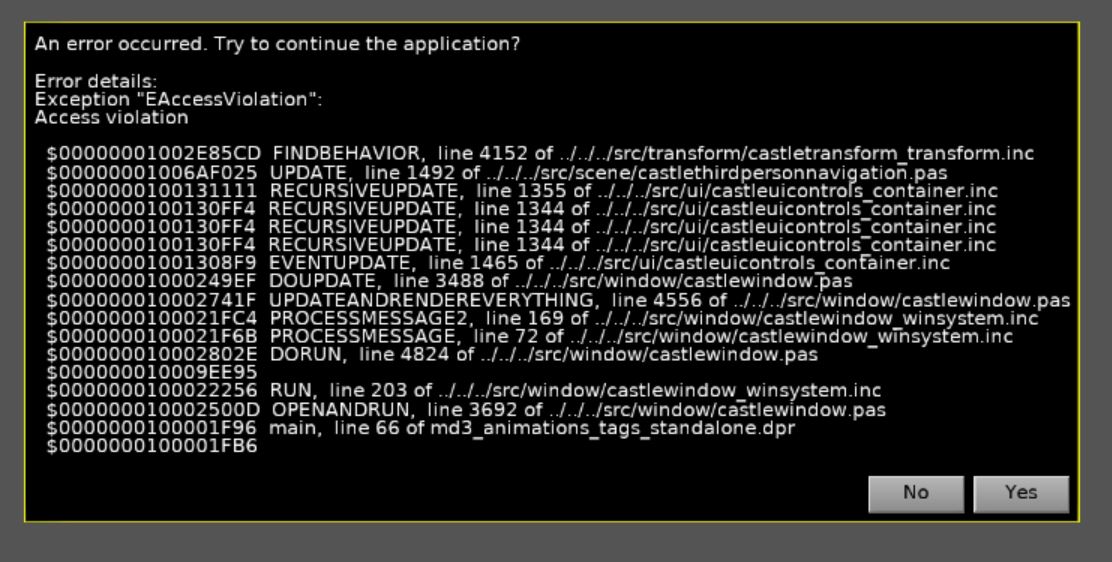
Oh yeah, I also omitted the “procedure AssignAvatar” under the protected section cause I am going to take care of that later once I actually finish the avatar.
Please read my post carefully. Above I wrote:
AvatarHierarchycan containTCastleTransforminstance
AvatarHierarchy can contain TCastleTransform instance – which may be a multi-part avatar.
AvatarHierarchy is something different than Avatar property which only accepts TCastleScene (and thus is suitable only for avatars that fit in one Avatar).
I cannot find in this thread where did I write about TMyThirdPersonNavigation.AutoAnimation . Ctrl + F doesn’t help. Is it possible you misunderstood something?
But I could also make a mistake, it’s a long thread – if I did, sorry. You can always check what is available on TCastleThirdPersonNavigation (as that’s the component in CGE) – Castle Game Engine: CastleThirdPersonNavigation . I did propose you make a descendant of it called TMyThirdPersonNavigation.
Looking at code, this error can occur if you don’t assign neither Avatar nor AvatarHierarchy.
I fixed the CGE to not make EAccessViolation in this case now. If neither Avatar nor AvatarHierarchy are assigned, the navigation will just do nothing.
In any case, your code has to assign Avatar or AvatarHierarchy to actually use some avatar. As said above, since you have multi-part avatar, then assign AvatarHierarchy.
If you have in your code “procedure AssignAvatar” that you mentioned later, then it didn’t do it’s job.
Oh, about the thing about the AutoAnimation, I don’t think you in particular sent me but my point was that in the example I was given, the exact syntax was in fact that particular formatting, and no other, and it would be weird for it to do one thing in some circumstances but a different thing in others - that’s not how programming usually works, like “int” always means integer no matter what, or “==” always means check if equal no matter what, etc.
{
  Copyright 2023-2023 Michalis Kamburelis.

  This file is part of "Castle Game Engine".

  "Castle Game Engine" is free software; see the file COPYING.txt,
  included in this distribution, for details about the copyright.

  "Castle Game Engine" is distributed in the hope that it will be useful,
  but WITHOUT ANY WARRANTY; without even the implied warranty of
  MERCHANTABILITY or FITNESS FOR A PARTICULAR PURPOSE.

  ----------------------------------------------------------------------------
}

{ Main view, where most of the application logic takes place. }
unit GameViewMain;

interface

uses Classes,
  CastleVectors, CastleComponentSerialize,
  CastleUIControls, CastleControls, CastleKeysMouse,
  CastleThirdPersonNavigation, CastleViewport, CastleScene,
  CastleCameras, CastleTransform, CastleInputs,
  CastleSceneCore, CastleDebugTransform;

type
  TMyThirdPersonNavigation = class(TCastleThirdPersonNavigation)
  protected
  procedure AssignAvatar;
  published
    SceneHumanLegs1, SceneHumanBase: TCastleScene;
    HumanBase1: TCastleTransform;
    ThirdPersonNavigation: TCastleThirdPersonNavigation;
  end;

  { Main view, where most of the application logic takes place. }
  TViewMain = class(TCastleView)
  published
    { Components designed using CGE editor.
      These fields will be automatically initialized at Start. }
    LabelFps: TCastleLabel;
  public
    constructor Create(AOwner: TComponent); override;
    procedure Start; override;
    procedure Update(const SecondsPassed: Single; var HandleInput: Boolean); override;
    function Press(const Event: TInputPressRelease): Boolean; override;
  end;

var
  ViewMain: TViewMain;

implementation

uses SysUtils;

procedure TMyThirdPersonNavigation.AssignAvatar;
begin
  TMyThirdPersonNavigation.AvatarHierarchy := HumanBase1;
end;

{ TViewMain ----------------------------------------------------------------- }

constructor TViewMain.Create(AOwner: TComponent);
begin
  inherited;
  DesignUrl := 'castle-data:/gameviewmain.castle-user-interface';
end;

procedure TViewMain.Start;
begin
  inherited;
end;

procedure TViewMain.Update(const SecondsPassed: Single; var HandleInput: Boolean);
begin
  inherited;
  { This virtual method is executed every frame (many times per second). }
  Assert(LabelFps <> nil, 'If you remove LabelFps from the design, remember to remove also the assignment "LabelFps.Caption := ..." from code');
  LabelFps.Caption := 'FPS: ' + Container.Fps.ToString;
end;

function TViewMain.Press(const Event: TInputPressRelease): Boolean;
begin
  Result := inherited;
  if Result then Exit; // allow the ancestor to handle keys

  { This virtual method is executed when user presses
    a key, a mouse button, or touches a touch-screen.

    Note that each UI control has also events like OnPress and OnClick.
    These events can be used to handle the "press", if it should do something
    specific when used in that UI control.
    The TViewMain.Press method should be used to handle keys
    not handled in children controls.
  }

  // Use this to handle keys:
  {
  if Event.IsKey(keyXxx) then
  begin
    // DoSomething;
    Exit(true); // key was handled
  end;
  }
end;

end.
Here is the code with the avatar added and the AvatarHiearchy assigned to HumanBase1, again I will add the parts about playing animation only later after I am sure this part works sucessfully,

but unfortunately I am getting errors about line 60 needing class references to be done correctly, even though TCastleThirdPersonNavigation, is in fact a class.
What the actual heck?
It was already explained by @Carring a few posts ago. Scroll up the thread and you’ll find it.
Did you mean this?
“Since it is published check if the name is exactly the same in the editor design. I remember this error when I changed names in the design and did not save the design first before recompiling the code.”
I did that, and as you can tell in the code the word “TMyThirdPersonNavigation” has the same exact syntax and spelling as when it was first defined earlier on the particular line it dislikes (line 60), so I don’t know what other errors I am making.
And even when I rename it to match the ThirdPersonNavigation name in the Viewport in all instances in the code, it gives me the same exact error. facepalm
Okay, actually I was wrong, it was about needing to use the variable name and not the class name, which again I stand by is nonsensical/weird, as almost always the syntax is “class.property” to access a property of a class and it doesn’t make sense to suddenly make random exceptions.
Now I am getting the crashing error I showed you guys earlier, even though I did everything right to the best of my ability. Am I missing something unspecified, because I did the same code as last time I did it and it was fine then?
For reference, here is the code now:
{
  Copyright 2023-2023 Michalis Kamburelis.

  This file is part of "Castle Game Engine".

  "Castle Game Engine" is free software; see the file COPYING.txt,
  included in this distribution, for details about the copyright.

  "Castle Game Engine" is distributed in the hope that it will be useful,
  but WITHOUT ANY WARRANTY; without even the implied warranty of
  MERCHANTABILITY or FITNESS FOR A PARTICULAR PURPOSE.

  ----------------------------------------------------------------------------
}

{ Main view, where most of the application logic takes place. }
unit GameViewMain;

interface

uses Classes,
  CastleVectors, CastleComponentSerialize,
  CastleUIControls, CastleControls, CastleKeysMouse,
  CastleThirdPersonNavigation, CastleViewport, CastleScene,
  CastleCameras, CastleTransform, CastleInputs,
  CastleSceneCore, CastleDebugTransform;

type
  TMyThirdPersonNavigation = class(TCastleThirdPersonNavigation)
  protected
  procedure AssignAvatar;
  published
    SceneHumanLegs1, SceneHumanBase: TCastleScene;
    HumanBase1: TCastleTransform;
    ThirdPersonNavigation: TCastleThirdPersonNavigation;
  end;

  { Main view, where most of the application logic takes place. }
  TViewMain = class(TCastleView)
  published
    { Components designed using CGE editor.
      These fields will be automatically initialized at Start. }
    LabelFps: TCastleLabel;
  public
    constructor Create(AOwner: TComponent); override;
    procedure Start; override;
    procedure Update(const SecondsPassed: Single; var HandleInput: Boolean); override;
    function Press(const Event: TInputPressRelease): Boolean; override;
  end;

var
  ViewMain: TViewMain;

implementation

uses SysUtils;

procedure TMyThirdPersonNavigation.AssignAvatar;
begin
  ThirdPersonNavigation.AvatarHierarchy := HumanBase1;
end;

{ TViewMain ----------------------------------------------------------------- }

constructor TViewMain.Create(AOwner: TComponent);
begin
  inherited;
  DesignUrl := 'castle-data:/gameviewmain.castle-user-interface';
end;

procedure TViewMain.Start;
begin
  inherited;
end;

procedure TViewMain.Update(const SecondsPassed: Single; var HandleInput: Boolean);
begin
  inherited;
  { This virtual method is executed every frame (many times per second). }
  Assert(LabelFps <> nil, 'If you remove LabelFps from the design, remember to remove also the assignment "LabelFps.Caption := ..." from code');
  LabelFps.Caption := 'FPS: ' + Container.Fps.ToString;
end;

function TViewMain.Press(const Event: TInputPressRelease): Boolean;
begin
  Result := inherited;
  if Result then Exit; // allow the ancestor to handle keys

  { This virtual method is executed when user presses
    a key, a mouse button, or touches a touch-screen.

    Note that each UI control has also events like OnPress and OnClick.
    These events can be used to handle the "press", if it should do something
    specific when used in that UI control.
    The TViewMain.Press method should be used to handle keys
    not handled in children controls.
  }

  // Use this to handle keys:
  {
  if Event.IsKey(keyXxx) then
  begin
    // DoSomething;
    Exit(true); // key was handled
  end;
  }
end;

end.
And when I look up the Third Person Navigation in the API, there isn’t anything listed about “implementation” under the Unit/uses section, only the general unit. Does anyone know how I should figure out what to add under the “implementation” clause if that is what I am missing?
I tried Googling “Castle Game Engine implementation” but only got results about the general implementation of the engine as a whole, and not anything specific about the implementation section and what uses go under it vs the topmost “Uses” section.