Since it is published check if the name is exactly the same in the editor design. I remember this error when I changed names in the design and did not save the design first before recompiling the code.
There doesn’t seem to be any variable that it references TMyThirdPersonNavigation.
Beneath that line is “ThirdPersonNavigation: TCastleThirdPersonNavigation;”. That defines a variable named ThirdPersonNavigation that is of type TCastleThirdPersonNavigation.
And to Carring’s reply: I checked and “ThirdPersonNavigation” is an object that actually exists in the user interface as well, like it’s part of the hiearchy.
Now the program launches without any errors, so I think I am all set to make the avatar multi-parted/multi-model, like have the legs and torso animated seperately (which again is my main goal), do you guys know how I should accomplish this?
Is it as simple as adding the leg and torsos as children of the avatar, or is there some more coding that needs to be done first?
You can add parts to the Transform by adding scenes to the Transform.
I am making a 2D game but it is basically the same.
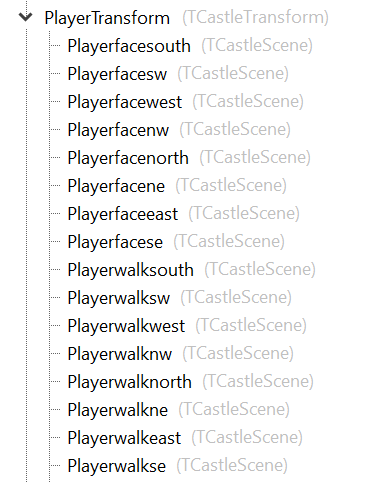
I have added Scenes for my character, for every motion. All Scenes have their own URL and animation properties.
In the editor it is:
Please read the tutorial:
When I started 5 years ago (wow, time flies) with CGE there was not much documentation and I was struggling just as you do now. (You can read it in this forum). But meanwhile Michalis has done a great job in adding and expanding documentation and tutorials (though API explanation still could be better) so you can directly benefit from it. I think you will learn more in taking time to read it first and follow the tutorials and find your way, then asking questions with every next step you get stuck with.
Oh, I already saw that tutorial and followed it for simple one model animations, I just wanted to clarify if multi- and seperate-model characters required additional work on top of that, which that specific tutorial doesn’t specify.
However, you specified for me just now that it does work the same way.
This is more brainstorming/thinking out loud at this point,
but once I work on the leg and torso models (again, they’re going to be seperate intentionally), I want for the legs model:
-
Idle/standing
-
Running
-
Jumping/in the air
For the torso model, I want:
-
Idle normal
-
Hands on hips when bored/standing too long
-
Running without attacking
-
Shooting laser
-
Spin attack
-
Jumping without attacking, arms more stretched out than normal/idle pose
All the rest will involve both playing at the same time:
-
Dizzy
-
Ultra spin attack
-
Climbing a pole
-
Climbing up a ledge
-
Pushing
-
Ziplining
-
Swinging on a bar
-
Stomping
-
Teetering on a ledge (note it will be used for rocket boots as well)
-
Falling
-
Getting up from falling, like pushing off the ground
-
Jumping back in pain
-
Dying
-
Hovering
-
Riding a grapple hook
I think I have all the animations covered in the way they did it for Buzz Lightyear in Toy Story 2; my goal is to make you play as Sandy Cheeks but it plays like the original Toy Story 2 game.
I feel that Sandy Cheeks is better to play as than Buzz Lightyear as well, because her boots look like actual boots seperate from her legs, rather than just normal legs with armor like how Buzz’s boots looked.
However, after that the differences end and they’re basically both just super tough and super smart astronaut characters, one a man and one a woman.
Okay, actually “walk” is the proper name for it if I want Castle Engine to recognize it as a proper animation or just load the model in general without errors, for the running animations, but for the other animations besides idle (which again is required to exist verbatim/word for word) I think I can do whatever the heck I want.
I am assuming that most likely for the Avatar that I assign, I should use a parent scene, call it “Sandy” and have the torsos and legs as children, and it will allow me to do it, based off how I know the hiearchy works?
I know this is obvious stuff, but I just want to be extra sure that I am being accurate.
Again, I still stand by in the manual there is nothing about child vs parent in the keywords for the sections, but I would make an educated guess that if you want to access a child specific thing, you would do something like “Parent.Child.Property”, because I know that’s usually how that works in most code?
The reason I ask is because my ultimate goal is to set the animation of torsos and legs seperately, while having one avatar that the camera follows all the way as the parent.
Yes, see my screenshot of Transform and Scenes above.
All Scenes are Childs of the Transform.
So if I for instance want to change a URL of a Scene:
Player.walk_north.URL:= ‘gonorth.png’; (access to the property)
Sandy := TCastleTransform;
Sandy.Torso.URL :=
(if you have added Torso as a Scene to Sandy).
Okay, awesome! Great to know. I am happy I am finally making progress.
Again, my goal is to make a model with multiple and seperately animated parts, because I want it to be playing as Sandy Cheeks in Toy Story 2’s Buzz Lightyear to the Rescue.
However, cause I couldn’t find models from the original Toy Story 2 levels, I decided to do them from the ground up in a SpongeBob style instead, so level 1 will take place in Sandy’s treedome rather than Andy’s house, etc, but it will be the same mechanics as the original game, so stuff like getting hurt always subtracts only 1 hit point no matter what, the ability to double jump, etc.
I figured as well for the pain sounds, it can be the Buzz Lightyear “rah!” sound for stepping in sludge or slime from the original game, an “owie” sound for getting hit by something like an enemy, and a “hot hot hot!” sound for touching something hot like a flame in the Elevator Hop level or the nails in the Construction Yard.
I am assuming as well, for the animation.cfg, cause I am using MD3 cause the other formats like glTF don’t support multiple seperately animated parts,
that if AutoAnimation wants animations named idle or run word for word to work correctly, then I should name one “idle” and one “run” in the name spots after the //'s, and that will mean “both parts run at the same time”, and then I can have a “shoot” one for the torso specifically.
However, it looks like the animation.cfg requires you to specify “BOTH_”, “LEGS_”, or “TORSO_” before the animations, because otherwise it won’t know which one is torso only, legs only or for both?
I would assume that if that is an issue and it will just assume “both” without the prefix, then I can in fact have an animation that does “shoot” for both, but just simply use scripting to play the animation on only the torso model and not the legs model? At least that’s what I would guess.
To be clear, ‘walk’ is only the default value of TCastleThirdPersonNavigation.AnimationWalk . If you want to use a different name for this animation, you can, just change TCastleThirdPersonNavigation.AnimationWalk .
You can also change the SetAnimation implementation, since you already are implementing it anyway. You can run any animation on any scene, depending on SetAnimation parameters.
CGE doesn’t recognize what animation goes for torso, legs, or both.
If your character model is composed from multiple MD3 models (and thus, multiple TCastleScene) then you have to manually call the animation on all relevant TCastleScene instances. That was also the point of my example in this earlier post:
To repeat:
procedure TMyThirdPersonNavigation.SetAnimation(const AnimationNames: array of String);
begin
  if AnimationNames[0] = 'idle' then
  begin
    ExampleLegsScene.PlayAnimation('idle', true);
    ExampleTorsoScene.PlayAnimation('idle', true);
  end else
  if AnimationNames[0] = 'walk' then
  begin
    ExampleLegsScene.PlayAnimation('walk', true);
    ExampleTorsoScene.PlayAnimation('walk', true);
  end;
end;
In that example, single SetAnimation call will cause PlayAnimation on 2 scenes. Naturally this is just an example, you need to adjust it to your animation names and scenes.
Okay, that makes a lot more sense now, that CGE doesn’t actually recognize what goes for both, legs or torso, so I can just give them any names I want but have to be specific about calling the animations on the individual scenes, which is what I guessed but wanted to be 100% sure.
I am assuming that in your procedure definition, the reason why the children don’t have the parent before them is because the parent is already specified as the thing that has the procedure, so it’s already assumed for the children?
And earlier I was just copy pasting the script literally/word for word without making my own judgment calls or understanding it at all, like you noticed yourself,
but if I had to make an educated guess at the reason why we use the SetAnimation procedure, I think it is because it sets the animations for the children of the transform, based on what name you set for the transform?
I am pretty sure that is accurate, but please correct me if I am wrong.
Or to be more precise, the name for the transform’s animation, I know obviously setting the name for the transform itself shouldn’t affect the animations cause that would be weird/silly.
There doesn’t seem to be anything I can find about references to arrays when using calls to procedures in the Modern Pascal basics page; do you know if when you use an array in parenthesis when you call a procedure, do you simply use the array name in parenthesis, or will it not work because it will turn into another data type?
I know references to classes work fine, like the example about TApple and TFruit near the bottom, but wasn’t sure about references to arrays like I would have to do here given how SetAnimation is defined specifically using an array as its argument/input.
And I already know how arrays in general work, so you use array[place here, starting at 0 and not 1] to ask for a variable in a particular spot, and stuff like that, I just wasn’t sure how they interact when called in procedures specifically.
Hi, does anyone have any replies on the correct formatting for using a call to an array that you pass to a procedure call? I still can’t find it in the tutorials, only the basics of what an array is and changing array data and stuff like that, which I know already how to do from other programming languages.