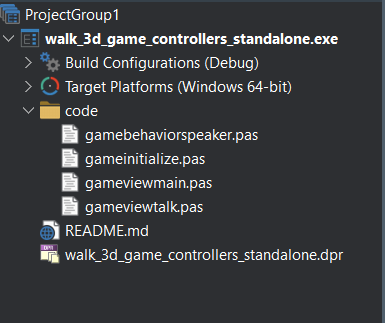
I’m not sure how far the implementation has progressed yet or how complete it currently is, but I took a closer look at the generated Delphi project.
I opened the generated project using Delphi 12. One thing that felt unusual to me was that the project already contains an extra .dpr file. This might indicate a potential issue or something that needs further attention.
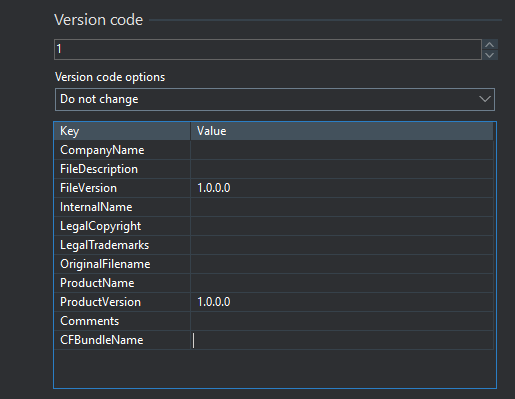
I also added the Android platform for testing purposes. Unfortunately, the project file is missing a number of Android-related configuration keys, and without configuring them, it is not possible to compile the project for Android.
But the above paragraph actually doesn’t apply to Delphi, where we can use a program, just like regular FMX applications using Delphi (also for mobile) do. So:
I think we’re fine with using .dpr, the same as for desktop, for Delphi + Android actually That’s how regular Delphi FMX applications look like.
But if we will find we need a different .dpr, it’s not a problem to auto-generate it in the future just like we do with FPC + Android. So we have a “plan B”
Thanks for the feedback. We should indeed include all the necessary keys to deploy on Android. We know them (from the project manifest). Added to TODO.
I understand you actually report that “the .pas files (units) are not part of the project”. That’s because they are not part of DPROJ, so Delphi doesn’t show them in the panel on your screenshot. Indeed it can be confusing, I have a TODO to address it – well have to add additional definition to CastleEngineManifest.xml to list used units, to make DPROJ contain the .pas files.
The Delphi still compiles the units (*.pas in the code/ subdirectory) because the code/ is in “search path” of the project. So everything works, it’s just that the project view in Delphi doesn’t show you units.
As a workaround for now: You can just add the units from the code subdirectory using the “Add Units” button (or such – I’m answering from Linux now, not running Delphi :), and I don’t recall the name) and they will be visible there nicely
Yes, I know where the files are and I open them manually.
They are not visible in the project panel, but I cannot add them to the project either — Delphi reports that they already exist in the project.
*One more thing that I think would be good to consider is adding .\$(Platform)\$(Config)or castle-engine-output\delphi\$(Platform)\$(Config). in Project Options → Building → Delphi Compiler, in the Output directory property.
This keeps the project root clean and prevents build files from being generated in the project root directory.
Currently, only the unit output is defined as castle-engine-output\delphi\$(Platform)\$(Config).
Adding all units from code/*.pas except gameinitialize.pas goes OK out-of-the-box in my tests. You can add them to the Delphi project OK, and in affect .dpr will also be extended with line like GameFoo in 'code\gamefoo.pas',
Adding gameinitialize.pas results in error that “The project already contains a form or module named gameinitialize.”. That’s because GameInitialize is indeed in the uses clause, but not with the in ... clause that Delphi likes to consider it a project file. To fix it, change the uses clause to say
GameInitialize in 'code\gameinitialize.pas',
instead of just
GameInitialize,
Close and reopen the project, and gameintialize.pas will appear in the uses list correctly.
P.S. I advise to be as precise in your reports as possible You wrote " I cannot add them to the project either — Delphi reports that they already exist in the project.". If you would instead write exact message from Delphi, “The project already contains a form or module named gameinitialize.”, I would answer this one faster
Hm, let me think about it.
Testing:
The difference (“all output” vs only “unit output”) would in practice mean that we place the resulting .exe (alongside the .dll files we automatically copy alongside it) and .rsm in the ...\$(Platform)\$(Config) instead of in the project root.
I admit I got used to having them in project root. Although they are, indeed, “just output”, but having them visible at root makes it easier to use (e.g. run directly). But this is of course just a matter of my personal preference.
I recognize Delphi default new projects (like “File → New → Multi-Device Application”) place all the output, including that .exe and .rsm, also inside .\$(Platform)\$(Config) subdirectory. So CGE projects by default are different.
Hm, let me think on this. For now, you can just change the “Output directory” in your projects naturally, it will work OK.
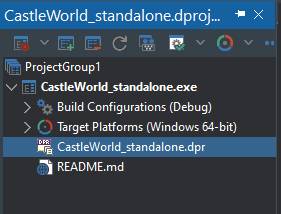
 That’s how regular Delphi FMX applications look like.