I tried to compile my game code to web but get this error:
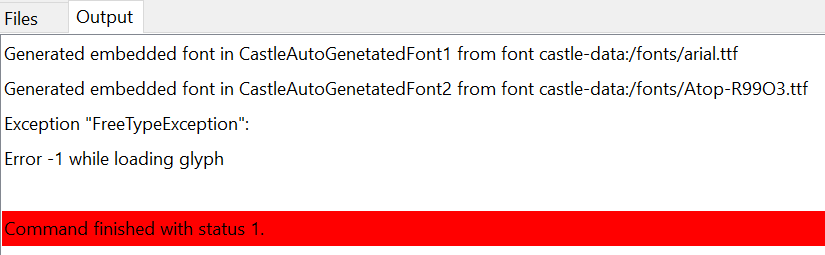
So it something has to do with the used fonts?
I tried to compile my game code to web but get this error:
So it something has to do with the used fonts?
Hm, it seems FreeType (library we use to read font files) has trouble processing one the fonts you use. I admit I never saw the error Error -1 while loading glyph but it is evidently emitted by TFontManager.CreateGlyph when FT_Load_Glyph or FT_Get_Glyph (these are FreeType routines to read particular glyph) fail.
I’m happy to investigate it further, but for this we need a testcase. Can you upload a minimal project that demonstrates this problem? Possibly, just creating a new project in CGE editor from “Empty” template, and just using there the TTF font files, will demonstrate the error. You can then zip the project and upload (to this forum thread, or as GitHub issue ).
I’ll be sure to fix it then, or at least advise something useful 
Thank you!
testfont.zip (49.6 MB)
Thanks Michalis, hereby the minimal testcase. It compiles fine in Windows but when I try to compile it to “web” it holds with the errror message above.
Fixed, thank you for the testcase!
I added detailed logging - looks like we had trouble reading glyph 170 from Atop-R99O3.ttf.
I upgraded FreeType DLLs we use on Windows, and the issue is gone
As usual, the engine downloads will contain the fixed version automatically in a few hours. You can observe this page, when it will no longer show the commit titled “Update FreeType Windows DLLs to version 2.14.3” then the fix is part of the release. Please download then the new engine version and retry → the issue should be gone
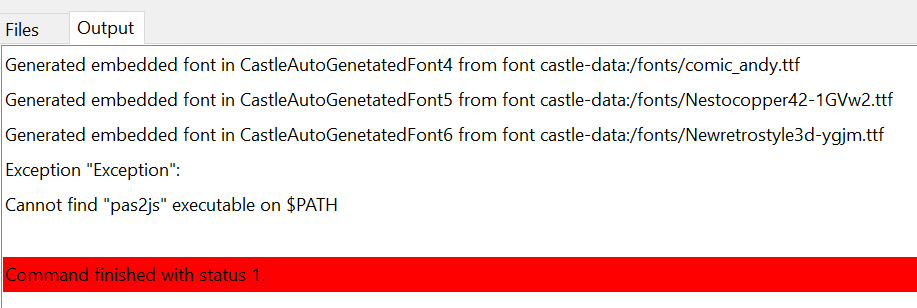
Thanks, I re-installed CGE newest version but now I get another error (only when compiling to “web”):
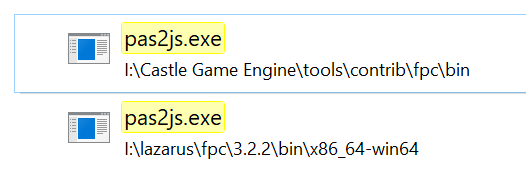
I looked up where the pas file is, it is available but not in the path?
(it compiles correctly in Win (default).
@Carring if you have such a setup, which looks incompatible with all web-target requirements (fpc version 3.3, proper pas2js installation) you’d probably need to reinstall everything from scratch, following updated instruction Web Target | Manual | Castle Game Engine , the part where WA-single button installation is described (so latest fpcupdeluxe, ideally new folder for fpc3.3 and WA-button for installation of everything needed, followed with steps in the after install section). Then everything works fine on windows
Thanks.
Ok, I just re-installed everything from fpcdeluxe but still get that error. I think it is now because I do not understand how to add the path, described in the manual. How can I add the path to the configuration?
On starting Lazarus (from “viewmain.pas in the editor) this is shown:
this is simple. here is the standard instruction, on the link.
and it has nothing to do with lazarus.
As for changing your PATH, we also link from our website (e.g. from here) to this overview: https://www.computerhope.com/issues/ch000549.htm . It has screenshots and sections per-Windows-version.
After changing the PATH, remember to restart the applications (if you’re not sure, just logout + login again).
You can test whether a working pas2js is present on PATH by doing a test independent of our engine:
begin
  Writeln('Hello from pas2js!');
end.
c:/tmp/hello_pas2js.lpr .cmd + Enter). In terminal:
c: enter, cd c:/tmp/ enter)pas2js -Jc -Jirtl.js -Tbrowser hello_pas2js.lpr hello_pas2js.js in the same directory.See the prerequisites section for more info.
Thanks again.
Ok, I finally managed to get pas2js recognized and the font testcase I uploaded earlier compiles ok to web. But my game code (by far not finished but at least it compiles and runs with some warnings in Win64) does not work, it only shows the title of the project without hints or errors showing. I guess there are probably too many drawbacks in this stage of web conversion to filter out my poor coding. I will try to compile smaller parts of the complete code to web to find out where it goes wrong.
While we try to make “everything just work” on the web,
Some things are not portable, in particular if you depend on external libraries (like DLLs) or have Windows-specific code (instead of using cross-platform API from our engine or FPC).
There are some TODOs on our side to make the web target perfect.
So, if something doesn’t work → it may be on your side, but it may be bug / unfinished feature on the engine side. I’m happy you got the compilation to the web working on your side and you’re welcome to report specific issues – as always, if you will have a testcase that reproduces the problem, then I can investigate it
2 practical advises:
If you want to make sure your project uses cross-platform features, it may be easier to make it run on Linux. Linux is a bit “more similar” to Windows, in the sense: you can use regular Lazarus IDE, with debugger etc. on Linux, so the experience debugging on Linux is easier. So it may be easier, as a first step, “make your application work on Linux”, before “making it run on web”.
If you see the application hangs on the web, in browser, you can access Developer Console using F12 (it is very similar in Firefox and Chrome-based browsers). In the “Console” you can see there the log of your application, everything logged using our engine WritelnLog but also errors reported by the browser. Look there for anything that reports some warnings / errors in your game, maybe it will explain what fails.
Thanks for the tips and feedback. I will try to run my game code from CGE on Linux (I installed Linux on my other PC a while ago but have not done anything with it since). I have some Procedures that read data from separate text files, maybe file handling is different, but I will try to find out what is wrong, else I will make small parts to evaluate and upload it to you.