Android crash + issue, resolved, but investigation of timer behavior could be important

Here is the commit which fixed the crash (the view file, other fix to CastleDownload issue is not a crash and quite specific to my case, but also a small point). A long debug and tests brought some clearance (bc at first sound lib on android was to blame) and a topic about timers Need Help Understanding How to Reset a Timer gave an idea to try approach with “trigger” instead of timer.

SO, the issue giving a crash revolves around usage of timer and switching view within its tick handler , which lead to a crash without any sort of stacktrace or logs (which I was tracking with adb). What’s funny - disabling switch of music theme (in a target view) was fixing the crash, but obviously I needed switch of music theme. That’s why at first I thought it is a sound lib issue.

Actually , in my case there is not a must to have a timer to switch the view, so I reworked it with trigger approach and it worked. However, I think this is a nasty issue to be addressed at some point, bc it crashes without any evident info (for me it was just starting playing the other theme and just closed app with android app crash report) and definitely not something that is prohibited or bad practice, anyone could just face it at some time. Unfortunately , idk the exact reason and didn’t yet investigate the source code, so can’t provide more clues for now.

The other minor issue (which is also fixed by this commit) is probably a tiny conditional block in android implementation of TCaslteDownload which led to http request status code 400+ be treated as success, and I had to make explicit check for it in app code. This issue might be even introduced by my own code changes, which I did a year or so ago. I will take a look a bit later and debug this, and probably post a PR to it.

The issue here, from what I see, is:

  • The timer components (TimerBlood, TimerGame, TimerHint: TCastleTimer) are loaded from the design. They are destroyed when the view stops.

  • This means that switching views, from the timer event → destroys the instance of the object calling this event.This can cause a lot of problems, in general.

    procedure TCastleTimer.DoTimer;
    begin
      if Assigned(OnTimer) then
        OnTimer(Self);
      SomeField := 123; // <- this will crash if OnTimer freed TCastleTimer instance
    end;
    

    then we will have a crash.

  • We have a loop iterating over UI components and calling their Update, which in case of timer will cause the DoTimer. But if some objects on this list suddenly disappear (or even all of them, if view disappeared) → we will get crashes.

“Crash” here means we access memory we should not access. So it may result in Access Violation (Unix SEGFAULT) exception, but it may also have a ~random effect, as it access memory where something unexpected lies, and this memory could be read/written.

The problem is more general than “switching views from TCastleTimer.OnTimer” to be clear. Switching views e.g. from button’s OnClick event has the same dangers.

For now, what I can offer is a rule: “Do not free the instance of the object from within that object’s event. And remember that this includes freeing the object indirectly, because the view stops → so do not stop view from within a component that is part of this view.”

I realize this sucks. It’s an easy mistake to make. Our API doesn’t prevent you from this in any way.

Ideas:

  1. First of all, we could detect (and then 1. very clearly warn about it, 2. after some time: even ignore?) at runtime this case. Trying to stop a view when we iterate over components of this view is an error.

  2. Another solution would be introducing API to schedule changing views – not doing it instantly. Here it’s a bit uneasy how to define it nicely.
    2.1. A new API, like ScheduleSetView, SchedulePushView etc. would be least invasive, but also don’t look nice.
    2.2. OTOH, changing the behavior of existing things, while it would look nice, could be confusing. E.g. after Container.View:=NewView, what should the immediate value of Container.View be? I guess NewView, but then remember NewView may not be actually yet part of Window.Controls, and effectively we will need to maintain a “future state of views” in addition to “current state of views”.

Hm, I guess 2 things should be done, as non-invasive, ASAP:

  • Make a warning if you try to stop a view from within component’s event that belongs to the view. This would at least make your error → obvious, I mean you would see in the log sthg like Warning: While processing Update of TViewGame children, that view is stopped. This likely means you stop the view from within an event handler of a component that is part of this view.
    • OK, I can likely make this warning better :slight_smile: But you get the idea.
  • Introduce ScheduleXxx methods, which would give you an immediate solution: you could just change your view operations to use ScheduleViewSet / ScheduleViewPop and be be OK.

And in the long-run, we can experiment should we change the current methods to immediately change views → into “schedule” versions. We could introduce a flag like TCastleContainer.ScheduleViewChanges:Boolean, if true → then all view change operations actually call their ScheduleXxx counterparts.

Added to TODO. My “productive April” has started, so I hope you will not have to wait for this long :slight_smile:

1 Like

it is pretty interesting, bc you say the things that are quite ambiguous to me, I mean you have the full authority and trust in my eyes, however, what is more natural than to switch a view by a button click handler ?? it is like everywhere. I agree that Stop can make some operations with view’s members be risky, but it seems that this is not the case, as seemingly no operations were done in handler after the switch of view inside, except for one boolean flag, and flag is a field in view instance, so should exist until destroy, also the switch to that view from the button worked well (with music switch in start and resume methods of target view, I tested both), and also switch to view worked from the timer handler, but with music change commented. So to me it seemed not like usual AV, but some race condition or really some memory corruption from specifics of thread processing on android (bc windows didn’t show such behavior ever).

I’ve read your thoughts and for sure you might see more behind it, compared to me, and I’m ok with whichever proposal from your side (and hooray, productive april ! :sweat_smile: ). I think still that destroyed timer on stop should not technically influence a workflow of a view method, as there is seemingly no dependency on the timer , and the DoTimer method should safely end even if timer itself is freed, as you pointing on source code, where nothing after handler processing is done. I can try to do it with the timer explicitly created (as a member of view class, and not from design) and see if it breaks, bc it is hard to believe (as I tested it in many ways, covered all the places with the logs and so on, commenting on and off blocks of code etc)

I share your surprise. It should not be dangerous to switch views from the button’s OnClick handler. Alas, you found a serious bug in CGE in this thread, that somehow was unnoticed for a long time → I confirmed now it’s a problem. I will fix it ASAP – I have some new ideas how to do this.

The TCastleView.InternalStop, which is called when view stops,

  • calls virtual Stop
  • and then does UnLoadDesign which, by doing FreeAndNil(FDesignLoadedOwner), frees all the design loaded components.

See castle-engine/src/ui/castleuicontrols_view.inc at bbbfc016ed179b2009cf8194dd692b81adf1f6e3 · castle-engine/castle-engine · GitHub .

I just confirmed it is a potential problem even in our platformer example code, that has OnClick handler doing trivial

procedure TViewMenu.ClickPlay(Sender: TObject);
begin
  Container.View := ViewPlay;
end;

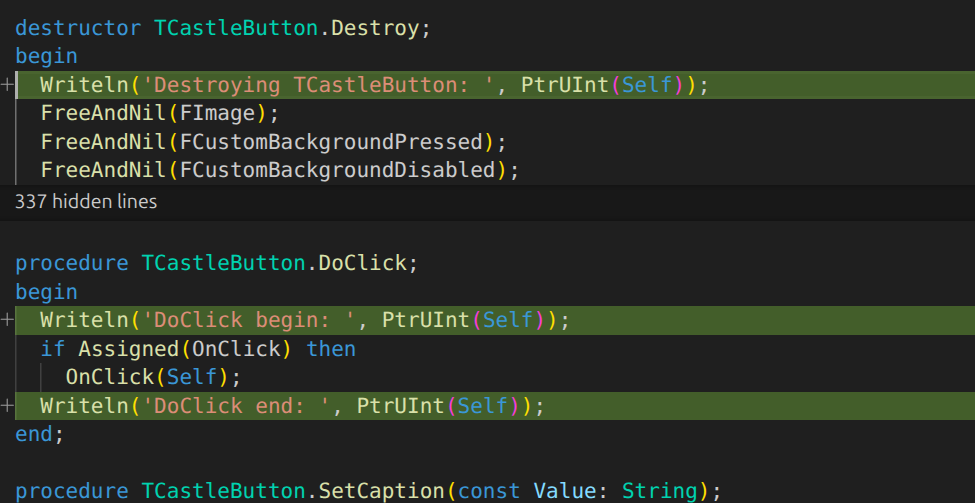
Adding 3 Writelns to the TCastleButton code, I can unfortunately confirm that when DoClick finishes, this button was destroyed.

→ results in log like this:

DoClick begin: 134962968364080
Destroying TCastleButton: 134962968367248
Destroying TCastleButton: 134962968366192
Destroying TCastleButton: 134962968365136
Destroying TCastleButton: 134962968364080 // our button is destroyed here
... (various game loading logs)
DoClick end: 134962968364080 // but here we are still in this button's method code

So the button 134962968364080 is really destroyed in the middle of it’s OnClick handler. If the DoClick would do anything more that is accessing the fields → then it’s an undefined behavior. E.g. this is undefined behavior (right now, I mean before the fix; we will fix it to make it OK):

procedure TCastleButton.DoClick;
begin
  Writeln('DoClick begin: ', PtrUInt(Self));
  Writeln('  DoClick begin says: Name is ', Name);
  if Assigned(OnClick) then
    OnClick(Self);
  Writeln('DoClick end: ', PtrUInt(Self));
  Writeln('  DoClick end says: Name is ', Name); // <-- this accesses Self which is now a dangling pointer
end;

Log for above shows, for my system and compiler now (FPC 3.2.2, Linux/x86_64):

DoClick begin: 139979378930736
  DoClick begin says: Name is ButtonPlay
Destroying TCastleButton: 139979378933904
Destroying TCastleButton: 139979378932848
Destroying TCastleButton: 139979378931792
Destroying TCastleButton: 139979378930736
...
DoClick end: 139979378930736
  DoClick end says: Name is 

So it seems like the Name changed to '' . Why? By accident, this memory piece is nil now. But this is an accident, it could as well be a crash, and some memory garbage. Different OS, different program workflow, different compiler / optimization level → could cause a crash.

And even if we would not even do anything from DoClick after calling OnClick, it’s still dangerous because DoClick is done from Release which is done by TCastleContainer.EventRelease ( castle-engine/src/ui/castleuicontrols_container.inc at bbbfc016ed179b2009cf8194dd692b81adf1f6e3 · castle-engine/castle-engine · GitHub ) doing loop for I := C.ControlsCount - 1 downto 0 do if RecursiveRelease(C.Controls[I]) then . So it may work by accident (it did work by accident in all tests until this thread! :slight_smile: ), esp. if the list count drops only by 1, but when C has been freed → we are undefined, and we can get crashes.

If you create / destroy the timer in view’s Start / Stop methods, and OnTimer will change views (stopping the view owning it) → then you should be able to confirm my grim conclusions. I mean, things inside view’s Stop will effectively happen in the middle of OnTimer.

Whether the timer is part of the design file (.castle-user-interface) or it’s created explicitly → will not matter.

The only way you could avoid this problem is by destroying timer later, e.g. in view’s Destroy. (So one idea for the fix is to move destroying loaded components later; alas, since you may also create/destroy stuff explicitly in Start/Stop, we should also introduce the “schedule view change” mentioned in earlier post; I’ll experiment today what is best to do).

Do be clear, right now

  • TCastleTimer.DoTimer does nothing after calling OnTimer.
  • And the caller of DoTimer, which is TCastleTimer.Update, also does nothing after calling DoTimer.
  • By accident, other OnXxx calls also don’t do anything more – I checked TCastleButton.OnClick, TCastleCheckbox.OnChange, TCastleEdit.OnChange.
    So at least we don’t get crash in timer… but
  1. We want to have, in the future, ability to place some Pascal code to be done after OnXxx on that instance is called.
  2. Even if not, they are inside a loop inside a container. That they don’t crash so far → is a lucky accident :slight_smile:
1 Like

I made a testcase showing various ways how it can go wrong, and confirmed in practice the grim prediction above. Indeed the loop itself may enter into a crash if we switch view during OnTimer – this is on Linux/x86_64:

TestStopViewFromEvent with activator MyTimer
TTestCastleUIControls.TestStopViewFromEvent: Failed: Access violation
An unhandled exception occurred at $000000000073F02D:
EAccessViolation: Access violation
  $000000000073F02D  COUNT,  line 169 of ../src/ui/castleuicontrols_internalchildrencontrols.inc
  $0000000000736B39  CONTROLSCOUNT,  line 1864 of ../src/ui/castleuicontrols_userinterface.inc
  $00000000007300D1  RECURSIVEUPDATE,  line 1578 of ../src/ui/castleuicontrols_container.inc
  $00000000007300F4  RECURSIVEUPDATE,  line 1579 of ../src/ui/castleuicontrols_container.inc
  $000000000072FB51  EVENTUPDATE,  line 1739 of ../src/ui/castleuicontrols_container.inc
  $00000000014DA946  FAKETIMER,  line 774 of code/testcases/testcastleuicontrols.pas
  $00000000014DA611  CORETESTSTOPVIEWFROMEVENT,  line 837 of code/testcases/testcastleuicontrols.pas
  $00000000014DAD9A  TESTSTOPVIEWFROMEVENT,  line 866 of code/testcases/testcastleuicontrols.pas
  $0000000001447058  RUN,  line 1652 of code/tester-castle/castletester.pas
  $000000000144043C  RUNTEST,  line 645 of code/tester-castle/castletester.pas
  $000000000144028E  RUN,  line 622 of code/tester-castle/castletester.pas
  $00000000005309A3  RUN,  line 74 of code/tester-castle/castleconsoletester.pas
  $00000000004AB471  main,  line 44 of castle_tester_standalone.dpr

Working on a fix :slight_smile:

1 Like