# Win64, LCL, simple shapes - something got broken
**URL:** https://forum.castle-engine.io/t/win64-lcl-simple-shapes-something-got-broken/579
**Category:** Uncategorized
**Created:** [May 1, 2022, 5:02pm UTC](https://forum.castle-engine.io/t/win64-lcl-simple-shapes-something-got-broken/579 "2022-05-01T17:02:56Z")
**Posts on this page:** 20
**Page:** 1
### Author:  [@Arioch](https://forum.castle-engine.io/u/Arioch)
#### Post date: [May 1, 2022, 5:02pm UTC](https://forum.castle-engine.io/t/win64-lcl-simple-shapes-something-got-broken/579/1 "2022-05-01T17:02:56Z")
Hello…
I wanted to make a simple demo about rounding errors…
…and suddenly, after git pull, saw my demo and then my app rendering nothing. Scaaary.
Okay, the rendering is back again at
Ревизия: f3f70782eb8c56e1e159db395c9f879059b4c7e1
Автор: Michalis Kamburelis [michalis.kambi@gmail.com](mailto:michalis.kambi@gmail.com)
Дата: 06.02.2022 6:33:17
Сообщение:
Mention load\_model\_and\_camera\_manually is deliberately by code
The rendering is totally lost (nothing but background color) on today fetch.
[JitterDemo.zip](https://forum.castle-engine.io/uploads/short-url/rqVCW6xa3QlHfCGT7k2NTtnNbTP.zip) (3.4 KB)
 
If rendering something at all 🙂 then by pressing left/right arrows you would be moving top grey shape.
And the rendering is not stable. The distance between leftmost triangle (cone) and the main body (cylinder or box) keeps varying on one pixel. Seems rounding is done differently one rotated elementary shapes, together making the shape.
Yet more weird is how the “bottom right” line of the rightmost cone keeps appearing and disappearing, but not the “top right” one! The movement is horizontal, so there should not be any jitter along the vertical axis.
Perhaps the rounding can be applied AFTER rotation, so the rounding errors would be the same over all the nodes?
Perhaps there can be some utility function that “fuses” a given shape with children, bringing all the inner nodes into the same flat array without nesting? This however would need destroying child components, which is dangerous of dangling pointers, or would need to turn children into hollow placeholders having zero nodes inside.
Maybe there is(was) something simple to make “antialiased” rendering that would conceal rounding errors but i failed to find it.
Keep right arrow pressed - and you would see the shape on the move distorted back-and-forth.
The idea was to keep coordinates in real world meters, so the numbers are quite large, but you said it was okay, there is no pre-fixed distance units in the engine.
Anyway, after upgrading to the latest engine - nothing is rendered at all :-/
```auto
procedure TfmSea.FormCreate(Sender: TObject);
begin
CreateScene;
end;
procedure TfmSea.CreateScene;
var ShipN: TCastleTransform; i: integer;
begin
Viewport := TCastleViewport.Create(Self);
Viewport.FullSize := true;
Viewport.Camera.Orthographic.Width := 2000 * pxInMeter;
Viewport.Camera.Orthographic.Height := 2000 * pxInMeter;
Viewport.Camera.Orthographic.Origin := Vector2(0.5, 0.5);
Viewport.Setup2D;
Viewport.Camera.ProjectionNear := -50000;
Viewport.Camera.ProjectionFar := +50000;
Viewport.BackgroundColor := Navy;
CastleSea.Controls.InsertFront(Viewport);
Ship1 := CreateShip1(Self, Vector4(0.2, 0.75, 0.75, 1), Teal);
Ship2 := CreateShip2(Self, Silver, Black);
Ship1.TranslationXY := Vector2(-5000, 0);
Ship2.TranslationXY := Vector2(-1500, +7500);
Ship2.Rotation := Vector4(0, 0, 1, - pi /2 );
Viewport.Items.Add(Ship1);
Viewport.Items.Add(Ship2);
for i := 1 to 10 do begin
ShipN := CreateShip2(Self, Teal, Blue);
ShipN.TranslationXY := Vector2(-1500 + i * pxInMeter, +7000 - pxInMeter * i * 40 );
ShipN.Rotation := Vector4(0, 0, 1, - pi /2 );
Viewport.Items.Add(ShipN);
end;
end;
function CreateShip2(const Owner: TComponent; const color, colorMark: TCastleColor
): TCastleTransform;
var
cf, cr: TCastleCone;
a: TCastlePlane; // TCastleCylinder;
b: TCastleBox;
L, W: integer;
procedure Setup1(const O: TCastleAbstractPrimitive);
begin
O.Material := pmUnlit;
O.Color := color;
// O.RenderOptions.Blending := True;
// O.RenderOptions.BlendingSort := bs2D;
end;
begin
Result := TCastleTransform.Create(Owner);
L := round(40 * pxInMeter);
W := round(15 * pxInMeter);
b := TCastleBox.Create(Owner);
a := TCastlePlane.Create(Owner);
cf := TCastleCone.Create(Owner);
cr := TCastleCone.Create(Owner);
Setup1(b);
Setup1(cf);
Setup1(cr);
//b.Height := L;
//b.Radius := W;
b.Size := Vector3(W*2, L, 2);
// a.Height := 3.5 * pxInMeter;
// a.Radius := 3.5 * pxInMeter;
a.Size := Vector2( 3 * pxInMeter, 2 * pxInMeter);
a.Axis := 2;
a.Material := pmUnlit;
a.Color := colorMark;
cf.BottomRadius := W;
cf.Height := W;
cr.BottomRadius := W;
cr.Height := W;
cf.TranslationXY := Vector2(0, -(L+W)/2);
cr.TranslationXY := Vector2(0, +(L+W)/2);
a.Translation := Vector3(0, 0, 2*W);
Result.Add(cf);
Result.Add(cr);
Result.Add(b);
b.Add(a);
end;
```
---
### Author:  [@michalis](https://forum.castle-engine.io/u/michalis)
#### Post date: [May 3, 2022, 2:14am UTC](https://forum.castle-engine.io/t/win64-lcl-simple-shapes-something-got-broken/579/2 "2022-05-03T02:14:04Z")
> [@](#):
>
> The rendering is totally lost (nothing but background color) on today fetch.
Testing on my side – it works fine for me. Using latest CGE master, 502db458ad1d631e6f5b107bc41d2ed786cc9946 right now, as of today.
Tested on Linux/x86\_64 and Windows/x86\_64 (Windows 10). Both using Lazarus 2.2 and FPC 3.2.2.
Rendering is OK, moving with left/right works fine for me.
So, we need more information:
1. What is your Lazarus, FPC version?
2. Please send the OpenGL report of your system, in case your GPU has some non-standard set of features/problems. Use the “Help → System Information” from the CGE editor, click there to save the whole report to file, attach it here.
3. Does the only thing that change betwen your 2 tests (you report that latest CGE master fails, but f3f70782eb8c56e1e159db395c9f879059b4c7e1 works) is the CGE version? Did you test them both on the same FPC, Lazarus etc., on exactly the same system, with the same drivers etc.?
4. Unless there’s some easy conclusion from your answers to AD 1 - AD 3, I may ask you to just do bisection, and locate where exactly do the trouble occur. There were a number of changes in the last ~3 months (since f3f70782eb8c56e1e159db395c9f879059b4c7e1) but nothing that obviously connects with my mind with what you’re doing.
The code looks OK, you create a number of TCastleTransform descendants, with unlit material, and move them. I don’t see there anything that could break because of some CGE change.
> [@](#):
>
> And the rendering is not stable. The distance between leftmost triangle (cone) and the main body (cylinder or box) keeps varying on one pixel.
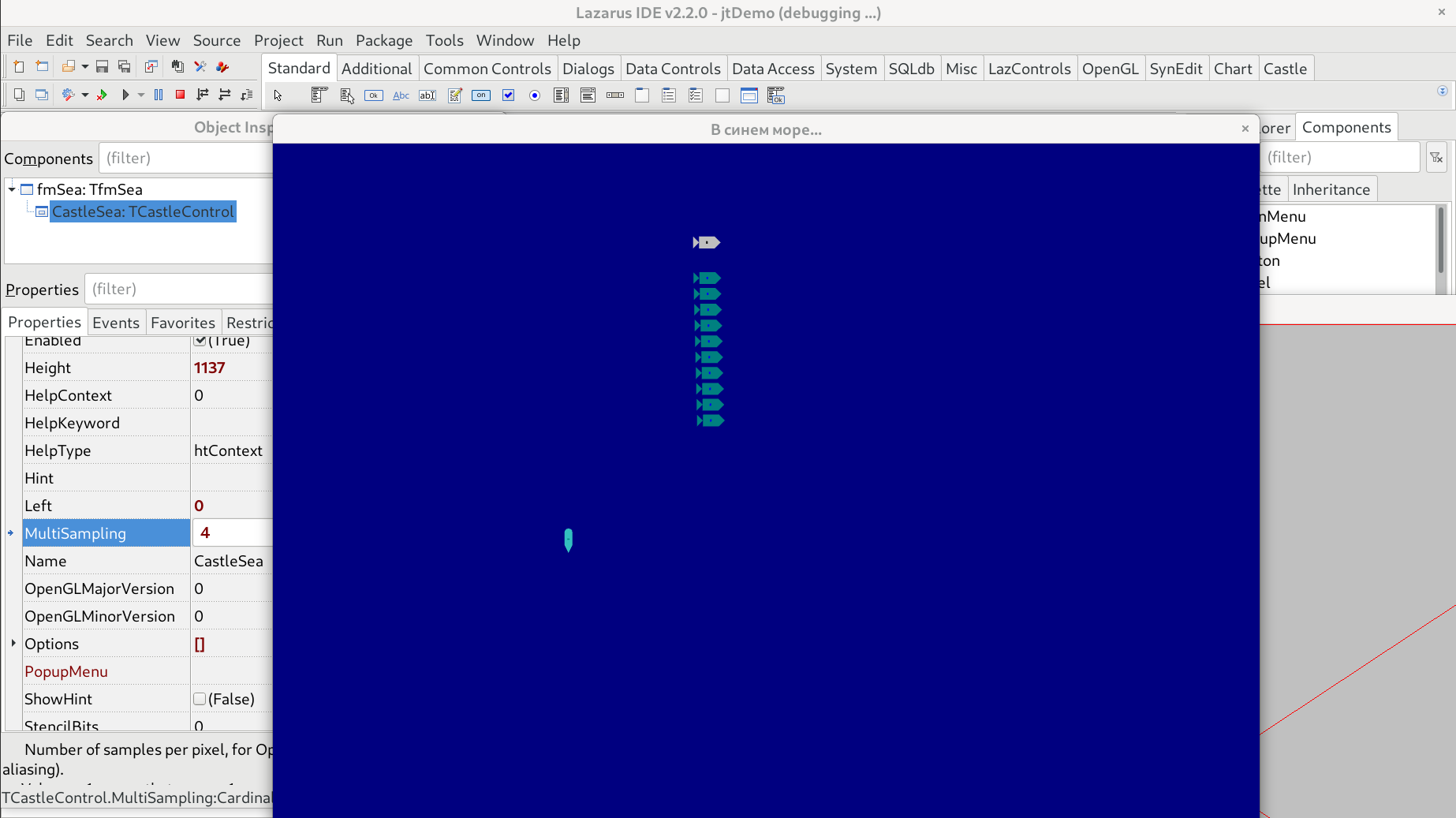
You render meshes that are very small (in final screen pixels). So the aliasing occurs. This is normal (in every rendering engine).
- The easiest way to deal with it is to use full-screen anti-aliasing.
- Another approach would be to render each ship as an image, instead of geometry. Then various texture filtering modes can essentially deal with aliasing too. But this would be a larger rework, and would prevent the ships from being customizable (each part existing or not, possibly transformed separately etc.) so you probably don’t want to go into this direction.
As for any weirdness: as I say, we just pass these things to OpenGL. Maybe some weird behavior is caused by large numbers (unlimately they are multiplied on GPU).
> [@](#):
>
> Perhaps the rounding can be applied AFTER rotation, so the rounding errors would be the same over all the nodes?
The “rounding” is just standard OpenGL rasterization in this case, not even controlled by the engine. The OpenGL determines which pixels are hit by triangle rendering. This already happens after the vertexes have been transformed (by all transformations in 3D, and projected to screen space).
> [@](#):
>
> Perhaps there can be some utility function that “fuses” a given shape with children, bringing all the inner nodes into the same flat array without nesting? This however would need destroying child components, which is dangerous of dangling pointers, or would need to turn children into hollow placeholders having zero nodes inside.
We have `DynamicBatching` that does what you seem to describe. It’s done at rendering, without reorganizing your data.
But it will likely not change anything in your case. You have aliasing. It is normal if you render geometries that are small (in pixels). Changing the way they are organized will not really cure it (though you may experience different artifacts due to different transformations being applied if you rearrange the hierarchy).
> [@](#):
>
> Maybe there is(was) something simple to make “antialiased” rendering that would conceal rounding errors but i failed to find it.
That is exactly `TCastleControl.MultiSampling` 🙂
---
### Author:  [@Arioch](https://forum.castle-engine.io/u/Arioch)
#### Post date: [May 3, 2022, 2:23pm UTC](https://forum.castle-engine.io/t/win64-lcl-simple-shapes-something-got-broken/579/3 "2022-05-03T14:23:15Z")
The devel box is integrated AMD/ATi video on Win7, but the “breathing” was also noticed on another box, with Intel integrated and Win10
I wonder if you have some integrated low-rank video boxes for tests or only expensive discrete videos? I think game devels would be naturally biased towards the latter.
Lazarus 2.2.0 (rev lazarus\_2\_2\_0-160-g6ba333bd22) FPC 3.2.3 x86\_64-win64-win32/win64
> Use the “Help → System Information” from the CGE editor
Can you add it to Preferences so could be queried without creating fake project first?
Anyway… i’m lost.
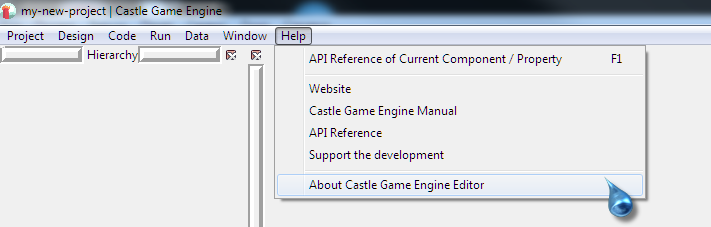
This is from one old program, not sure if helps:
[pcwizard\_2012.zip](https://forum.castle-engine.io/uploads/short-url/3Qf6WWXbQDD5i8nR0vtWDSmJUn3.zip) (7.2 KB)
---
### Author:  [@Arioch](https://forum.castle-engine.io/u/Arioch)
#### Post date: [May 3, 2022, 2:41pm UTC](https://forum.castle-engine.io/t/win64-lcl-simple-shapes-something-got-broken/579/4 "2022-05-03T14:41:58Z")
> [@michalis](#):
>
> - Does the only thing that change betwen your 2 tests (you report that latest CGE master fails, but f3f70782eb8c56e1e159db395c9f879059b4c7e1 works) is the CGE version? Did you test them both on the same FPC, Lazarus etc., on exactly the same system, with the same drivers etc.?
> - Unless there’s some easy conclusion from your answers to AD 1 - AD 3, I may ask you to just do bisection, and locate where exactly do the trouble occur. There were a number of changes in the last ~3 months (since f3f70782eb8c56e1e159db395c9f879059b4c7e1) but nothing that obviously connects with my mind with what you’re doing.
3: sure.
4: i feared that 🙂 that would take a learning curve… And some spare time. So i hoped for some low-hanging fruit 😃
> to render each ship as an image, instead of geometry.
would try multisampling, thanks for hint.
I expect that free rotations would be needed, so sprites do not seem that good of idea.
Fre zooming was nixed as unnecessary complication yet, but maybe would come back later.
I remade that code into GL 2D primitives and there are antialiazingg problems toom albeit less obvious. The only thing i thought that maybe GC does or can do all the coords normalization before passing them to GL drivers, but not sure that is worth it. I don’t know if real, not theoretical, videodrivers have problems with coordinates of 10^4 or 10^5 range, do not feel realyl large for modern computers, and especially for floating point numbers.
P.S. I wonder if something like porting SVG TCanvas to GL 2D primitives would make any sense, towards working on low-tech video cards if nothing else, comparing to managing full-flavor x3d nodes, especially for HUD-like uses where “virtual world” zooming should be ignored and the 2D physical screen should be anchor of object sizes instead.
I can snap Radeon 7700 into the box but would prefer not too 🙂
---
### Author:  [@Arioch](https://forum.castle-engine.io/u/Arioch)
#### Post date: [May 3, 2022, 4:33pm UTC](https://forum.castle-engine.io/t/win64-lcl-simple-shapes-something-got-broken/579/5 "2022-05-03T16:33:56Z")
> [@michalis](#):
>
> That is exactly `TCastleControl.MultiSampling`
Gave it a quick try;
With the demo, MS = 2 and MS = 4 produce different pictures, but MS = 8 seems (on a quick glance, can be wrong) render the same as MS = 0
Artifacts are different (with MS = 2 even curiously different), but still there.
I wonder if sub-pixel antialiasing can be enabled, something like Font rendering on WinXP and MaxOS ?
For a while i settled with MS = 4 and
```auto
// DrawPrimitive2D(pmLineStrip, Hull, ColorHull);
// DrawPrimitive2D(pmLineStrip, Hull, ColorHull, bsOne, bdZero, false, 1);
DrawPrimitive2D(pmLineStrip, Hull, ColorHull, bsOne, bdZero, false, 2);
```
There still is a small inaccuracy, but it is less obvious (the tip and the very ends of lines)


---
### Author:  [@michalis](https://forum.castle-engine.io/u/michalis)
#### Post date: [May 3, 2022, 8:55pm UTC](https://forum.castle-engine.io/t/win64-lcl-simple-shapes-something-got-broken/579/6 "2022-05-03T20:55:34Z")
> [@](#):
>
> The devel box is integrated AMD/ATi video on Win7, but the “breathing” was also noticed on another box, with Intel integrated and Win10[quote]
My questions were targetted at resolving the problem you mentioned – “The rendering is totally lost (nothing but background color) on today fetch.”. So I’m interested whether you tested (both master and f3f70782eb8c56e1e159db395c9f879059b4c7e1) on the exactly same system with the same compiler etc. (and confirmed that master rendering is blank, while f3f70782eb8c56e1e159db395c9f879059b4c7e1 renders OK).
OK, from your later answer I understand this is “yes”.
> [@](#):
>
> I wonder if you have some integrated low-rank video boxes for tests or only expensive discrete videos? I think game devels would be naturally biased towards the latter.
Among me and all the contributors we likely have good coverage of everything. Most developers, myself included, don’t really have that “super-high-end gamer GPU” from what I know 🙂
> [@](#):
>
> Anyway… i’m lost.
You show a screenshot from old CGE editor, that’s why “Help → System Information” is missing of course.
> [@](#):
>
> This is from one old program, not sure if helps:
Thanks, but please still make a report using “Help → System Information”. I also want to know how CGE “sees” your GPU.
> [@](#):
>
> I expect that free rotations would be needed, so sprites do not seem that good of idea.
Note that sprites in `TCastleScene` can be rotated, like anything else descending from `TCastleTransform`.
> [@](#):
>
> but MS = 8 seems (on a quick glance, can be wrong) render the same as MS = 0
That probably means your GPU doesn’t support MultiSampling = 8. LCL `TOpenGLControl`, on which `TCastleControl` is based, falls back to “no multisampling” in this case.
> [@](#):
>
> I wonder if sub-pixel antialiasing can be enabled, something like Font rendering on WinXP and MaxOS ?
This is what multi-sampling (full-screen anti-aliasing) does.
---
### Author:  [@Arioch](https://forum.castle-engine.io/u/Arioch)
#### Post date: [May 3, 2022, 9:05pm UTC](https://forum.castle-engine.io/t/win64-lcl-simple-shapes-something-got-broken/579/7 "2022-05-03T21:05:20Z")
i am trying bi-sect now
two major fears were
1. i have that RotationAngle patch - irrelevant as i removed its use from the minimized demo
2. i am not sure if ALL the commits are to be ocnsidered working, there could be ones with major malfunciton or even ones just used to “save temporary work” with no wattanty to even compile.
Okay, this latter can only be known by trial 🙂
---
### Author:  [@Arioch](https://forum.castle-engine.io/u/Arioch)
#### Post date: [May 3, 2022, 9:39pm UTC](https://forum.castle-engine.io/t/win64-lcl-simple-shapes-something-got-broken/579/8 "2022-05-03T21:39:09Z")
> Note that sprites in `TCastleScene` can be rotated
sure, i took part in that rotating wheel topic 🙂
but the quality would degrade, and the less details (‘noise’) and the less pixels (size) the sprite has - the more noticeable it would be. So i hope to avoid that avenue.
> falls back to “no multisampling” in this case
thought so, did not bother to check
> I wonder if sub-pixel antialiasing
this is what multi-sampling (full-screen anti-aliasing) does.
frankly, to me this did not look like that…
more correct: IF i used `DrawPrimitive2D(pmLineStrip, Hull, ColorHull);` there seemed to be subpixel antialiasing done badly. And if you fouce on my later screenshots, done with uncommented line with 2px wide lines, focus on the very very tip - i do not see there any half-drawn pixels, there either is one pixel on the very forward corner, or there is no and the “nose” is blunt.
granted, i did not do much testing, only what it looked on the first glance.
and this is dependent upon specific video driver, settings, and what not.
P.S. and that was one thing i feared too, one about Laz IDE being spoiled with Delphi…
```auto
Компиляция пакета castle_base 6.5: Код завершения 1, ошибок: 1
Fatal: Internal error 200611031
```
Perhaps i could use LazBuild instead of full-featured IDE but i am newb on the tooling.
Okay, going with clean-and-rebuild instead, works but sloooow.
…and here we go.
```auto
179b384d5bc0df3b88abf6f1575611666f9d0297 is the first bad commit
commit 179b384d5bc0df3b88abf6f1575611666f9d0297
Date: Fri Mar 4 16:50:13 2022 +0100
Change PhongShading default to true, MaxLightsPerShape to 64
src/base/castlerenderoptions_renderoptions.inc | 18 ++++++++++--------
1 file changed, 10 insertions(+), 8 deletions(-)
```
Looks like we, just like wit hmultisampling, hit another GL driver/hardware limit.
Is there a way to query the value from real GL subsystem in runtime?
```auto
- DefaultPhongShading = false;
- DefaultMaxLightsPerShape = 8;
+ DefaultPhongShading = true;
+ DefaultMaxLightsPerShape = 64;
```
---
### Author:  [@Arioch](https://forum.castle-engine.io/u/Arioch)
#### Post date: [May 3, 2022, 9:48pm UTC](https://forum.castle-engine.io/t/win64-lcl-simple-shapes-something-got-broken/579/9 "2022-05-03T21:48:39Z")
Need your help again…
I do this change to my demo…
```auto
Viewport.BackgroundColor := Navy;
// Viewport.Items.MainScene.RenderOptions.MaxLightsPerShape := 8;
// Viewport.Items.MainScene.RenderOptions.PhongShading := False;
CastleSea.Controls.InsertFront(Viewport);
```
As long as i uncomment those lines - i get the AV at the starting of the app.
```auto
function TCastleScene.GetRenderOptions: TCastleRenderOptions;
begin
Result := Renderer.RenderOptions;
end;
```
Where should i be overriding those default values then ?
```auto
tmp1 := Viewport.Items;
tmp2 := tmp1.MainScene;
tmp3 := tmp2.RenderOptions;
tmp3.MaxLightsPerShape := 8;
tmp3.PhongShading := False;
```
MainScene seems nil no matter where i do it.
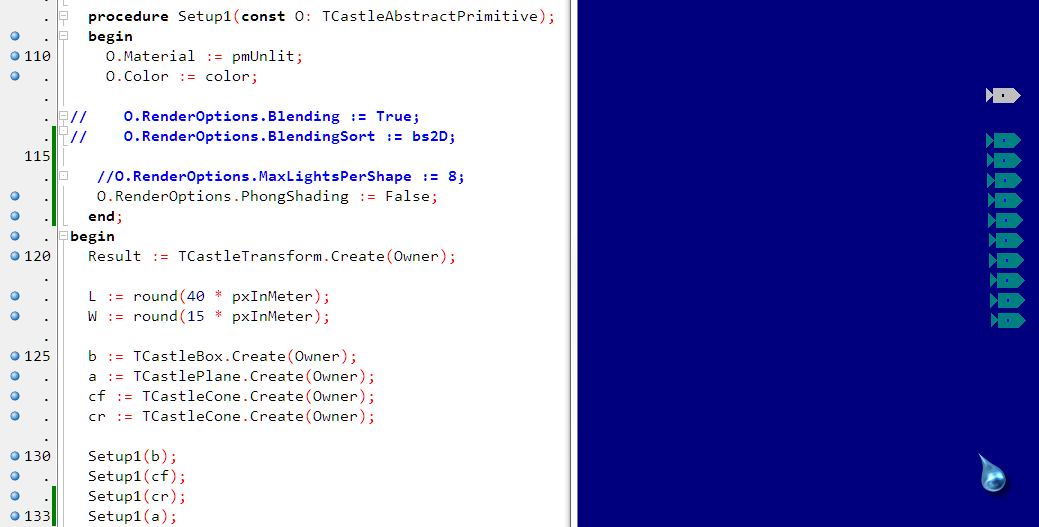
UPD 2. So it is all about Phong… Whenever i add/remove `Setup1` calls - the element is appearing or disappearing
---
### Author:  [@michalis](https://forum.castle-engine.io/u/michalis)
#### Post date: [May 3, 2022, 10:02pm UTC](https://forum.castle-engine.io/t/win64-lcl-simple-shapes-something-got-broken/579/10 "2022-05-03T22:02:30Z")
> [@Arioch](#):
>
> `Change PhongShading default to true, MaxLightsPerShape to 64`
>
> Looks like we, just like wit hmultisampling, hit another GL driver/hardware limit.
>
> Is there a way to query the value from real GL subsystem in runtime?
This is unrelated to this thread, it seems. Please stay on topic, don’t turn this into another thread where you ask about many unrelated things. The point of this thread is to find why do you experience the problem “The rendering is totally lost (nothing but background color)”.
As for MaxLightsPerShape, this value is not queried from OpenGL, as modern OpenGL essentially doesn’t have such limit. OK, there is a practical limit – which comes from the shader code complexity (so, depends on everything else the shader is doing), and also from the fact that too many light sources (if you actually use them) would slow down your rendering. So it’s not really something we can query. See [Design lights using Castle Game Engine: new light components and related features, with video! – Castle Game Engine](https://castle-engine.io/wp/2022/04/01/design-lights-using-castle-game-engine-new-light-components-and-related-features-with-video/) about it.
With older OpenGL (fixed-function pipeline) there is a hard limit, and indeed we query it. In case you use ancient GPU with ancient OpenGL fixed-function pipeline, we internally cap the actual limit by the OpenGL limit in this case.
> [@](#):
>
> MainScene seems nil no matter where i do it.
MainScene is not automatically assigned by anything. You need to assign some scene to it, or it will be `nil`. (And it can actually stay `nil`, in many practical applications.)
---
### Author:  [@Arioch](https://forum.castle-engine.io/u/Arioch)
#### Post date: [May 3, 2022, 10:06pm UTC](https://forum.castle-engine.io/t/win64-lcl-simple-shapes-something-got-broken/579/11 "2022-05-03T22:06:21Z")
> [@Arioch](#):
>
> `179b384d5bc0df3b88abf6f1575611666f9d0297 is the first bad commit`
it actually was very related
---
### Author:  [@michalis](https://forum.castle-engine.io/u/michalis)
#### Post date: [May 3, 2022, 10:06pm UTC](https://forum.castle-engine.io/t/win64-lcl-simple-shapes-something-got-broken/579/12 "2022-05-03T22:06:44Z")
> [@](#):
>
> UPD 2. So it is all about Phong… Whenever i add/remove `Setup1` calls - the element is appearing or disappearing
Hm. Weird. Of course, for unlit material – the Phong shading should not matter.
Please send the OpenGL report I asked for earlier. I’d like to see what CGE determined for your GPU.
---
### Author:  [@michalis](https://forum.castle-engine.io/u/michalis)
#### Post date: [May 3, 2022, 10:08pm UTC](https://forum.castle-engine.io/t/win64-lcl-simple-shapes-something-got-broken/579/13 "2022-05-03T22:08:28Z")
> [@Arioch](#):
>
> > [@Arioch](#):
> >
> > `179b384d5bc0df3b88abf6f1575611666f9d0297 is the first bad commit`
>
> it actually was very related
I missed that comment “is the first bad commit”, sorry.
All right – we have a culprit. Thanks! Interesting. Please send the OpenGL report, I wonder if your OpenGL was detected to use some different rendering approach then usual?
---
### Author:  [@Arioch](https://forum.castle-engine.io/u/Arioch)
#### Post date: [May 3, 2022, 10:13pm UTC](https://forum.castle-engine.io/t/win64-lcl-simple-shapes-something-got-broken/579/14 "2022-05-03T22:13:44Z")
recompiling all now, wait a bit 🙂
back to “MainScene” - is there some other place i can suppress Phong once for all, some top-level render options when `MainScene` is nil ? Or is applying this to every single 3D object the only way for me in situations like this?
P.S. i still vote this would be immediately available from the starting screen, or from Preferences, without having to creating dummy project first.
> **GCE GL Summary**
>
> OpenGL information (detected by castle-editor):
>
> * * *
>
> Version:
> Version string: 3.2.9606 Compatibility Profile Context
> Version parsed: major: 3, minor: 2, release exists: True, release: 9606, vendor-specific information: “Compatibility Profile Context”
> Vendor-specific version parsed: major: 0, minor: 0, release: 0
> Vendor: ATI Technologies Inc.
> Vendor type: ATI
>
> Renderer: ATI Radeon HD 4250
> Fglrx (ATI on Linux): False
> Mesa: False
>
> Buggy glGenerateMipmap(EXT): False
> Buggy GL\_LIGHT\_MODEL\_TWO\_SIDE: False
> Buggy VBO: False
> Buggy shader shadow map: False
> Buggy FBO rendering to multi-sampling texture: False
> Buggy FBO rendering to cube map texture: False
> Buggy swap buffers with non-standard glViewport: False
> Buggy 32-bit depth buffer: False
> Buggy GLSL gl\_FrontFacing: False
> Buggy GLSL read varying: False
> Buggy Pure Shader Pipeline: True
> Buggy Texture Size Above 2048: False
> Buggy Shader Bump Mapping num\_steps: False
>
> * * *
>
> Real versions available:
> (checks both version string and actual functions availability in GL library, to secure from buggy implementations)
>
> 1.2: True
> 1.3: True
> 1.4: True
> 1.5: True
> 2.0: True
> 2.1: True
> 3.0: True
> 3.1: True
> 3.2: False
> 3.3: False
> 4.0: False
>
> * * *
>
> Features:
> Shaders (GLSL) support: Standard
> =\> Enable deprecated (fixed-function) support: True
> Multi-texturing: True
> Framebuffer Object: Standard (or ARB “core extension”)
> Multi-sampling for FBO buffers and textures: True
> Vertex Buffer Object: True
> GenerateMipmap available (and reliable): True
> Cube map textures: Standard
> Compressed textures supported: [DXT1\_RGB, DXT1\_RGBA, DXT3, DXT5]
> 3D textures: Standard
> Textures non-power-of-2: True
> Blend constant parameter: True
> Float textures: True
> Depth textures: True
> Packed depth + stencil: True
>
> All extensions: GL\_AMDX\_name\_gen\_delete GL\_AMD\_draw\_buffers\_blend GL\_AMD\_performance\_monitor GL\_AMD\_shader\_stencil\_export GL\_ARB\_color\_buffer\_float GL\_ARB\_copy\_buffer GL\_ARB\_depth\_buffer\_float GL\_ARB\_depth\_clamp GL\_ARB\_depth\_texture GL\_ARB\_draw\_buffers GL\_ARB\_draw\_buffers\_blend GL\_ARB\_draw\_elements\_base\_vertex GL\_ARB\_draw\_instanced GL\_ARB\_fragment\_coord\_conventions GL\_ARB\_fragment\_program GL\_ARB\_fragment\_program\_shadow GL\_ARB\_fragment\_shader GL\_ARB\_framebuffer\_object GL\_ARB\_framebuffer\_sRGB GL\_ARB\_geometry\_shader4 GL\_ARB\_half\_float\_pixel GL\_ARB\_half\_float\_vertex GL\_ARB\_imaging GL\_ARB\_instanced\_arrays GL\_ARB\_map\_buffer\_range GL\_ARB\_multisample GL\_ARB\_multitexture GL\_ARB\_occlusion\_query GL\_ARB\_pixel\_buffer\_object GL\_ARB\_point\_parameters GL\_ARB\_point\_sprite GL\_ARB\_provoking\_vertex GL\_ARB\_seamless\_cube\_map GL\_ARB\_shader\_objects GL\_ARB\_shader\_texture\_lod GL\_ARB\_shading\_language\_100 GL\_ARB\_shadow GL\_ARB\_shadow\_ambient GL\_ARB\_sync GL\_ARB\_texture\_border\_clamp GL\_ARB\_texture\_buffer\_object GL\_ARB\_texture\_compression GL\_ARB\_texture\_compression\_rgtc GL\_ARB\_texture\_cube\_map GL\_ARB\_texture\_env\_add GL\_ARB\_texture\_env\_combine GL\_ARB\_texture\_env\_crossbar GL\_ARB\_texture\_env\_dot3 GL\_ARB\_texture\_float GL\_ARB\_texture\_mirrored\_repeat GL\_ARB\_texture\_multisample GL\_ARB\_texture\_non\_power\_of\_two GL\_ARB\_texture\_rectangle GL\_ARB\_texture\_rg GL\_ARB\_texture\_snorm GL\_ARB\_transpose\_matrix GL\_ARB\_uniform\_buffer\_object GL\_ARB\_vertex\_array\_bgra GL\_ARB\_vertex\_array\_object GL\_ARB\_vertex\_buffer\_object GL\_ARB\_vertex\_program GL\_ARB\_vertex\_shader GL\_ARB\_window\_pos GL\_ATI\_draw\_buffers GL\_ATI\_envmap\_bumpmap GL\_ATI\_fragment\_shader GL\_ATI\_meminfo GL\_ATI\_separate\_stencil GL\_ATI\_texture\_compression\_3dc GL\_ATI\_texture\_env\_combine3 GL\_ATI\_texture\_float GL\_ATI\_texture\_mirror\_once GL\_EXT\_abgr GL\_EXT\_bgra GL\_EXT\_bindable\_uniform GL\_EXT\_blend\_color GL\_EXT\_blend\_equation\_separate GL\_EXT\_blend\_func\_separate GL\_EXT\_blend\_minmax GL\_EXT\_blend\_subtract GL\_EXT\_compiled\_vertex\_array GL\_EXT\_copy\_buffer GL\_EXT\_copy\_texture GL\_EXT\_draw\_buffers2 GL\_EXT\_draw\_instanced GL\_EXT\_draw\_range\_elements GL\_EXT\_fog\_coord GL\_EXT\_framebuffer\_blit GL\_EXT\_framebuffer\_multisample GL\_EXT\_framebuffer\_object GL\_EXT\_framebuffer\_sRGB GL\_EXT\_geometry\_shader4 GL\_EXT\_gpu\_program\_parameters GL\_EXT\_gpu\_shader4 GL\_EXT\_histogram GL\_EXT\_multi\_draw\_arrays GL\_EXT\_packed\_depth\_stencil GL\_EXT\_packed\_float GL\_EXT\_packed\_pixels GL\_EXT\_pixel\_buffer\_object GL\_EXT\_point\_parameters GL\_EXT\_provoking\_vertex GL\_EXT\_rescale\_normal GL\_EXT\_secondary\_color GL\_EXT\_separate\_specular\_color GL\_EXT\_shadow\_funcs GL\_EXT\_stencil\_wrap GL\_EXT\_subtexture GL\_EXT\_texgen\_reflection GL\_EXT\_texture3D GL\_EXT\_texture\_array GL\_EXT\_texture\_buffer\_object GL\_EXT\_texture\_buffer\_object\_rgb32 GL\_EXT\_texture\_compression\_latc GL\_EXT\_texture\_compression\_rgtc GL\_EXT\_texture\_compression\_s3tc GL\_EXT\_texture\_cube\_map GL\_EXT\_texture\_edge\_clamp GL\_EXT\_texture\_env\_add GL\_EXT\_texture\_env\_combine GL\_EXT\_texture\_env\_dot3 GL\_EXT\_texture\_filter\_anisotropic GL\_EXT\_texture\_integer GL\_EXT\_texture\_lod GL\_EXT\_texture\_lod\_bias GL\_EXT\_texture\_mirror\_clamp GL\_EXT\_texture\_object GL\_EXT\_texture\_rectangle GL\_EXT\_texture\_sRGB GL\_EXT\_texture\_shared\_exponent GL\_EXT\_texture\_snorm GL\_EXT\_texture\_swizzle GL\_EXT\_timer\_query GL\_EXT\_transform\_feedback GL\_EXT\_vertex\_array GL\_EXT\_vertex\_array\_bgra GL\_IBM\_texture\_mirrored\_repeat GL\_KTX\_buffer\_region GL\_NV\_blend\_square GL\_NV\_conditional\_render GL\_NV\_copy\_depth\_to\_color GL\_NV\_explicit\_multisample GL\_NV\_primitive\_restart GL\_NV\_texgen\_reflection GL\_SGIS\_generate\_mipmap GL\_SGIS\_texture\_edge\_clamp GL\_SGIS\_texture\_lod GL\_SUN\_multi\_draw\_arrays GL\_WIN\_swap\_hint WGL\_EXT\_swap\_control
>
> * * *
>
> Current buffers bit depths:
> Color (red / green / blue / alpha): 8 / 8 / 8 / 8
> Depth: 24
> Index: 0
> Stencil: 8
> Accumulation (red / green / blue / alpha): 0 / 0 / 0 / 0
> Double buffer: True
> Multi-sampling (full-screen anti-aliasing) possible: True
> Current: 1 samples per pixel
>
> * * *
>
> Stack depths:
> Attributes: 16
> Client attributes: 16
> Modelview: 32
> Projection: 10
> Texture: 10
> Name: 64
>
> * * *
>
> Limits:
> Max clip planes: 8
> Max lights (fixed-function limit): 8
> Max eval order: 40
> Max list nesting: 64
> Max pixel map table: 256
> Max texture size: 8192
> Max viewport dims (width, height): 8192 8192
> Max texture units (shader pipeline): 16
> Max texture units (fixed-function): 8
> Max cube map texture size: 8192
> Max 3d texture size: 8192
> Max texture max anisotropy: 16
> Query counter bits (for occlusion query): 32
> Max renderbuffer size: 8192
>
> * * *
>
> Memory (in Kb):
> Total: 0 (unknown)
> Current: 0 (unknown)
> Current for VBO: 229817
> Current for Textures: 229817
> Current for Renderbuffers: 229817
P.P.S. this is the chip - [ATI Radeon HD 4250 Specs | TechPowerUp GPU Database](https://www.techpowerup.com/gpu-specs/radeon-hd-4250.c2074)
i now kinda pity i used the opportunity to grab this mainboard. Year or two ago it was Ati 690G aka Radeon X1250 - it could be even more amuzing 🙂 But i could not resist upgrading to native 6x SATA and native USB3 🙂
---
### Author:  [@Arioch](https://forum.castle-engine.io/u/Arioch)
#### Post date: [May 3, 2022, 10:24pm UTC](https://forum.castle-engine.io/t/win64-lcl-simple-shapes-something-got-broken/579/15 "2022-05-03T22:24:33Z")
Can we perhaps just do somethign ultra-simple and then step `procedure TGLRenderer.RenderShape(const Shape: TX3DRendererShape);` line by line at my and your hardware, comparing local variables and taken if-branches ?
---
### Author:  [@michalis](https://forum.castle-engine.io/u/michalis)
#### Post date: [May 3, 2022, 10:24pm UTC](https://forum.castle-engine.io/t/win64-lcl-simple-shapes-something-got-broken/579/16 "2022-05-03T22:24:57Z")
> [@Arioch](#):
>
> back to “MainScene” - is there some other place i can suppress Phong once for all, some top-level render options when `MainScene` is nil ? Or is applying this to every single 3D object the only way for me in situations like this?
Every scene has separate, independent `RenderOptions`.
To adjust them all, assign callback to `TCastleRenderOptions.OnCreate` (class variable) to adjust it to have `PhongShading := false`. (Note that I just fixed related bug to it yesterday, [https://github.com/castle-engine/castle-engine/commit/502db458ad1d631e6f5b107bc41d2ed786cc9946](https://github.com/castle-engine/castle-engine/commit/502db458ad1d631e6f5b107bc41d2ed786cc9946) , so be sure you really use latest master when doing it.)
Of course, in this case it should not be needed.
> [@](#):
>
> P.S. i still vote this would be immediately available from the starting screen, or from Preferences, without having to creating dummy project first.
Added to my TODO list. Admittedly it has low priority – for most normal engine usage, you have a project with `CastleEngineManifest.xml` ready.
> [@](#):
>
> Buggy Pure Shader Pipeline: True
> …
> =\> Enable deprecated (fixed-function) support: True
That’s the culprit, and the reason why I asked for this report 🙂
This enables the old-style rendering.
I’ll work on fixing that. Hm, but it’s not the first time this old rendering algorithm fails, because it didn’t get enough testing. I may also consider just removing this deprecated way of rendering.
In the meantime, please check whether changing `FBuggyPureShaderPipeline := ...` assignment you can find in `castleglversion.pas` into trivial `FBuggyPureShaderPipeline := false` fixes a problem for you. I suspect it may, and it would be the best solution.
---
### Author:  [@Arioch](https://forum.castle-engine.io/u/Arioch)
#### Post date: [May 3, 2022, 10:44pm UTC](https://forum.castle-engine.io/t/win64-lcl-simple-shapes-something-got-broken/579/17 "2022-05-03T22:44:11Z")
> [@michalis](#):
>
> `castleglversion.pas` into trivial `FBuggyPureShaderPipeline := false`
it would take a slow clean-and-rebuild or IDE would throw an ICE for me again
i wish i could just `GLVersion.BuggyPureShaderPipeline := False;` instead.
tweaking those vars back and forth in runtime could be dangerous, but perhaps one-way (into more conservative of two options) would be safe?
* * *
Okay, it does NOT change bad rendering.
I made sure i actually do change it by
```auto
procedure TfmSea.FormResize(Sender: TObject);
begin
if nil = GLVersion then exit;
Caption := Caption + ' GL ' + IntTOStr(Ord(
GLVersion.BuggyPureShaderPipeline
));
OnResize := nil;
end;
```
---
### Author:  [@michalis](https://forum.castle-engine.io/u/michalis)
#### Post date: [May 3, 2022, 10:57pm UTC](https://forum.castle-engine.io/t/win64-lcl-simple-shapes-something-got-broken/579/19 "2022-05-03T22:57:13Z")
> [@Arioch](#):
>
> tweaking those vars back and forth in runtime could be dangerous, but perhaps one-way (into more conservative of two options) would be safe?
`EnableFixedFunction` is calculated looking at `GLVersion.BuggyPureShaderPipeline`. Which is why I asked to modify the `castleglversion.pas`, not try to tweak it later. Please test what happens if you modify the `castleglversion.pas` to have `BuggyPureShaderPipeline` always `false`.
In the meantime, I made a quick fix and committed to master. Please update to latest CGE master, and retest (and now make sure you leave the `GLVersion.BuggyPureShaderPipeline` as was autodetected in your case, i.e. `true`). It essentially forces `PhongShading` to be always `false` in case `GLVersion.BuggyPureShaderPipeline`.
We really should do better, treat above as just a quick solution.
- We should enable Phong shading on this GPU.
- We should actually remove the `GLVersion.BuggyPureShaderPipeline` concept. We should localize and fix cases why it fails (instead of “giving up on shader rendering”) in this case (it applies now to old drivers on Intel and ATI GPUs).
- Ideally, both `BuggyPureShaderPipeline` and `EnableFixedFunction` should just cease to exist in the future. For some time, I guess I’ll display a big fat warning to people affected. We should “solve” the issue on their GPUs but keeping the shader rendering going, not giving up on it (i.e. we should not just revert to old way of rendering, which is in practice seldom tested so may cause bugs).
I will want to get my hands on affected ATI GPU for this.
---
### Author:  [@Arioch](https://forum.castle-engine.io/u/Arioch)
#### Post date: [May 3, 2022, 11:00pm UTC](https://forum.castle-engine.io/t/win64-lcl-simple-shapes-something-got-broken/579/20 "2022-05-03T23:00:20Z")
> [@michalis](#):
>
> if you modify the `castleglversion.pas` to have `BuggyPureShaderPipeline` always `false`.
i did, the render was still faulty, like i said above.
> [@michalis](#):
>
> (instead of “giving up on shader rendering”)
Maybe the fix (one of fixes) it the opposite direction?
If CGEngine - for whatever reason, right or wrong - settled on fixed function - then should it perhaps disable Phong? Is Phong given on any FFP ?
UPD.
```auto
FMaxClipPlanes := glGetInteger(GL_MAX_CLIP_PLANES)
else
FMaxClipPlanes := glGetInteger(GL_MAX_CLIP_DISTANCES);
```
Both return 8
```auto
FMaxViewportDimensions := GetVector2Integer(GL_MAX_VIEWPORT_DIMS);
```
gives 8192x8192
---
### Author:  [@michalis](https://forum.castle-engine.io/u/michalis)
#### Post date: [May 3, 2022, 11:06pm UTC](https://forum.castle-engine.io/t/win64-lcl-simple-shapes-something-got-broken/579/21 "2022-05-03T23:06:14Z")
> [@Arioch](#):
>
> > [@michalis](#):
> >
> > if you modify the `castleglversion.pas` to have `BuggyPureShaderPipeline` always `false`.
>
> i did, the render was still faulty, like i said above.
Thanks. I guess the `BuggyPureShaderPipeline` is (unfortunately) right in this case. I still would like to solve it better – maybe we can make exception for this GPU, but not such “drastic” exception where we just disable using shader pipeline. Perhaps some much-more-local exception for this GPU would make the shaders work OK there. As I said, I’ll try to get my hands on affected ATI GPU to experiment and make it better,
> [@](#):
>
> If CGEngine - for whatever reason, right or wrong - settled on fixed function - then should it perhaps disable Phong? Is Phong given on any FFP ?
This is more or less what my last commit to master does. The `BuggyPureShaderPipeline` disables the Phong shading. (The `EnableFixedFunction` by itself does not – as fixed-function and shader pipeline may cooperate in many cases.)
Please test whether the latest master fixes the problem for you.
[Next page](https://forum.castle-engine.io/t/win64-lcl-simple-shapes-something-got-broken/579.md?page=2)