# TransformUnderMouse with Alpha pixels check for quad-based Transforms
**URL:** https://forum.castle-engine.io/t/transformundermouse-with-alpha-pixels-check-for-quad-based-transforms/1494
**Category:** 3D
**Created:** [January 3, 2025, 7:33pm UTC](https://forum.castle-engine.io/t/transformundermouse-with-alpha-pixels-check-for-quad-based-transforms/1494 "2025-01-03T19:33:25Z")
**Posts on this page:** 10
**Page:** 1
### Author:  [@phomm](https://forum.castle-engine.io/u/phomm)
#### Post date: [January 3, 2025, 7:33pm UTC](https://forum.castle-engine.io/t/transformundermouse-with-alpha-pixels-check-for-quad-based-transforms/1494/1 "2025-01-03T19:33:25Z")
Hi, All ! Happy new year!
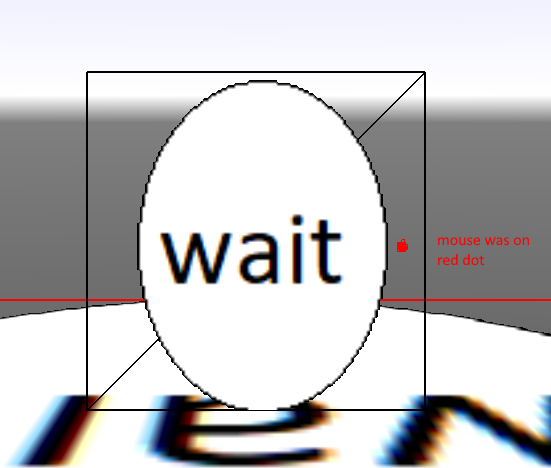
I want to make precise Mouse picking of quad based Transforms - like TCastleImageTransform, or TCastleScene with 2d sprite, in this case TransformUnderMouse performs hit-test over whole quad (geometry) and not taking into account transparent pixels of loaded textures. I found those similar topics : [Convenient way to determine exact point under mouse - #4 by michalis](https://forum.castle-engine.io/t/convenient-way-to-determine-exact-point-under-mouse/791/4) and [Get all geometry under raycast? - #5 by bugan11](https://forum.castle-engine.io/t/get-all-geometry-under-raycast/957/5) where some ideas presented , but no complete solution so far. So here is my attempt (and a screenshot with wrong work), somewhat compilation of ideas from above topics.
The issues I have still - raycast is a bit buggy, not hitting properly the desired polygon, esp. if you move (zoom out) away from it, and this is not the case for standard TransformUnderMouse (for this I wrote my solution and tried also one from the code in Bugan11 topic, claimed to be working, but incomplete). And ofc. the pixel check is not working (the one I wrote in my method) as well.
Maybe somebody will have ideas, I also posted this in discord, but seems less people are checking it than the forum.
[my-new-project.zip](https://forum.castle-engine.io/uploads/short-url/ht70FpoWI4zimC8bky4QpbUAOpt.zip) (25.1 KB)
---
### Author:  [@michalis](https://forum.castle-engine.io/u/michalis)
#### Post date: [January 3, 2025, 10:01pm UTC](https://forum.castle-engine.io/t/transformundermouse-with-alpha-pixels-check-for-quad-based-transforms/1494/2 "2025-01-03T22:01:32Z")
> [@phomm](#):
>
> I also posted this in discord, but seems less people are checking it than the forum.
Hi, I’ll take a look and answer around the weekend.
I’m indeed offline on Discord from quite some time, sorry about it – I got busy lately working on a big new feature ( [Web Target | Manual | Castle Game Engine](https://castle-engine.io/web) ) and I kind of went offline for a long time 🙂 I will catch up with Discord eventually. And I will answer here when I have time to carefully read and investigate.
Happy 2025!
---
### Author:  [@michalis](https://forum.castle-engine.io/u/michalis)
#### Post date: [January 21, 2025, 11:21am UTC](https://forum.castle-engine.io/t/transformundermouse-with-alpha-pixels-check-for-quad-based-transforms/1494/3 "2025-01-21T11:21:02Z")
Just a note that this topic is not forgotten, I have this in TODO, to read carefully and answer something useful 🙂
---
### Author:  [@phomm](https://forum.castle-engine.io/u/phomm)
#### Post date: [January 21, 2025, 11:28am UTC](https://forum.castle-engine.io/t/transformundermouse-with-alpha-pixels-check-for-quad-based-transforms/1494/4 "2025-01-21T11:28:27Z")
Thanks , @michalis !
Maybe you could give some hints and I could try by myself first.
It is even a bit hard to debug this to understand what’s going on, that’s why I’m blind without clues for now…
---
### Author:  [@phomm](https://forum.castle-engine.io/u/phomm)
#### Post date: [January 21, 2025, 2:38pm UTC](https://forum.castle-engine.io/t/transformundermouse-with-alpha-pixels-check-for-quad-based-transforms/1494/5 "2025-01-21T14:38:23Z")
It seems that I did it !
I rechecked the comments in the Castle sources and found that I need PreciseCollisions to be set, which makes proper Triangle hit within raycast. I also tried various Coords translations to get proper Texture coords out of Triangle+HitPoint (and it seems that comments in the castle code are misleading in some cases). Ofc I fixed couple of my own errors in this example.
So here it is, please, guys, check it, if it fulfills the task and common sense.
@michalis, maybe you could suggest improvements or simplifications (for example more solid way to get texture node from hit transform).
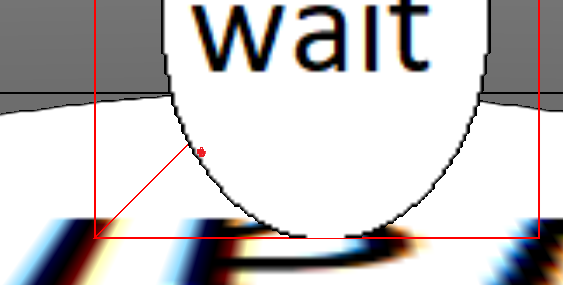
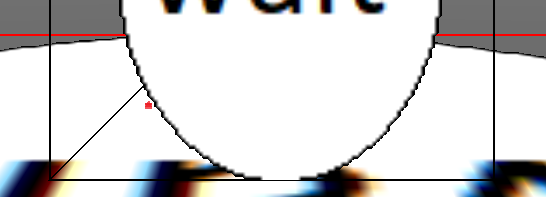
As seen on screenshots, red dot marks a mouse pointer and detects which transform is under mouse, correctly filtering alpha pixels, and highlighting the wireframe of the transform with red. And it works on any zoom, on any position (click and drag in example) and even overlapping transforms.
[alpha\_mouse\_hittest\_working.zip](https://forum.castle-engine.io/uploads/short-url/qVaedcN4F4ojJa8tcVRlZd8Tpnx.zip) (25.2 KB)
---
### Author:  [@michalis](https://forum.castle-engine.io/u/michalis)
#### Post date: [January 27, 2025, 3:10pm UTC](https://forum.castle-engine.io/t/transformundermouse-with-alpha-pixels-check-for-quad-based-transforms/1494/6 "2025-01-27T15:10:23Z")
> [@phomm](#):
>
> I rechecked the comments in the Castle sources and found that I need PreciseCollisions to be set, which makes proper Triangle hit within raycast.
Indeed, you need `PreciseCollisions` = `true` right now to make collision queries like `Viewport.TransformUnderMouse` precise.
More info: We have a plan for new “hit API” (it will be `TCastleViewport.PointingDeviceHit`) to use physics by default (which means it will ignore `PreciseCollisions`), and then at some point deprecate `PreciseCollisions` (see [Roadmap | Manual | Castle Game Engine](https://castle-engine.io/roadmap#_in_progress_remove_the_need_to_care_about_precisecollisions_cleanup_old_collision_detection_using_our_octrees) ). At this (future) point we should only use physics engine to detect collisions, and it should account for whatever colliders (like `TCastleMeshCollider`) or not are present. This will be done slowly naturally, i.e. first we will deprecate old things (`TransformUnderMouse` and `PreciseCollisions`) but keep them working for some releases, to give time everyone to upgrade, before we actually remove the “old ways”.
Right now, while we use physics engine (Kraft), we also have our own implementation of collision detection used by some routines, like the `TransformUnderMouse`. A scene collides “as its bounding box” when `PreciseCollisions` = `false`, and as a precise mesh (set of polygons) when `PreciseCollisions` = `true`. See _“13. Old system for collisions and gravity”_ on [Physics | Manual | Castle Game Engine](https://castle-engine.io/physics#_old_system_for_collisions_and_gravity) .
> [@phomm](#):
>
> @michalis, maybe you could suggest improvements or simplifications (for example more solid way to get texture node from hit transform).
I tested your application in case I can provide any suggestions, esp. looking at `TViewMain.GetSceneUnderMouseWithPixelTest`, added some fixes to CGE comments, and added `TAbstractTextureNode.Color` to make it all easier.
Details:
- You don’t need to track `FMousePos` in `TViewMain.Motion` yourself. Instead, just access `Container.MousePosition`.
- To debug pointers, instead of `Integer(Pointer(...)).ToString` you can use ready `PointerToStr(...)` from `CastleStringUtils`.
- For “production usage”, I would add some “sanity counter” to the `repeat .. until false` loop, to break after e.g. 1000 iterations. Reasons: We’re checking collisions using floating-point numbers and relying that opetations like `LRayNode.Point + LDirection.AdjustToLength(SingleEpsilon)` reliably move the point “beyond” the first hit. These calculations may be imprecise in some edge-cases (e.g. when hugely large or incredibly small distances are involved), in which case it’s good to be sure we don’t “hang indefinitely” the loop.
- As for your comment:
- As for
- Accessing the texture easier, without creating the new `TImageTextureNode`:
- Oh, minor note, I see you have `function IIF(ACond: Boolean; IfTrue, IfFalse: string): string;`. Note that there’s `IfThen` overload in `StrUtils` doing the same 🙂
Overall, I got this code for `TViewMain.GetSceneUnderMouseWithPixelTest`:
>
Add to `uses` clause `CastleStringUtils, CastleLog`. The above implements my suggestions above _except the “sanity counter”_.
## Version 2.0
It is also possible to account for filtering (nearest, bilinear) and repeat/clamp modes. See how `GetDiffuseTexture` is doing it: [castle-engine/src/scene/castleraytracer.pas at d47705c0cea96d32746fc3943cec5034f1f4fb98 · castle-engine/castle-engine · GitHub](https://github.com/castle-engine/castle-engine/blob/d47705c0cea96d32746fc3943cec5034f1f4fb98/src/scene/castleraytracer.pas#L424) .
Hmmm, I decided to make it better and easier. In the latest CGE commit, I exposed a new method `TAbstractTextureNode.Color` that makes the last part of your task a bit easier, see [TAbstractTextureNode.Color to query texture contents from Pascal · castle-engine/castle-engine@5ebe44c · GitHub](https://github.com/castle-engine/castle-engine/commit/5ebe44ca8e650d06c761647322ab8ff67929fdb1) . The `GetDiffuseTexture` from `CastleRayTracer` is removed (it was internal there anyway, and now ray-tracer calls `TAbstractTextureNode.Color`).
So you can now write:
```delphi
LMainTexture := LRayNode.Triangle^.State.MainTexture;
if LMainTexture <> nil then
begin
LPixelColor := LMainTexture.Color(LTexCoords);
Result := LPixelColor[3] < 0.5; // Consider pixel transparent if alpha is less than 0.5
end;
```
In the end, this is the code for `TViewMain.GetSceneUnderMouseWithPixelTest`, that requires the very latest engine versio to work (just committed, it will be available in [Download Castle Game Engine - Free Open-Source Game Development Tool](https://castle-engine.io/download) in a few hours), and accounts for all my suggestions (_except the “sanity counter”!_):
>
Have fun! And thank you for all the feedback – we did improve resulting CGE thanks to this 🙂
---
### Author:  [@phomm](https://forum.castle-engine.io/u/phomm)
#### Post date: [January 27, 2025, 4:05pm UTC](https://forum.castle-engine.io/t/transformundermouse-with-alpha-pixels-check-for-quad-based-transforms/1494/7 "2025-01-27T16:05:37Z")
THanks, @michalis ! What an expanded response from you, it is very informative and helpful !
I will pull the CGE sources (I rarely use full snapshot package) and your gist and play with all the details to see the improvements you’ve brought.
I’m glad, that this case introduced points to increase CGE clarity and richness, thanks for sorting this out and investing your time, I know you have lots of other todos for engine (webtarget is a killer feature for sure 🤘)
And I’m happy that now I have distilled solution which I would soon use in my game 😇
Thank you for all this commitment !
---
### Author:  [@michalis](https://forum.castle-engine.io/u/michalis)
#### Post date: [January 28, 2025, 8:59am UTC](https://forum.castle-engine.io/t/transformundermouse-with-alpha-pixels-check-for-quad-based-transforms/1494/8 "2025-01-28T08:59:56Z")
Additional correction (I edited my post above to account for it):
It the “version 2.0” code, I made a mistake yesterday, not accounting for the case that `LRayNode.Triangle^.State.MainTexture` may be `nil`. Yesterday’s code would crash on shapes that don’t use any texture.
Fixed now. I edited both the above post and the [gist with version 2.0](https://gist.github.com/michaliskambi/1b0f58c20ebb1108dad2babcf23ee183) to account for it. One can see the diff in [gist history](https://gist.github.com/michaliskambi/1b0f58c20ebb1108dad2babcf23ee183/revisions) .
---
### Author:  [@phomm](https://forum.castle-engine.io/u/phomm)
#### Post date: [February 9, 2025, 3:07pm UTC](https://forum.castle-engine.io/t/transformundermouse-with-alpha-pixels-check-for-quad-based-transforms/1494/9 "2025-02-09T15:07:42Z")
Ok, so I transferred the code from test project to my main one and found one detail in discussed solution, that’s need to be covered I think.
The fact is, in the test project all quad-objects are placed in editor without any hierarchy, while in the game I use hierarchy and design-files, in this case the calls to just `LRay.Info(LRayNode)` are giving not the full picture, so I decided to add cycling through `LRay.Count`, which helped me to address transient objects (namely the quads with sprites) inside `TCastleTransformDesign` which hides them.
So I added this test case in the test project and attaching it (ofc it contains all suggestions from @michalis )
In my game I also use CastleImageTransforms as field cells, bc they have convenient Color property, and they are “properly” hittested in my case along with the sprites above them, bc I use rectangular images and for me it works ok, but I also noticed that in test project `TCastleImageTransform` with non-rect textrure (I changed 1 of scenes to image) is not behaving the same way as `TCastleScene` which we were testing before. If you try to test, you will see, that `LRay.Count` is reported as 3 for imageTransform (same as for scenes), but it didn’t come to PC or TxC debug line (which stands for PixelCheck and TextureCheck), and that means `LRayNode.Triangle` is not accessible for this kind of workflow. The reason could be that `TCastleImageTransform` is not having `PreciseCollisions` property which is needed.
So maybe some additional adjustment for `TCastleImageTransform` is needed for alphapixel check to be performed (or one could use alternative `TCastleScene` for it).
And one more small question - is the code optimal in the sense of reducing redundant calculations, and is properly gradually discards unneeded steps with the checks? Or could it be done better performance-wise?
Thanks !
[alpha\_mouse\_hittest\_working\_v2.zip](https://forum.castle-engine.io/uploads/short-url/8yzCQS7kwazSq54UU9nmGCpySc9.zip) (25.3 KB)
---
### Author:  [@michalis](https://forum.castle-engine.io/u/michalis)
#### Post date: [February 10, 2025, 2:49pm UTC](https://forum.castle-engine.io/t/transformundermouse-with-alpha-pixels-check-for-quad-based-transforms/1494/10 "2025-02-10T14:49:00Z")
> [@phomm](#):
>
> The fact is, in the test project all quad-objects are placed in editor without any hierarchy, while in the game I use hierarchy and design-files, in this case the calls to just `LRay.Info(LRayNode)` are giving not the full picture, so I decided to add cycling through `LRay.Count`, which helped me to address transient objects (namely the quads with sprites) inside `TCastleTransformDesign` which hides them.
The `TRayCollision.Info` indeed returns only part of the information, it returns (from [this comment](https://github.com/castle-engine/castle-engine/blob/8ce77b04e4420cfd4b9032aff43e7e883eaa8824/src/transform/castletransform_initial_types.inc#L187)):
> the first TRayCollisionNode on the list
> except it doesn’t return TRayCollisionNode that relates to
> internal TCastleTransform (that has csTransient
> flag is ComponentState).
I found that this is always, or almost always, all that you need, that’s why we advise to not iterate over this list yourself ( [castle-engine/src/transform/castletransform\_initial\_types.inc at 8ce77b04e4420cfd4b9032aff43e7e883eaa8824 · castle-engine/castle-engine · GitHub](https://github.com/castle-engine/castle-engine/blob/8ce77b04e4420cfd4b9032aff43e7e883eaa8824/src/transform/castletransform_initial_types.inc#L129) ).
I’ll investigate your testcase to see why it was necessary, thank you – I will want to address it as I design the promised “new hit API”, `TCastleViewport.PointingDeviceHit`, mentioned in one of the posts above. I will want to account for this.
> [@phomm](#):
>
> I also noticed that in test project `TCastleImageTransform` with non-rect textrure (I changed 1 of scenes to image) is not behaving the same way as `TCastleScene` which we were testing before. If you try to test, you will see, that `LRay.Count` is reported as 3 for imageTransform (same as for scenes), but it didn’t come to PC or TxC debug line (which stands for PixelCheck and TextureCheck), and that means `LRayNode.Triangle` is not accessible for this kind of workflow. The reason could be that `TCastleImageTransform` is not having `PreciseCollisions` property which is needed.
> So maybe some additional adjustment for `TCastleImageTransform` is needed for alphapixel check to be performed (or one could use alternative `TCastleScene` for it).
Ah, indeed. Internally the `TCastleImageTransform` is actually using the `TCastleScene`, but indeed there’s no `TCastleImageTransform.PreciseCollisions` so there’s no information about the exact triangle hit and position within that triangle.
Hm. I decided to just add it 🙂 Done in [Add TCastleImageTransform.PreciseCollisions · castle-engine/castle-engine@d8ed28d · GitHub](https://github.com/castle-engine/castle-engine/commit/d8ed28d8867cb109ee66c4bae7fde3b8ada1edf2) .
It will be available in [downloads](https://castle-engine.io/download) soon, once the commit titled _" Add TCastleImageTransform.PreciseCollisions"_ is no longer visible on [this page](https://github.com/castle-engine/castle-engine/compare/snapshot...master).