# TCastleTransformReference improvements - intuitive transformation, menu items to "Duplicate Linked", "Edit (Make Independent Copy)", cooperates with LOD, fixed TCastleStickToSurface
**URL:** https://forum.castle-engine.io/t/tcastletransformreference-improvements-intuitive-transformation-menu-items-to-duplicate-linked-edit-make-independent-copy-cooperates-with-lod-fixed-tcastlesticktosurface/1837
**Category:** News
**Created:** [March 22, 2025, 12:05pm UTC](https://forum.castle-engine.io/t/tcastletransformreference-improvements-intuitive-transformation-menu-items-to-duplicate-linked-edit-make-independent-copy-cooperates-with-lod-fixed-tcastlesticktosurface/1837 "2025-03-22T12:05:16Z")
**Posts on this page:** 2
**Page:** 1
### Author:  [@michalis](https://forum.castle-engine.io/u/michalis)
#### Post date: [March 22, 2025, 12:05pm UTC](https://forum.castle-engine.io/t/tcastletransformreference-improvements-intuitive-transformation-menu-items-to-duplicate-linked-edit-make-independent-copy-cooperates-with-lod-fixed-tcastlesticktosurface/1837/1 "2025-03-22T12:05:16Z")
| [](https://castle-engine.io/wp/wp-content/uploads/2025/03/terrain_more_trees.png "Terrain with multiple trees and houses") |
| [](https://castle-engine.io/wp/wp-content/uploads/2025/03/screenshot_2.png "LOD demo screenshot") |
| [](https://castle-engine.io/wp/wp-content/uploads/2025/03/screenshot_1.png "LOD demo screenshot") |
| [](https://castle-engine.io/wp/wp-content/uploads/2025/03/screenshot_editor.png "LOD demo screenshot") |
We implemented multiple improvements around `TCastleTransformReference`, making it easier to use, have more options, be more optimal and correct in certain cases. Overall, we think that after these improvements, you will use `TCastleTransformReference` much more often 🙂
The `TCastleTransformReference` is a component that allows to use the same `TCastleTransform` multiple times in the viewport. This can imply using the same `TCastleScene` many times or using a whole hierarchy of `TCastleTransform` multiple times in one viewport. The technique implies we point to the same `TCastleTransform` from multiple parents, so the same pointer is present multiple times in the `TCastleTransform` graph. This is sometimes a very powerful optimization: having a million `TCastleTransformReference` means you display a million trees, but we still have only one tree in the memory, with one set of GPU resources (VBO etc.). Rendering it will be fast and memory-efficient. On the other hand, this technique also imposes some limits: as all instances are really one object, it must have the same state, e.g. play the same moment of the same animation.
Our engine has other features to cache things between models (even when not using `TCastleTransformReference`, we cache textures, shaders, we make an effort to cache VBOs too). But using `TCastleTransformReference` triumphs (in terms of efficiency) everything: everything _has_ to be shared across all references, because they are really just one object underneath.
What we effectively want to achieve by improvements below: encourage you to use `TCastleTransformReference` more often!
- It’s available with an easy menu item (_“Duplicate Linked”_) and key shortcut (_Ctrl + Shift + D_),
- it behaves in a more intuitive way (thanks to ignoring target transformation by default),
- and if you change your mind — you can always “escape” from sharing by using _“Edit (Make Independent Copy) Referenced Transform”_.
The choice between “Duplicate” and “Duplicate Linked” comes down to answering _“will I want to modify this clone”_, and if the answer is “probably not” -\> then _“Duplicate Linked (TCastleTransformReference)”_ is an excellent choice. So you can use `TCastleTransformReference` and reap the benefits (i.e. enjoy smaller resource usage) when it makes sense.
Thanks go to [DiggiDoggi](https://github.com/DiggiDoggi) for providing a lot of useful feedback, testcases and analysis that ultimately resulted in these improvements!
The changes are:
1. First of all, the display of reference (`TCastleTransformReference`) is no longer affected by the transformation (translation, rotation, scale) of the target (in `TCastleTransformReference.Reference`). This makes the relation between reference and target more intuitive. You can move target independently of the reference.
You can adjust this behavior using `TCastleTransformReference.ReferenceTransformation`: `rtIgnoreTransform` is now the default, while `rtDoNotIgnore` restores the old behavior. And sometimes the `rtIgnoreTranslation` is useful, to ignore only translation but still apply rotation and scale from the target.
2. New menu item _“Duplicate Linked (TCastleTransformReference)”_ is available in both the main menu (in _“Edit”_) and in the context menu (right-click on source transformation in the hierarchy).
3. Our manual has been updated to mention the new option: [TCastleTransformReference](https://castle-engine.io/viewport_and_scenes#_reference_tcastletransformreference), [3D tutorial with car](https://castle-engine.io/viewport_3d#_multiple_instances_of_the_same_scene_using_tcastletransformreference).
4. Examples using `TCastleTransformReference` have been adjusted too:
5. We have additional options in the editor context menu, when you right-click on `TCastleTransformReference` instance in the hierarchy.
- _“Edit (Make Independent Copy) Referenced Transform”_
- _“Revert To Referenced Transform”_
In effect, you can easily “make real copy” (making the `TCastleTransformReference` act like a basic `TCastleTransform` container for that copy, and nothing more) or remove that copy. They work in a consistent way with analogous commands for [TCastleTransformDesign](https://castle-engine.io/reuse_design), which is good.
6. We fixed a bug (crash in debug mode, missing texture in release mode) when you use `TCastleTransformReference` in certain conditions. Namely, when some references are within a given light radius, the others are not, then the shaders were not setup correctly. This is now fixed. See [issue 664 for details and 3 testcases](https://github.com/castle-engine/castle-engine/issues/664), one testcase is also part of our [automatic tests](https://github.com/castle-engine/castle-engine/tree/master/tests) now.
7. We improved optimzation around the `TCastleTransformReference`, to better account that when you have multiple references, some of them may be affected by different lights than others. See also [the same issue 664](https://github.com/castle-engine/castle-engine/issues/664).
8. We exposed a new option to configure optimization: `TCastleScene.TransformOptimization`. It may be beneficial to use this for scenes where you change the translation often, and by a large amount: it will prevent recreating shaders needlessly. Much more details are in the `TCastleScene.TransformOptimization` and `TTransformOptimization` API documentation.
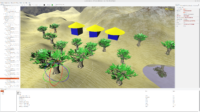
9. We fixed `TCastleStickToSurface` coordinate system (not really connected to `TCastleTransformReference`, although often used together, both `TCastleStickToSurface` and `TCastleTransformReference` make sense for planting trees on a terrain). Now moving the `TCastleStickToSurface.Target` (like a terrain) makes a proper effect, moving also trees.
10. Making the LOD work no longer requires `TCastleSceneCore.ProcessEvents`. The displayed LOD level is updated regardless of `TCastleSceneCore.ProcessEvents`.
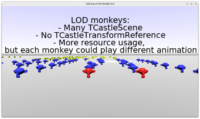
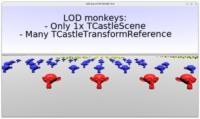
11. LODs in scenes references by `TCastleTransformReference` work now perfectly. Each reference displays the correct LOD level. It’s not a problem that multiple `TCastleTransformReference` instances point to the same `TCastleScene` while displaying a different LOD level of this scene.
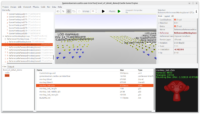
12. The example [examples/viewport\_and\_scenes/level\_of\_detail\_demo/](https://github.com/castle-engine/castle-engine/tree/master/examples/viewport_and_scenes/level_of_detail_demo) has been expanded with a demo of it, the [README.md there](https://github.com/castle-engine/castle-engine/tree/master/examples/viewport_and_scenes/level_of_detail_demo#readme) was also updated.
Enjoy! And if you like what we do, please remember to [support us on Patreon](https://www.patreon.com/c/castleengine) or in [other ways](https://castle-engine.io/donate). Have fun making games!
---
### Author:  [@michalis](https://forum.castle-engine.io/u/michalis)
#### Post date: [March 22, 2025, 12:07pm UTC](https://forum.castle-engine.io/t/tcastletransformreference-improvements-intuitive-transformation-menu-items-to-duplicate-linked-edit-make-independent-copy-cooperates-with-lod-fixed-tcastlesticktosurface/1837/2 "2025-03-22T12:07:30Z")