# \[solved\] Error on compiling to web
**URL:** https://forum.castle-engine.io/t/solved-error-on-compiling-to-web/2146
**Category:** Uncategorized
**Created:** [April 29, 2026, 12:43pm UTC](https://forum.castle-engine.io/t/solved-error-on-compiling-to-web/2146 "2026-04-29T12:43:49Z")
**Posts on this page:** 12
**Page:** 1
### Author:  [@Carring](https://forum.castle-engine.io/u/Carring)
#### Post date: [April 29, 2026, 12:43pm UTC](https://forum.castle-engine.io/t/solved-error-on-compiling-to-web/2146/1 "2026-04-29T12:43:49Z")
I tried to compile my game code to web but get this error:
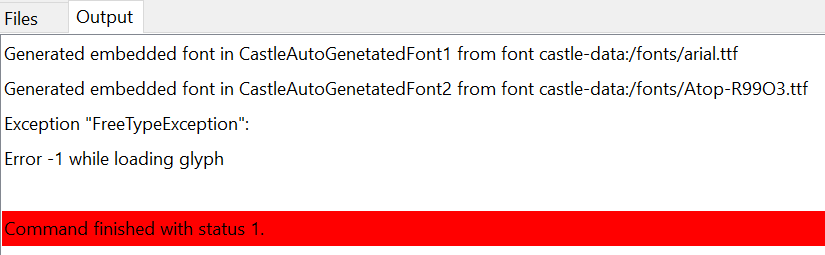
So it something has to do with the used fonts?
---
### Author:  [@michalis](https://forum.castle-engine.io/u/michalis)
#### Post date: [April 29, 2026, 8:58pm UTC](https://forum.castle-engine.io/t/solved-error-on-compiling-to-web/2146/2 "2026-04-29T20:58:44Z")
Hm, it seems _FreeType_ (library we use to read font files) has trouble processing one the fonts you use. I admit I never saw the error `Error -1 while loading glyph` but it is evidently emitted by `TFontManager.CreateGlyph` when `FT_Load_Glyph` or `FT_Get_Glyph` (these are FreeType routines to read particular glyph) fail.
I’m happy to investigate it further, but for this we need a testcase. Can you upload a minimal project that demonstrates this problem? Possibly, just creating a new project in CGE editor from “Empty” template, and just using there the TTF font files, will demonstrate the error. You can then zip the project and upload (to this forum thread, or as [GitHub issue](https://github.com/castle-engine/castle-engine/issues) ).
I’ll be sure to fix it then, or at least advise something useful 🙂
Thank you!
---
### Author:  [@Carring](https://forum.castle-engine.io/u/Carring)
#### Post date: [April 30, 2026, 4:42pm UTC](https://forum.castle-engine.io/t/solved-error-on-compiling-to-web/2146/3 "2026-04-30T16:42:19Z")
[testfont.zip](https://forum.castle-engine.io/uploads/short-url/gDRdHWpLJ85ApwVSfqcjrzfxsGb.zip) (49.6 MB)
Thanks Michalis, hereby the minimal testcase. It compiles fine in Windows but when I try to compile it to “web” it holds with the errror message above.
---
### Author:  [@michalis](https://forum.castle-engine.io/u/michalis)
#### Post date: [May 2, 2026, 1:41am UTC](https://forum.castle-engine.io/t/solved-error-on-compiling-to-web/2146/4 "2026-05-02T01:41:44Z")
Fixed, thank you for the testcase!
- I added detailed logging - looks like we had trouble reading glyph 170 from `Atop-R99O3.ttf`.
- I upgraded FreeType DLLs we use on Windows, and the issue is gone 🙂
As usual, the [engine downloads](https://castle-engine.io/download) will contain the fixed version automatically in a few hours. You can observe [this page](https://github.com/castle-engine/castle-engine/compare/snapshot...master), when it will _no longer_ show the commit titled _“Update FreeType Windows DLLs to version 2.14.3”_ then the fix is part of the release. Please download then the new engine version and retry → the issue should be gone 🙂
---
### Author:  [@Carring](https://forum.castle-engine.io/u/Carring)
#### Post date: [May 2, 2026, 8:29am UTC](https://forum.castle-engine.io/t/solved-error-on-compiling-to-web/2146/5 "2026-05-02T08:29:53Z")
Thanks, I re-installed CGE newest version but now I get another error (only when compiling to “web”):
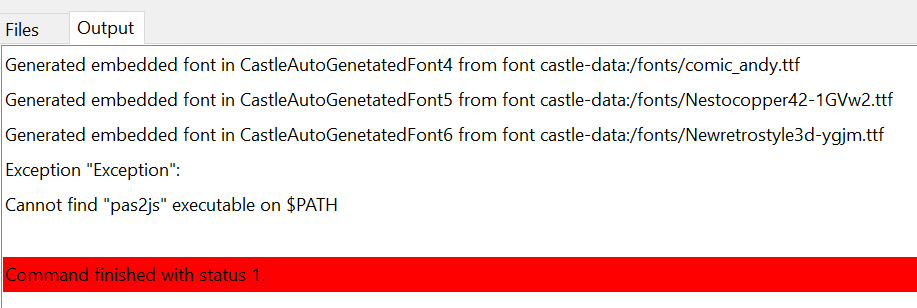
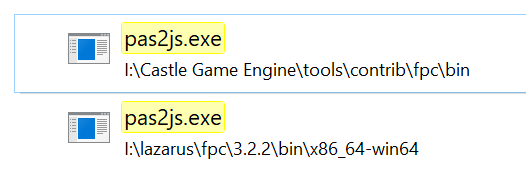
I looked up where the pas file is, it is available but not in the path?
(it compiles correctly in Win (default).
v
---
### Author:  [@phomm](https://forum.castle-engine.io/u/phomm)
#### Post date: [May 2, 2026, 9:25am UTC](https://forum.castle-engine.io/t/solved-error-on-compiling-to-web/2146/6 "2026-05-02T09:25:55Z")
@Carring if you have such a setup, which looks incompatible with all web-target requirements (fpc version 3.3, proper pas2js installation) you’d probably need to reinstall everything from scratch, following updated instruction [Web Target | Manual | Castle Game Engine](https://castle-engine.io/web#%5C_prerequisites_using_fpcupdeluxe_wa_webassembly_button) , the part where WA-single button installation is described (so latest fpcupdeluxe, ideally new folder for fpc3.3 and WA-button for installation of everything needed, followed with steps in the after install section). Then everything works fine on windows
---
### Author:  [@Carring](https://forum.castle-engine.io/u/Carring)
#### Post date: [May 2, 2026, 12:51pm UTC](https://forum.castle-engine.io/t/solved-error-on-compiling-to-web/2146/7 "2026-05-02T12:51:36Z")
Thanks.
Ok, I just re-installed everything from fpcdeluxe but still get that error. I think it is now because I do not understand how to add the path, described in the manual. How can I add the path to the configuration?

On starting Lazarus (from “viewmain.pas in the editor) this is shown:

---
### Author:  [@phomm](https://forum.castle-engine.io/u/phomm)
#### Post date: [May 2, 2026, 9:55pm UTC](https://forum.castle-engine.io/t/solved-error-on-compiling-to-web/2146/8 "2026-05-02T21:55:53Z")
> **[How to set the Path variable in Windows | NYU Courant](https://cims.nyu.edu/dynamic/systems/platforms/windows/setpath/)**
this is simple. here is the standard instruction, on the link.
and it has nothing to do with lazarus.
---
### Author:  [@michalis](https://forum.castle-engine.io/u/michalis)
#### Post date: [May 2, 2026, 10:15pm UTC](https://forum.castle-engine.io/t/solved-error-on-compiling-to-web/2146/9 "2026-05-02T22:15:17Z")
As for changing your `PATH`, we also link from our website (e.g. from [here](https://castle-engine.io/compiling_from_source)) to this overview: [https://www.computerhope.com/issues/ch000549.htm](https://www.computerhope.com/issues/ch000549.htm) . It has screenshots and sections per-Windows-version.
After changing the `PATH`, remember to restart the applications (if you’re not sure, just logout + login again).
You can test whether a working `pas2js` is present on `PATH` by doing a test independent of our engine:
- Create a Pascal file with such trivial contents:
```delphi
begin
Writeln('Hello from pas2js!');
end.
```
- Save it anywhere with any name. E.g. `c:/tmp/hello_pas2js.lpr` .
- Run Windows _Terrminal_ (press super + `cmd` + Enter). In terminal:
- enter the proper directory (`c:` enter, `cd c:/tmp/` enter)
- execute `pas2js -Jc -Jirtl.js -Tbrowser hello_pas2js.lpr`
- if this goes OK, you should have ` hello_pas2js.js` in the same directory.
See the [prerequisites section](https://castle-engine.io/web#_installing_prerequisites) for more info.
---
### Author:  [@Carring](https://forum.castle-engine.io/u/Carring)
#### Post date: [May 6, 2026, 3:21pm UTC](https://forum.castle-engine.io/t/solved-error-on-compiling-to-web/2146/10 "2026-05-06T15:21:45Z")
Thanks again.
Ok, I finally managed to get pas2js recognized and the font testcase I uploaded earlier compiles ok to web. But my game code (by far not finished but at least it compiles and runs with some warnings in Win64) does not work, it only shows the title of the project without hints or errors showing. I guess there are probably too many drawbacks in this stage of web conversion to filter out my poor coding. I will try to compile smaller parts of the complete code to web to find out where it goes wrong.
---
### Author:  [@michalis](https://forum.castle-engine.io/u/michalis)
#### Post date: [May 6, 2026, 5:07pm UTC](https://forum.castle-engine.io/t/solved-error-on-compiling-to-web/2146/11 "2026-05-06T17:07:38Z")
> [@Carring](#):
>
> But my game code (by far not finished but at least it compiles and runs with some warnings in Win64) does not work, it only shows the title of the project without hints or errors showing. I guess there are probably too many drawbacks in this stage of web conversion to filter out my poor coding. I will try to compile smaller parts of the complete code to web to find out where it goes wrong.
While we try to make “everything just work” on the web,
1. Some things are not portable, in particular if you depend on external libraries (like DLLs) or have Windows-specific code (instead of using cross-platform API from our engine or FPC).
2. There are some TODOs on our side to make the [web target](https://castle-engine.io/web) perfect.
So, if something doesn’t work → it may be on your side, but it may be bug / unfinished feature on the engine side. I’m happy you got the compilation to the web working on your side and you’re welcome to report specific issues – as always, if you will have a testcase that reproduces the problem, then I can investigate it 🙂
2 practical advises:
1. If you want to make sure your project uses cross-platform features, it may be easier to make it run on Linux. Linux is a bit “more similar” to Windows, in the sense: you can use regular Lazarus IDE, with debugger etc. on Linux, so the experience debugging on Linux is easier. So it may be easier, as a first step, “make your application work on Linux”, before “making it run on web”.
2. If you see the application hangs on the web, in browser, you can access _Developer Console_ using F12 (it is very similar in Firefox and Chrome-based browsers). In the “Console” you can see there the log of your application, everything logged using our engine [WritelnLog](https://castle-engine.io/log) but also errors reported by the browser. Look there for anything that reports some warnings / errors in your game, maybe it will explain what fails.
---
### Author:  [@Carring](https://forum.castle-engine.io/u/Carring)
#### Post date: [May 7, 2026, 3:20pm UTC](https://forum.castle-engine.io/t/solved-error-on-compiling-to-web/2146/12 "2026-05-07T15:20:30Z")
Thanks for the tips and feedback. I will try to run my game code from CGE on Linux (I installed Linux on my other PC a while ago but have not done anything with it since). I have some Procedures that read data from separate text files, maybe file handling is different, but I will try to find out what is wrong, else I will make small parts to evaluate and upload it to you.