# Roads segments working!
**URL:** https://forum.castle-engine.io/t/roads-segments-working/835
**Category:** Uncategorized
**Created:** [June 27, 2023, 11:15pm UTC](https://forum.castle-engine.io/t/roads-segments-working/835 "2023-06-27T23:15:06Z")
**Posts on this page:** 17
**Page:** 1
### Author:  [@edj](https://forum.castle-engine.io/u/edj)
#### Post date: [June 27, 2023, 11:15pm UTC](https://forum.castle-engine.io/t/roads-segments-working/835/1 "2023-06-27T23:15:06Z")
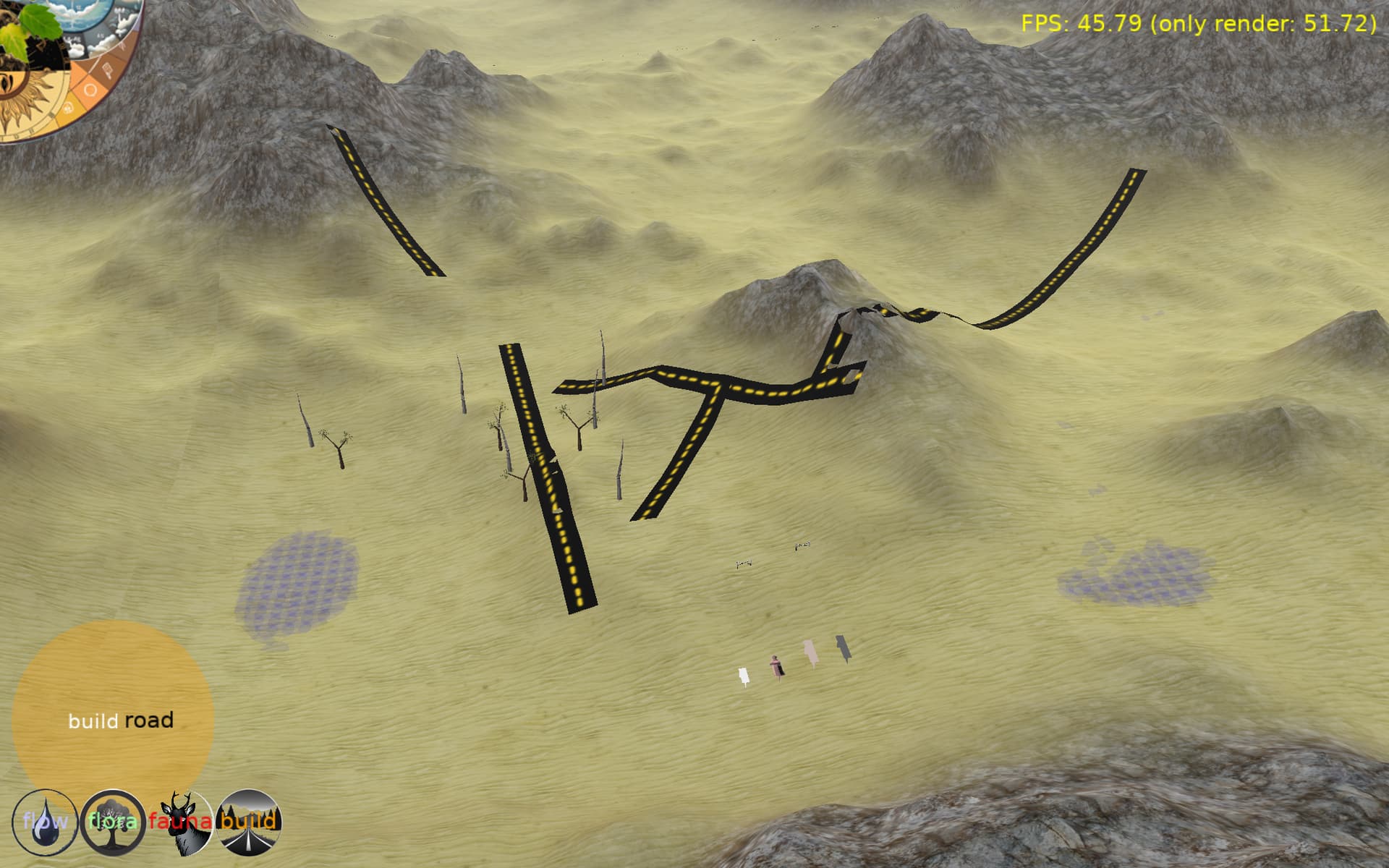
This isn’t a question. Just excited to say I have basic crude road segments working. They follow the terrain and are made with TTriangleSetNode and have a simple texture (two dashes on black). I cheated with chatgpt help to figure out the texture coordinates. It was wrong. But it was easy to figure out from there.
There are no constraints yet as to how much camber or steepness can be allowed, and terrain pokes through in places even though it is raised 0.1 off of the terrain.
It is beautiful to me.
---
### Author:  [@edj](https://forum.castle-engine.io/u/edj)
#### Post date: [June 27, 2023, 11:50pm UTC](https://forum.castle-engine.io/t/roads-segments-working/835/2 "2023-06-27T23:50:19Z")
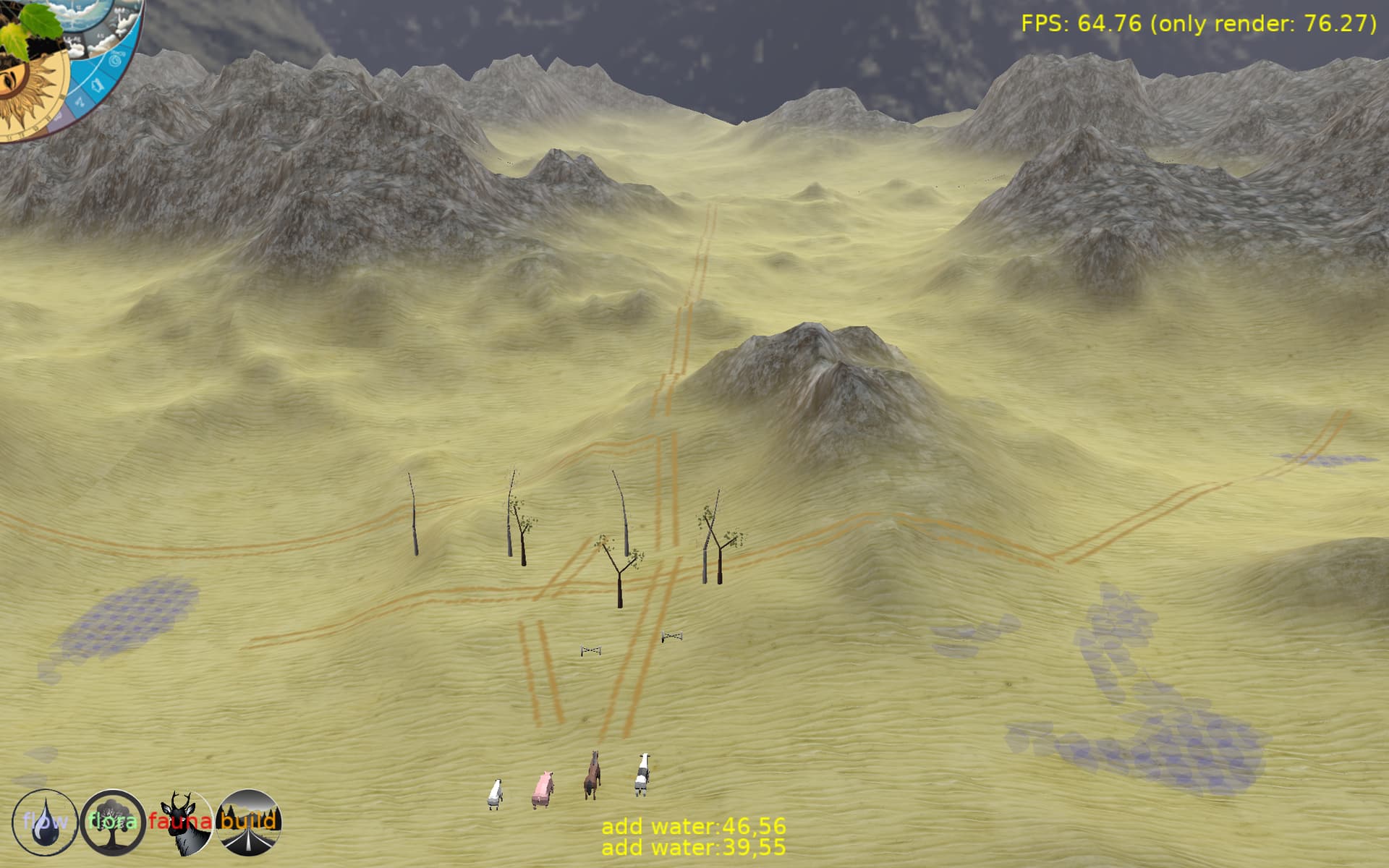
These roads look more natural to the environment…
---
### Author:  [@Didi](https://forum.castle-engine.io/u/Didi)
#### Post date: [June 28, 2023, 10:46am UTC](https://forum.castle-engine.io/t/roads-segments-working/835/3 "2023-06-28T10:46:51Z")
Hi edj,
your roads are looking great 👍. Do you create these at runtime?
Would you like to share the code for creating roads on terrain?
Regards
Didi
---
### Author:  [@edj](https://forum.castle-engine.io/u/edj)
#### Post date: [June 28, 2023, 2:24pm UTC](https://forum.castle-engine.io/t/roads-segments-working/835/4 "2023-06-28T14:24:13Z")
The graphic is created at runtime. The code is really messy still as it is very quick and dirty 1 day effort. I will share when cleaner. I have the two end points. I determine their distance and know my width. then subdivide that distance by how many segments I want in it… currently about one segment per world unit. I calculate the corner points from the start point by taking the angle from p0 to p1 and adding ±1.57 (90 deg) off from the start point. You can use the same delta from the center point to step through those in a loop taking the 4 points for each (step) and adding as a pair of triangles. You know the percent of the distance you are along the segment so can use that for the texture coordinate. I use the heightaboveterrain function from wyrdforest (but have made it drill down to the real terrain data instead of terrain map polys).
---
### Author:  [@edj](https://forum.castle-engine.io/u/edj)
#### Post date: [June 28, 2023, 2:31pm UTC](https://forum.castle-engine.io/t/roads-segments-working/835/5 "2023-06-28T14:31:25Z")
One tip is to start simple so you know things are working as you go. I started with spheres at the endpoints of the right size… then connected them with a cylinder. Then calculating the points would put red (right) green (left) smaller spheres so I could see that everything was as it should be before figuring out the triangles.
---
### Author:  [@edj](https://forum.castle-engine.io/u/edj)
#### Post date: [June 28, 2023, 3:22pm UTC](https://forum.castle-engine.io/t/roads-segments-working/835/6 "2023-06-28T15:22:32Z")
Here is the still rough and unoptimized code. It is using a couple deprecated lists (I got some help from ChatGPT whose knowledge of cge is out of date). No warranties. Could be buggy. Use at your own peril. Make your road texture (hardcoded in here) something like 64x64 with the centerline going from left to right. My TRoadGraphic is a TCastleScene.
```auto
function anglefromdelta2d( const delta : TVector2 ) : single;
begin
Result := arctan2(delta.y,delta.x);
end;
const heightroadaboveterrain : single = 0.1;
procedure TRoadGraphic.buildx3dgraphic( const P1, P2 : TVector2;
width : single;
terrainheight : THeightAboveTerrainEvent;
TextureUrl : string = '' );
var x3dRootNode : TX3DRootNode;
var i : integer;
n : integer;
distance : single;
delta : TVector2;
w2 : single;
pL, pR : TVector3;
LastPL, LastPR : TVector3;
angle : single;
sideDelta : TVector2;
TrianglesNode : TTriangleSetNode;
TextureCoordinates: TVector2SingleList;
TextureCoordinateNode: TTextureCoordinateNode;
TextureScale : Single;
Shape : TShapeNode;
Texture : TImageTextureNode;
CoordinateNode : TCoordinateNode;
Points : TVector3SingleList;
TexPct : single;
TexDelta : single;
procedure addsquare( pL0, pR0, pL1, pR1 : TVector3 );
{ add the 4 point square as two cw triangles }
var t0, t1 : single;
begin
Points.Add( pR0 );
Points.Add( pL0 );
Points.Add( pR1 );
Points.Add( pR1 );
Points.Add( pL0 );
Points.Add( pL1 );
t0 := ( texpct-texdelta ) * TextureScale;
t1 := texpct * TextureScale;
TextureCoordinates.Add(Vector2(t0, 0));
TextureCoordinates.Add(Vector2(t0, 1));
TextureCoordinates.Add(Vector2(t1, 0));
TextureCoordinates.Add(Vector2(t1, 0));
TextureCoordinates.Add(Vector2(t0, 1));
TextureCoordinates.Add(Vector2(t1, 1));
end;
var sina, cosa : single;
begin
x3dRootNode := TX3DRootNode.Create;
w2 := width * 0.5;
distance := PointsDistance( P1, P2 );
{ segment the road in to n number of sections, maybe a unit each}
n := trunc( distance ) + 1; {at least 1 segment per unit}
Delta := ( p2 - p1 );
texpct := 0;
texdelta := 1/n;
{ step through each segment and determine sidepoints from the middle point and terrain }
angle := anglefromdelta2d( Delta );
Delta := Delta / n;
{ determine left and right corner points at start point }
angle := angle + Pi/2; { 90 deg }
sincos( angle, sina, cosa );
sideDelta.X := cosa * w2;
sideDelta.Y := sina * w2;
pL := Vector3( p1.x + sideDelta.x, 0, p1.y + sideDelta.y );
pR := Vector3( p1.x - sideDelta.x, 0, p1.y - sideDelta.y );
textureScale := distance / width;
{ no need to initialize these but keeps compiler from complaning }
LastpR := Vector3(0,0,0);
LastpL := LastPr;
{ build a triangle strip }
TrianglesNode := TTriangleSetNode.CreateWithShape(Shape);
CoordinateNode := TCoordinateNode.Create;
Points := TVector3SingleList.Create;
TextureCoordinateNode := TTextureCoordinateNode.Create;
TextureCoordinates := TVector2SingleList.Create;
for i := 0 to n do
begin
{ set heights from terrain }
terrainheight( pL, pL.Y );
terrainheight( pR, pR.Y );
{ raise the points to not be coplaner with terrain }
pr.y := pr.y + heightroadaboveterrain;
pl.y := pl.y + heightroadaboveterrain;
if i > 0 then
AddSquare( LastPl, LastPr, PL, PR );
lastPl := Pl;
LastPr := PR;
pL.x := pL.x + delta.x;
pL.z := pL.z + delta.y;
pR.x := pR.x + delta.x;
pR.z := pR.z + delta.y;
texpct := texpct + texdelta;
end;
CoordinateNode.SetPoint(Points);
CoordinateNode.FdPoint.Changed;
TrianglesNode.Coord := CoordinateNode;
TextureCoordinateNode.SetPoint(TextureCoordinates);
TextureCoordinateNode.FdPoint.Changed;
TrianglesNode.TexCoord := TextureCoordinateNode;
Shape.Appearance := TAppearanceNode.Create;
Texture := TImageTextureNode.Create;
Texture.SetUrl(['castle-data:/textures/road_twotrack.png']);
Shape.Appearance.Texture := Texture;
x3dRootNode.AddChildren( Shape );
Load(x3dRootNode, true);
PreciseCollisions := true;
end;
```
Of course this is only the tip of the iceburg for what is required for a road system.
---
### Author:  [@edj](https://forum.castle-engine.io/u/edj)
#### Post date: [June 28, 2023, 5:23pm UTC](https://forum.castle-engine.io/t/roads-segments-working/835/7 "2023-06-28T17:23:27Z")
Here is cleaner version of same thing:
```auto
const heightroadaboveterrain : single = 0.1;
function anglefromdelta2d( const delta : TVector2 ) : single;
begin
Result := arctan2(delta.y,delta.x);
end;
procedure calcstartcorners( const p : TVector2;
angle, w2 : single;
var L, R : TVector3 );
{ given a point, an angle and a distance, calculate
the cornerpoints 90deg from the angle at that distance
p is vector2, returns L and R which are vector 3 without Y set}
var sina, cosa : single;
dx, dy : single;
begin
sincos( angle, sina, cosa );
dx := cosa * w2;
dy := sina * w2;
L := Vector3( p.x + dx, 0, p.y + dy );
R := Vector3( p.x - dx, 0, p.y - dy );
end;
procedure addtexture( Shape : TShapeNode;
turl : string );
var Texture : TImageTextureNode;
begin
Shape.Appearance := TAppearanceNode.Create;
Texture := TImageTextureNode.Create;
Texture.SetUrl([turl]);
Shape.Appearance.Texture := Texture;
end;
procedure TRoadGraphic.buildx3dgraphic( const P1, P2 : TVector2;
width : single;
terrainheight : THeightAboveTerrainEvent;
TextureUrl : string = '' );
var Points : TVector3SingleList;
TextureCoordinates : TVector2SingleList;
procedure addsquare( const pL0, pR0, pL1, pR1 : TVector3;
t0, t1 : single );
{ add the 4 point square as two cw triangles }
begin
Points.Add( pR0 );
Points.Add( pL0 );
Points.Add( pR1 );
TextureCoordinates.Add(Vector2(t0, 0));
TextureCoordinates.Add(Vector2(t0, 1));
TextureCoordinates.Add(Vector2(t1, 0));
Points.Add( pR1 );
Points.Add( pL0 );
Points.Add( pL1 );
TextureCoordinates.Add(Vector2(t1, 0));
TextureCoordinates.Add(Vector2(t0, 1));
TextureCoordinates.Add(Vector2(t1, 1));
end;
var x3dRootNode : TX3DRootNode;
angle, distance, w2 : single;
i, n : integer;
delta : TVector2;
pL, pR, lastpL, lastpR : TVector3;
TrianglesNode : TTriangleSetNode;
CoordinateNode : TCoordinateNode;
TextureCoordinateNode: TTextureCoordinateNode;
Shape : TShapeNode;
TextureScale, TexPct, LastTexPct, TexDelta : single;
begin
w2 := width * 0.5;
distance := PointsDistance( P1, P2 );
textureScale := distance / width;
{ split the road in to n>=1 number of segments about a world unit each}
n := trunc( distance ) + 1;
Delta := ( p2 - p1 );
angle := anglefromdelta2d( Delta );
Delta := Delta / n;
texpct := 0;
texdelta := TextureScale / n;
{ determine left and right corner points at start point }
calcstartcorners( p1, angle + Pi/2 { 90 deg }, w2, pL, pR );
{ no need to initialize these but keeps compiler from complaning }
LastpR := Vector3(0,0,0);
LastpL := LastPr;
LastTexPct := 0;
{ initalize a triangle set node}
TrianglesNode := TTriangleSetNode.CreateWithShape(Shape);
CoordinateNode := TCoordinateNode.Create;
Points := TVector3SingleList.Create;
TextureCoordinateNode := TTextureCoordinateNode.Create;
TextureCoordinates := TVector2SingleList.Create;
{ step through n road segments, adding the side points to the triangle set }
for i := 0 to n do
begin
{ set heights from terrain }
terrainheight( pL, pL.Y );
terrainheight( pR, pR.Y );
{ raise the points to not be coplaner with terrain }
pr.y := pr.y + heightroadaboveterrain;
pl.y := pl.y + heightroadaboveterrain;
if i > 0 then
AddSquare( LastPl, LastPr, PL, PR, lasttexpct, texpct );
lastPl := Pl;
LastPr := PR;
lasttexpct := texpct;
{ walk all the values to the next set of points }
pL.x := pL.x + delta.x;
pL.z := pL.z + delta.y;
pR.x := pR.x + delta.x;
pR.z := pR.z + delta.y;
texpct := texpct + texdelta;
end;
CoordinateNode.SetPoint(Points);
TrianglesNode.Coord := CoordinateNode;
TextureCoordinateNode.SetPoint(TextureCoordinates);
TrianglesNode.TexCoord := TextureCoordinateNode;
if TextureUrl <> '' then
AddTexture( Shape, TextureUrl );
x3dRootNode := TX3DRootNode.Create;
x3dRootNode.AddChildren( Shape );
Load(x3dRootNode, true);
PreciseCollisions := true;
end;
```
---
### Author:  [@edj](https://forum.castle-engine.io/u/edj)
#### Post date: [June 28, 2023, 5:37pm UTC](https://forum.castle-engine.io/t/roads-segments-working/835/8 "2023-06-28T17:37:08Z")
My super amazing test road texture:


---
### Author:  [@edj](https://forum.castle-engine.io/u/edj)
#### Post date: [June 28, 2023, 9:57pm UTC](https://forum.castle-engine.io/t/roads-segments-working/835/9 "2023-06-28T21:57:53Z")
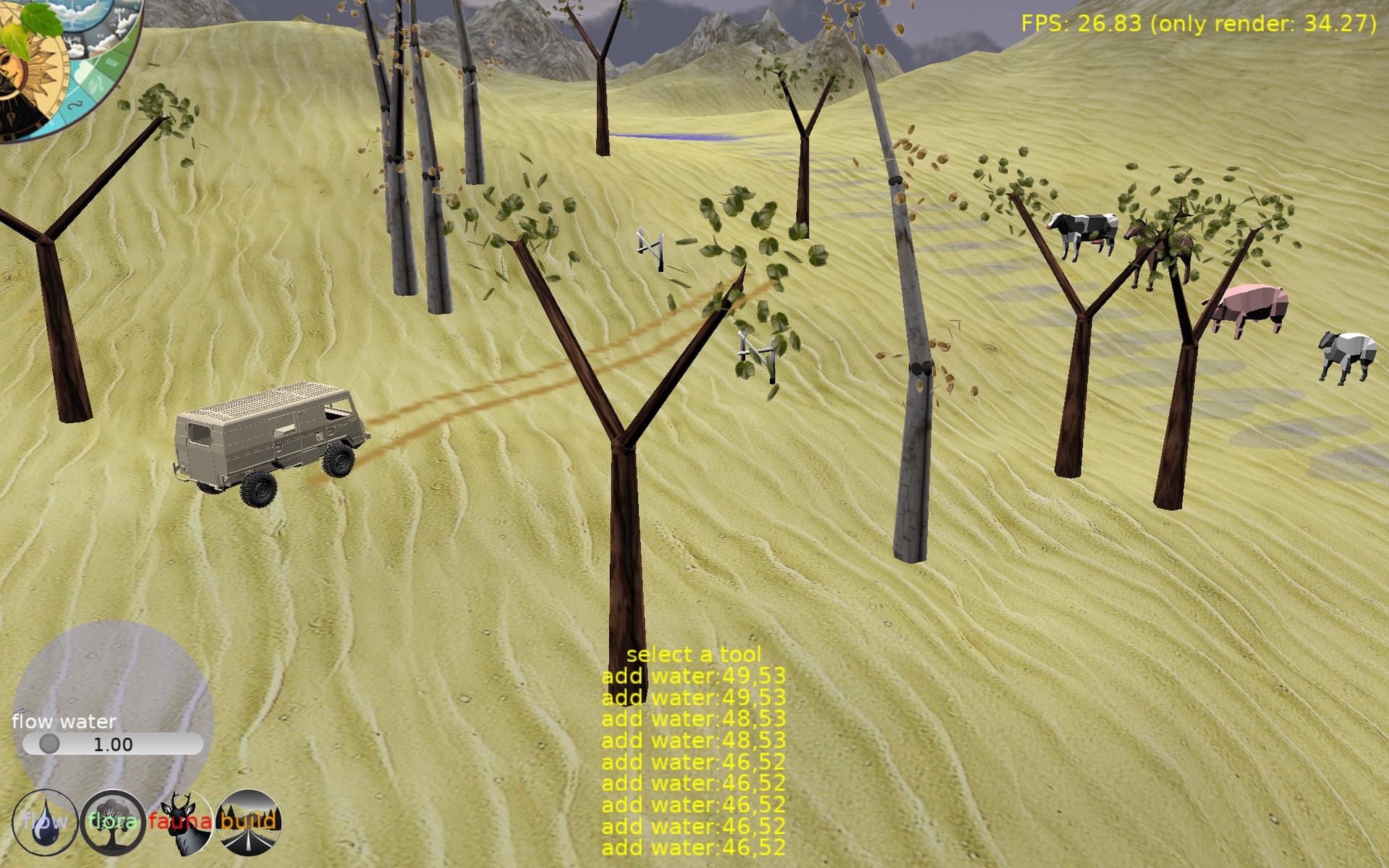
This vehicle model is way too heavy to really use. But it looks cool on the road
---
### Author:  [@edj](https://forum.castle-engine.io/u/edj)
#### Post date: [June 29, 2023, 12:33am UTC](https://forum.castle-engine.io/t/roads-segments-working/835/10 "2023-06-29T00:33:54Z")
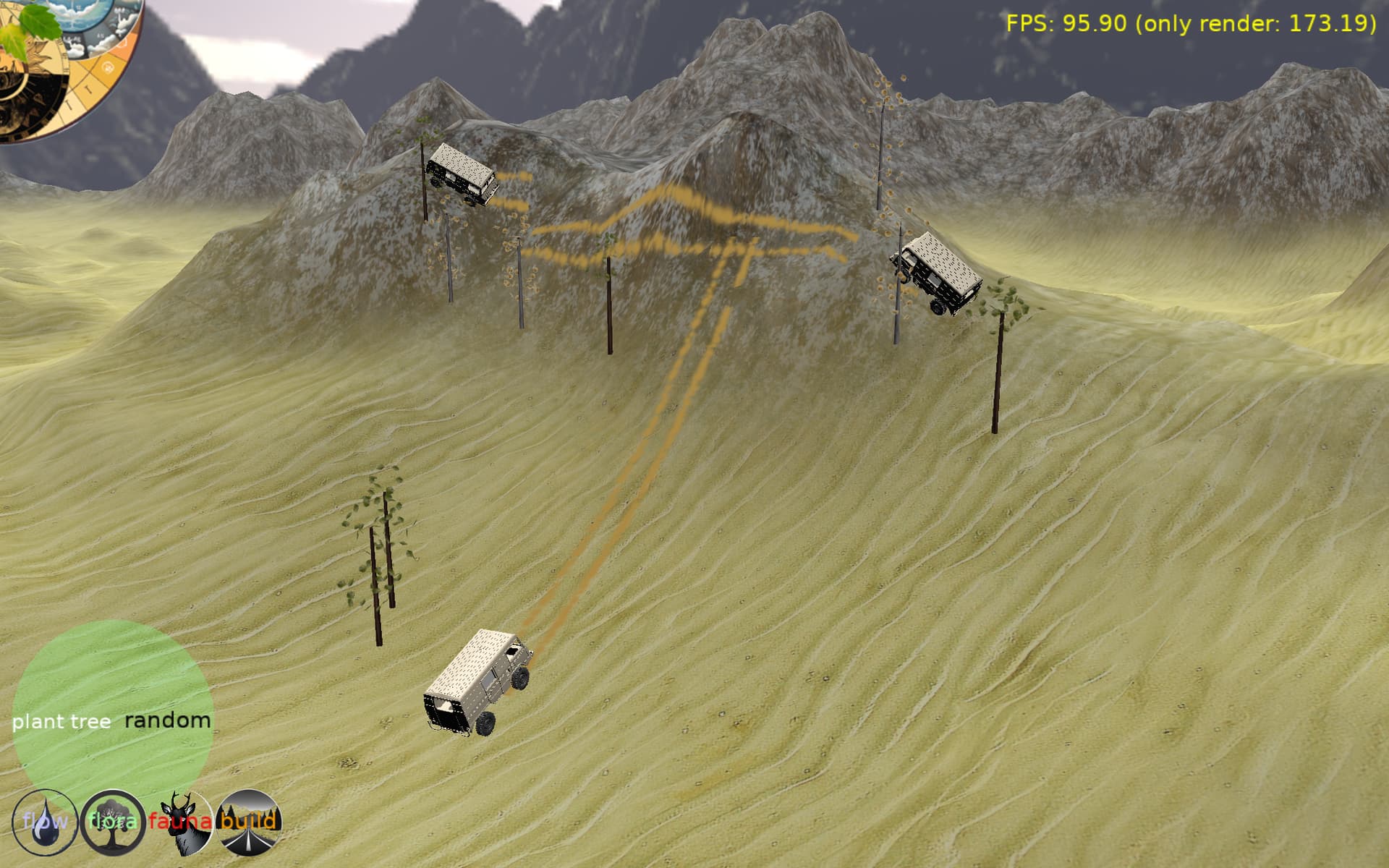
Now vehicle pitch and camber match terrain. This model is 46Mb so 3 of them is all I can do. But it is so cool.
---
### Author:  [@Didi](https://forum.castle-engine.io/u/Didi)
#### Post date: [June 29, 2023, 9:04am UTC](https://forum.castle-engine.io/t/roads-segments-working/835/11 "2023-06-29T09:04:31Z")
> [@edj](#):
>
> ```auto
> Load(x3dRootNode, true);
>
> ```
Can you tell me what “Load” is? Compiler can’t find this procedure.
---
### Author:  [@eugeneloza](https://forum.castle-engine.io/u/eugeneloza)
#### Post date: [June 29, 2023, 9:32am UTC](https://forum.castle-engine.io/t/roads-segments-working/835/12 "2023-06-29T09:32:32Z")
It’s a procedure from `TRoadGraphic` or rather from `TCastleScene` it overrides: [Castle Game Engine: CastleSceneCore: Class TCastleSceneCore](https://castle-engine.io/apidoc/html/CastleSceneCore.TCastleSceneCore.html#Load-TX3DRootNode-boolean-TSceneLoadOptions-)
---
### Author:  [@Didi](https://forum.castle-engine.io/u/Didi)
#### Post date: [June 29, 2023, 10:12am UTC](https://forum.castle-engine.io/t/roads-segments-working/835/13 "2023-06-29T10:12:20Z")
Thank you, I was to fast with my question. Sorry.
I found in the documentation **Scene graph (X3D)** some help.
Now it works:
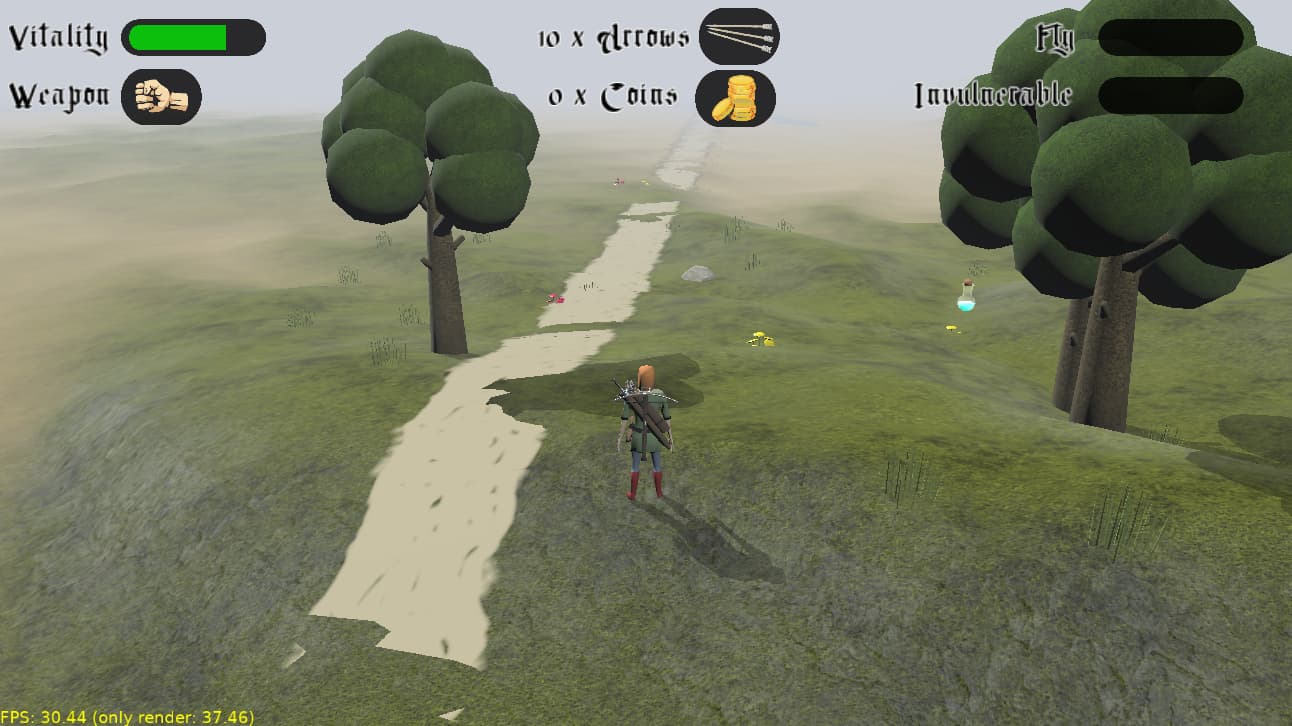
It is not 100% correct with the terrain, maybe it helps if the texture is a little smaller.
But it works and is a starting point.
Thanks to you all.
---
### Author:  [@edj](https://forum.castle-engine.io/u/edj)
#### Post date: [June 29, 2023, 2:14pm UTC](https://forum.castle-engine.io/t/roads-segments-working/835/14 "2023-06-29T14:14:22Z")
Looks good. I think if you see too much terrain through you need to break the road into more sections. Also possible if you can exactly match your sections to the grid of the terrain, you might be able to get a close match. In reality roads smooth the terrain before they are built… so a good road will also need terrain deformation, which I haven’t gotten to yet. I like your trees. Are they models or procedural?
---
### Author:  [@edj](https://forum.castle-engine.io/u/edj)
#### Post date: [June 29, 2023, 2:18pm UTC](https://forum.castle-engine.io/t/roads-segments-working/835/15 "2023-06-29T14:18:31Z")
Also you might be able to lift the road up a little higher than 0.1 depending on the scale you are using for everything. But in 1st person you might be able to see it is floating above the ground.
---
### Author:  [@Didi](https://forum.castle-engine.io/u/Didi)
#### Post date: [June 30, 2023, 6:15am UTC](https://forum.castle-engine.io/t/roads-segments-working/835/16 "2023-06-30T06:15:16Z")
My trees are lowpoly gLTF models. I have one scene on the terrain and multiply it with:
```
TreeTransforms: array [1..50] of TCastleTransform;
```
```auto
for i := 1 to high(TreeTransforms) do
begin
TreeTransforms[I] := TCastleTransform.Create(FreeAtStop);
TreeTransforms[I].Translation := CalcTransformPos(SceneTree1,Terrain6,200,9,11,3);
TreeTransforms[I].Add(SceneTree1);
MainViewport.Items.Add(TreeTransforms[I]);
end;
```
CalcTransformPos calculates valid values for translation, depending on the radius around the scene and the terrain height.
Yes, the road is floating and terrain deformation would be a good solution.
At the moment the biggest thing is the material of the road. It looks like that there is no reflection of light and ReceiveShadowVolumes doesn’t work.
---
### Author:  [@edj](https://forum.castle-engine.io/u/edj)
#### Post date: [June 30, 2023, 2:41pm UTC](https://forum.castle-engine.io/t/roads-segments-working/835/17 "2023-06-30T14:41:12Z")
I can’t help you with materials. I imagine you just need to set renderoptions as needed. I am newbie to all this so haven’t gotten into shadows and textures much.