# Problem with capsule Autosize
**URL:** https://forum.castle-engine.io/t/problem-with-capsule-autosize/1502
**Category:** Physics and Collisions
**Created:** [January 17, 2025, 11:23am UTC](https://forum.castle-engine.io/t/problem-with-capsule-autosize/1502 "2025-01-17T11:23:38Z")
**Posts on this page:** 7
**Page:** 1
### Author:  [@NiunioMartinez](https://forum.castle-engine.io/u/NiunioMartinez)
#### Post date: [January 17, 2025, 11:23am UTC](https://forum.castle-engine.io/t/problem-with-capsule-autosize/1502/1 "2025-01-17T11:23:38Z")
I’m doing some tests and I’ve found a problem with the capsule collider `Autosize` property.
I’m using some Kenney 3D animated models ([mini-characters](https://opengameart.org/content/mini-character-1) and [mini-dungeon](https://opengameart.org/content/mini-dungeon) packages, both from [OpenGameArt.org](http://OpenGameArt.org)). First I created a ground platform with a box collider and fixed its rigidbody position and rotation to prevent it to move. Then I put the human character from _mini-dungeon_, added a capsule collider and programmed a semi-complex control that allows to move and jump, with animations… It works.
Then I decided to change the model by another from the _mini-characters_ (character-female-b) and suddenly the animations didn’t work as expected: the character shivers when walking, and sometimes it still plays the walking animation when it’s not walking.
Fortunately I do versioning/backup so I recovered the previous view design and compared both and i’ve found that, despite both models have same dimensions (approx), their capsule sizes are quite different. That makes my `FindGround` algorithm to fail hence the problems (i.e. it detects ground and air intermittently so it changes between “walk” and “fall” animations quickly).
For the one that works:
- Height : 0.21
- Radius : 0.27
- translation: 0 0.38 0.02
For the one that doesn’t work:
- Height : 0.11
- Radius : 0.31
- translation: 0 0.37 0
So, I set the `AutoSize` to false and manually changed the collider size and position and now it works.
I don’t know if the problem is the way the collider calculates its own size, or maybe because the models aren’t actually so similar as they look but I decided to tell you just to be sure.
---
### Author:  [@michalis](https://forum.castle-engine.io/u/michalis)
#### Post date: [January 20, 2025, 10:11am UTC](https://forum.castle-engine.io/t/problem-with-capsule-autosize/1502/2 "2025-01-20T10:11:28Z")
Indeed, the `AutoSize` is sometimes not guessing what you want. We experimented (with Andrzej Kilijański) and found there’s no perfect algorithm here, all approaches to autosize seem to be just “guesses, that are sometimes wrong”.
Below is the `TCastleCapsuleCollider.CalculateSizeCore` current algorithm.
Any ideas to improve it are welcome 🙂 You can experiment with editing it (it’s here: [castle-engine/src/transform/castletransform\_physics.inc at master · castle-engine/castle-engine · GitHub](https://github.com/castle-engine/castle-engine/blob/master/src/transform/castletransform_physics.inc#L2474) ) .
```delphi
procedure TCastleCapsuleCollider.CalculateSizeCore;
var
LocalBoundingBox: TBox3D;
MinThickness: Single;
begin
inherited; // resets Translation, Rotation
if Mode2D then
MinThickness := AutoSizeMinThickness2D
else
MinThickness := AutoSizeMinThickness;
if (Parent = nil) or (Parent.BoundingBox.IsEmptyOrZero) then
begin
Radius := MinThickness;
Height := MinThickness;
Exit;
end;
LocalBoundingBox := Parent.LocalBoundingBox;
if Mode2D then
Radius := LocalBoundingBox.SizeX * 0.50
else
Radius := ((LocalBoundingBox.SizeX * 0.50) + (LocalBoundingBox.SizeZ * 0.50)) / 2;
{ If radius * 2 is bigger than height make it smaller. }
if Radius * 2 > LocalBoundingBox.SizeY then
Radius := LocalBoundingBox.SizeY / 2 - 0.001;
{ Radius must be at least MinThickness }
Radius := Max(Radius, MinThickness);
Height := Max(LocalBoundingBox.SizeY - Radius * 2, 0.001);
Translation := LocalBoundingBox.Center;
end;
```
---
### Author:  [@NiunioMartinez](https://forum.castle-engine.io/u/NiunioMartinez)
#### Post date: [January 22, 2025, 6:11pm UTC](https://forum.castle-engine.io/t/problem-with-capsule-autosize/1502/3 "2025-01-22T18:11:02Z")
I see, it does an approximation. I thought it calculates the maximum and minimum vertex coordinates and use them, but that would be time consuming if model has a high vertex count.
_BTW_, if I remember correctly, previous versions of CGE rendered the collision volumes, didn’t it? Is it planned to render them in the future?
Unity uses a method in its `MonoBehaviour` and a `Gizmos` API for this. Next code is from a project I did:
```auto
/* Draw a gizmo to show the attack area. */
void OnDrawGizmosSelected ()
{
Vector3 lPoint = new Vector3 (this.Origin.x * this.transform.right.x, this.Origin.y);
Gizmos.color = Color.red;
Gizmos.DrawWireSphere (this.transform.position + lPoint , this.Radius);
}
```
---
### Author:  [@michalis](https://forum.castle-engine.io/u/michalis)
#### Post date: [January 23, 2025, 8:21am UTC](https://forum.castle-engine.io/t/problem-with-capsule-autosize/1502/4 "2025-01-23T08:21:11Z")
> [@NiunioMartinez](#):
>
> I thought it calculates the maximum and minimum vertex coordinates and use them, but that would be time consuming if model has a high vertex count.
We do calculate minimum and maximum vertex coordinates. That’s what the `Parent.LocalBoundingBox` in code above does 🙂
> [@NiunioMartinez](#):
>
> _BTW_, if I remember correctly, previous versions of CGE rendered the collision volumes, didn’t it? Is it planned to render them in the future?
We can show colliders, nothing changed in this regard I think. Use _“Physics → Show Colliders”_.
Hmmm, though testing on `examples/platformer`, I see that capsule collider can be not visible for some reason, until I toggle _“Viewport → Wireframe Mode → Wireframe”_ (Alt + Z). TODO: I’ll look into it. For now, if you experience the same issue, switch to wireframe rendering in editor – you should see capsule collider then.


---
### Author:  [@NiunioMartinez](https://forum.castle-engine.io/u/NiunioMartinez)
#### Post date: [January 24, 2025, 1:53pm UTC](https://forum.castle-engine.io/t/problem-with-capsule-autosize/1502/5 "2025-01-24T13:53:58Z")
> [@michalis](#):
>
> We can show colliders, nothing changed in this regard I think. Use _“Physics → Show Colliders”_.
Oh, I didn’t remember that.
TODO: I think I’ll look for the Editor code that renders it and try to figure how to render a simpler _capsule volume_. I have an idea, maybe I can implement it.
---
### Author:  [@NiunioMartinez](https://forum.castle-engine.io/u/NiunioMartinez)
#### Post date: [April 4, 2025, 7:46pm UTC](https://forum.castle-engine.io/t/problem-with-capsule-autosize/1502/6 "2025-04-04T19:46:08Z")
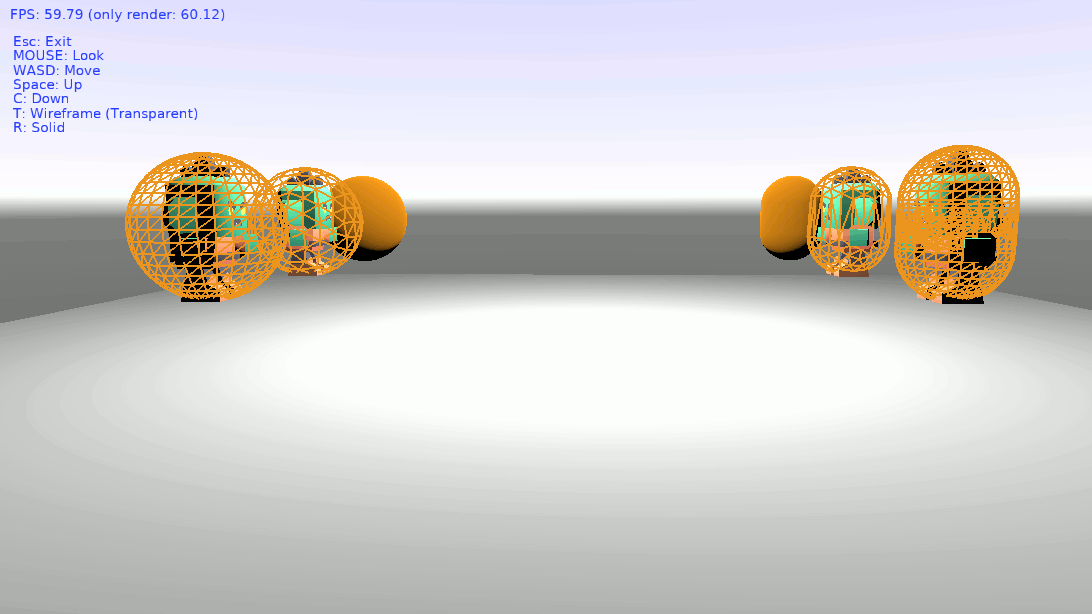
Finally, I was able to test my idea and it seems to work. It’s a proposal for the capsule collider. As you see in the attached screenshot, on the right, the nearest is the current capsule and the middle one is my proposal. Even being farther it is more clean and you can see the model better. The farthest one is a solid capsule.
On the left there’s also a sphere proposal, just because I build the capsule from a sphere so I have the code. You see also the sphere is more clean.
I’ve upload my test project with the code I use to create these volumes [here](https://www.dropbox.com/scl/fi/s7bvgmuf75ldzzbvj8na8/CGEvolumeproposal.zip?rlkey=0o04nd1zcsmvn9h8j3finik66&st=wzoeeztw&dl=0). Please read the `README.md` and the comments.
I don’t know if it will be helpful. I’m open to suggestions too.
---
### Author:  [@michalis](https://forum.castle-engine.io/u/michalis)
#### Post date: [April 4, 2025, 8:11pm UTC](https://forum.castle-engine.io/t/problem-with-capsule-autosize/1502/7 "2025-04-04T20:11:39Z")
Oh, neat. I see you use icosahedron to get a uniform sphere. And to make capsule, you just move top half of the sphere higher, and bottom half lower.
Blender also has 2 such sphere types (UV and Ico), and in general both these ways to make a sphere make sense.
I would be happy to accept PR that dds to `TSphereNode`
- a boolean X3D field like `Icosahedron` . Default `false` (current behavior), when `true` → uses your logic for icosahedron.
- a single X3D field like `ExtrudeIntoCapsule` . When \> 0, we move the vertexes just like you – the ones with y \>= 0 are moved += `ExtrudeIntoCapsule/2`, the ones with y \< 0 are moved `ExtrudeIntoCapsule/2`. Thus one can use `TSphereNode (with`Icosahedron` true or false, it is independent) to get a capsule. (with the caveat that for UV sphere, it will only be capsule if stacks are odd, not even, but that’s normal, we’ll just document it).
- We can then easily use this to render physics capsule colliders.