# Porting an existing Delphi FMX card game to Castle Game Engine
**URL:** https://forum.castle-engine.io/t/porting-an-existing-delphi-fmx-card-game-to-castle-game-engine/2204
**Category:** 3D
**Created:** [August 29, 2026, 8:21pm UTC](https://forum.castle-engine.io/t/porting-an-existing-delphi-fmx-card-game-to-castle-game-engine/2204 "2026-08-29T20:21:16Z")
**Posts on this page:** 19
**Page:** 1
### Author:  [@Hamid](https://forum.castle-engine.io/u/Hamid)
#### Post date: [August 29, 2026, 8:21pm UTC](https://forum.castle-engine.io/t/porting-an-existing-delphi-fmx-card-game-to-castle-game-engine/2204/1 "2026-08-29T20:21:16Z")
Hi,
I have an existing card game developed with Delphi and FireMonkey (FMX).
What would be the easiest way to port it to Castle Game Engine?
Is there a recommended approach for reusing as much of the existing Delphi/FMX code and game logic as possible, while replacing the FMX-specific parts with Castle Game Engine?
Any advice or examples of similar projects would be greatly appreciated.
Thanks!
---
### Author:  [@michalis](https://forum.castle-engine.io/u/michalis)
#### Post date: [August 29, 2026, 9:39pm UTC](https://forum.castle-engine.io/t/porting-an-existing-delphi-fmx-card-game-to-castle-game-engine/2204/2 "2026-08-29T21:39:26Z")
The answer depends on how you used FMX, I would say.
If you have a regular “standard” UI made using FMX, e.g. buttons, edit boxes, and then you draw your game on a canvas → then as a first step, maybe intermediate, I would suggest to use TCastleControl on FMX form (see [Engine on a form (VCL, FMX, LCL) using TCastleControl | Manual | Castle Game Engine](https://castle-engine.io/control_on_form) ). You can surround such TCastleControl with your existing FMX controls, so you can switch your rendering to CGE “gradually”… only in places where you want to switch, and keep the rest of UI using FMX. In this approach, FMX and CGE will work together.
Once it works, as a 2nd step (if you want to move away from FMX completely), then you can “expand” how much space is taken by TCastleControl on your form, and move more of the UI to use CGE UI. For example, buttons using FMX `TButton` could migrate to using our `TCastleButton`, and be inside `TCastleControl`.
Step 3: Working this way, you can eventually have a state when `TCastleControl` just fills your entire form, and this is your own form → at which point you can change your entire game to just use our `TCastleWindow`.
Whether this plan makes sense, really depends on your game, how you use FMX. And what are your plans (above, I assumed you don’t want to use FMX, at least not directly; note that CGE `TCastleWindow` will still use FMX is some cases underneath, for “Delphi on non-Windows” now, but this is hidden from you). You’re welcome to send screenshots of your existing game → this may help me to give better advise, what to replace with what:)
---
### Author:  [@Hamid](https://forum.castle-engine.io/u/Hamid)
#### Post date: [August 29, 2026, 11:01pm UTC](https://forum.castle-engine.io/t/porting-an-existing-delphi-fmx-card-game-to-castle-game-engine/2204/3 "2026-08-29T23:01:05Z")
The project is actually made up of several parts:
- A **3D card game engine** that I wrote myself.
- A **UI layer** , which has many layers and controls, all built with FMX.
- A part that uses **FMX 3D** , which is controlled by my own game engine.
Ultimately, my goal is to migrate the entire project to **Castle Game Engine (CGE) and FPC**, mainly for Android.
So I’m not just trying to replace the rendering part. I would eventually like to move the whole project away from FMX and have it run completely on CGE/FPC.
There are about **5 screenshots and a video** of the current application here:
[Google Play – Card horoscope](https://play.google.com/store/apps/details?id=com.zig.FallX&utm_source=castle-engine.io)
I think seeing the screenshots and video may give you a better idea of the current architecture and what I’m trying to migrate.
---
### Author:  [@michalis](https://forum.castle-engine.io/u/michalis)
#### Post date: [August 31, 2026, 5:46pm UTC](https://forum.castle-engine.io/t/porting-an-existing-delphi-fmx-card-game-to-castle-game-engine/2204/4 "2026-08-31T17:46:03Z")
Thanks for the Google Play link with screenshots and video!
So, I think my advise from last post was mostly good:) But it is simpler: you main view is a 3D view with table + cards (and UI on top), so that’s where I would start porting. Also, the information that your goal is to move 100% to CGE (and FPC) is important, and so I would suggest to just start new project and move the code there.
Detailed advises:
1. Preparations:
2. Focus on the “3D view with table + cards”.
3. Then add missing things:)
You want to eventually switch to FPC+Android. I would suggest to identify and change the Pascal code to work with both FPC and Delphi, for some time (whole CGE compiles with both FPC and Delphi, so this is possible 🙂 ). But to make it easier, you can also just focus at the beginning on making the game working with CGE with Delphi for Windows. You can make a desktop window have portrait-like size (to simulate phone) using code like in `examples/network/tcp_connection/client/code/gameinitialize.pas`, see also [Window size and fullscreen | Manual | Castle Game Engine](https://castle-engine.io/window_size) . Once you will have everything working, using CGE, with Delphi + Windows, then porting it to FPC + Windows and then to FPC + Android could be done.
These are hints that come to my mind.
I hope this is useful. Take a look at above links and examples, and let me know if something is unclear, I can expand on any topic here. Let me know in general if you will be stuck at any point, we can help:) From what I can see, your game should be completely doable in CGE:)
---
### Author:  [@Hamid](https://forum.castle-engine.io/u/Hamid)
#### Post date: [September 1, 2026, 8:37am UTC](https://forum.castle-engine.io/t/porting-an-existing-delphi-fmx-card-game-to-castle-game-engine/2204/5 "2026-09-01T08:37:14Z")
Thank you, @michalis
That was a very good and comprehensive explanation. Fortunately, most of the game logic is already organized into separate units.
One issue that just came to mind is that my game is multilingual. However, in some previous tests I did with Castle Game Engine, it didn’t support right-to-left languages. I don’t know if that is still the case or not, but it isn’t important for getting started.
What is important, though, is whether it is possible to implement multilingual support.
I’ll get started, and if I run into any problems, I’ll definitely ask.
---
### Author:  [@michalis](https://forum.castle-engine.io/u/michalis)
#### Post date: [September 1, 2026, 11:11am UTC](https://forum.castle-engine.io/t/porting-an-existing-delphi-fmx-card-game-to-castle-game-engine/2204/6 "2026-09-01T11:11:07Z")
> [@Hamid](#):
>
> What is important, though, is whether it is possible to implement multilingual support.
Sure:)
Our recommended way is our localization approach, see:
- manual: [Localization (translating your application) | Manual | Castle Game Engine](https://castle-engine.io/localization)
- API of unit [CastleLocalizationGetText](https://castle-engine.io/apidoc/html/CastleLocalizationGetText.html)
- with example in [examples/localization/gettext](https://github.com/castle-engine/castle-engine/tree/master/examples/localization/gettext).
- It uses FPC’s `GetText` API underneath – the underlying format is supported by various tools and GUI editors.
- We used it for a bigger game: [“Escape from the Universe” Japanese version](https://castle-engine.io/wp/2020/10/23/escape-from-the-universe-has-been-released-in-japan-for-nintendo-switch/) and it went smooth (and the translators were familiar with PO format immediately, so that was nice).
If that is not enough, CGE could probably be integrated with any other localization system – CGE core components provide the necessary points (like `TCastleComponent.TranslateProperties`) and other translation systems could be build on top of it.
As for right-to-left languages: Admittedly I don’t have experience with them, and our UI controls may not support necessary properties. Right now, `TCastleLabel` always renders left-to-right. I’m happy to improve it, feel welcome to submit an issue (on forum or GitHub issue) when you get to it and see things are missing. Along with feature requests, in this case it may be best to compare what other APIs offer (e.g. FMX, or game engines like Godot, Unity) in terms of right-to-left languages rendering, as we may want to be consistent.
---
### Author:  [@Hamid](https://forum.castle-engine.io/u/Hamid)
#### Post date: [September 1, 2026, 10:01pm UTC](https://forum.castle-engine.io/t/porting-an-existing-delphi-fmx-card-game-to-castle-game-engine/2204/7 "2026-09-01T22:01:43Z")
Regarding RTL languages, I have actually tested CGE, and currently it does not support right-to-left text properly.
FMX has a similar problem. Unfortunately, this issue has not really been fixed over the years. For several years, the usual recommendation has been to use Skia, but I don’t find Skia to be a particularly good solution for this problem either.
I actually have some experience fixing RTL-related issues in FMX myself, so I may be able to provide some useful information when I get to this part of the migration.
I don’t have much experience with how other frameworks or game engines have solved RTL text rendering, so I’m not sure what approach they use. I can investigate that as well when the time comes.
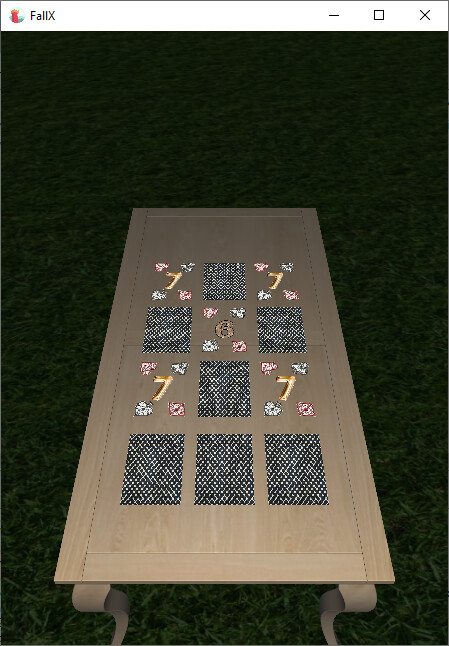
I started the migration with the easier part and created the game board first.
---
### Author:  [@Hamid](https://forum.castle-engine.io/u/Hamid)
#### Post date: [September 2, 2026, 8:22am UTC](https://forum.castle-engine.io/t/porting-an-existing-delphi-fmx-card-game-to-castle-game-engine/2204/8 "2026-09-02T08:22:53Z")
In CGE, the elements look a bit blurry, and adjusting the lighting is quite difficult.
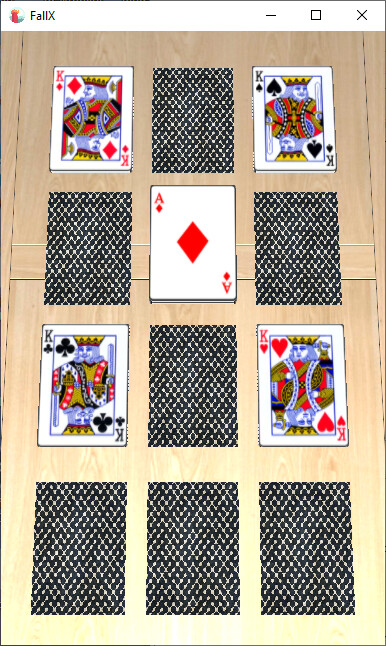
The image below is the output from FMX.
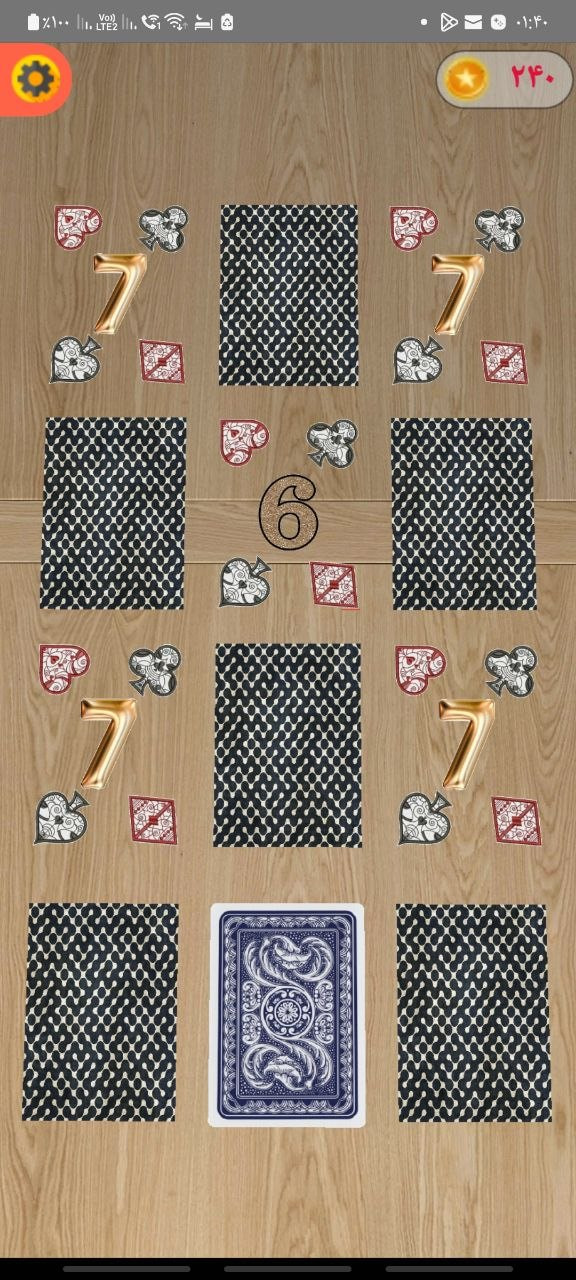
Card movement is much smoother in CGE than in FMX.
\*\* One issue that I just remembered and haven’t tested with version 13 yet (only with the release version): sometimes the table would disappear without any changes to the table itself or even rebuilding the app.
---
### Author:  [@michalis](https://forum.castle-engine.io/u/michalis)
#### Post date: [September 2, 2026, 10:51am UTC](https://forum.castle-engine.io/t/porting-an-existing-delphi-fmx-card-game-to-castle-game-engine/2204/9 "2026-09-02T10:51:16Z")
> [@Hamid](#):
>
> In CGE, the elements look a bit blurry,
Do you maybe use non-power-of-2 textures? For textures, CGE by default resizes them to the nearest “power of 2” size to enable using mipmaps for them.
You can take a look does your [log](https://castle-engine.io/log) contain messages like this: `Resizing 2D texture "%s" from %dx%d to %dx%d`
If yes, and you want to avoid it (not scaling to power of 2, also means no mipmaps → but it will not matter if you never zoom too far from the table) you can use [TextureProperties.GuiTexture field](https://castle-engine.io/x3d_implementation_texturing_extensions.php#section_texture_properties_gui_texture). After loading the model from 3D file, you want to find all `TImageTextureNode` in your models (use `MyScene.RootNode.EnumNodes`, and add to each texture a `TTexturePropertiesNode` instance with `GuiTexture` set to `true`:
```delphi
TexProperties := TTexturePropertiesNode.Create;
{ Do not force "power of 2" size, which will prevent mipmaps but also prevent scaling to power of 2 size. }
TexProperties.GuiTexture := true;
MyImageTexture.TextureProperties := TexProperties;
```
> [@Hamid](#):
>
> and adjusting the lighting is quite difficult.
Maybe it’s because we use by default PBR materials (`TPhysicalMaterialNode`) which means PBR lighting equation, and it behaves differently than Phong materials `TMaterialNode` and Phong lighting model?
You can switch to Phong lighting model to have a version more consistent with what FMX lighting is doing:
- If you load from glTF, set global `GltfForcePhongMaterials` from `GltfForcePhongMaterials` to `true`
- If you build models using X3D nodes from Pascal code, just make sure to use `TMaterialNode` and not `TPhysicalMaterialNode`
Hope this helps:)
---
### Author:  [@Hamid](https://forum.castle-engine.io/u/Hamid)
#### Post date: [September 12, 2026, 11:27am UTC](https://forum.castle-engine.io/t/porting-an-existing-delphi-fmx-card-game-to-castle-game-engine/2204/10 "2026-09-12T11:27:38Z")
I ported the game, and everything worked fine.
I just have three questions:
1. Where should I define the application package name? Directly in the Android manifest file
2. Where should I add the application version?
3. How do I add the signing file
It seems that UMP consent has not been implemented for CGE.
\*- Since I wanted to release the app update today, I didn’t wait and made the changes myself, then created a pull request.
---
### Author:  [@michalis](https://forum.castle-engine.io/u/michalis)
#### Post date: [September 14, 2026, 11:56am UTC](https://forum.castle-engine.io/t/porting-an-existing-delphi-fmx-card-game-to-castle-game-engine/2204/11 "2026-09-14T11:56:06Z")
> [@Hamid](#):
>
> 1. Where should I define the application package name? Directly in the Android manifest file
Specify `qualified_name` in project manifest: [CastleEngineManifest.xml - Syntax and Examples | Manual | Castle Game Engine](https://castle-engine.io/project_manifest)
> [@Hamid](#):
>
> 1. Where should I add the application version?
See `` in in project manifest: [CastleEngineManifest.xml - Syntax and Examples | Manual | Castle Game Engine](https://castle-engine.io/project_manifest)
> [@Hamid](#):
>
> 1. How do I add the signing file
Use `AndroidSigningProperties.txt` file, see [Android signing in CGE manual](https://castle-engine.io/android_faq#_signing_a_release_apk_aab).
> [@Hamid](#):
>
> It seems that UMP consent has not been implemented for CGE.
Thanks! Indeed we didn’t implement this before.
---
### Author:  [@Hamid](https://forum.castle-engine.io/u/Hamid)
#### Post date: [September 14, 2026, 12:42pm UTC](https://forum.castle-engine.io/t/porting-an-existing-delphi-fmx-card-game-to-castle-game-engine/2204/12 "2026-09-14T12:42:42Z")
> [@michalis](#):
>
> Use `AndroidSigningProperties.txt` file, see [Android signing in CGE manual](https://castle-engine.io/android_faq#_signing_a_release_apk_aab).
Yeah, I finally found it and did it using the same method. It would have been better if I hadn’t written the password in a text file, though.
The current version of the game on Google Play uses CGE.
---
### Author:  [@Hamid](https://forum.castle-engine.io/u/Hamid)
#### Post date: [September 14, 2026, 6:41pm UTC](https://forum.castle-engine.io/t/porting-an-existing-delphi-fmx-card-game-to-castle-game-engine/2204/13 "2026-09-14T18:41:10Z")
If you have a chance, I’d really appreciate it if you could try my game and give me some feedback.
In particular, I’d like to know whether you were able to learn how to play easily using the in-game tutorial, or whether you found the game too difficult or confusing.
Any honest feedback would be very helpful. Thanks!💗
---
### Author:  [@Hamid](https://forum.castle-engine.io/u/Hamid)
#### Post date: [September 16, 2026, 9:20am UTC](https://forum.castle-engine.io/t/porting-an-existing-delphi-fmx-card-game-to-castle-game-engine/2204/14 "2026-09-16T09:20:27Z")
Does Castle Game Engine provide built-in support for sending Android notifications? If so, is there an existing service or API that can be used to schedule or trigger local notifications from a CGE application?
\*\*-I checked the documentation, but I couldn’t find anything about Android notifications.
---
### Author:  [@phomm](https://forum.castle-engine.io/u/phomm)
#### Post date: [September 16, 2026, 12:18pm UTC](https://forum.castle-engine.io/t/porting-an-existing-delphi-fmx-card-game-to-castle-game-engine/2204/15 "2026-09-16T12:18:51Z")
> **[4. Default features of integrated projects - Android Services | Manual | Castle...](https://castle-engine.io/android_services#_default_features_of_integrated_projects)**
>
> Even if you don’t add any services explicitly, by default the following features are available:
> **[Castle Game Engine: CastleOpenDocument](https://castle-engine.io/apidoc/html/CastleOpenDocument.html#OnScreenNotification-string-)**
>
> Warning: this symbol is deprecated: This is Android-specific and probably will not be ever supported on other platforms. Better use CGE UI to make cros-platform UI notifications, like TCastleNotifications or just TCastleLabel with animated...
---
### Author:  [@michalis](https://forum.castle-engine.io/u/michalis)
#### Post date: [September 23, 2026, 4:20pm UTC](https://forum.castle-engine.io/t/porting-an-existing-delphi-fmx-card-game-to-castle-game-engine/2204/16 "2026-09-23T16:20:34Z")
> [@Hamid](#):
>
> Does Castle Game Engine provide built-in support for sending Android notifications?
If you mean “push notifications” – we don’t have a ready service doing this yet. We have a number of [serivces](https://castle-engine.io/android_services), like admob you used, but none that allows to send notifications (yet). You can add a new service (following [Adding New Android Services | Manual | Castle Game Engine](https://castle-engine.io/adding_new_android_services) , though you possibly know this already since your PRs around admob 🙂 ) to do this.
PR adding new service, capable of making push notifications, would be welcome:)
A service can use some external Android library (provided in many forms, native code or not) or just use existing Android system API. So everything that is at all possible on Android → for sure can be done using a service from our engine:)
From what I recall in our “Cat-astrophe Games” games, we used [Firebase (now owned by Google)](https://firebase.google.com/) to make push notifications in mobile games.
---
### Author:  [@Hamid](https://forum.castle-engine.io/u/Hamid)
#### Post date: [September 23, 2026, 5:38pm UTC](https://forum.castle-engine.io/t/porting-an-existing-delphi-fmx-card-game-to-castle-game-engine/2204/17 "2026-09-23T17:38:30Z")
> [@michalis](#):
>
> If you mean “push notifications” – we don’t have a ready service doing this yet. We have a number of [serivces](https://castle-engine.io/android_services), like admob you used, but none that allows to send notifications (yet). You can add a new service (following [Adding New Android Services | Manual | Castle Game Engine](https://castle-engine.io/adding_new_android_services) , though you possibly know this already since your PRs around admob 🙂 ) to do this.
>
> PR adding new service, capable of making push notifications, would be welcome:)
>
> A service can use some external Android library (provided in many forms, native code or not) or just use existing Android system API. So everything that is at all possible on Android → for sure can be done using a service from our engine:)
>
> From what I recall in our “Cat-astrophe Games” games, we used [Firebase (now owned by Google)](https://firebase.google.com/) to make push notifications in mobile games.
I actually meant **local notifications** , not push notifications. 🙂
I’ve already implemented a small Android service for this. It handles two messages, `local-notification-schedule` and `local-notification-cancel`, uses Android’s `AlarmManager` to schedule the notifications, and requests the `POST_NOTIFICATIONS` permission on Android 13 using the engine’s existing `requestPermission` mechanism.
The notification is displayed at the scheduled time, and tapping it opens the app.
I’ve tested it in my own game and it worked fine.
It’s not a push notification service, though. If you think it would be useful for the engine, I’d be happy to submit it as a PR. 🙂
---
### Author:  [@michalis](https://forum.castle-engine.io/u/michalis)
#### Post date: [September 30, 2026, 8:16pm UTC](https://forum.castle-engine.io/t/porting-an-existing-delphi-fmx-card-game-to-castle-game-engine/2204/18 "2026-09-30T20:16:04Z")
> [@Hamid](#):
>
> It’s not a push notification service, though. If you think it would be useful for the engine, I’d be happy to submit it as a PR. 🙂
Sorry for delay – yeah, this is absolutely something we want in the engine 🙂 I see you already make a [PR](https://github.com/castle-engine/castle-engine/pull/732), I have it in TODO to review and apply.
---
### Author:  [@Hamid](https://forum.castle-engine.io/u/Hamid)
#### Post date: [October 1, 2026, 7:07am UTC](https://forum.castle-engine.io/t/porting-an-existing-delphi-fmx-card-game-to-castle-game-engine/2204/19 "2026-10-01T07:07:51Z")
> [@michalis](#):
>
> Sorry for delay – yeah, this is absolutely something we want in the engine 🙂 I see you already make a [PR](https://github.com/castle-engine/castle-engine/pull/732), I have it in TODO to review and apply.
No problem at all! Thank you for taking the time to review it. I’m glad this is something you’d like to have in the engine. I’ll be happy to make any changes needed after your review.