# Playing part of an animation xml file
**URL:** https://forum.castle-engine.io/t/playing-part-of-an-animation-xml-file/432
**Category:** Uncategorized
**Created:** [October 8, 2021, 5:40pm UTC](https://forum.castle-engine.io/t/playing-part-of-an-animation-xml-file/432 "2021-10-08T17:40:05Z")
**Posts on this page:** 20
**Page:** 1
### Author:  [@Carring](https://forum.castle-engine.io/u/Carring)
#### Post date: [October 8, 2021, 5:40pm UTC](https://forum.castle-engine.io/t/playing-part-of-an-animation-xml-file/432/1 "2021-10-08T17:40:05Z")
I have this sprite image xml file and want to play a range of it:
```auto
```
Then I load it with:
Player.TurnScene.URL:= ‘kyleyturn.starling-xml#fps:10,anim-naming:strict-underscore’;
If I try to play the first 4 images with:
PlayAnimation(‘kyleyturn\_01, kyleyturn\_02, kyleyturn\_03, kyleyturn\_04’, false);
it does not work (it only shows the first image)
If I use:
PlayAnimation(‘kyleyturn’, false);
it plays all 32 images.
But in this example I want to play just images 1-4. So how can I just play a range?
I read [https://github.com/castle-engine/castle-engine/wiki/Sprite-sheets](https://github.com/castle-engine/castle-engine/wiki/Sprite-sheets) and cannot find what is wrong.
---
### Author:  [@michalis](https://forum.castle-engine.io/u/michalis)
#### Post date: [October 8, 2021, 5:57pm UTC](https://forum.castle-engine.io/t/playing-part-of-an-animation-xml-file/432/2 "2021-10-08T17:57:01Z")
> [@Carring](#):
>
> PlayAnimation(‘kyleyturn\_01, kyleyturn\_02, kyleyturn\_03, kyleyturn\_04’, false);
`PlayAnimation` takes an animation name, not a list of frame names.
If you want to have an animation that is a subset of another animation, right now you just have to define the new animation, as `kyleyturnShort` or something like that.
It’s simplest to use of CGE Sprite Sheet Editor to copy the old animation to new, and remove unneeded frames from the new animation.
---
### Author:  [@Carring](https://forum.castle-engine.io/u/Carring)
#### Post date: [October 8, 2021, 7:55pm UTC](https://forum.castle-engine.io/t/playing-part-of-an-animation-xml-file/432/3 "2021-10-08T19:55:48Z")
The idea is that the sprite character can turn in every direction.

I have now renamed the first subtexture names to:
kyleyturnfronttosw\_01
kyleyturnfronttosw\_02
kyleyturnfronttosw\_03
kyleyturnfronttosw\_04
(turns facing front to facing south west)
PlayAnimation(‘kyleyturnfronttosw’, false);
This works, but if I, for instance, want to turn in one animation sequence from facing front to back I would need 4 different lists that play after each other.
Or is there a way to set a Playanimation list?
PlayAnimation(‘kyleyturnfronttosw’, false); // (turns facing front to facing south west)
PlayAnimation(‘kyleyturnswtoleft’, false); // (turns facing south west to facing left)
PlayAnimation(‘kyleyturnlefttonw’, false); // (turns facing left to north west)
PlayAnimation(‘kyleyturnnwtoback’, false); // (turns facing north west to back)
This only plays the last sequence. 🤨
So every next Playanimation command should “wait” for the previous one to finish, but I don’t know how.
I noticed the backlog in the new sprite editor and found:
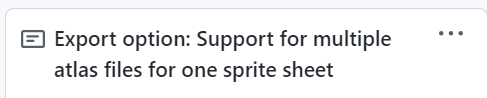
This looks interesting because I would be able to create different xml files for the same .png, so using different anim names for the same images and so different subsets.
But the sprite editor development looks quiet for some Months and is not updated since 21 April.
---
### Author:  [@michalis](https://forum.castle-engine.io/u/michalis)
#### Post date: [October 8, 2021, 10:45pm UTC](https://forum.castle-engine.io/t/playing-part-of-an-animation-xml-file/432/4 "2021-10-08T22:45:10Z")
> [@Carring](#):
>
> So every next Playanimation command should “wait” for the previous one to finish, but I don’t know how.
Use `TPlayAnimationParameters.StopNotification` feature to implement “playing a list of animations, in a sequence”.
This mechanism was already mentioned, with examples, in 2 threads where you participated 🙂
1. [Sprite control with the new system - #2 by michalis](https://forum.castle-engine.io/t/sprite-control-with-the-new-system/311/2) ,
2. [Play all animations in sequence - #8 by michalis](https://forum.castle-engine.io/t/play-all-animations-in-sequence/315/8) .
The latter thread contains a ready example from me that you can adjust to do exactly what you need here. It implements `RunAllAnimations` , taking `AnimList := Scene.AnimationsList`. You can adjust it to implement instead
```auto
RunAnimationList(const Scene: TCastleSceneCore; const AnimNames: array of Strings)
```
You would then call it like
```auto
RunAnimationList(Scene, ['kyleyturnfronttosw’,‘kyleyturnswtoleft’, ‘kyleyturnlefttonw’, ‘kyleyturnnwtoback'])
```
The only difference between your `RunAnimationList` and the `RunAllAnimations` is how to populate the `AnimList`, list of animations scheduled to play. In `RunAnimationList` you should
- make sure to clear `AnimList` and stop current animation, if any
- populate the `AnimList` with new animation names you want to play (``AnimNames` from my declaration)
> [@Carring](#):
>
> This looks interesting because I would be able to create different xml files for the same .png, so using different anim names for the same images and so different subsets.
You can already do this. You can refer to the same PNG image from multiple sprite sheets, in any format (Starling XML or `.castle-sprite-sheets`), this was never a problem. You can just edit the XML files in a text editor to make them refer to the same PNG.
The “Support for multile atlas files for one sprite sheet” ticket you mention is about a different thing – to have one `.castle-sprite-sheet` refer to multiple PNG files.
> [@Carring](#):
>
> But the sprite editor development looks quiet for some Months and is not updated since 21 April.
Because the main features are working and we are just using them, see e.g. recent news about [Platformer by Castle Game Engine](https://castle-engine.itch.io/platformer) release – it’s a CGE demo that is using new sprite sheets for everything.
---
### Author:  [@Carring](https://forum.castle-engine.io/u/Carring)
#### Post date: [October 9, 2021, 8:01am UTC](https://forum.castle-engine.io/t/playing-part-of-an-animation-xml-file/432/5 "2021-10-09T08:01:22Z")
> [@michalis](#):
>
> This mechanism was already mentioned, with examples, in 2 threads where you participated 🙂
Sorry, I already had a deja-vu about this 😉
Thanks. I still find it difficult to implement.
I also looked at the examples\animations\play\_animation.
I tried out to start as simple as possible and now have:
```auto
procedure CreateAnimationSequence;
var
AnimationName: String;
begin
Player.TurnScene.AnimationsList.LoadFromURL('kyleyturn.starling-xml#fps:10,anim-naming:strict-underscore');
for AnimationName in Player.TurnScene.AnimationsList do
begin
RunAnimationList(Player.TurnScene, ['kyleyturnfronttosw’,‘kyleyturnswtoleft’, ‘kyleyturnlefttonw’, ‘kyleyturnnwtoback'])
end;
```
Is this okay to load the existing animations from xml file and select a few of them with the (still not existing RunAnimation procedure)?
---
### Author:  [@michalis](https://forum.castle-engine.io/u/michalis)
#### Post date: [October 11, 2021, 10:35am UTC](https://forum.castle-engine.io/t/playing-part-of-an-animation-xml-file/432/6 "2021-10-11T10:35:38Z")
Sorry, I don’t follow what your code above tries to do.
- You should load the scene from a sprite sheet. There is no `AnimationsList.LoadFromURL`.
- You should play all animations with one call to `RunAnimationList(Player.TurnScene, 'kyleyturnfronttosw’,‘kyle....`). There’s no point for a loop there (`for AnimationName in Player.TurnScene.AnimationsList do...`).
My advise:
- create a new project, with a viewport with 2D camera, that only contains one scene with a sprite sheet.
- Try to adjust my code from [Play all animations in sequence - #8 by michalis](https://forum.castle-engine.io/t/play-all-animations-in-sequence/315/8) to implement `RunAllAnimations` in that new simple project. See that it works.
- Then remake it to implement `RunAnimationList` as I described above.
---
### Author:  [@Carring](https://forum.castle-engine.io/u/Carring)
#### Post date: [October 16, 2021, 8:39am UTC](https://forum.castle-engine.io/t/playing-part-of-an-animation-xml-file/432/7 "2021-10-16T08:39:26Z")
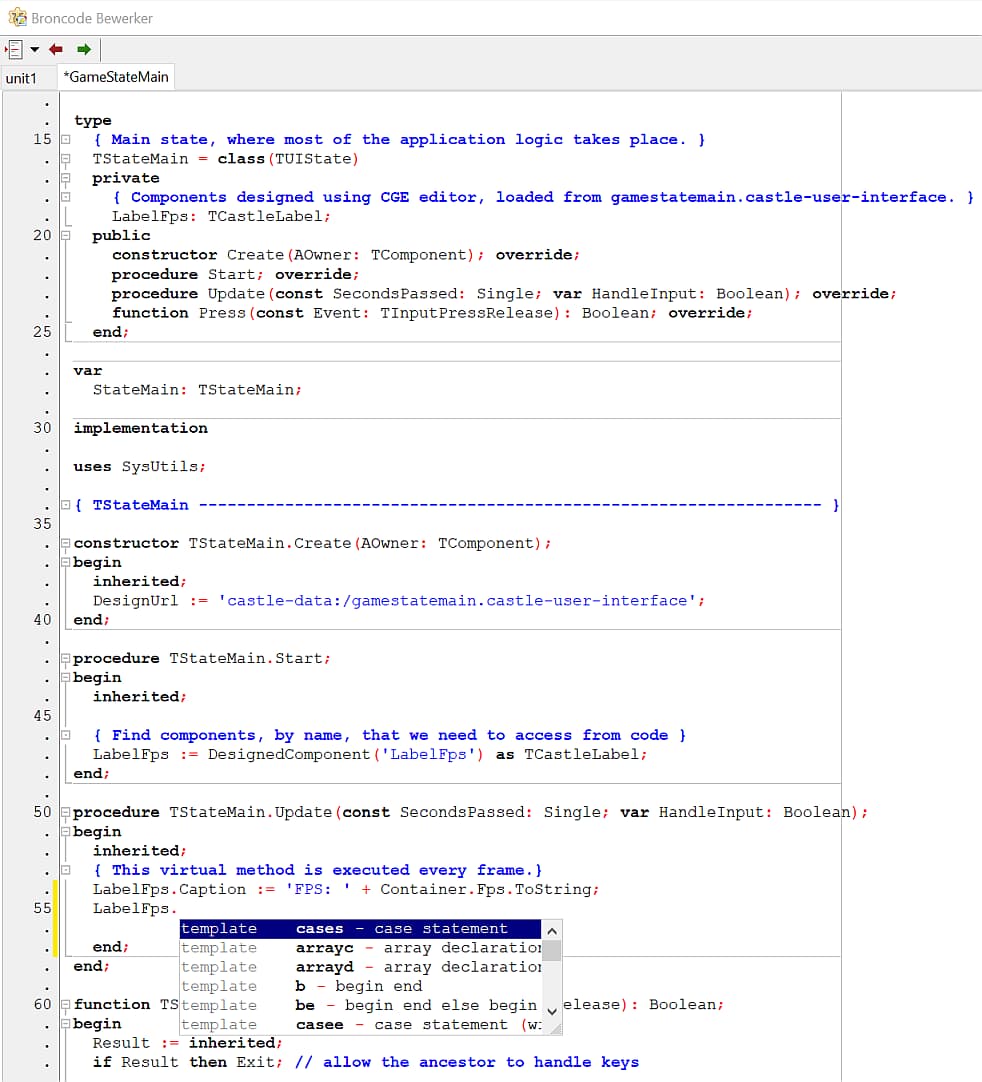
Ok, I tried to create a new project with the CGE template but I noticed the properties do not show up anymore in Lazarus. Then I re-installed lazarus and latest CGE but I cannot access the properties anymore(I tried the standard LabelFps).
Loading CGE examples and trying to change properties in code also do not show up (though they work, I tried changing label caption and it shows my edited text when I compile from the editor.
Any idea what is wrong here?
@michalis
Also I am trying to use your:
> [@michalis](#):
>
> [Play all animations in sequence - #8 by michalis](https://forum.castle-engine.io/t/play-all-animations-in-sequence/315/8) .
I got an error, though Animlist is a TStringlist it says it is a TString.
I have put all stuff in the attachment (and commented out some procedures as I get errors).
Can you please take a look at it? This is difficult for me.
[animationsequence3.zip](https://forum.castle-engine.io/uploads/short-url/ufxBqroFUpEHB9y1IntWisJRVWb.zip) (61.0 MB)
---
### Author:  [@michalis](https://forum.castle-engine.io/u/michalis)
#### Post date: [October 19, 2021, 8:53am UTC](https://forum.castle-engine.io/t/playing-part-of-an-animation-xml-file/432/8 "2021-10-19T08:53:51Z")
> [@Carring](#):
>
> Any idea what is wrong here?
Maybe you didn’t open the proper Lazarus project (and only a file in this project)? Use “Project → Open Project” in Lazarus to open the right project. Or use “Code → Open Project In Code Editor” from CGE editor.
It’s easy right now to mistakenly forget about it, because of [Trello](https://trello.com/c/MWX2s9PY/162-submit-to-lazarus-open-file-x-in-project-y)
> [@Carring](#):
>
> I got an error, though Animlist is a TStringlist it says it is a TString.
`TStrings` is more abstract ancestor of `TStringList`. You probably need to change `Animlist` to be just `TStrings` as well in this example.
I recommend first learning these classes, if you don’t know them. Create a new project, unrelated to CGE, and play there with creating, copying contents of etc. of `TStringList`. See docs like
- [TStrings](https://www.freepascal.org/docs-html/rtl/classes/tstrings.html)
- [System.Classes.TStrings - RAD Studio API Documentation](https://docwiki.embarcadero.com/Libraries/Sydney/en/System.Classes.TStrings) (Delphi docs are good enough in practice too, and FPC and Delphi are quite compatible at this class)
- [TStrings - Free Pascal wiki](https://wiki.lazarus.freepascal.org/TStrings)
---
### Author:  [@Carring](https://forum.castle-engine.io/u/Carring)
#### Post date: [October 19, 2021, 7:33pm UTC](https://forum.castle-engine.io/t/playing-part-of-an-animation-xml-file/432/9 "2021-10-19T19:33:23Z")
> [@michalis](#):
>
> Maybe you didn’t open the proper Lazarus project (and only a file in this project)? Use “Project → Open Project” in Lazarus to open the right project. Or use “Code → Open Project In Code Editor” from CGE editor.
Yes, that did it. Thanks.
> [@michalis](#):
>
> You probably need to change `Animlist` to be just `TStrings` as well in this example.
Yes, when I change AnimList: TStringList to
AnimList: TStrings I get no errors. Makes sense because Scene property AnimationsList is also a TString.

Now I get TTimeSensorNode error.
I have uploaded a new attachment. I just need to play the sequence of the 4 animation names that are in the sprite xml screen. Can you please help me with the code? I got my game animation stuff almost complete except playing sequences of animations.

[animationsequence4.zip](https://forum.castle-engine.io/uploads/short-url/Sh7R62JAVOULjXxspaUdRrwFzn.zip) (44.3 MB)
---
### Author:  [@michalis](https://forum.castle-engine.io/u/michalis)
#### Post date: [October 19, 2021, 10:22pm UTC](https://forum.castle-engine.io/t/playing-part-of-an-animation-xml-file/432/10 "2021-10-19T22:22:35Z")
> [@Carring](#):
>
> Now I get TTimeSensorNode error.
> I have uploaded a new attachment. I just need to play the sequence of the 4 animation names that are in the sprite xml screen. Can you please help me with the code? I got my game animation stuff almost complete except playing sequences of animations.
The first step was to make `RunAllAnimations` running, so that my example from [Play all animations in sequence - #8 by michalis](https://forum.castle-engine.io/t/play-all-animations-in-sequence/315/8) works.
Please first make sure it works – that you have a working `RunAllAnimations`, in a simple test application.
Try to understand that code. Code from the outside should not call `RunNextAnimation`, this doesn’t make sense – `RunNextAnimation` is just a helper method, we need it as a the `Params.StopNotification` callback. Code from the outside should only call `RunAllAnimations`. I emphasize: make sure it works, and play with this code so you understand what it does.
Once you got it, the next step is to change `RunAllAnimations` into something like `RunAnimationSequence` . It should take, as arguments, the Scene, and the list of animation names, and look like
```auto
procedure xxx.RunAnimationSequence(const Scene: TCastleSceneCore; const Names: array of String);
begin
..// implementation should be similar to RunAllAnimations, but you have to initialize new AnimList with the contents of Names
end;
```
The only thing you have to do is initialize `AnimList` to be
- a new instance of `TStringList`
- to contain a copy of `Names: array of String`
---
### Author:  [@Carring](https://forum.castle-engine.io/u/Carring)
#### Post date: [October 20, 2021, 7:08pm UTC](https://forum.castle-engine.io/t/playing-part-of-an-animation-xml-file/432/11 "2021-10-20T19:08:08Z")
Ok, I made the code as small as possible and focused on procedure RunAllAnimation.
Now I get an access violation error.
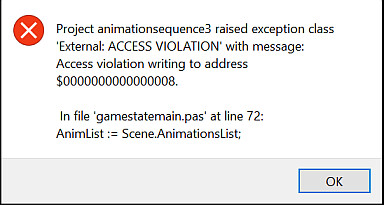
I thought Scene1.AnimationsList automatically contains all animation names of the loaded “kyleyturn.starling-xml” file?
```auto
unit GameStateMain;
interface
uses Classes,
CastleUIState, CastleComponentSerialize, CastleUIControls, CastleControls,
CastleKeysMouse, CastleViewport, CastleScene, CastleVectors, StrUtils, Dialogs,
CastleWindow,CastleUtils, CastleGLImages, CastleFilesUtils,
CastleSoundEngine, CastleTimeUtils, CastleColors,
CastleRectangles, CastleFonts, CastleGLUtils, Generics.Defaults,
Generics.Collections, CastleDownload, CastleSceneCore,
CastleCameras, CastleTransform, CastleImages, X3DNodes, X3DFields, CastleURIUtils;
type
TStateMain = class(TUIState)
private
Viewport: TCastleViewport;
public
constructor Create(AOwner: TComponent); override;
procedure Start; override;
end;
type
TSomeClass = class
private
AnimList: TStrings;
NextAnim: Integer;
procedure RunNextAnimation(const Scene: TCastleSceneCore; const Animation: TTimeSensorNode);
public
procedure RunAllAnimations(const Scene: TCastleSceneCore);
end;
var
StateMain: TStateMain;
Scene1: TCastleScene;
PlayList: TSomeClass;
implementation
uses SysUtils;
{ TStateMain ----------------------------------------------------------------- }
constructor TStateMain.Create(AOwner: TComponent);
begin
inherited;
DesignUrl := 'castle-data:/gamestatemain.castle-user-interface';
end;
procedure TStateMain.Start;
begin
inherited;
Viewport := DesignedComponent ('Viewport') as TCastleViewport;
Scene1 := DesignedComponent('Scene') as TCastleScene;
Viewport.Items.Add(Scene1);
Scene1.Translation:= Vector3(800,300,0);
Scene1.URL:= 'castle-data:/kyleyturn.starling-xml';
PlayList.RunAllAnimations(Scene1);
end;
procedure TSomeClass.RunAllAnimations(const Scene: TCastleSceneCore);
begin
AnimList := Scene.AnimationsList;
NextAnim := 0;
RunNextAnimation(Scene, nil);
end;
procedure TSomeClass.RunNextAnimation(const Scene: TCastleSceneCore; const Animation: TTimeSensorNode);
var
NextAnimationName: String;
Params: TPlayAnimationParameters;
begin
NextAnimationName := AnimList[NextAnim];
NextAnim := (NextAnim + 1) mod AnimList.Count;
Params := TPlayAnimationParameters.Create;
try
Params.Name := NextAnimationName;
Params.StopNotification := @RunNextAnimation;
Scene.PlayAnimation(Params);
finally FreeAndNil(Params) end;
end;
end.
```
---
### Author:  [@michalis](https://forum.castle-engine.io/u/michalis)
#### Post date: [October 21, 2021, 12:00am UTC](https://forum.castle-engine.io/t/playing-part-of-an-animation-xml-file/432/12 "2021-10-21T00:00:47Z")
Looking at your code: you declare `PlayList` to be an instance of class `TSomeClass`, but you never actually create it, you never call the `TSomeClass` constructor. That’s the reason for Access Violation – your code cannot write to the field `AnimList`, because it is part of `PlayList` instance, but `PlayList` was never created.
If you’re not sure how to create an instance of the class, consult learning resources about Pascal, like
- [Modern Object Pascal Introduction for Programmers](https://castle-engine.io/modern_pascal_introduction.html)
- FPC wiki has a lot of learning links: [Object Oriented Programming with Free Pascal and Lazarus - Lazarus wiki](https://wiki.freepascal.org/Object_Oriented_Programming_with_Free_Pascal_and_Lazarus) , [Programming Using Classes - Lazarus wiki](https://wiki.freepascal.org/Programming_Using_Classes)
- Delphi also has a dedicated learning portal: [https://learndelphi.org/](https://learndelphi.org/) , e.g. linking here [Delphi Boot Camp Day 2 - Getting to Know the Delphi Language - YouTube](https://www.youtube.com/watch?v=CqlHeBPKu-0&list=PLwUPJvR9mZHjDFgI9MlNUhH4I7CScwKm0&index=2)
---
### Author:  [@michalis](https://forum.castle-engine.io/u/michalis)
#### Post date: [October 21, 2021, 12:02am UTC](https://forum.castle-engine.io/t/playing-part-of-an-animation-xml-file/432/13 "2021-10-21T00:02:39Z")
Note that you could also just place the example code from [Play all animations in sequence - #8 by michalis](https://forum.castle-engine.io/t/play-all-animations-in-sequence/315/8) inside the state class, i.e. you don’t really need a new class (`TSomeClass`), you can just use the `TStateMain` class and extend it.
That is what my comment in that example meant:
```auto
TSomeClass = class // place this in any class you have handy
```
---
### Author:  [@Carring](https://forum.castle-engine.io/u/Carring)
#### Post date: [October 21, 2021, 4:19pm UTC](https://forum.castle-engine.io/t/playing-part-of-an-animation-xml-file/432/14 "2021-10-21T16:19:57Z")
> [@michalis](#):
>
> you declare `PlayList` to be an instance of class `TSomeClass`, but you never actually create it, you never call the `TSomeClass` constructor.
Ah, of course, stupid of me. Normally I get a SIGSEGV error when I forget to create the instance.
Sorry!
> [@michalis](#):
>
> Note that you could also just place the example code from [Play all animations in sequence - #8 by michalis](https://forum.castle-engine.io/t/play-all-animations-in-sequence/315/8) inside the state class, i.e. you don’t really need a new class (`TSomeClass`), you can just use the `TStateMain` class and extend it.
Yes, I finally got RunAllAnimations working, thanks! All animations are playing now.
Now I added a RunAnimationList procedure (and outcommented the RunAllAnimations for now) but it is not quite clear to me how to load the 4 animation strings in the start procedure.
> [@michalis](#):
>
> The only thing you have to do is initialize `AnimList` to be
>
> - a new instance of `TStringList`
> - to contain a copy of `Names: array of String`
Yes, I don’t know how to put this in the RunAnimationList procedure now, sorry.
And then they only have to play once in the RunNext procedure, so they should not loop.
```auto
unit GameStateMain;
interface
uses Classes,
CastleUIState, CastleComponentSerialize, CastleUIControls, CastleControls,
CastleKeysMouse, CastleViewport, CastleScene, CastleVectors, StrUtils, Dialogs,
CastleWindow,CastleUtils, CastleGLImages, CastleFilesUtils,
CastleSoundEngine, CastleTimeUtils, CastleColors,
CastleRectangles, CastleFonts, CastleGLUtils, Generics.Defaults,
Generics.Collections, CastleDownload, CastleSceneCore,
CastleCameras, CastleTransform, CastleImages, X3DNodes, X3DFields, CastleURIUtils;
type
TStateMain = class(TUIState)
private
Viewport: TCastleViewport;
AnimList: TStrings;
NextAnim: Integer;
procedure RunNextAnimation(const Scene: TCastleSceneCore; const Animation: TTimeSensorNode);
public
constructor Create(AOwner: TComponent); override;
procedure Start; override;
procedure RunAllAnimations(const Scene: TCastleSceneCore);
procedure RunAnimationList(const Scene: TCastleSceneCore; const AnimNames: array of String);
end;
var
StateMain: TStateMain;
Scene1: TCastleScene;
implementation
uses SysUtils;
{ TStateMain ----------------------------------------------------------------- }
constructor TStateMain.Create(AOwner: TComponent);
begin
inherited;
DesignUrl := 'castle-data:/gamestatemain.castle-user-interface';
end;
procedure TStateMain.Start;
begin
inherited;
Viewport := DesignedComponent ('Viewport') as TCastleViewport;
Scene1 := DesignedComponent('Scene') as TCastleScene;
Viewport.Items.Add(Scene1);
Scene1.Translation:= Vector3(800,300,0);
Scene1.URL:= 'castle-data:/kyleyturn.starling-xml';
// RunAllAnimations(Scene1);
RunAnimationList(Scene1, ['kyleyturnfronttosw’,‘kyleyturnswtoleft’, ‘kyleyturnlefttonw’, ‘kyleyturnnwtoback']);
end;
procedure TStateMain.RunAllAnimations(const Scene: TCastleSceneCore);
begin
// AnimList := Scene.AnimationsList;
// NextAnim := 0;
// RunNextAnimation(Scene, nil);
end;
procedure TStateMain.RunAnimationList(const Scene: TCastleSceneCore; const AnimNames: array of String);
begin
AnimList := ??????????????
NextAnim := 0;
RunNextAnimation(Scene, nil);
end;
procedure TStateMain.RunNextAnimation(const Scene: TCastleSceneCore; const Animation: TTimeSensorNode);
var
NextAnimationName: String;
Params: TPlayAnimationParameters;
begin
NextAnimationName := AnimList[NextAnim];
NextAnim := (NextAnim + 1) mod AnimList.Count;
Params := TPlayAnimationParameters.Create;
try
Params.Name := NextAnimationName;
Params.StopNotification := @RunNextAnimation;
Scene.PlayAnimation(Params);
finally FreeAndNil(Params) end;
end;
end.
```
---
### Author:  [@michalis](https://forum.castle-engine.io/u/michalis)
#### Post date: [October 22, 2021, 7:40am UTC](https://forum.castle-engine.io/t/playing-part-of-an-animation-xml-file/432/15 "2021-10-22T07:40:44Z")
> [@Carring](#):
>
> > [@michalis](#):
> >
> > The only thing you have to do is initialize `AnimList` to be
> >
> > > - a new instance of `TStringList`
> > > - to contain a copy of `Names: array of String`
>
> Yes, I don’t know how to put this in the RunAnimationList procedure now, sorry.
> And then they only have to play once in the RunNext procedure, so they should not loop.
Please read about and learn to use `TStringList` class, standard in FPC and Delphi. I provided links to their documentation earlier in this thread:
> [@](#):
>
> Create a new project, unrelated to CGE, and play there with creating, copying contents of etc. of `TStringList`. See docs like
>
> - [TStrings](https://www.freepascal.org/docs-html/rtl/classes/tstrings.html)
>
> - [System.Classes.TStrings - RAD Studio API Documentation](https://docwiki.embarcadero.com/Libraries/Sydney/en/System.Classes.TStrings) (Delphi docs are good enough in practice too, and FPC and Delphi are quite compatible at this class)
>
> - [https://wiki.lazarus.freepascal.org/TStrings](https://wiki.lazarus.freepascal.org/TStrings)
What you need in this case is to create new `TStringList` instance (or clear some existing one) and add there all strings from the array that `RunAnimationSequence` gets as an argument (like `const Names: array of String`).
You can also use our `TCastleStringList` (see docs [Castle Game Engine: CastleStringUtils: Class TCastleStringList](https://castle-engine.io/apidoc-unstable/html/CastleStringUtils.TCastleStringList.html) ), that descends from `TStringList` and adds some helpers like `AddRange`.
To not loop, modify the `NextAnim` variable behavior. Right now it’s incremented such that it loops:
> NextAnim := (NextAnim + 1) mod AnimList.Count;
You want to instead increment it simply, and do not call next animation if `NextAnim` reached `AnimList.Count`.
---
### Author:  [@Carring](https://forum.castle-engine.io/u/Carring)
#### Post date: [October 23, 2021, 7:16am UTC](https://forum.castle-engine.io/t/playing-part-of-an-animation-xml-file/432/16 "2021-10-23T07:16:50Z")
Thanks for the links but I did not find examples in them. A summary of all functions and properties to me is like showing me all parts of a car without telling me how to actually drive the thing.
This is what I miss: examples and tutorials. 🙂
The Delphi boot camp course looks good though as it shows tutorial like. I will start to learn this route.
But I have found a few examples on TStringList and this actually works:
```auto
type
TStateMain = class(TUIState)
private
Viewport: TCastleViewport;
AnimList: TStrings;
SequenceList: TStringList;
NextAnim: Integer;
procedure RunNextAnimation(const Scene: TCastleSceneCore; const Animation: TTimeSensorNode);
public
constructor Create(AOwner: TComponent); override;
procedure Start; override;
procedure RunAllAnimations(const Scene: TCastleSceneCore);
procedure RunAnimationList(const Scene: TCastleSceneCore; const AnimNames: array of String);
end;
procedure TStateMain.RunAnimationList(const Scene: TCastleSceneCore; const AnimNames: array of String);
begin
SequenceList.Add('kyleyturnfronttosw');
SequenceList.Add('kyleyturnswtoleft');
SequenceList.Add('kyleyturnlefttonw');
SequenceList.Add('kyleyturnnwtoback');
AnimList := SequenceList;
NextAnim := 0;
RunNextAnimation(Scene, nil);
end;
```
So I am already happpy with that.
Next thing I tried is putting the arguments of
```auto
RunAnimationList(Scene1, ['kyleyturnfronttosw’,‘kyleyturnswtoleft’, ‘kyleyturnlefttonw’, ‘kyleyturnnwtoback']);
```
instead of the list that I added in RunAnimationList
as argument so I had to use ‘const AnimNames: array of String’
SequenceList.Add(AnimNames[1]);
SequenceList.Add(AnimNames[2]);
SequenceList.Add(AnimNames[3]);
SequenceList.Add(AnimNames[4]);
This is of course not right, but how can I get the [‘kyleyturnfronttosw’,‘kyleyturnswtoleft’, ‘kyleyturnlefttonw’, ‘kyleyturnnwtoback’]); list into it? I cannot find any examples on this.
> [@michalis](#):
>
> To not loop, modify the `NextAnim` variable behavior. Right now it’s incremented such that it loops:
>
> > NextAnim := (NextAnim + 1) mod AnimList.Count;
If I make it:
```auto
if NextAnim = AnimList.Count then Exit else Inc(NextAnim);
```
I get a ‘list out of bounds’ error and if I make it
```auto
if NextAnim = AnimList.Count-1 then Exit else Inc(NextAnim);
```
it exits the procedure after playing the third animation (and does not play the last animation?)
---
### Author:  [@michalis](https://forum.castle-engine.io/u/michalis)
#### Post date: [October 23, 2021, 4:27pm UTC](https://forum.castle-engine.io/t/playing-part-of-an-animation-xml-file/432/17 "2021-10-23T16:27:33Z")
There are lots of examples of `TStringList`, I see you found some of them. I found [https://wiki.lazarus.freepascal.org/TStringList-TStrings\_Tutorial](https://wiki.lazarus.freepascal.org/TStringList-TStrings_Tutorial) .
> [@Carring](#):
>
> This is of course not right, but how can I get the [‘kyleyturnfronttosw’,‘kyleyturnswtoleft’, ‘kyleyturnlefttonw’, ‘kyleyturnnwtoback’]); list into it? I cannot find any examples on this.
The `Names` is an array of Strings. More precisely, an “open array” that is passed as an argument. The first string has index 0, last string has index `High(Names)`.
You need to learn how to iterate over an array of strings now. For each item in `Names`, you want to do `SequenceList.Add(Names[I])`.
> [@Carring](#):
>
> it exits the procedure after playing the third animation (and does not play the last animation?)
You need to place a check for this at a proper place of the application. Find the right place to put
```auto
Inc(NextAnim);
```
And find the right place to put exit condition:
```auto
if NextAnim = AnimList.Count then Exit;
```
They may not have to be done together. Track the value of `NextAnim` variable to understand when it gets large enough to stop the iteration.
---
### Author:  [@Carring](https://forum.castle-engine.io/u/Carring)
#### Post date: [October 24, 2021, 7:48pm UTC](https://forum.castle-engine.io/t/playing-part-of-an-animation-xml-file/432/18 "2021-10-24T19:48:28Z")
> [@michalis](#):
>
> You need to learn how to iterate over an array of strings now. For each item in `Names`, you want to do `SequenceList.Add(Names[I])`.
I got a “list out of bounds” as soon AnimNames[I] was 1 or higher. Only 0 worked. So it seemed there was only 1 string in the array.
Then I tried separating the strings in the array again and found out the line
[‘kyleyturnfronttosw’,'kyleyturnswtoleft’, ‘kyleyturnlefttonw’, ‘kyleyturnnwtoback’] was wrong.
I had copied it from your example but some commas were the wrong characters.
It had to be [‘kyleyturnfronttosw’,‘kyleyturnswtoleft’, ‘kyleyturnlefttonw’, 'kyleyturnnwtoback’].
🙂
In the forum the commas do not show up right, as I noticed when I “corrected” them. They are replaced by accolades.
> [@michalis](#):
>
> > [@Carring](#):
> >
> > it exits the procedure after playing the third animation (and does not play the last animation?)
>
> You need to place a check for this at a proper place of the application. Find the right place to put
>
> ```auto
> Inc(NextAnim);
>
> ```
Solved.
And here is the final code. I don’t know if this is the best method but it works like a charm. 🙂
I added a PlayForward switch so the order of playing animation of the sprite screen can also be from last to first or something in between, so the turning of the sprite can be clockwise or counterclockwise.
```auto
unit GameStateMain;
interface
uses Classes,
CastleUIState, CastleComponentSerialize, CastleUIControls, CastleControls,
CastleKeysMouse, CastleViewport, CastleScene, CastleVectors, StrUtils, Dialogs,
CastleWindow,CastleUtils, CastleGLImages, CastleFilesUtils,
CastleSoundEngine, CastleTimeUtils, CastleColors,
CastleRectangles, CastleFonts, CastleGLUtils, Generics.Defaults,
Generics.Collections, CastleDownload, CastleSceneCore,
CastleCameras, CastleTransform, CastleImages, X3DNodes, X3DFields, CastleURIUtils;
type
TStateMain = class(TUIState)
private
Viewport: TCastleViewport;
AnimList: TStrings;
SequenceList: TStringList;
NextAnim: Integer;
PlayForward: Boolean;
procedure RunNextAnimation(const Scene: TCastleSceneCore; const Animation: TTimeSensorNode);
public
constructor Create(AOwner: TComponent); override;
procedure Start; override;
procedure RunAllAnimations(const Scene: TCastleSceneCore);
procedure RunAnimationList(const Scene: TCastleSceneCore; const AnimNames: array of String);
end;
var
StateMain: TStateMain;
Scene1: TCastleScene;
implementation
uses SysUtils;
{ TStateMain ----------------------------------------------------------------- }
constructor TStateMain.Create(AOwner: TComponent);
begin
inherited;
DesignUrl := 'castle-data:/gamestatemain.castle-user-interface';
end;
procedure TStateMain.Start;
begin
inherited;
Viewport := DesignedComponent ('Viewport') as TCastleViewport;
Scene1 := DesignedComponent('Scene') as TCastleScene;
Viewport.Items.Add(Scene1);
Scene1.Translation:= Vector3(800,300,0);
Scene1.URL:= 'castle-data:/kyley_idle.starling-xml';
SequenceList := TStringList.Create();
// RunAllAnimations(Scene1);
PlayForward := False;
RunAnimationList(Scene1, ['kyleyfront', 'kyleyturnsw', 'kyleysw', 'kyleyturnleft', 'kyleyleft', 'kyleyturnnw', 'kyleynw',
'kyleyturnback', 'kyleyback', 'kyleyturnne', 'kyleyne', 'kyleyturnright', 'kyleyright', 'kyleyturnse', 'kyleyse', 'kyleyturnfront', 'kyleyfront']);
end;
procedure TStateMain.RunAllAnimations(const Scene: TCastleSceneCore);
begin
AnimList := Scene.AnimationsList;
NextAnim := 0;
RunNextAnimation(Scene, nil);
end;
procedure TStateMain.RunAnimationList(const Scene: TCastleSceneCore; const AnimNames: array of String);
var I: integer;
begin
if PlayForward then
begin
For I := 0 to High(AnimNames) do
begin
SequenceList.Add(AnimNames[I]);
end;
end else
begin
For I := High(AnimNames) downto 0 do
begin
SequenceList.Add(AnimNames[I]);
end;
end;
AnimList := SequenceList;
NextAnim := 0;
RunNextAnimation(Scene, nil);
end;
procedure TStateMain.RunNextAnimation(const Scene: TCastleSceneCore; const Animation: TTimeSensorNode);
var
NextAnimationName: String;
Params: TPlayAnimationParameters;
begin
if NextAnim = AnimList.Count then
begin
FreeAndNil(SequenceList);
Exit;
end;
NextAnimationName := AnimList[NextAnim];
Inc(NextAnim);
Params := TPlayAnimationParameters.Create;
try
Params.Name := NextAnimationName;
Params.Forward:= PlayForward;
Params.StopNotification := @RunNextAnimation;
Scene.PlayAnimation(Params);
finally FreeAndNil(Params) end;
end;
end.
```
---
### Author:  [@Carring](https://forum.castle-engine.io/u/Carring)
#### Post date: [October 27, 2021, 5:16am UTC](https://forum.castle-engine.io/t/playing-part-of-an-animation-xml-file/432/19 "2021-10-27T05:16:05Z")
Now I edited it somewhat.
What it should do is
1. play the animations up until the selected LastAnimationName and then exit. (this works okay).
2. Then by pushing a button it should start animation from the last animation (which is the current animation) and end with the animation that is declared in the push button procedure.
I cannot get this to work; currently every animation sequence starts from the first animation (standfront).
If I start with NextAnim = FirstAnim (which is 8, the number it should start with (StandBack) it does not work.
I would like some help here. Thanks.
(see attachment for the code and data)
```auto
unit GameStateMain;
interface
uses Classes,
CastleUIState, CastleComponentSerialize, CastleUIControls, CastleControls,
CastleKeysMouse, CastleViewport, CastleScene, CastleVectors, StrUtils, Dialogs,
CastleWindow,CastleUtils, CastleGLImages, CastleFilesUtils,
CastleSoundEngine, CastleTimeUtils, CastleColors,
CastleRectangles, CastleFonts, CastleGLUtils, Generics.Defaults,
Generics.Collections, CastleDownload, CastleSceneCore,
CastleCameras, CastleTransform, CastleImages, X3DNodes, X3DFields, CastleURIUtils;
type
TStateMain = class(TUIState)
private
Viewport: TCastleViewport;
AnimList: TStrings;
SequenceList: TStringList;
FirstAnim: Integer;
NextAnim: Integer;
LastAnim: Boolean;
FirstAnimationName, LastAnimationName: String;
PlayForward: Boolean;
procedure StandLeft(Sender: TObject);
procedure StandNE(Sender: TObject);
procedure RunNextAnimation(const Scene: TCastleSceneCore; const Animation: TTimeSensorNode);
public
constructor Create(AOwner: TComponent); override;
procedure Start; override;
procedure RunAllAnimations(const Scene: TCastleSceneCore);
procedure RunAnimationList(const Scene: TCastleSceneCore; const AnimNames: array of String);
end;
var
StateMain: TStateMain;
Button1, Button2: TCastleButton;
Label1, Label2: TCastleLabel;
Scene1: TCastleScene;
implementation
uses SysUtils;
{ TStateMain ----------------------------------------------------------------- }
constructor TStateMain.Create(AOwner: TComponent);
begin
inherited;
DesignUrl := 'castle-data:/gamestatemain.castle-user-interface';
end;
procedure TStateMain.Start;
begin
inherited;
Viewport := DesignedComponent ('Viewport') as TCastleViewport;
Button1 := DesignedComponent('Button1') as TCastleButton;
Button2 := DesignedComponent('Button2') as TCastleButton;
Label1 := DesignedComponent('Label1') as TCastleLabel;
Label2 := DesignedComponent('Label2') as TCastleLabel;
Button1.Caption := 'standleft';
Button2.Caption := 'standne';
Button1.OnClick:= @StandLeft;
Button2.OnClick:= @StandNE;
Scene1 := DesignedComponent('Scene') as TCastleScene;
Viewport.Items.Add(Scene1);
Scene1.Translation:= Vector3(800,300,0);
// Scene1.URL:= 'castle-data:/kyley_idle.starling-xml';
Scene1.URL:= 'castle-data:/john_idle.starling-xml';
SequenceList := TStringList.Create();
// RunAllAnimations(Scene1);
// RunAnimationList(Scene1, ['kyleyfront', 'kyleyturnsw', 'kyleysw', 'kyleyturnleft', 'kyleyleft', 'kyleyturnnw', 'kyleynw',
// 'kyleyturnback', 'kyleyback', 'kyleyturnne', 'kyleyne', 'kyleyturnright', 'kyleyright', 'kyleyturnse', 'kyleyse', 'kyleyturnfront', 'kyleyfront']);
FirstAnimationName := 'johnstandfront';
LastAnimationName := 'johnstandback';
PlayForward := True;
RunAnimationList(Scene1, ['johnstandfront', 'johnturnsw', 'johnstandsw', 'johnturnleft', 'johnstandleft', 'johnturnnw', 'johnstandnw', 'johnturnback', 'johnstandback',
'johnturnne', 'johnstandne', 'johnturnright', 'johnstandright', 'johnturnse', 'johnstandse', 'johnturnfront', 'johnstandfront']);
end;
procedure TStateMain.StandLeft(Sender: TObject);
begin
SequenceList := TStringList.Create();
LastAnimationName := 'johnstandleft';
PlayForward := False;
RunAnimationList(Scene1, ['johnstandfront', 'johnturnsw', 'johnstandsw', 'johnturnleft', 'johnstandleft', 'johnturnnw', 'johnstandnw', 'johnturnback', 'johnstandback',
'johnturnne', 'johnstandne', 'johnturnright', 'johnstandright', 'johnturnse', 'johnstandse', 'johnturnfront', 'johnstandfront']);
end;
procedure TStateMain.StandNE(Sender: TObject);
begin
SequenceList := TStringList.Create();
LastAnimationName := 'johnstandne';
PlayForward := True;
RunAnimationList(Scene1, ['johnstandfront', 'johnturnsw', 'johnstandsw', 'johnturnleft', 'johnstandleft', 'johnturnnw', 'johnstandnw', 'johnturnback', 'johnstandback',
'johnturnne', 'johnstandne', 'johnturnright', 'johnstandright', 'johnturnse', 'johnstandse', 'johnturnfront', 'johnstandfront']);
end;
procedure TStateMain.RunAllAnimations(const Scene: TCastleSceneCore);
begin
AnimList := Scene.AnimationsList;
NextAnim := 0;
RunNextAnimation(Scene, nil);
end;
procedure TStateMain.RunAnimationList(const Scene: TCastleSceneCore; const AnimNames: array of String);
var I: integer;
begin
if PlayForward then
begin
For I := 0 to High(AnimNames) do
begin
SequenceList.Add(AnimNames[I]);
end;
end else
begin
For I := High(AnimNames) downto 0 do
begin
SequenceList.Add(AnimNames[I]);
end;
end;
AnimList := SequenceList;
NextAnim := 0;
RunNextAnimation(Scene, nil);
end;
procedure TStateMain.RunNextAnimation(const Scene: TCastleSceneCore; const Animation: TTimeSensorNode);
var
NextAnimationName: String;
Params: TPlayAnimationParameters;
begin
{if NextAnim = AnimList.Count then
begin
FreeAndNil(SequenceList);
Exit;
end;}
// if AnimList[NextAnim] = LastAnimationName then Exit;
Label1.Caption:= 'current animation number: ' + IntToStr(NextAnim);
Label2.Caption:= 'First to start animation in next call: ' + IntToStr(FirstAnim);
if LastAnim then
begin
FirstAnim := NextAnim; // remember the index value of LastAnimationName so next call to RunAnimationList will start from this animation
FirstAnimationName := LastAnimationName; // next call to RunNextAnimation should start with this animation
FreeAndNil(SequenceList);
LastAnim := False;
Exit;
end;
NextAnimationName := AnimList[NextAnim];
if NextAnimationName = LastAnimationName then LastAnim := True else
Inc(NextAnim);
Params := TPlayAnimationParameters.Create;
try
Params.Name := NextAnimationName;
Params.Forward:= PlayForward;
Params.StopNotification := @RunNextAnimation;
Scene.PlayAnimation(Params);
finally FreeAndNil(Params) end;
end;
end.
```
[animationsequence4.zip](https://forum.castle-engine.io/uploads/short-url/yZdDlje3EO3ATMEdoWDSBg3Jtdx.zip) (48.1 MB)
---
### Author:  [@michalis](https://forum.castle-engine.io/u/michalis)
#### Post date: [October 27, 2021, 10:02am UTC](https://forum.castle-engine.io/t/playing-part-of-an-animation-xml-file/432/20 "2021-10-27T10:02:12Z")
You need to decide what `LastAnim` should do and when it should be set.
I would advise to not do this by modifying `RunNextAnimation` and `RunAnimationList` – you made them quite convoluted. It could probably be fixed, but TBH it looks complicated and would result in complication of a simple and working code.
Instead I would advise: if you want your animations to stop at some animation, just don’t pass more animations to `RunAnimationList`. I.e. instead of
```auto
LastAnimationName := 'johnstandne';
RunAnimationList(Scene1, ['johnstandfront', 'johnturnsw', 'johnstandsw', 'johnturnleft', 'johnstandleft', 'johnturnnw', 'johnstandnw', 'johnturnback', 'johnstandback',
'johnturnne', 'johnstandne', 'johnturnright', 'johnstandright', 'johnturnse', 'johnstandse', 'johnturnfront', 'johnstandfront']);
```
→ just do
```auto
RunAnimationList(Scene1, ['johnstandfront', 'johnturnsw', 'johnstandsw', 'johnturnleft', 'johnstandleft', 'johnturnnw', 'johnstandnw', 'johnturnback', 'johnstandback',
'johnturnne', 'johnstandne']);
// and put remaining animations list in another list, to be used by button click later:
AnimationsScheduledForButton.Clear;
AnimationsScheduledForButton.AddRange(['johnturnright', 'johnstandright', 'johnturnse', 'johnstandse', 'johnturnfront', 'johnstandfront']);
```
Use `TCastleStringList` to have `AddRange` available. Then your button click can just use `AnimationsScheduledForButton` (I think it has `ToArray` method to get list as array, if not you can do it on your side).
[Next page](https://forum.castle-engine.io/t/playing-part-of-an-animation-xml-file/432.md?page=2)