# Object Tracking
**URL:** https://forum.castle-engine.io/t/object-tracking/1392
**Category:** 2D
**Created:** [October 18, 2024, 12:56am UTC](https://forum.castle-engine.io/t/object-tracking/1392 "2024-10-18T00:56:33Z")
**Posts on this page:** 5
**Page:** 1
### Author:  [@Pizzacud](https://forum.castle-engine.io/u/Pizzacud)
#### Post date: [October 18, 2024, 12:56am UTC](https://forum.castle-engine.io/t/object-tracking/1392/1 "2024-10-18T00:56:33Z")
(I’m using the mobile app) I have a sprite that spawns enemies away from it, which face towards the spawner, but I can’t figure out how to make the enemies move towards the spawner. There’s literally code for moving towards a sprite, but it seems not to work for some reason. Is there a way to set velocity for my enemies based on its position? Part of the problem is that when you rotate a sprite, the x velocity still goes in the x plane, and doesn’t follow the rotation
---
### Author:  [@Noscow](https://forum.castle-engine.io/u/Noscow)
#### Post date: [October 20, 2024, 10:14am UTC](https://forum.castle-engine.io/t/object-tracking/1392/2 "2024-10-20T10:14:51Z")
Good day!
Show you code for the enemy moving.
Basically, you code must set the enemy position in the every iteraion of the game cycle.
You can use the spawner as anchor. You hold his position and calculate from them enemies position every frame. If enemy is moving, you add to the current `Enemy.Position.X` and `Enemy.Position.Y` some numbers.
If you want to change enemy speed in depend of the distance to spawner, you can just use something like this:
```auto
Enemy.Speed := Min(SpeedOfLight, Enemy.DistanceToSpawner / LevelMapSize + Enemy.BasicSpeed);
```
Where:
SpeedOfLight - maximum speed of the enemy in you game,
LevelMapSize - distance from the one map side to another. For example, if spawner and enemy in the opposite sides of map, you add 1 to the his speed. If distance is the half of map - only 0.5.
BasicSpeed - the enemy speed without modefications.
---
### Author:  [@michalis](https://forum.castle-engine.io/u/michalis)
#### Post date: [October 22, 2024, 2:58pm UTC](https://forum.castle-engine.io/t/object-tracking/1392/3 "2024-10-22T14:58:28Z")
To expand on the above answer:
1. If we could see your exact code, and/or more description how do you move things, this would help – maybe we can give more precise advise then 🙂
2. One can move and rotate things using CGE in 2 ways (broadly speaking):
I hope these links help how to deal with positions, directions, and thus velocities. The general advise is that you need to be aware in which coordinate system you “think”, and make sure to perform calculations in the same coordinate system.
---
### Author:  [@Pizzacud](https://forum.castle-engine.io/u/Pizzacud)
#### Post date: [October 23, 2024, 12:42pm UTC](https://forum.castle-engine.io/t/object-tracking/1392/4 "2024-10-23T12:42:08Z")
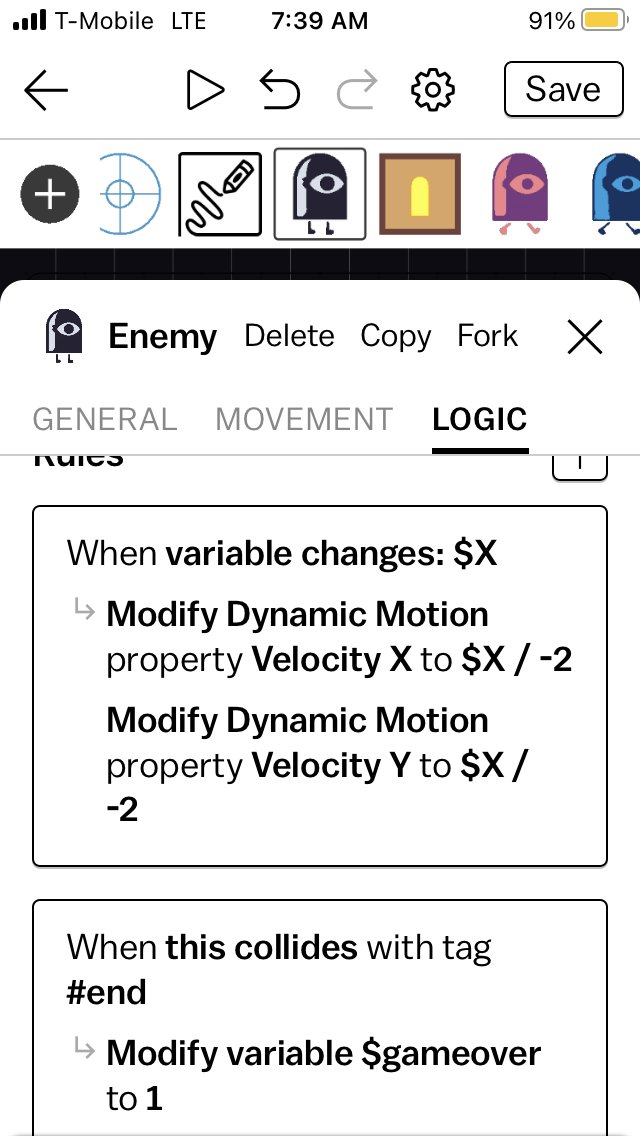
Sorry I wish I understood this more. I have variable X and Y change every frame, but I don’t know how I would translate that to the velocity of a sprite
---
### Author:  [@Noscow](https://forum.castle-engine.io/u/Noscow)
#### Post date: [October 24, 2024, 2:38pm UTC](https://forum.castle-engine.io/t/object-tracking/1392/5 "2024-10-24T14:38:34Z")
> [@Pizzacud](#):
>
> Sorry I wish I understood this more. I have variable X and Y change every frame, but I don’t know how I would translate that to the velocity of a sprite
Globally, speed - is the measure of the changes.
If you walk and you position changes to the 3 kilometers after 30 minutes, it means, you speed is 6 km/hour (or literally 3 km per 30 minutes).
Simitelly, if you have (X1, Y1) and (X2, Y2) speed is distance between them, devided to the time between measures.
So, you changes of the X and Y is already is speed.
But usually you need to use special variable to scale this speed for the game reality.
You can see it in this example:
> **[Designing user interface and handling events (press, update) within the view...](https://castle-engine.io/view_events)**
>
> Using basic view features: displaying images and handling events.
Chapter 6, “Move the player in the Update method”