# Need Help Understanding how to Assign a Transform as an Avatar of a Third Person Navigation Camera, After Following Instructions
**URL:** https://forum.castle-engine.io/t/need-help-understanding-how-to-assign-a-transform-as-an-avatar-of-a-third-person-navigation-camera-after-following-instructions/1144
**Category:** 3D
**Created:** [April 6, 2024, 1:39am UTC](https://forum.castle-engine.io/t/need-help-understanding-how-to-assign-a-transform-as-an-avatar-of-a-third-person-navigation-camera-after-following-instructions/1144 "2024-04-06T01:39:31Z")
**Posts on this page:** 20
**Page:** 3
### Author:  [@JPF12141999](https://forum.castle-engine.io/u/JPF12141999)
#### Post date: [May 7, 2024, 12:23pm UTC](https://forum.castle-engine.io/t/need-help-understanding-how-to-assign-a-transform-as-an-avatar-of-a-third-person-navigation-camera-after-following-instructions/1144/46 "2024-05-07T12:23:09Z")
Okay, awesome! Thank you so much!
I will share the source model with you as it is in the .glb format, so here it is:
I don’t believe it’s necessary to share the original .blend file, because the Castle Game Engine will never accept .blend files so it has to be converted to another format like .glb first out of necessity, and on top of that I deleted it to save space on my hard drive.
[JoshuaPFingerle-SandyDome.glb](https://forum.castle-engine.io/uploads/short-url/omukoWLsCAMCpxKrhNv5Y8hO1AZ.glb) (2.5 MB)
On an unrelated note, I have been working hard on implementing features like jumping, foot steps working in sync with your movements, and so on, but ran into an error about “Single mod Single not being overriden” when I tried to mod the SecondsPassed in the Update function by 2 to make the boot step sound play every 2 seconds while you’re running,
So I am assuming it is because the mod operator that comes with the engine by default only mods integers and not singles, in which case I will need to override it because the Update function’s SecondsPassed is a single by default when you start a blank project, and I assume it’s intended to be that way?
```auto
{ Main view, where most of the application logic takes place.
Feel free to use this code as a starting point for your own projects.
This template code is in public domain, unlike most other CGE code which
is covered by BSD or LGPL (see https://castle-engine.io/license). }
unit GameViewPlay;
interface
uses Classes,
CastleComponentSerialize, CastleUIControls, CastleControls,
CastleKeysMouse, CastleViewport, CastleScene, CastleSoundEngine, CastleVectors,
CastleCameras, CastleTransform, CastleInputs, CastleThirdPersonNavigation,
CastleDebugTransform, CastleSceneCore,
GameEnemy;
type
{ Main view, where most of the application logic takes place. }
TViewMain = class(TCastleView)
published
{ Components designed using CGE editor.
These fields will be automatically initialized at Start. }
MainViewport: TCastleViewport;
ThirdPersonNavigation: TCastleThirdPersonNavigation;
SceneLevel: TCastleScene;
AvatarTransform: TCastleTransform;
SceneLegs: TCastleScene;
SandyJump: TCastleSound;
SandyBootstep: TCastleSound;
private
Enemies: TEnemyList;
procedure NavigationSetAnimation(const Sender: TCastleThirdPersonNavigation;
const AnimationNames: array of String);
public
constructor Create(AOwner: TComponent); override;
procedure Start; override;
procedure Update(const SecondsPassed: Single; var HandleInput: Boolean); override;
function Press(const Event: TInputPressRelease): Boolean; override;
end;
var
ViewMain: TViewMain;
JumpAnimation: array[0..1] of String;
RunAnimation: array[0..1] of String;
SandyRunning: Boolean;
implementation
uses SysUtils;
{ TViewMain ----------------------------------------------------------------- }
constructor TViewMain.Create(AOwner: TComponent);
begin
inherited;
DesignUrl := 'castle-data:/gameviewmain.castle-user-interface';
end;
procedure TViewMain.Start;
begin
inherited;
{ Critical to make camera orbiting around and movement of avatar
to follow proper direction and up.
In the AvatarTransform local coordinate system,
the avatar is moving in +X, and has up (head) in +Z. }
AvatarTransform.Orientation := otUpZDirectionX;
ThirdPersonNavigation.MouseLook := true;
ThirdPersonNavigation.OnAnimation := {$ifdef FPC}@{$endif} NavigationSetAnimation;
{ Configure parameters to move nicely using old simple physics,
see examples/third_person_navigation for comments.
Use these if you decide to move using "direct" method
(when AvatarTransform.ChangeTransform = ctDirect,
or when AvatarTransform.ChangeTransform = ctAuto and
AvatarTransform has no rigid body and collider). }
AvatarTransform.MiddleHeight := 0.9;
AvatarTransform.GrowSpeed := 10.0;
AvatarTransform.FallSpeed := 10.0;
// a bit large, but it is scaled by AvatarTransform scale = 0.1, making it 0.3 effectively
AvatarTransform.CollisionSphereRadius := 3;
ThirdPersonNavigation.Init;
end;
procedure TViewMain.NavigationSetAnimation(const Sender: TCastleThirdPersonNavigation;
const AnimationNames: array of String);
begin
{ Example implementation that merely sets animation on SceneLegs,
to either TORSO_IDLE or TORSO_RUN.
Use castle-model-viewer (formerly view3dscene),
https://castle-engine.io/castle-model-viewer,
just double-click on MD3 file from CGE editor, to see available animations
(in "Animations" panel).
}
if AnimationNames[0] = 'idle' then
SceneLegs.AutoAnimation := 'TORSO_IDLE'
else
if AnimationNames[0] = 'jump' then
SceneLegs.AutoAnimation := 'TORSO_JUMP'
else
if AnimationNames[0] = 'run' then
SceneLegs.AutoAnimation := 'TORSO_RUN'
end;
procedure TViewMain.Update(const SecondsPassed: Single; var HandleInput: Boolean);
begin
inherited;
while (SandyRunning = true and (SecondsPassed mod 2.0) = 0) do
SoundEngine.Play(SandyBootstep);
{ This virtual method is executed every frame (many times per second). }
end;
function TViewMain.Press(const Event: TInputPressRelease): Boolean;
begin
{ Alternative version, using Items.PhysicsRayCast
(everything in world space coordinates).
This works equally well, showing it here just for reference.
RayCastResult := MainViewport.Items.PhysicsRayCast(
SceneAvatar.Parent.LocalToWorld(SceneAvatar.Middle),
SceneAvatar.Parent.LocalToWorldDirection(SceneAvatar.Direction),
MaxSingle,
AvatarRigidBody
);
Result := RayCastResult.Transform;
}
(* Alternative versions, using old physics,
see https://castle-engine.io/physics#_old_system_for_collisions_and_gravity .
They still work (even when you also use new physics).
if not AvatarRigidBody.Exists then
begin
{ SceneAvatar.RayCast tests a ray collision,
ignoring the collisions with SceneAvatar itself (so we don't detect our own
geometry as colliding). }
Result := SceneAvatar.RayCast(SceneAvatar.Middle, SceneAvatar.Direction);
end else
begin
{ When physics engine is working, we should not toggle Exists multiple
times in a single frame, which makes the curent TCastleTransform.RayCast not good.
So use Items.WorldRayCast, and secure from "hitting yourself" by just moving
the initial ray point by 0.5 units. }
Result := MainViewport.Items.WorldRayCast(
SceneAvatar.Middle + SceneAvatar.Direction * 0.5, SceneAvatar.Direction);
end;
*)
{ This virtual method is executed when user presses
a key, a mouse button, or touches a touch-screen.
Note that each UI control has also events like OnPress and OnClick.
These events can be used to handle the "press", if it should do something
specific when used in that UI control.
The TViewMain.Press method should be used to handle keys
not handled in children controls.
}
// Use this to handle keys:
{
if Event.IsKey(keyXxx) then
begin
// DoSomething;
Exit(true); // key was handled
end;
}
if Event.IsKey(keySpace) then
begin
JumpAnimation[0] := 'jump';
SoundEngine.Play(SandyJump);
AvatarTransform.Move(Vector3(0, 3, 0), false, true);
NavigationSetAnimation(ThirdPersonNavigation, JumpAnimation);
Exit(true);
end;
if Event.IsKey(keyArrowUp) then
begin
RunAnimation[0] := 'run';
SandyRunning := true;
NavigationSetAnimation(ThirdPersonNavigation, RunAnimation);
Exit(true);
end;
if Event.IsKey(keyArrowDown) then
begin
RunAnimation[0] := 'run';
SandyRunning := true;
NavigationSetAnimation(ThirdPersonNavigation, RunAnimation);
Exit(true);
end;
if Event.IsKey(keyArrowLeft) then
begin
RunAnimation[0] := 'run';
SandyRunning := true;
NavigationSetAnimation(ThirdPersonNavigation, RunAnimation);
Exit(true);
end;
if Event.IsKey(keyArrowRight) then
begin
RunAnimation[0] := 'run';
SandyRunning := true;
NavigationSetAnimation(ThirdPersonNavigation, RunAnimation);
Exit(true);
end;
end;
end.
```
---
### Author:  [@michalis](https://forum.castle-engine.io/u/michalis)
#### Post date: [May 7, 2024, 12:34pm UTC](https://forum.castle-engine.io/t/need-help-understanding-how-to-assign-a-transform-as-an-avatar-of-a-third-person-navigation-camera-after-following-instructions/1144/47 "2024-05-07T12:34:47Z")
A was asking for source, which is .blend file, not .glb file.
Indeed _Castle Game Engine_ doesn’t read .blend files, but it would be easy for me to check some stuff in Blender – e.g. whether you have non-uniform scale. Doesn’t matter, I can do without it.
But for your own sake, it’s very bad if you deleted the original Blender file. It makes any modifications to that GLB file impossible. If you can, find it, and keep it. You don’t have to send it to me, but you really should keep this file, to allow any possible modifications to your level.
As for “mod”, Pascal “mod” only operates on integers. There is " FloatModulo" in Castle Game Engine. But the lines where you try to use it
```delphi
while (SandyRunning = true and (SecondsPassed mod 2.0) = 0) do
SoundEngine.Play(SandyBootstep);
```
→ this doesn’t make much sense even if you would fix it to compile using `FloatModulo` somehow. Watching `SecondsPassed` with modulo, doing things in a loop here → will not lead to something sensible, from what I can see. Use `TCastleTimer` (search examples for demo) if you just want something to happen to every 2 seconds. Or sum up `SecondsPassed` to another variable and watch when it reaches 2.0 – your current code doesn’t do it.
---
### Author:  [@JPF12141999](https://forum.castle-engine.io/u/JPF12141999)
#### Post date: [May 7, 2024, 12:42pm UTC](https://forum.castle-engine.io/t/need-help-understanding-how-to-assign-a-transform-as-an-avatar-of-a-third-person-navigation-camera-after-following-instructions/1144/48 "2024-05-07T12:42:13Z")
Okay, awesome suggestions for alternatives! Thank you so much!
I will make sure not to delete the original .blend file in the future, because as you suggest the non-uniform scale I may have on certain objects could be explaining why it doesn’t work as intended.
I think TCastleTimer is my best bet for timing the footsteps, from researching how the examples do it.
---
### Author:  [@JPF12141999](https://forum.castle-engine.io/u/JPF12141999)
#### Post date: [May 7, 2024, 12:58pm UTC](https://forum.castle-engine.io/t/need-help-understanding-how-to-assign-a-transform-as-an-avatar-of-a-third-person-navigation-camera-after-following-instructions/1144/49 "2024-05-07T12:58:18Z")
Okay, I am having trouble figuring out how to do “every 2 seconds” without using a modulo, because I can see in the examples and the manual/API that the timer has functions to take a difference of seconds, but I am not sure how to make something happen exactly every 2 seconds regardless of the actual amount of seconds passed without using modulo.
Could you please help me out with this one, michaelis?
---
### Author:  [@JPF12141999](https://forum.castle-engine.io/u/JPF12141999)
#### Post date: [May 7, 2024, 12:59pm UTC](https://forum.castle-engine.io/t/need-help-understanding-how-to-assign-a-transform-as-an-avatar-of-a-third-person-navigation-camera-after-following-instructions/1144/50 "2024-05-07T12:59:38Z")
So I just don’t want it to happen only after 2 seconds period, but every multiple of 2 seconds as long as you are holding the key to run down.
---
### Author:  [@JPF12141999](https://forum.castle-engine.io/u/JPF12141999)
#### Post date: [May 7, 2024, 1:03pm UTC](https://forum.castle-engine.io/t/need-help-understanding-how-to-assign-a-transform-as-an-avatar-of-a-third-person-navigation-camera-after-following-instructions/1144/51 "2024-05-07T13:03:36Z")
As you suggested, I can just look it up in the examples but I can’t seem to find any that are specifically designed to do something every couple of seconds in their title, but maybe is there something like the platformer example?
I figured out the “mesh\_update” example, but again it doesn’t have a script to do everything every couple of seconds, but rather it seems to update the mesh every single second which isn’t what I want.
---
### Author:  [@JPF12141999](https://forum.castle-engine.io/u/JPF12141999)
#### Post date: [May 7, 2024, 1:28pm UTC](https://forum.castle-engine.io/t/need-help-understanding-how-to-assign-a-transform-as-an-avatar-of-a-third-person-navigation-camera-after-following-instructions/1144/52 "2024-05-07T13:28:27Z")
Okay, I think I got it - I can reset the timer back to 0 after 2 seconds have passed, so it starts at 0, waits 2 seconds, then goes back to 0 forever as long as you are holding down the keys to run.
---
### Author:  [@JPF12141999](https://forum.castle-engine.io/u/JPF12141999)
#### Post date: [May 7, 2024, 1:59pm UTC](https://forum.castle-engine.io/t/need-help-understanding-how-to-assign-a-transform-as-an-avatar-of-a-third-person-navigation-camera-after-following-instructions/1144/53 "2024-05-07T13:59:12Z")
Okay, so I tried the method with this code in full in the gameviewplay.pas of the project:
```auto
{ Main view, where most of the application logic takes place.
Feel free to use this code as a starting point for your own projects.
This template code is in public domain, unlike most other CGE code which
is covered by BSD or LGPL (see https://castle-engine.io/license). }
unit GameViewPlay;
interface
uses Classes,
CastleComponentSerialize, CastleUIControls, CastleControls,
CastleKeysMouse, CastleViewport, CastleScene, CastleSoundEngine, CastleVectors,
CastleCameras, CastleTransform, CastleInputs, CastleThirdPersonNavigation,
CastleDebugTransform, CastleSceneCore, CastleTimeUtils,
GameEnemy;
type
{ Main view, where most of the application logic takes place. }
TViewMain = class(TCastleView)
published
{ Components designed using CGE editor.
These fields will be automatically initialized at Start. }
MainViewport: TCastleViewport;
ThirdPersonNavigation: TCastleThirdPersonNavigation;
SceneLevel: TCastleScene;
AvatarTransform: TCastleTransform;
SceneLegs: TCastleScene;
SandyJump: TCastleSound;
SandyBootstep: TCastleSound;
private
Enemies: TEnemyList;
procedure NavigationSetAnimation(const Sender: TCastleThirdPersonNavigation;
const AnimationNames: array of String);
public
constructor Create(AOwner: TComponent); override;
procedure Start; override;
procedure Update(const SecondsPassed: Single; var HandleInput: Boolean); override;
function Press(const Event: TInputPressRelease): Boolean; override;
end;
var
ViewMain: TViewMain;
RunningTimeStart: TTimerResult;
RunningSeconds: TFloatTime;
JumpAnimation: array[0..1] of String;
RunAnimation: array[0..1] of String;
SandyRunning: Boolean;
implementation
uses SysUtils;
{ TViewMain ----------------------------------------------------------------- }
constructor TViewMain.Create(AOwner: TComponent);
begin
inherited;
DesignUrl := 'castle-data:/gameviewmain.castle-user-interface';
end;
procedure TViewMain.Start;
begin
inherited;
{ Critical to make camera orbiting around and movement of avatar
to follow proper direction and up.
In the AvatarTransform local coordinate system,
the avatar is moving in +X, and has up (head) in +Z. }
AvatarTransform.Orientation := otUpZDirectionX;
ThirdPersonNavigation.MouseLook := true;
ThirdPersonNavigation.OnAnimation := {$ifdef FPC}@{$endif} NavigationSetAnimation;
{ Configure parameters to move nicely using old simple physics,
see examples/third_person_navigation for comments.
Use these if you decide to move using "direct" method
(when AvatarTransform.ChangeTransform = ctDirect,
or when AvatarTransform.ChangeTransform = ctAuto and
AvatarTransform has no rigid body and collider). }
AvatarTransform.MiddleHeight := 0.9;
AvatarTransform.GrowSpeed := 10.0;
AvatarTransform.FallSpeed := 10.0;
// a bit large, but it is scaled by AvatarTransform scale = 0.1, making it 0.3 effectively
AvatarTransform.CollisionSphereRadius := 3;
ThirdPersonNavigation.Init;
end;
procedure TViewMain.NavigationSetAnimation(const Sender: TCastleThirdPersonNavigation;
const AnimationNames: array of String);
begin
{ Example implementation that merely sets animation on SceneLegs,
to either TORSO_IDLE or TORSO_RUN.
Use castle-model-viewer (formerly view3dscene),
https://castle-engine.io/castle-model-viewer,
just double-click on MD3 file from CGE editor, to see available animations
(in "Animations" panel).
}
if AnimationNames[0] = 'idle' then
SceneLegs.AutoAnimation := 'TORSO_IDLE'
else
if AnimationNames[0] = 'jump' then
SceneLegs.AutoAnimation := 'TORSO_JUMP'
else
if AnimationNames[0] = 'run' then
SceneLegs.AutoAnimation := 'TORSO_RUN'
end;
procedure TViewMain.Update(const SecondsPassed: Single; var HandleInput: Boolean);
begin
inherited;
RunningTimeStart := Timer;
RunningSeconds := TimerSeconds(Timer, RunningTimeStart);
while ((SandyRunning = true) and (RunningSeconds = 2)) do
begin
SoundEngine.Play(SandyBootstep);
RunningTimeStart := 0.00;
end;
{ This virtual method is executed every frame (many times per second). }
end;
function TViewMain.Press(const Event: TInputPressRelease): Boolean;
begin
{ Alternative version, using Items.PhysicsRayCast
(everything in world space coordinates).
This works equally well, showing it here just for reference.
RayCastResult := MainViewport.Items.PhysicsRayCast(
SceneAvatar.Parent.LocalToWorld(SceneAvatar.Middle),
SceneAvatar.Parent.LocalToWorldDirection(SceneAvatar.Direction),
MaxSingle,
AvatarRigidBody
);
Result := RayCastResult.Transform;
}
(* Alternative versions, using old physics,
see https://castle-engine.io/physics#_old_system_for_collisions_and_gravity .
They still work (even when you also use new physics).
if not AvatarRigidBody.Exists then
begin
{ SceneAvatar.RayCast tests a ray collision,
ignoring the collisions with SceneAvatar itself (so we don't detect our own
geometry as colliding). }
Result := SceneAvatar.RayCast(SceneAvatar.Middle, SceneAvatar.Direction);
end else
begin
{ When physics engine is working, we should not toggle Exists multiple
times in a single frame, which makes the curent TCastleTransform.RayCast not good.
So use Items.WorldRayCast, and secure from "hitting yourself" by just moving
the initial ray point by 0.5 units. }
Result := MainViewport.Items.WorldRayCast(
SceneAvatar.Middle + SceneAvatar.Direction * 0.5, SceneAvatar.Direction);
end;
*)
{ This virtual method is executed when user presses
a key, a mouse button, or touches a touch-screen.
Note that each UI control has also events like OnPress and OnClick.
These events can be used to handle the "press", if it should do something
specific when used in that UI control.
The TViewMain.Press method should be used to handle keys
not handled in children controls.
}
// Use this to handle keys:
{
if Event.IsKey(keyXxx) then
begin
// DoSomething;
Exit(true); // key was handled
end;
}
if Event.IsKey(keySpace) then
begin
JumpAnimation[0] := 'jump';
SoundEngine.Play(SandyJump);
AvatarTransform.Move(Vector3(0, 3, 0), false, true);
NavigationSetAnimation(ThirdPersonNavigation, JumpAnimation);
Exit(true);
end;
if Event.IsKey(keyArrowUp) then
begin
RunAnimation[0] := 'run';
SandyRunning := true;
NavigationSetAnimation(ThirdPersonNavigation, RunAnimation);
Exit(true);
end;
if Event.IsKey(keyArrowDown) then
begin
RunAnimation[0] := 'run';
SandyRunning := true;
NavigationSetAnimation(ThirdPersonNavigation, RunAnimation);
Exit(true);
end;
if Event.IsKey(keyArrowLeft) then
begin
RunAnimation[0] := 'run';
SandyRunning := true;
NavigationSetAnimation(ThirdPersonNavigation, RunAnimation);
Exit(true);
end;
if Event.IsKey(keyArrowRight) then
begin
RunAnimation[0] := 'run';
SandyRunning := true;
NavigationSetAnimation(ThirdPersonNavigation, RunAnimation);
Exit(true);
end;
end;
end.
```
Unfortunately, I get that when I try resetting the timer back to 0, I am told the types of “Single” and the expected “TTimerResult” are incompatible, even though from looking up on [this](https://castle-engine.io/apidoc/html/CastleTimeUtils.TTimerResult.html) API page for the TTimerResult details, that it is of type Double specifically, and I typed the “0.00” in the Double format and not Single, if I am correct in assuming Double means “double precision decimal number”.
Do you know the correct way to reset the timer back to 0 so that way I can make the sound happen every 2 seconds forever and not just after only 2 seconds period and then stop?
I am assuming it is probably because the TTimerResult is a record of the current time and cannot be altered in the usual way by the way it is programmed in, so do you know the correct way to reset the timer back to 0?
Thank you in advance.
---
### Author:  [@michalis](https://forum.castle-engine.io/u/michalis)
#### Post date: [May 7, 2024, 2:19pm UTC](https://forum.castle-engine.io/t/need-help-understanding-how-to-assign-a-transform-as-an-avatar-of-a-third-person-navigation-camera-after-following-instructions/1144/54 "2024-05-07T14:19:55Z")
`TTimerResult` is not compatible with `Double`. The API page to which you link yourself tells this. `TTimerResult` is a record, says so right at the beginning.
Only the `TFloatTime` is `Double` and thus compatible with `Single`.
---
### Author:  [@JPF12141999](https://forum.castle-engine.io/u/JPF12141999)
#### Post date: [May 7, 2024, 2:20pm UTC](https://forum.castle-engine.io/t/need-help-understanding-how-to-assign-a-transform-as-an-avatar-of-a-third-person-navigation-camera-after-following-instructions/1144/55 "2024-05-07T14:20:37Z")
Okay, so do you know the correct way to reset the timer back to 0 in this case?
---
### Author:  [@michalis](https://forum.castle-engine.io/u/michalis)
#### Post date: [May 7, 2024, 2:21pm UTC](https://forum.castle-engine.io/t/need-help-understanding-how-to-assign-a-transform-as-an-avatar-of-a-third-person-navigation-camera-after-following-instructions/1144/56 "2024-05-07T14:21:22Z")
Moreover, looking at code, I am not clear what you try to do. You don’t need to use `Timer` or `TTimerResult`.
You need to use either
- `TCastleTimer`
- or sum times from `SecondsPassed` yourself until then reach given time.
---
### Author:  [@JPF12141999](https://forum.castle-engine.io/u/JPF12141999)
#### Post date: [May 7, 2024, 2:22pm UTC](https://forum.castle-engine.io/t/need-help-understanding-how-to-assign-a-transform-as-an-avatar-of-a-third-person-navigation-camera-after-following-instructions/1144/57 "2024-05-07T14:22:52Z")
Okay, so I have to be more specific about what type of timer I am using, TCastleTimer works differently than Timer.
I will make sure to look up the API page of TCastleTimer, because again the examples that come with the latest public version don’t seem to use TCastleTimer anywhere obvious.
---
### Author:  [@JPF12141999](https://forum.castle-engine.io/u/JPF12141999)
#### Post date: [May 7, 2024, 2:25pm UTC](https://forum.castle-engine.io/t/need-help-understanding-how-to-assign-a-transform-as-an-avatar-of-a-third-person-navigation-camera-after-following-instructions/1144/58 "2024-05-07T14:25:18Z")
Okay, yeah, it’s very obvious it has “OnTimer” property and “IntervalSeconds” property, that which specify what happens every couple seconds, and exactly how long the interval is respectively.
---
### Author:  [@michalis](https://forum.castle-engine.io/u/michalis)
#### Post date: [May 7, 2024, 2:29pm UTC](https://forum.castle-engine.io/t/need-help-understanding-how-to-assign-a-transform-as-an-avatar-of-a-third-person-navigation-camera-after-following-instructions/1144/59 "2024-05-07T14:29:13Z")
> [@JPF12141999](#):
>
> I will make sure to look up the API page of TCastleTimer, because again the examples that come with the latest public version don’t seem to use TCastleTimer anywhere obvious.
A search in CGE examples show where TCastleTimer is used:
- examples/user\_interface/timer\_test/
- examples/user\_interface/test\_all\_view\_events/
- examples/physics/physics\_2d\_game\_sopwith/
- examples/audio/game\_3d\_sound/
That’s what I assumed you will find when I asked
> Use `TCastleTimer` (search examples for demo)
If you’re not sure how to search examples – familiarize with your text editor, e.g. VS Code has “Search” to find in multiple files.
In general, please spend more time researching the answer, instead of writing multiple posts on this forum. I can see you type an answer sometimes in a few seconds after you get some advise – this is not a good reaction. When you get some advise on this forum, please spend some time researching it and trying to understand, try to implement the indicated solution, try to search the Internet for the solutions, try to do the solution in a simple test program etc.
---
### Author:  [@JPF12141999](https://forum.castle-engine.io/u/JPF12141999)
#### Post date: [May 7, 2024, 2:32pm UTC](https://forum.castle-engine.io/t/need-help-understanding-how-to-assign-a-transform-as-an-avatar-of-a-third-person-navigation-camera-after-following-instructions/1144/60 "2024-05-07T14:32:48Z")
Okay. I will make sure not to post a ton of posts at once but make sure to follow the advice, but I still stand by the TCastleTimer not being immediately obvious where to find it in the many examples that come with the game engine.
I have a Windows computer so I don’t have VS Code by default, but I know I can just dig manually and use trail and error to figure out where things are.
I will follow the examples you posted ASAP, like I do for anything else.
---
### Author:  [@JPF12141999](https://forum.castle-engine.io/u/JPF12141999)
#### Post date: [May 7, 2024, 3:23pm UTC](https://forum.castle-engine.io/t/need-help-understanding-how-to-assign-a-transform-as-an-avatar-of-a-third-person-navigation-camera-after-following-instructions/1144/61 "2024-05-07T15:23:12Z")
I figured out by what the compiler tells me the physics problem is indeed because I messed up, like it gives warning about meshes having non uniform scale, and so I will have to go back and re-do pretty much everything.
I also figured out how to add the timer for the footsteps using the example from physics\_2d\_game\_sopwith, so I should be set to go with all of that after reading all your advice.
---
### Author:  [@michalis](https://forum.castle-engine.io/u/michalis)
#### Post date: [May 7, 2024, 5:38pm UTC](https://forum.castle-engine.io/t/need-help-understanding-how-to-assign-a-transform-as-an-avatar-of-a-third-person-navigation-camera-after-following-instructions/1144/62 "2024-05-07T17:38:33Z")
> [@JPF12141999](#):
>
> I have a Windows computer so I don’t have VS Code by default, but I know I can just dig manually and use trail and error to figure out where things are.
Install _VS Code_ in Windows then 🙂 Nobody has _VS Code_ installed in their system by default.
To be clear, I don’t require specifically _VS Code_ (though I use it myself and recommend). You can use many other text editors. _Lazarus_ IDE, _Delphi_ IDE, or _Notepad++_ are all reasonable choices that I know people use.
I just advise any “decent” text editor that gives you _“find in files”_ (aka “grep”) functionality. You should be able to search Castle Game Engine for a text like `TCastleTimer` easily – every decent text editor (all editors I mentioned above!) gives you that possibility. If your text editor doesn’t give this functionality, then install a better one.
As for collision detection:
1. Fixed in Castle Game Engine!
2. Moreover, I was confused in my head too when I suggested to use `AvatarTransform.CollisionSphereRadius := 5` in your code. Actually the correct value should be `AvatarTransform.CollisionSphereRadius := 0.5` , that is: CollisionSphereRadius is expressed in the _parent_ coordinate system of `AvatarTransform`.
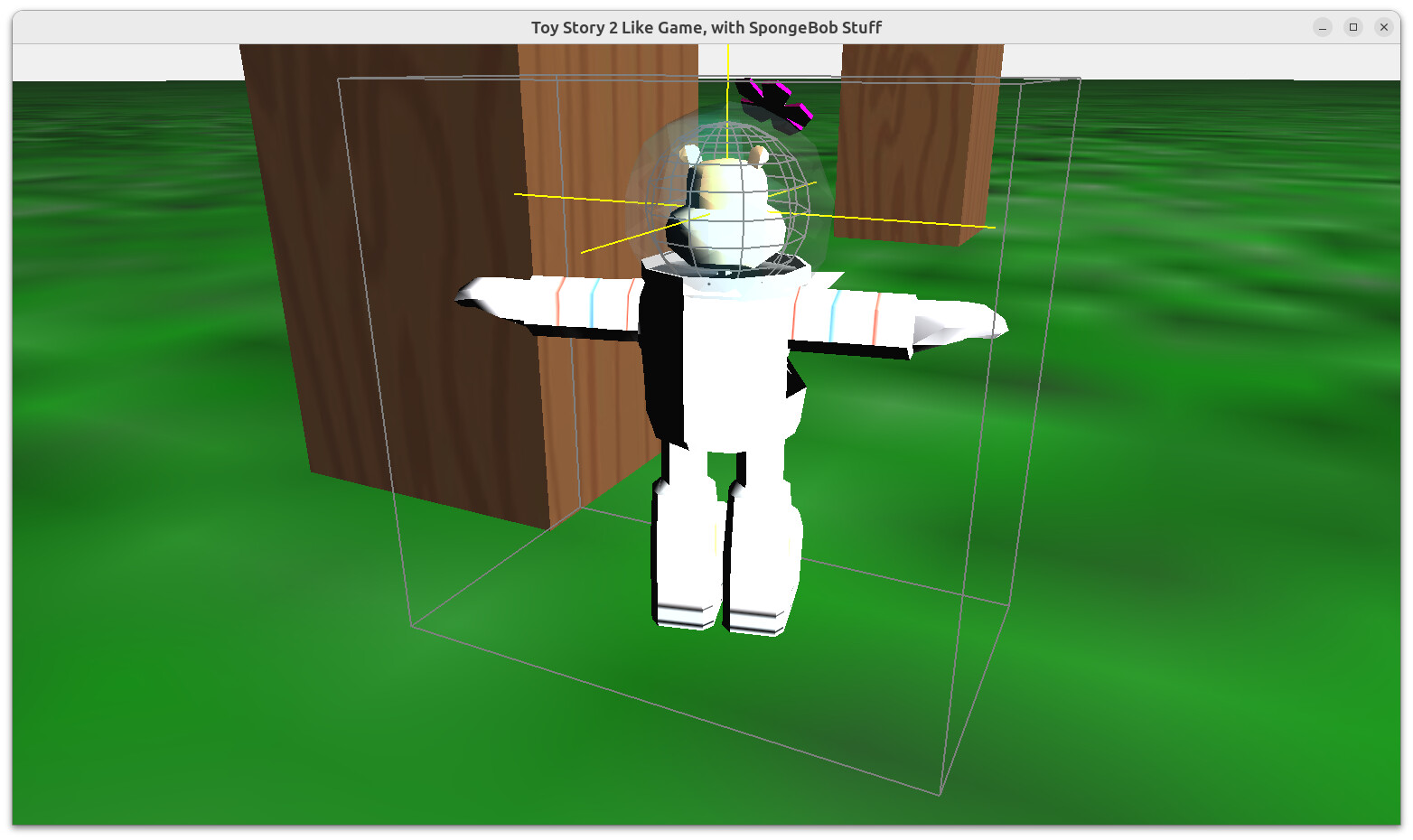
3. You can also add DebugAvatar to actually visualize this sphere radius. I added code how to do this in the PR too.
After the above changes, the avatar nicely collides with walls it should (boxes, table legs) and can also enter into the corridor where it fits.
---
### Author:  [@JPF12141999](https://forum.castle-engine.io/u/JPF12141999)
#### Post date: [May 7, 2024, 5:48pm UTC](https://forum.castle-engine.io/t/need-help-understanding-how-to-assign-a-transform-as-an-avatar-of-a-third-person-navigation-camera-after-following-instructions/1144/63 "2024-05-07T17:48:36Z")
Awesome! Thank you so so so much! I thought it would take months to fix but you fixed it ASAP. You’re the best!
Now that the physics should work properly after I have upgraded, without me needing to re-scale or redo anything like I first thought, I should be able to make a master piece of a game. 🙂
---
### Author:  [@michalis](https://forum.castle-engine.io/u/michalis)
#### Post date: [May 7, 2024, 7:22pm UTC](https://forum.castle-engine.io/t/need-help-understanding-how-to-assign-a-transform-as-an-avatar-of-a-third-person-navigation-camera-after-following-instructions/1144/64 "2024-05-07T19:22:11Z")
> [@JPF12141999](#):
>
> Now that the physics should work properly after I have upgraded, without me needing to re-scale or redo anything like I first thought, I should be able to make a master piece of a game. 🙂
To be clear, I fixed in _Castle Game Engine_ how collisions are calculated for the case of “avatar versus the world” for TCastleThirdPersonNavigation. And this is special case, using “old simple physics”. And your avatar and main level had proper (uniform) scale.
If you plan to use physics for anything else (e.g. other “object versus object” collisions, see [Physics | Manual | Castle Game Engine](https://castle-engine.io/physics) ) then you still have to address all the warnings you see at
```auto
Warning: Using non-uniform scale 5 1 5 for physics body (collider MeshColliderOil) is not fully supported
```
The non-uniform scale is still not fully supported. This is a common limitation of physics engines, including Kraft we currently use, but likely applying to all physics engines. Even big engines like Unity or Unreal have the same recommendation: physics really only works correctly when scale is uniform. That is, all 3 scale coordinates (X, Y, Z) should be equal. So scale like (1, 1, 1) is OK, scale (0.1, 0.1, 0.1) is OK, but scale (5, 1, 5) is not OK.
You have to decide yourself whether it matters to you. I don’t know how else do you plan to use physics, e.g. do you plan to do explosions or shoot missiles using physics (as documented on [Physics | Manual | Castle Game Engine](https://castle-engine.io/physics) ). If you do, then be prepared that non-uniform scale will cause problems.
---
### Author:  [@JPF12141999](https://forum.castle-engine.io/u/JPF12141999)
#### Post date: [May 7, 2024, 7:28pm UTC](https://forum.castle-engine.io/t/need-help-understanding-how-to-assign-a-transform-as-an-avatar-of-a-third-person-navigation-camera-after-following-instructions/1144/65 "2024-05-07T19:28:24Z")
Okay, thank you for the heads up! I will definitely figure out how I can re-do the scaling then, because I will still need to do object on object collisions for things like lasers touching enemies, which will be generated like the bouncing balls are in the FPS game and won’t be on the object hiearchy in the editor, like anything generated with code.
[Previous page](https://forum.castle-engine.io/t/need-help-understanding-how-to-assign-a-transform-as-an-avatar-of-a-third-person-navigation-camera-after-following-instructions/1144.md?page=2)
[Next page](https://forum.castle-engine.io/t/need-help-understanding-how-to-assign-a-transform-as-an-avatar-of-a-third-person-navigation-camera-after-following-instructions/1144.md?page=4)