# Need Help Understanding how to Assign a Transform as an Avatar of a Third Person Navigation Camera, After Following Instructions
**URL:** https://forum.castle-engine.io/t/need-help-understanding-how-to-assign-a-transform-as-an-avatar-of-a-third-person-navigation-camera-after-following-instructions/1144
**Category:** 3D
**Created:** [April 6, 2024, 1:39am UTC](https://forum.castle-engine.io/t/need-help-understanding-how-to-assign-a-transform-as-an-avatar-of-a-third-person-navigation-camera-after-following-instructions/1144 "2024-04-06T01:39:31Z")
**Posts on this page:** 20
**Page:** 2
### Author:  [@JPF12141999](https://forum.castle-engine.io/u/JPF12141999)
#### Post date: [April 29, 2024, 7:04pm UTC](https://forum.castle-engine.io/t/need-help-understanding-how-to-assign-a-transform-as-an-avatar-of-a-third-person-navigation-camera-after-following-instructions/1144/21 "2024-04-29T19:04:38Z")
Okay, so I tried figuring out how to correct the problem myself because you basically already specified what it was (the camera being orthogonal to a side vector of the avatar), by rotating the camera to face the player correctly, and it actually works!
So yeah, I think I am all set for that one now, all I have to do now is actually make the character moveable as it currently isn’t right now, but I think those details I can figure out on my own given that I know what a procedure is conecptually, as well as how to assign it a specific function/duty, and all of that.
---
### Author:  [@JPF12141999](https://forum.castle-engine.io/u/JPF12141999)
#### Post date: [April 29, 2024, 7:12pm UTC](https://forum.castle-engine.io/t/need-help-understanding-how-to-assign-a-transform-as-an-avatar-of-a-third-person-navigation-camera-after-following-instructions/1144/22 "2024-04-29T19:12:52Z")
Okay, actually I was only partially right; when I try changing “Distance to Avatar Target” property of the third person navigation, I don’t get any changes and I still get the camera stuck between the character’s legs, after I point the camera in the correct direction.
I will wait patiently for your solution instead, as I am assuming there is something extra I am missing that I don’t understand how to figure out myself.
---
### Author:  [@michalis](https://forum.castle-engine.io/u/michalis)
#### Post date: [April 29, 2024, 11:16pm UTC](https://forum.castle-engine.io/t/need-help-understanding-how-to-assign-a-transform-as-an-avatar-of-a-third-person-navigation-camera-after-following-instructions/1144/23 "2024-04-29T23:16:51Z")
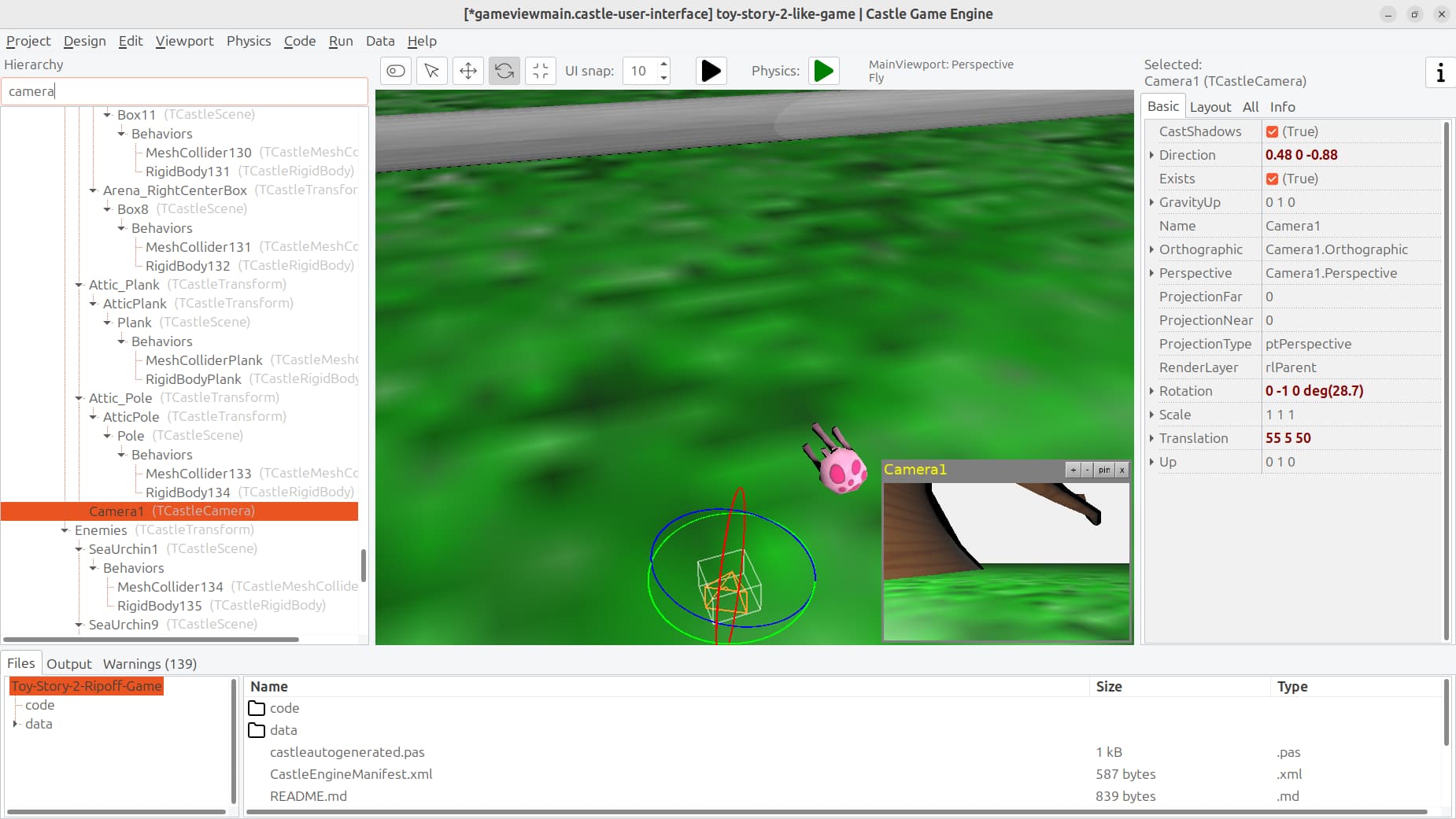
Sorry for delay, it took me some time because I decided to implement a new feature, not related to your question in this thread, but I think it will be useful to you anyway: to easier navigate in a larger design like yours I implemented ability to easily find component by name.
- You can now use editor menu item “Edit → Find” (Ctrl + F) to show / hide a text box where you can type component name.
- Typing a name there, like “camera”, will search and select the first component matching given name (as a substring, so e.g. it will find `Camera1`).
- Pressing F3 (or using menu item “Edit → Find Next”) searches for next occurrence.
- This should allow to move around in a larger design much easier. E.g. you can search for “camera” or “submarine” to easily select components with matching names.
- The feature will be available in a few hours in downloads on [Download | Castle Game Engine](https://castle-engine.io/download) . To know when it’s available, you can observe this page: [Comparing snapshot...master · castle-engine/castle-engine · GitHub](https://github.com/castle-engine/castle-engine/compare/snapshot...master) . When it will _no longer show the commit_ titled _“Find (Ctrl+F) and Find Next (F3) in editor…”_ it means that given feature is available now in editor. You can then download the latest engine version and try it out.
This post is a bit off-topic – I know it’s not a feature related to your question. But I hope it will be useful to navigate a larger design for you.
I will investigate and answer the actual question here (how to use 3rd person navigation so it doesn’t result in blank screen or block) soon, in next post.
---
### Author:  [@michalis](https://forum.castle-engine.io/u/michalis)
#### Post date: [April 30, 2024, 1:50am UTC](https://forum.castle-engine.io/t/need-help-understanding-how-to-assign-a-transform-as-an-avatar-of-a-third-person-navigation-camera-after-following-instructions/1144/24 "2024-04-30T01:50:48Z")
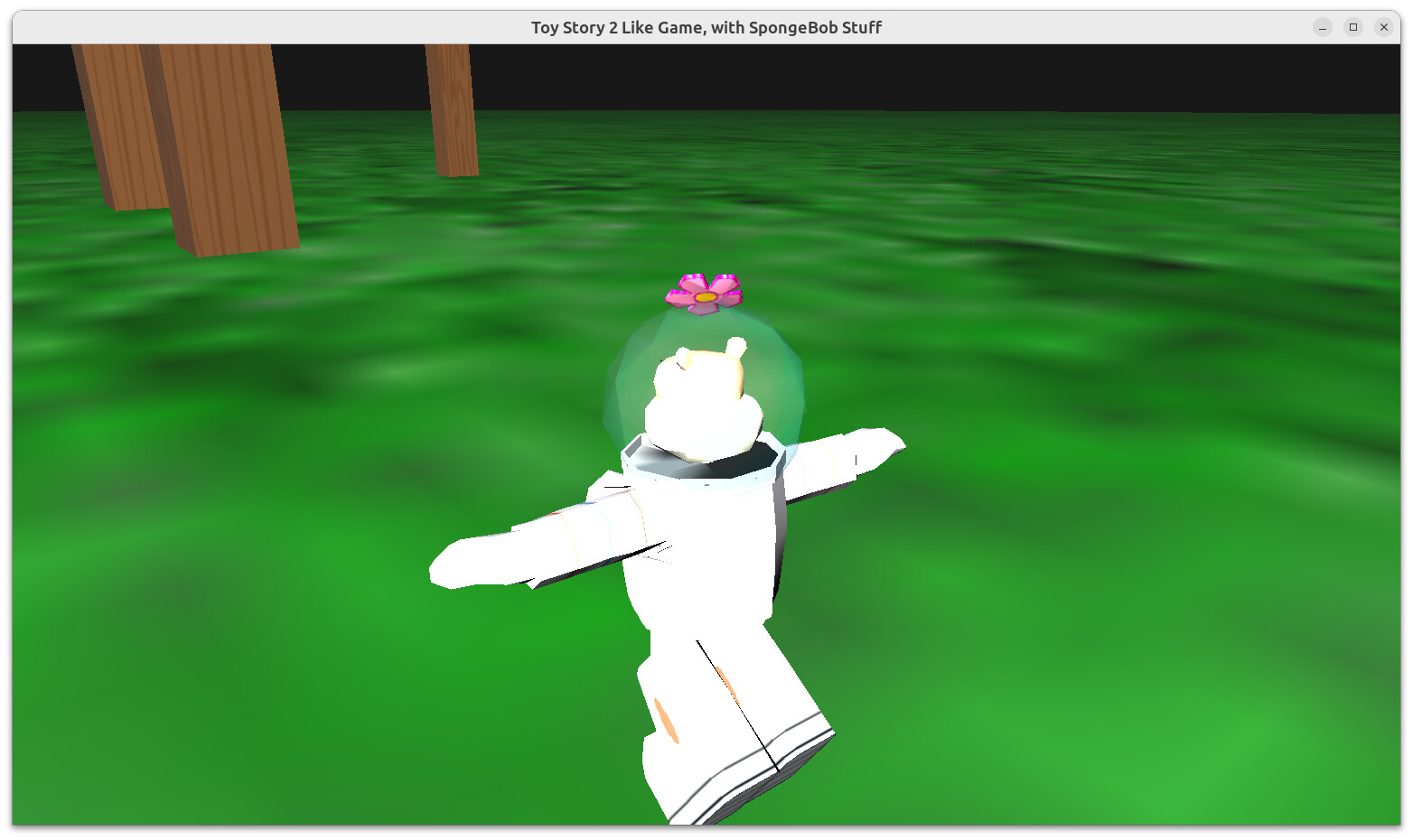
I have a few notes, but I also discovered some things I want to improve in the engine. Your `AvatarTransform` has a rotation for which our code was not prepared for – making what we like to consider “direction” match “up”. I’m adding additional properties to enable configuring it nicely in the engine.
I have a working camera “orbiting” around and zooming with mouse wheel around Sandy’s head. I still have to investigate why actual movement (AWSD) doesn’t work out-of-the-box, probably also because of direction / up mixup.
Hold on tight, I’ll get back to this thread with detailed answer tomorrow!
---
### Author:  [@JPF12141999](https://forum.castle-engine.io/u/JPF12141999)
#### Post date: [April 30, 2024, 9:58am UTC](https://forum.castle-engine.io/t/need-help-understanding-how-to-assign-a-transform-as-an-avatar-of-a-third-person-navigation-camera-after-following-instructions/1144/25 "2024-04-30T09:58:12Z")
Yes, I intentionally did it using a transform with multiple scenes because as I discussed earlier in another thread, I cannot seem to animate mutliple parts independently of each other, like a human skeleton works, for single scenes.
Do you know if there is a way to do, using single scenes, something like animating the arms shooting while the legs run from seperate animations, or is there no way to do that?
---
### Author:  [@michalis](https://forum.castle-engine.io/u/michalis)
#### Post date: [April 30, 2024, 10:02am UTC](https://forum.castle-engine.io/t/need-help-understanding-how-to-assign-a-transform-as-an-avatar-of-a-third-person-navigation-camera-after-following-instructions/1144/26 "2024-04-30T10:02:48Z")
> [@JPF12141999](#):
>
> Do you know if there is a way to do, using single scenes, something like animating the arms shooting while the legs run from seperate animations, or is there no way to do that?
There is a way to play multiple animations on one 3D model, see example examples/animations/simultaneous\_animations\_one\_scene/ , [castle-engine/examples/animations/simultaneous\_animations\_one\_scene at master · castle-engine/castle-engine · GitHub](https://github.com/castle-engine/castle-engine/tree/master/examples/animations/simultaneous_animations_one_scene/) . It requires to design animation in a special way (each animation must “touch” different bones). Frankly I wouldn’t advise you to go with this change – multiple model parts should be good also, and you have them already set up, you will just have to handle `SetAnimation`.
And as for avatar transformation, that’s something I will want to fix on CGE side, I’m working on it. We should cope with any AvatarTransfom initial transformation on CGE — it’s a bug that we don’t by default. I’ll get back here when it’s done.
---
### Author:  [@JPF12141999](https://forum.castle-engine.io/u/JPF12141999)
#### Post date: [April 30, 2024, 10:02am UTC](https://forum.castle-engine.io/t/need-help-understanding-how-to-assign-a-transform-as-an-avatar-of-a-third-person-navigation-camera-after-following-instructions/1144/27 "2024-04-30T10:02:54Z")
I tried matching the “Up” and “Direction” myself, but unfortunately one changes automatically when I change the other so they end up never being exactly the same.
I assume this is intentional for the current public version, and your aim is to correct it later.
---
### Author:  [@JPF12141999](https://forum.castle-engine.io/u/JPF12141999)
#### Post date: [April 30, 2024, 10:03am UTC](https://forum.castle-engine.io/t/need-help-understanding-how-to-assign-a-transform-as-an-avatar-of-a-third-person-navigation-camera-after-following-instructions/1144/28 "2024-04-30T10:03:49Z")
Okay, that makes sense too about the avatar transform thing. Thank you for explaining that it was a bug and not something wrong I am doing! 🙂
---
### Author:  [@michalis](https://forum.castle-engine.io/u/michalis)
#### Post date: [April 30, 2024, 10:05am UTC](https://forum.castle-engine.io/t/need-help-understanding-how-to-assign-a-transform-as-an-avatar-of-a-third-person-navigation-camera-after-following-instructions/1144/29 "2024-04-30T10:05:46Z")
> [@JPF12141999](#):
>
> I tried matching the “Up” and “Direction” myself, but unfortunately one changes automatically when I change the other so they end up never being exactly the same.
>
> I assume this is intentional for the current public version, and your aim is to correct it later.
This is intentional and correct, not planned to change. `Direction` and `Up` must be orthogonal, changing one (sometimes) must change the other. In total, they both actually just set `Rotation`. See the `Direction` docs ( [Castle Game Engine: CastleTransform: Class TCastleTransform](https://castle-engine.io/apidoc/html/CastleTransform.TCastleTransform.html#Direction) ) to understand how it works.
Anyhow, we should cope with any rotation for `AvatarTransform`. I’m investigating/fixing this in CGE, I’ll get back here.
---
### Author:  [@JPF12141999](https://forum.castle-engine.io/u/JPF12141999)
#### Post date: [April 30, 2024, 10:07am UTC](https://forum.castle-engine.io/t/need-help-understanding-how-to-assign-a-transform-as-an-avatar-of-a-third-person-navigation-camera-after-following-instructions/1144/30 "2024-04-30T10:07:10Z")
Okay. Thank you for clarifying that as well.
Do you know how you got the camera to work correctly?
I know I can just set the animations manually, which you explained how to do already using the overriden SetAnimation function, as well as move the character manually using the appropriate code (like move by a specific Vector3 when the player presses a key).
---
### Author:  [@JPF12141999](https://forum.castle-engine.io/u/JPF12141999)
#### Post date: [April 30, 2024, 10:43am UTC](https://forum.castle-engine.io/t/need-help-understanding-how-to-assign-a-transform-as-an-avatar-of-a-third-person-navigation-camera-after-following-instructions/1144/31 "2024-04-30T10:43:41Z")
Or are you stating in the next version and not my current version the camera will work correctly, IE you are developing the version right now and all I have to do is sit tight and wait patiently?
---
### Author:  [@michalis](https://forum.castle-engine.io/u/michalis)
#### Post date: [April 30, 2024, 11:04am UTC](https://forum.castle-engine.io/t/need-help-understanding-how-to-assign-a-transform-as-an-avatar-of-a-third-person-navigation-camera-after-following-instructions/1144/32 "2024-04-30T11:04:18Z")
I am investigating and will get back here. I’ve done 1 improvement, but it doesn’t solve the actual issue.
So I’m saying that “I don’t know yet” 🙂 But I’m investigating and will get back here – with either comments what to change in your project, or fixes to CGE to behave better for your use-case, and most likely: with both. For now please wait patiently, I’m working on it right now.
The goal is to have TCastleThirdPersonNavigation that works (initial camera sensible, and avatar movement) and that is intuitive to use.
---
### Author:  [@JPF12141999](https://forum.castle-engine.io/u/JPF12141999)
#### Post date: [April 30, 2024, 11:06am UTC](https://forum.castle-engine.io/t/need-help-understanding-how-to-assign-a-transform-as-an-avatar-of-a-third-person-navigation-camera-after-following-instructions/1144/33 "2024-04-30T11:06:56Z")
Oh, that makes sense - you need more time to investigate in more detail about what exactly is wrong, and there isn’t a definite answer about what exactly I need to do yet.
So I know to just wait patiently as you continue the great work 🙂
---
### Author:  [@michalis](https://forum.castle-engine.io/u/michalis)
#### Post date: [May 6, 2024, 1:58am UTC](https://forum.castle-engine.io/t/need-help-understanding-how-to-assign-a-transform-as-an-avatar-of-a-third-person-navigation-camera-after-following-instructions/1144/34 "2024-05-06T01:58:10Z")
Sorry for delay. I got sick last week and am still recovering. But I have answers.
1. First of all:
2. Your application had effectively 2 instances of `TCastleThirdPersonNavigation`. One is `ThirdPersonNavigation`, the one you have designed in editor, and another is `ThirdPersonNav`, the one you have created at run-time. They will both try to control the camera – it will not work OK.
3. You need to set `PreciseCollisions` to `true` on `Scene1`. The camera (used by `TCastleThirdPersonNavigation`) is using this (old) system for collisions. See [Physics | Manual | Castle Game Engine](https://castle-engine.io/physics#_old_system_for_collisions_and_gravity) .
4. As your `AvatarTransform` has non-standard rotation, you have to set
5. You didn’t call `Init` method of the navigation. See the API docs ( [Castle Game Engine: CastleThirdPersonNavigation: Class TCastleThirdPersonNavigation](https://castle-engine.io/apidoc/html/CastleThirdPersonNavigation.TCastleThirdPersonNavigation.html) – “Call Init once the parameters that determine initial camera location are all set.”), we explicitly require calling this method to make initial camera sensible.
6. You put `TCastleMeshCollider` on the avatar (as behavior of `AvatarTransform`). This is not good for a moving object – `TCastleMeshCollider` is static (see [Physics | Manual | Castle Game Engine](https://castle-engine.io/physics) , “”“TCastleMeshCollider (using this collider forces the body to be static)”“” ).
7. Default speed is slow, it is applied in local transformation system and your `AvatarHierachy` has scale = 0.1. Set `MoveSpeed` to 10 on `ThirdPersonNavigation` to make nice speed.
Additional notes (not really related to navigations):
1. There are still some images that are being referred to using absolute paths that only work on your computer: `file:///C:/Users/Joshua/Pictures/toystoryimages/level1_background/front.jpg` . Seems like they are at background. They will not work on other systems, refer to them using `castle-data:/..`.
2. There are a lot of textures that don’t have power-of-2. They are resized to have power-of-2 at runtime (this is necessary to have something called “mipmaps” which makes textures in 3D look good regardless of from what distance/angle you view them). You can make things load much faster by already providing textures in sizes that are power of 2.
3. You have some Wavefront OBJ with invalid materials, `Warning: Wavefront material "cannon_puffer_jf" specifies specular exponent (Ns) as zero, ignorin` .
4. There are a lot of warnings `Warning: Using non-uniform scale 5 1 5 for physics body (collider MeshColliderOil) is not fully supported`.
5. In your new project upload, you didn’t add `.gitignore` file. I recommend you add it, to avoid committing by accident stuff that should not be committed. Sample contents of `.gitignore`:
6. Looking at commit logs, you seem to do a lot of things to “file upload” on GitHub. That’s an option, but it’s not very convenient way to synchronize your project in the long run. Use rather a proper “GIT client”, I recommend [https://desktop.github.com/](https://desktop.github.com/) which has a good set of features while maintaining a simple user interface.
7. `Submarine` component, child of `Workshop_Submarine`, has rotation with zero axis but non-zero angle: `0 0 0 deg(90)`. This is causing warnings
---
### Author:  [@JPF12141999](https://forum.castle-engine.io/u/JPF12141999)
#### Post date: [May 6, 2024, 11:42am UTC](https://forum.castle-engine.io/t/need-help-understanding-how-to-assign-a-transform-as-an-avatar-of-a-third-person-navigation-camera-after-following-instructions/1144/35 "2024-05-06T11:42:40Z")
Thank you so much for all the useful feedback and suggestions! I will implement them to the best of my ability.
I would believe needing to Init a ThirdPersonNavigation is crucial to any kind of ThirdPersonNavigation, and not just one with a Transform with multiple scenes, like one that has only one Scene like in the official examples would also need to be initialized as well?
---
### Author:  [@michalis](https://forum.castle-engine.io/u/michalis)
#### Post date: [May 6, 2024, 11:59am UTC](https://forum.castle-engine.io/t/need-help-understanding-how-to-assign-a-transform-as-an-avatar-of-a-third-person-navigation-camera-after-following-instructions/1144/36 "2024-05-06T11:59:12Z")
> [@JPF12141999](#):
>
> I would believe needing to Init a ThirdPersonNavigation is crucial to any kind of ThirdPersonNavigation, and not just one with a Transform with multiple scenes, like one that has only one Scene like in the official examples would also need to be initialized as well?
Indeed, `Init` is necessary for all cases of TCastleThirdPersonNavigation usage. Examples call it, e.g. this is where `examples/third_person_navigation/` calls it: [castle-engine/examples/third\_person\_navigation/code/gameviewplay.pas at master · castle-engine/castle-engine · GitHub](https://github.com/castle-engine/castle-engine/blob/master/examples/third_person_navigation/code/gameviewplay.pas#L157) .
---
### Author:  [@JPF12141999](https://forum.castle-engine.io/u/JPF12141999)
#### Post date: [May 6, 2024, 12:00pm UTC](https://forum.castle-engine.io/t/need-help-understanding-how-to-assign-a-transform-as-an-avatar-of-a-third-person-navigation-camera-after-following-instructions/1144/37 "2024-05-06T12:00:37Z")
Okay, awesome! Thank you for the clarification as well 🙂
And I know as always the best way to learn is to just use my common sense and read what the heck the example says I should do in the first place, like always.
---
### Author:  [@JPF12141999](https://forum.castle-engine.io/u/JPF12141999)
#### Post date: [May 6, 2024, 1:59pm UTC](https://forum.castle-engine.io/t/need-help-understanding-how-to-assign-a-transform-as-an-avatar-of-a-third-person-navigation-camera-after-following-instructions/1144/43 "2024-05-06T13:59:49Z")
Okay, I merged the fix into the Github project like you said I should, and tested it the way it is - the collision box can’t go in a certain radius sphere in the center inside the treedome, despite it being able to walk literally everywhere else in the level, treating any solid walls like a joke.
Does anyone know why this is, perhaps michaelis who has so thoughtfully helped me out with every weird thing I ran into so far?
I read in his latest post about still needing to implement better physics, so I suppose this probably is something that will be addressed later on and all I have to do is sit tight and wait patiently?
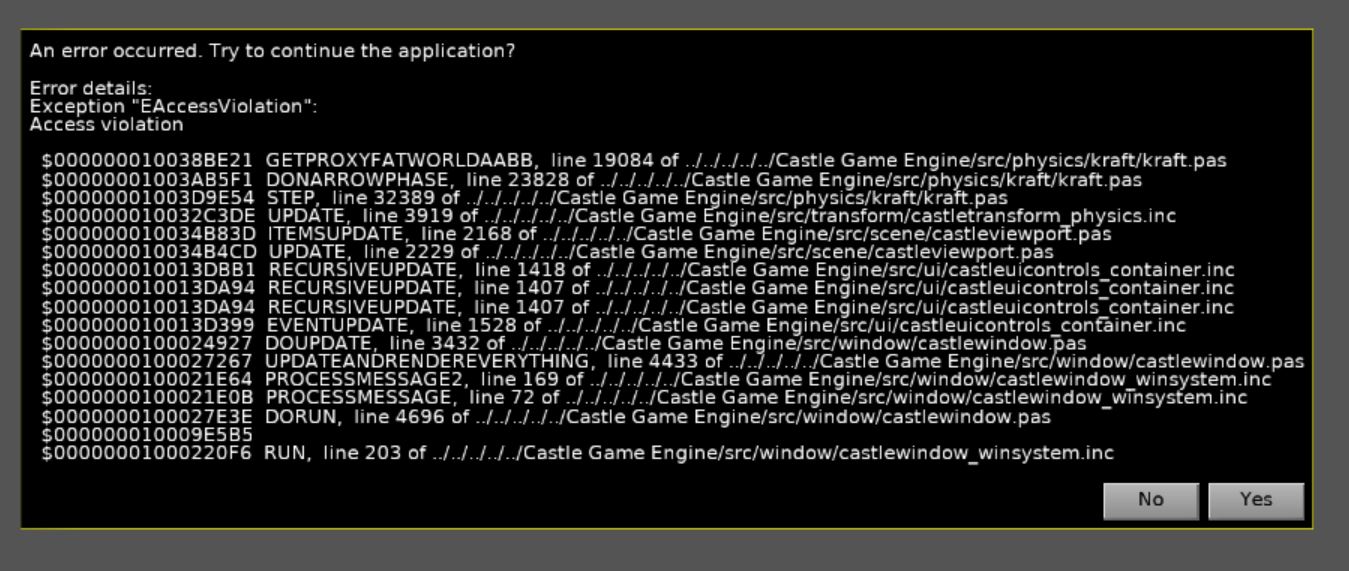
I tried implementing a collision box on the Avatar Transform, using the same method I did for the other collision boxes (so right click on the parent object and add a physics box collision) but got tons of lag and a crash with this error message:
Thank you very much in advance 🙂
---
### Author:  [@JPF12141999](https://forum.castle-engine.io/u/JPF12141999)
#### Post date: [May 7, 2024, 10:08am UTC](https://forum.castle-engine.io/t/need-help-understanding-how-to-assign-a-transform-as-an-avatar-of-a-third-person-navigation-camera-after-following-instructions/1144/44 "2024-05-07T10:08:21Z")
Okay, I tried again with the collision box and rigid body method, this time by doing it with the exact numbers that the third person navigation does and the exact type of collision it uses (Capsule rather than Box; I know it should work the same in theory with the only difference the shape of the collision, but just wanted to be 100% precise about following directions),
But still got lag and a crash with a black screen error message, as well as tons of warnings about “Warning: AvatarTransform:TCastleTransform: The existence of this TCastleTransform changed multiple times in a single frame and it uses physics (has TCastleRigidBody and TCastleCollider behaviors). This is not good for performance and right now can even cause physics simulation crashes, esp. when TCastleCollider.AutoSize=true and animation may change LocalBoundingBox. Avoid changing the Exists of physical objects multiple times in a single Update.” verbatim/exact words.
Do I perhaps just have to wait patiently for better physics handling, or am I doing something wrong I am not aware of?
I would assume it is because I am using physics on a Transform rather than a Scene, as the error message suggests, and as your post stated I am not supposed to use physics on a Transform yet because you are still working on that, so I will just not use physics for now until you have the version with better physics released.
---
### Author:  [@michalis](https://forum.castle-engine.io/u/michalis)
#### Post date: [May 7, 2024, 12:13pm UTC](https://forum.castle-engine.io/t/need-help-understanding-how-to-assign-a-transform-as-an-avatar-of-a-third-person-navigation-camera-after-following-instructions/1144/45 "2024-05-07T12:13:25Z")
For physics to work with avatar, you would have to change `ThirdPersonNavigation.ChangeTransform` to `ctAuto`. But this goes into other problems, so I would not recommend it.
I can see the problems with collisions in the current version. Hm, I’m not sure yet what is the cause – this should not happen. I’ll investigate and get back here.
If you can share the source model (in Blender maybe?) of the level, this would make it easier to experiment for me. (but it’s not necessary, I can do some necessary experiments anyway.)
[Previous page](https://forum.castle-engine.io/t/need-help-understanding-how-to-assign-a-transform-as-an-avatar-of-a-third-person-navigation-camera-after-following-instructions/1144.md?page=1)
[Next page](https://forum.castle-engine.io/t/need-help-understanding-how-to-assign-a-transform-as-an-avatar-of-a-third-person-navigation-camera-after-following-instructions/1144.md?page=3)