# MD3 - improve animations support
**URL:** https://forum.castle-engine.io/t/md3-improve-animations-support/775
**Category:** 3D
**Created:** [March 23, 2023, 7:32pm UTC](https://forum.castle-engine.io/t/md3-improve-animations-support/775 "2023-03-23T19:32:40Z")
**Posts on this page:** 20
**Page:** 4
### Author:  [@JPF12141999](https://forum.castle-engine.io/u/JPF12141999)
#### Post date: [May 12, 2023, 6:39pm UTC](https://forum.castle-engine.io/t/md3-improve-animations-support/775/61 "2023-05-12T18:39:12Z")
Hi,
I know in a previous version the helmet blending worked perfectly for the model I want (Sandy Cheeks), but now with all the fixes for animating different parts, it seems that somehow the helmet blending is no longer working properly.
In the example attachment, I replaced the “human\_base” in the default example provided with the engine, with the Sandy Cheeks model instead. I didn’t change anything from her previous version, like the textures, animation scripts and shader scripts are all still exactly the same, so it is very weird it isn’t working here.
I also didn’t modify the castle-transform that is used to showcase the model,
the only thing I modified was the actual model inside the human-base directory.
Can you please help figure out what is causing the problem?
[md3tags-humanbasereplaced.zip](https://forum.castle-engine.io/uploads/short-url/zg8gYS2aVLzzZO45L7CeWSIBTic.zip) (15.8 MB)
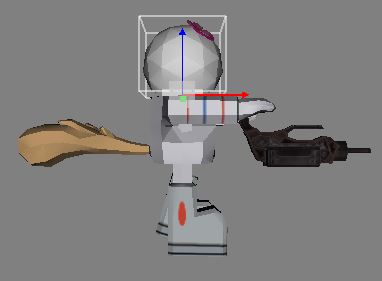
Here is a screenshot of the problem as well, for your conveneince as you specified
you wanted earlier; note that I limit the capture to the problem itself and not the entire
window, to both save on data and make it easier to emphasize which part of the scene is the problem:
---
### Author:  [@michalis](https://forum.castle-engine.io/u/michalis)
#### Post date: [May 13, 2023, 1:07am UTC](https://forum.castle-engine.io/t/md3-improve-animations-support/775/62 "2023-05-13T01:07:53Z")
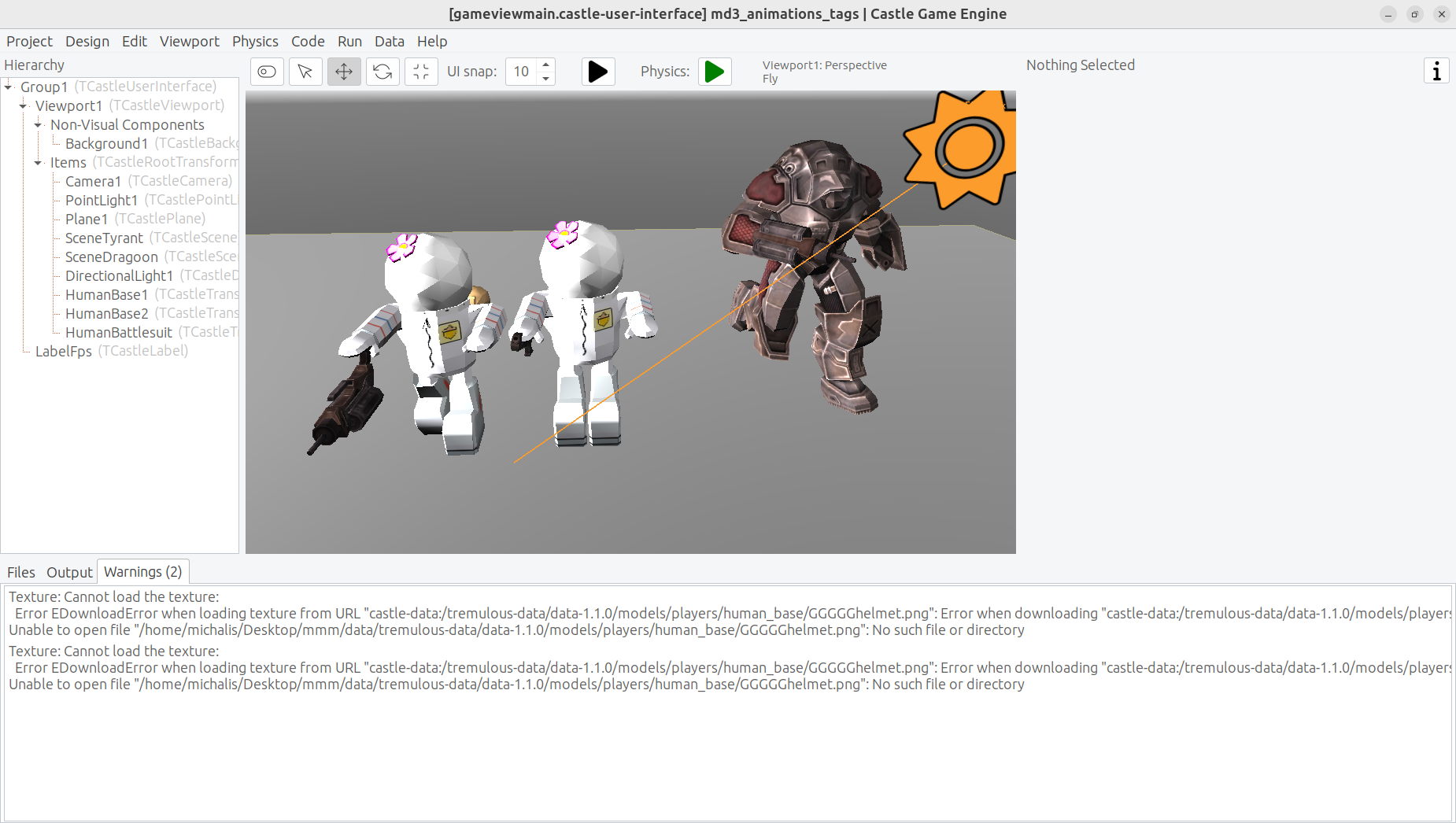
The head of your model doesn’t have proper blending, because the material name is `GGGGGhelmet.png` instead of `helmet.png` in the MD3 file. This does not match any texture filename or any material name from `head_default.skin`.
You need that material to correctly point to `helmet.png` texture (maybe indirectly, through the skin file) since `helmet.png` texture contains your transparent pixels.
There is an information about it displayed in the “Warnings” tab of the editor:
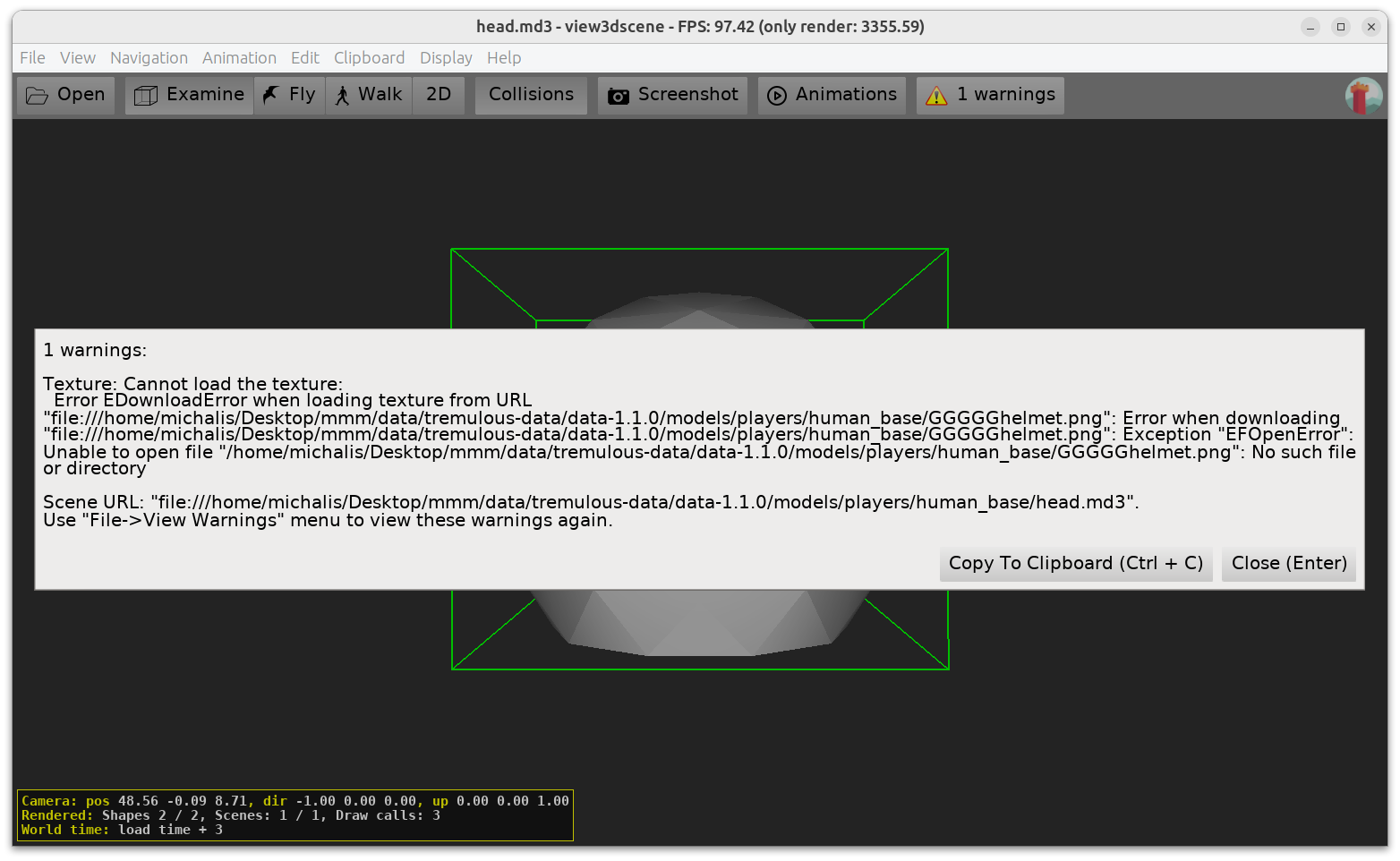
If you double-click on the MD3, we open it in our 3D model viewer “view3dscene” which also displays this warning:
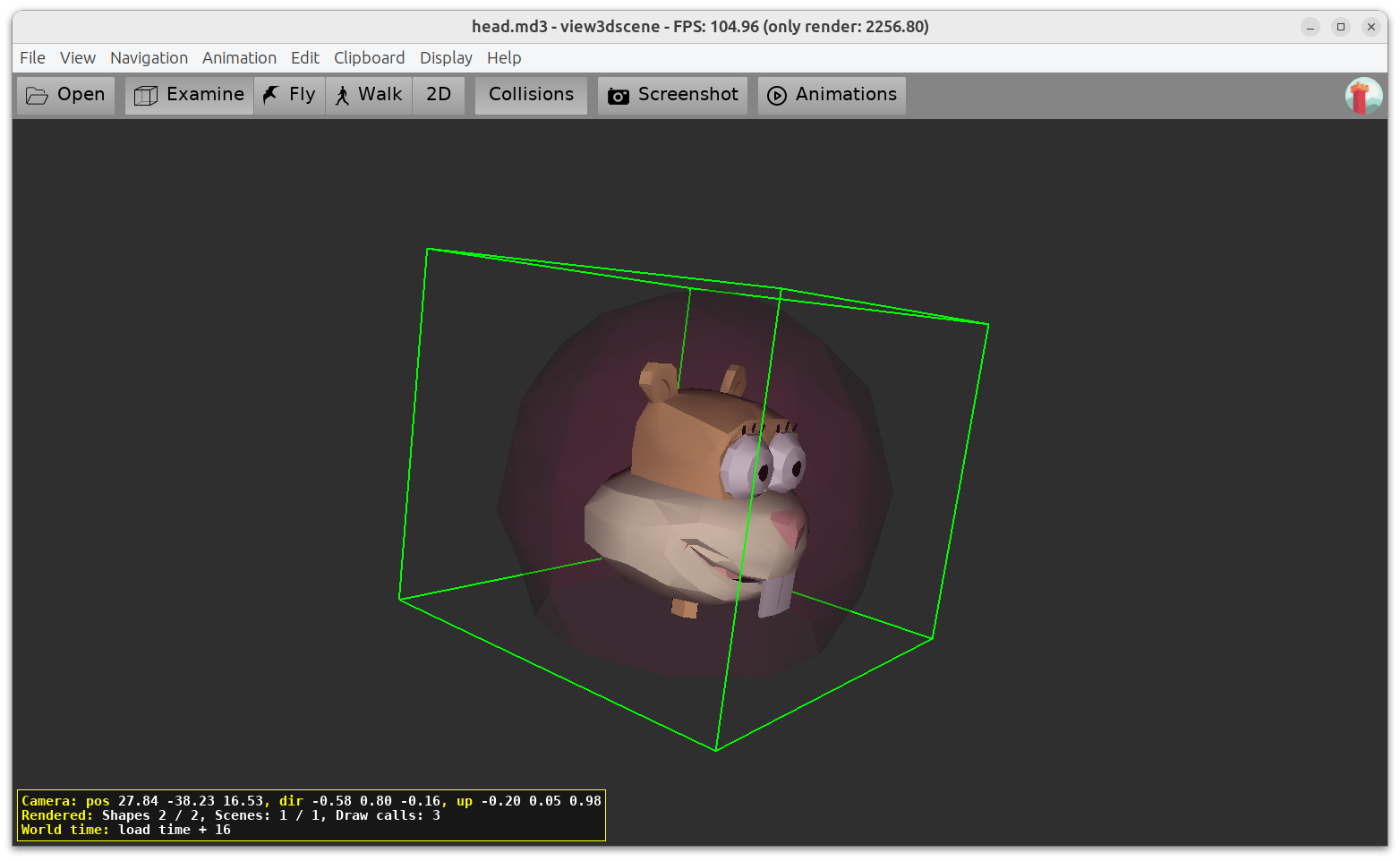
I confirmed that we didn’t break anything by checking the test `blendinghelp.zip` you submitted before. That one contains correct `head.md3` that still shows nice blending on the helmet.
---
### Author:  [@JPF12141999](https://forum.castle-engine.io/u/JPF12141999)
#### Post date: [May 13, 2023, 5:21pm UTC](https://forum.castle-engine.io/t/md3-improve-animations-support/775/63 "2023-05-13T17:21:18Z")
Okay, so it is in fact a problem with the model data itself, and not the engine’s interpretation of it. That is really weird cause I remember from last time, saving it as “helmet” without the “GGGG”'s before it, but I will definitely fix that now. Thank you so much for the catch!
---
### Author:  [@Arioch](https://forum.castle-engine.io/u/Arioch)
#### Post date: [May 13, 2023, 8:03pm UTC](https://forum.castle-engine.io/t/md3-improve-animations-support/775/64 "2023-05-13T20:03:58Z")
Late to the party, but i feel you are struggling with basic concepts of how 3-rd gen source-management systems work. And WHY they evolved into that, sometimes weird, way.
Yeah. yeah, technobabble…
I suggest you’d give a try to this book - [Version Control by Example - Wikipedia](https://en.wikipedia.org/wiki/Version_Control_by_Example)
Just to grasp why and what for.
Then, personally i prefer TortoiseGit - it is very easy, and while it does not cover all of git gunctions, and probably none of “GitHub more than git” funcitons, but it is simple and works with every git repository (including shared folders or USB thumb drives at your home).
GitHub’s own application would probably give you most of GitHub, but less with other Git repos, also for a beginner internalizing the “barebone” functionality might be more important than getting all poitns covered in one app.
However i again emphasize the VCBE book to you, as long as you grok the idea - trying different tools would come easy.
---
### Author:  [@michalis](https://forum.castle-engine.io/u/michalis)
#### Post date: [May 13, 2023, 9:23pm UTC](https://forum.castle-engine.io/t/md3-improve-animations-support/775/65 "2023-05-13T21:23:26Z")
> [@Arioch](#):
>
> Late to the party, but i feel you are struggling with basic concepts of how 3-rd gen source-management systems work. And WHY they evolved into that, sometimes weird, way.
As for using version control, I would actually say to use [https://desktop.github.com/](https://desktop.github.com/) as a simplest solution to work with GIT. In absolutely works with repositories outside of GitHub too (like GitLab).
It’s not exactly what I use myself (I use magit or – more recently – VS Code integration, plus often command-line 🙂 ). But it does the job :), and has a simple UI and good defaults.
In any case, esp. since this is topic about MD3: I would say that for most users, just download CGE from [Download | Castle Game Engine](https://castle-engine.io/download) . Don’t deal with GIT or compiling CGE from sources if you don’t need to 🙂
---
### Author:  [@Arioch](https://forum.castle-engine.io/u/Arioch)
#### Post date: [May 13, 2023, 9:52pm UTC](https://forum.castle-engine.io/t/md3-improve-animations-support/775/66 "2023-05-13T21:52:31Z")
> I would say that for most users, just download CGE from [Download](https://castle-engine.io/download)
…and don’t even touch CGE 7, yet 🙂
But those who do - would pretty much need `git log` and `git blame` or at least have them available 😃
…and, again, making the sense of the whole process is the foremost, and by my account VCBE format was what guided me through painful road away from CVS/SVN mindset.
After a person knows WHAT he is doing, chosing a tool becomes a minor thing. SO, I was reacting to some his earlier confusion, and to, expected, cargo-cult like learning to click icons (first to run GH desktop, then buttons in it) in a memorized but otherwise meaningless order, essentially locking a person to a specific version of specific software ever fearing one day magic would stop working.
---
### Author:  [@michalis](https://forum.castle-engine.io/u/michalis)
#### Post date: [May 13, 2023, 10:07pm UTC](https://forum.castle-engine.io/t/md3-improve-animations-support/775/67 "2023-05-13T22:07:31Z")
> [@Arioch](#):
>
> > I would say that for most users, just download CGE from [Download](https://castle-engine.io/download)
>
> …and don’t even touch CGE 7, yet 🙂
>
> But those who do - would pretty much need `git log` and `git blame` or at least have them available 😃
I don’t follow what you mean here? Our downloads on [Download | Castle Game Engine](https://castle-engine.io/download) are version `7.0-alpha-snapshot` and this is practically corresponding to GitHub master after a number of automatic tests.
This _is_ the version of CGE I absolutely recommend people to use.
---
### Author:  [@Arioch](https://forum.castle-engine.io/u/Arioch)
#### Post date: [May 13, 2023, 10:19pm UTC](https://forum.castle-engine.io/t/md3-improve-animations-support/775/68 "2023-05-13T22:19:24Z")
Alpha versions are alphas for a reason (they’re not even “betta than nuffin”). They make quick changes, sometimes breaking ones (as in incompatible), sometimes breaking one (as in buggy).
Without being able to look at the development history and reasoning between specific changes - just grabbing some arbitrary snapshot and hoping it will go is one risky game. If getting into version-control is too much of effort, then i believe one should never start sailing. HAve the stable mostly immovable shore - as in last released stable - and homestead there, updating as rarely as possible.
If one choses to live on the edge, then, merely having a snapshot as a blackbox is not safe. Being able to read WHY this specific linewas changed and why (as in both commit message and other lines changed in the same day) can be a life saver. And “perverseness of the universe tends to a maximum”.
When i first wet my feet in CGE, git blame often helped me - to grasp the idea of some low level code line i had to match it with other lines changed in the same batch.
Now, surely, not everyone happen to have some old buggy video driver like i did - yet these or those troubles are always lurking in the shadows and one is always better safe than sorry.
---
### Author:  [@michalis](https://forum.castle-engine.io/u/michalis)
#### Post date: [May 13, 2023, 10:40pm UTC](https://forum.castle-engine.io/t/md3-improve-animations-support/775/69 "2023-05-13T22:40:42Z")
> [@Arioch](#):
>
> Alpha versions are alphas for a reason (they’re not even “betta than nuffin”). They make quick changes, sometimes breaking ones (as in incompatible), sometimes breaking one (as in buggy).
We take both stability and backward compatibility heavily into consideration. I reiterate: the versions on [Download | Castle Game Engine](https://castle-engine.io/download) , even though marked as `7.0-alpha.snapshot`, _are_ what I recommend to use, also for production.
Of course if you use them for production – take a note about the date when you get them, and always when upgrading do the testing before you commit to new version. Watch our news ( [Castle Game Engine – Open-Source 3D and 2D Game Engine](https://castle-engine.io/wp/) ) for notes about important changes. (If anyone wants, of course also look at `git log/blame`… but this is unworkable for most people, in CGE or any other actively developed project.)
Current `7.0-alpha.snapshot` is much better than last released 7.0-alpha.2 ( [Release 7.0-alpha.2 release: a lot of new components (lights, primitives), new cameras, terrains, sprite sheet editor, Delphi · castle-engine/castle-engine · GitHub](https://github.com/castle-engine/castle-engine/releases/tag/v7.0-alpha.2) ). And really noone should even consider using older 6.4. The new things done are on [New Features in Castle Game Engine 7.0 | Castle Game Engine](https://castle-engine.io/new_features_in_castle_game_engine_7.0) .
In all of this, there’s of course an important TODO that I want to address ASAP: release “Castle Game Engine” as full, official, 7.0. Without any alpha or beta. But this takes time. Until that is available, I repeat: I heavily recommend using the default downloads from [Download | Castle Game Engine](https://castle-engine.io/download) , even though they are marked as `7.0-alpha.snapshot` . They are simply the best we got.
---
### Author:  [@JPF12141999](https://forum.castle-engine.io/u/JPF12141999)
#### Post date: [May 20, 2023, 4:20pm UTC](https://forum.castle-engine.io/t/md3-improve-animations-support/775/70 "2023-05-20T16:20:21Z")
Hi,
It appears that when I try to add a “ThirdPersonNavigation” Navigation object, it only lets you use nonsegmented/one piece models as avatars, and won’t let you use castle transforms that contain multiple parts, like the example uses.
Do you know of a good workaround, to make a third person camera that lets you use multi-part models as well as single part models for reference avatars that the camera should follow all the time?
---
### Author:  [@michalis](https://forum.castle-engine.io/u/michalis)
#### Post date: [May 22, 2023, 11:36pm UTC](https://forum.castle-engine.io/t/md3-improve-animations-support/775/71 "2023-05-22T23:36:09Z")
> [@JPF12141999](#):
>
> It appears that when I try to add a “ThirdPersonNavigation” Navigation object, it only lets you use nonsegmented/one piece models as avatars, and won’t let you use castle transforms that contain multiple parts, like the example uses.
>
> Do you know of a good workaround, to make a third person camera that lets you use multi-part models as well as single part models for reference avatars that the camera should follow all the time?
Indeed `TCastleThirdPersonNavigation` expected to control animations using `TCastleScene.AutoAnimation`. So it assumed that the animation is played by `TCastleScene`.
I thought about possible answers, even pondering a recommendation to fork our `CastleThirdPersonNavigation` unit into your own.
… But then I realized I can easily make the `TCastleThirdPersonNavigation` class more flexible. I made the `SetAnimation` method virtual – see this GitHub commit which includes documentation how `SetAnimation` should behave: [Make SetAnimation virtual, allow to override it in descendants · castle-engine/castle-engine@88dc2b9 · GitHub](https://github.com/castle-engine/castle-engine/commit/88dc2b9e172a250a651eca029972307fac086869) . As usual, I pushed the change to GitHub and it will take a while but eventually it will be available in the downloads on [Download | Castle Game Engine](https://castle-engine.io/download) . Watch this page: [Comparing snapshot...master · castle-engine/castle-engine · GitHub](https://github.com/castle-engine/castle-engine/compare/snapshot...master) , when it will _no longer show the commit_ " Make SetAnimation virtual, allow to override it in descendants" → it means that this commit is now part of download on [Download | Castle Game Engine](https://castle-engine.io/download) .
The way to use it:
Define your own descendant of `TCastleThirdPersonNavigation` in your game that overrides `SetAnimation`. Like this:
```delphi
type
TMyThirdPersonNavigation = class(TCastleThirdPersonNavigation)
protected
procedure SetAnimation(const AnimationNames: array of String); override;
end;
procedure TMyThirdPersonNavigation.SetAnimation(const AnimationNames: array of String);
begin
// Apply desired animation in any way.
// You are most interested in AnimationNames[0].
// Over-simplifying, you can think that default implementation does "Avatar.AutoAnimation := AnimationNames[0]"
end;
```
Next use this class. You can add it to the viewport from code e.g. in view start:
```auto
procedure TMyView.Start;
var
MyNavigation: TMyThirdPersonNavigation;
begin
inherited;
MyNavigation := TMyThirdPersonNavigation.Create(FreeAtStop);
// adjust any parameters you need:MyNavigation.CameraSpeed := 9;
MyViewport.InsertBack(MyNavigation);
end;
```
Make sure to remove the previous navigation, if you added any (by code or in editor).
Alternatively, you could register your custom navigation class following [Custom Components | Manual | Castle Game Engine](https://castle-engine.io/custom_components) . This way `TMyThirdPersonNavigation` will be available at design-time, in the editor. Ignore this if this sounds too complicated 🙂
Note: We are designing with Andrzej Kilijański a new approach to more modular “navigation classes”. They will be simpler, split into behaviors, and will make it easier to “roll your own navigation”. Initially a big simplification for 1st-person navigation, they will also come to offer simpler alternative to 3rd-person navigation. Watch CGE news in the upcoming weeks 🙂
---
### Author:  [@JPF12141999](https://forum.castle-engine.io/u/JPF12141999)
#### Post date: [May 23, 2023, 9:50am UTC](https://forum.castle-engine.io/t/md3-improve-animations-support/775/72 "2023-05-23T09:50:55Z")
Thank you so much for the fix! I think from what I can tell, the latter half about custom components has the same instructions as the former one where you gave the instructions directly in the post, it just has more details on top of it.
I know because I want to do ThirdPersonNavigation only however, and not worry about other details, it would most likely be smarter to follow only the instructions in the post and ignore the link unless I need it for other classes.
I also highly anticipate and appreciate making the navigation classes more modular, instead of having only one very limited type of each.
---
### Author:  [@JPF12141999](https://forum.castle-engine.io/u/JPF12141999)
#### Post date: [June 28, 2023, 11:23am UTC](https://forum.castle-engine.io/t/md3-improve-animations-support/775/73 "2023-06-28T11:23:20Z")
Hi,
I downloaded the lateset version, making sure the set virtual thing you mentioned in the post is no longer on the page and therefore implemented,
but unfortunately I am running into syntax error weirdness with other parts of the code, even though I make sure to paste it word for word.
I used the code from the “md3 tags” demonstration that comes with the project per usual, but then just pasted the code provided above as an addition on top.
The exact error I am getting is “an = where a : should be” even though that is the syntax you used in the above post for the class defintion of TCastleThirdPersonNavigation.
Do you know why this is, is it perhaps put in the wrong spot?
```auto
{
Copyright 2023-2023 Michalis Kamburelis.
This file is part of "Castle Game Engine".
"Castle Game Engine" is free software; see the file COPYING.txt,
included in this distribution, for details about the copyright.
"Castle Game Engine" is distributed in the hope that it will be useful,
but WITHOUT ANY WARRANTY; without even the implied warranty of
MERCHANTABILITY or FITNESS FOR A PARTICULAR PURPOSE.
----------------------------------------------------------------------------
}
{ Main view, where most of the application logic takes place. }
unit GameViewMain;
interface
uses Classes,
CastleVectors, CastleComponentSerialize,
CastleUIControls, CastleControls, CastleKeysMouse;
type
{ Main view, where most of the application logic takes place. }
TViewMain = class(TCastleView)
TMyThirdPersonNavigation = class(TCastleThirdPersonNavigation)
protected
procedure SetAnimation(const AnimationNames: array of String); override;
published
{ Components designed using CGE editor.
These fields will be automatically initialized at Start. }
LabelFps: TCastleLabel;
public
constructor Create(AOwner: TComponent); override;
procedure Start; override;
procedure Update(const SecondsPassed: Single; var HandleInput: Boolean); override;
function Press(const Event: TInputPressRelease): Boolean; override;
end;
procedure TMyThirdPersonNavigation.SetAnimation(const AnimationNames: array of
begin
end;
)
var
ViewMain: TViewMain;
implementation
uses SysUtils;
{ TViewMain ----------------------------------------------------------------- }
constructor TViewMain.Create(AOwner: TComponent);
begin
inherited;
DesignUrl := 'castle-data:/gameviewmain.castle-user-interface';
end;
procedure TViewMain.Start;
var
MyNavigation: TMyThirdPersonNavigation;
begin
inherited;
MyNavigation := TMyThirdPersonNavigation.Create(FreeAtStop);
MyViewport.InsertBack(MyNavigation);
end;
procedure TViewMain.Update(const SecondsPassed: Single; var HandleInput: Boolean);
begin
inherited;
{ This virtual method is executed every frame (many times per second). }
Assert(LabelFps <> nil, 'If you remove LabelFps from the design, remember to remove also the assignment "LabelFps.Caption := ..." from code');
LabelFps.Caption := 'FPS: ' + Container.Fps.ToString;
end;
function TViewMain.Press(const Event: TInputPressRelease): Boolean;
begin
Result := inherited;
if Result then Exit; // allow the ancestor to handle keys
{ This virtual method is executed when user presses
a key, a mouse button, or touches a touch-screen.
Note that each UI control has also events like OnPress and OnClick.
These events can be used to handle the "press", if it should do something
specific when used in that UI control.
The TViewMain.Press method should be used to handle keys
not handled in children controls.
}
// Use this to handle keys:
{
if Event.IsKey(keyXxx) then
begin
// DoSomething;
Exit(true); // key was handled
end;
}
end;
end.
```
---
### Author:  [@JPF12141999](https://forum.castle-engine.io/u/JPF12141999)
#### Post date: [August 18, 2023, 1:14pm UTC](https://forum.castle-engine.io/t/md3-improve-animations-support/775/74 "2023-08-18T13:14:11Z")
Hi,
Does anyone have any replies on the issue in my previous post?
I made sure to be diligent about posting exactly the original code plus the additions given above where I thought it would fit best in the code (note in the original example that it was just standing alone and I had to guess where each line goes, which is probably part of the problem);
am I simply going about this the wrong way, like maybe there’s a different method altogether than using a third person camera explicitly to make a third person character with multiple, seperately, animated parts, or am I on the right track and need help with the code like I initially thought?
---
### Author:  [@michalis](https://forum.castle-engine.io/u/michalis)
#### Post date: [August 18, 2023, 2:08pm UTC](https://forum.castle-engine.io/t/md3-improve-animations-support/775/75 "2023-08-18T14:08:27Z")
Sorry for a delay in answering. I had a busy July (started with IPC conference: [International Pascal Congress – my presentation slides, various (positive) thoughts about Pascal (both FPC and Delphi) bright future, and why you should use Pascal – Castle Game Engine](https://castle-engine.io/wp/2023/07/08/international-pascal-congress-my-presentation-slides-various-positive-thoughts-about-pascal-both-fpc-and-delphi-bright-future-and-why-you-should-use-pascal/) ), and I still didn’t recover to go through all my backlog and answer everything pending 🙂
As for your question: The syntax you used to declare `TMyThirdPersonNavigation` inside `TViewMain` is incorrect.
1. You do
```delphi
TViewMain = class(TCastleView)
TMyThirdPersonNavigation = class(TCastleThirdPersonNavigation)
```
which starts one class in another, but that’s not a way to declare a class within another (misses `type` keyword), also you never end the “inner” class.
See e.g. section " 9.2. More stuff inside classes and nested classes" in [Modern Object Pascal Introduction for Programmers | Castle Game Engine](https://castle-engine.io/modern_pascal#_more_stuff_inside_classes_and_nested_classes) about how to use nested classes. But, I would advise to actually _not_ try to use this feature if you’re just starting, better follow my advise lower 🙂
2. You also placed `TMyThirdPersonNavigation.SetAnimation` in the interface, while it’s an implementation should go into unit `implementation` section. You also added `)` after it.
What you should do:
- You should instead just define a 2nd class in the same unit interface. So it has 2 classes, TMyThirdPersonNavigation and TViewMain . Like this: [Fix syntax from https://forum.castle-engine.io/t/md3-improve-animations-support/775/73 · GitHub](https://gist.github.com/michaliskambi/2d304ea033e47b93dc1282bbbc53a9a0)
- Consult a book to learn the Pascal syntax. We have [Modern Object Pascal Introduction for Programmers | Castle Game Engine](https://castle-engine.io/modern_pascal) (even translated into some non-English languages now 🙂 ).
---
### Author:  [@JPF12141999](https://forum.castle-engine.io/u/JPF12141999)
#### Post date: [August 18, 2023, 2:35pm UTC](https://forum.castle-engine.io/t/md3-improve-animations-support/775/76 "2023-08-18T14:35:23Z")
I know how the Pascal syntax in general works, so I don’t think reading up on how to program better would solve this particular issue; it’s just that I had problems understanding how your particular script was supposed to work, cause I was told to just copy paste it without understanding the implications of each line.
For example, declaring a class below another class should make it seperate intuitively/by common sense, and it’s really weird/unexpected that it would start a nested class.
Also, just based off the code provided there was no easy way to know ahead of time that the implementation of .SetAnimation should go in the implementation and not the interface section, but maybe I should have read about what classes go in interface and what go in implementation?
Either way, it would be easier for someone seeking support like me if you explained limitations like that ahead of time, instead of just assuming that I would look up that each piece of code belongs somewhere else specific from the other lines.
The help is always appreciated though!
Could you please help show me in full how the correct implementation looks using the third person camera example that comes with the game, what I was trying to do?
---
### Author:  [@JPF12141999](https://forum.castle-engine.io/u/JPF12141999)
#### Post date: [August 18, 2023, 3:09pm UTC](https://forum.castle-engine.io/t/md3-improve-animations-support/775/77 "2023-08-18T15:09:16Z")
Okay, I copy pasted the code you attached as your example of the fixed version word for word, but now I am getting exactly these errors, I did the smart thing and sent a screenshot of what the errors say word for word so that way there is no misunderstanding like earlier.

Do you know why this is happening? I know that the classes should work correctly, so TCastleThirdPersonNavigation class should be in fact declared.
---
### Author:  [@michalis](https://forum.castle-engine.io/u/michalis)
#### Post date: [August 18, 2023, 4:39pm UTC](https://forum.castle-engine.io/t/md3-improve-animations-support/775/78 "2023-08-18T16:39:01Z")
First of all, sorry – the code snippets I post here are often not tested for compilation, and they are often not the final solution ready to be pasted verbatim without any adjustments. I post code snippets to get you started 🙂 I hope to post enough to make it clear, but since I really don’t test for compilation all my snippets, some additional work is sometimes needed. If I’ll post something that I tested (for compilation / execution), I usually make it clear. If I instead mark the code snippet with a text like “use something like this” – the “like this” in general means that this is not final, and will not work if just pasted verbatim.
Up to your question from last post:
The error message means that you didn’t add to use `uses` clause in the `interface` section of your unit (`GameViewMain`) the unit that defines the `TCastleThirdPersonNavigation` class.
The missing unit is `CastleThirdPersonNavigation` in this case.
In general: You can always find the unit that contains some identifier by finding the given class in our API docs ( [Castle Game Engine: API Reference](https://castle-engine.io/apidoc/html/) ) and see at the “unit” containing it. In this case, these are docs for `TCastleThirdPersonNavigation` class: [Castle Game Engine: CastleThirdPersonNavigation: Class TCastleThirdPersonNavigation](https://castle-engine.io/apidoc/html/CastleThirdPersonNavigation.TCastleThirdPersonNavigation.html) . They specify it is in “Unit CastleThirdPersonNavigation”.
In Pascal, when you refer to something in the interface (in this case: `TCastleThirdPersonNavigation` class) then the respective unit (in this case: `CastleThirdPersonNavigation`) has to be in the `uses` clause in the `interface` section. And note that the unit in this case _cannot_ be in the implementation section (you can only use unit once).
I would still very suggest to read our " Modern Object Pascal Introduction for Programmers" [Modern Object Pascal Introduction for Programmers | Castle Game Engine](https://castle-engine.io/modern_pascal) . It has a section “Units” that explains these and other details about units 🙂 FPC has also docs e.g. about units: [Free Pascal Reference guide](https://www.freepascal.org/docs-html/current/ref/ref.html) .
I updated my sample on [Fix syntax from https://forum.castle-engine.io/t/md3-improve-animations-support/775/73 · GitHub](https://gist.github.com/michaliskambi/2d304ea033e47b93dc1282bbbc53a9a0) now. But this is still not something I tested for compilation! Go ahead and test it. If it fails, see if above resources allow to find the fix 🙂
---
### Author:  [@JPF12141999](https://forum.castle-engine.io/u/JPF12141999)
#### Post date: [August 18, 2023, 4:53pm UTC](https://forum.castle-engine.io/t/md3-improve-animations-support/775/79 "2023-08-18T16:53:15Z")
Okay, thank you for clarifying that misunderstanding that the code snippets are not actually the final versions but works in progress.
I will try to work with your suggestions in this post and see how it goes.
---
### Author:  [@JPF12141999](https://forum.castle-engine.io/u/JPF12141999)
#### Post date: [August 18, 2023, 5:08pm UTC](https://forum.castle-engine.io/t/md3-improve-animations-support/775/80 "2023-08-18T17:08:22Z")
Sadly, I am still getting the error about there being no method to override classes, even with your code; is there something in the documents I am missing?
[Link to Image; darn upload feature isn’t working](https://drive.google.com/file/d/1DFTBLn1A74_ra2Fa-B_NiiIr5L6rLLCh/view?usp=sharing)
Again, the issue isn’t that I am ignorant of Pascal language because I know that “uses” defines the code that lets you use the resources, or that I know that you have to type things in a particular order or else it won’t work,
the only problem is that I was trying to follow your directions literally/verbatim without understanding that there was actually more steps to it than just that, but you helped clarify that. I still strongly believe that showing all the steps to make something correct is the most helpful, however, rather than telling them to figure it out themselves after only a few steps.
For example, you should tell the person asking for help up front that they need to use the uses class for the ThirdPersonNavigation, rather than just having them shift through the documents and hope they figure it out themselves, as it is not obvious in the documents what classes require special “uses” declarations and which ones do not.
Do you understand that is my point now, like not everything is put neatly in the documents otherwise there probably wouldn’t be a need to ask for help?
[Previous page](https://forum.castle-engine.io/t/md3-improve-animations-support/775.md?page=3)
[Next page](https://forum.castle-engine.io/t/md3-improve-animations-support/775.md?page=5)