# Many documentation updates
**URL:** https://forum.castle-engine.io/t/many-documentation-updates/503
**Category:** News
**Created:** [January 23, 2022, 6:05pm UTC](https://forum.castle-engine.io/t/many-documentation-updates/503 "2022-01-23T18:05:02Z")
**Posts on this page:** 4
**Page:** 1
### Author:  [@michalis](https://forum.castle-engine.io/u/michalis)
#### Post date: [January 23, 2022, 6:05pm UTC](https://forum.castle-engine.io/t/many-documentation-updates/503/1 "2022-01-23T18:05:02Z")
| [](https://castle-engine.io/wp/wp-content/uploads/2022/01/ui_label.png "component\_gallery example - TCastleLabel") |
| [](https://castle-engine.io/wp/wp-content/uploads/2022/01/ui_empty_rectangle.png "component\_gallery example - TCastleUserInterface") |
| [](https://castle-engine.io/wp/wp-content/uploads/2022/01/ui_color_rectangle.png "component\_gallery example - TCastleRectangleControl") |
| [](https://castle-engine.io/wp/wp-content/uploads/2022/01/ui_button_2.png "component\_gallery example - TCastleButton") |
| [](https://castle-engine.io/wp/wp-content/uploads/2022/01/ui_button_1.png "component\_gallery example - TCastleButton") |
_Documentation_ is the theme of recent news, as I work intensively on updating [our manual](https://castle-engine.io/manual_intro.php) 🙂
1. [Added section about TCastleBehavior](https://castle-engine.io/viewport_and_scenes_from_code#_behaviors).
2. [Improved X3D example to show building a mesh.](https://castle-engine.io/viewport_and_scenes_from_code#_building_a_mesh_using_code)
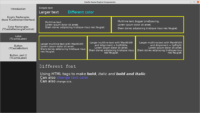
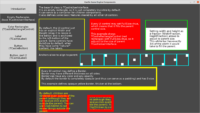
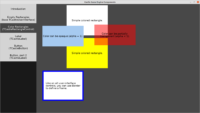
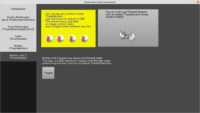
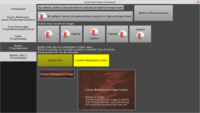
3. Update to [user interface](https://castle-engine.io/user_interface) page is in progress, using an updated version of [examples/component\_gallery](https://github.com/castle-engine/castle-engine/tree/master/examples/component_gallery). It is not yet finished, but I feel it is already better.
4. [Documentation about AAB (Android App Bundle) added, documentation about Android signing updated](https://castle-engine.io/android_faq#_creating_aab_android_app_bundle).
5. [Logging docs updated](https://castle-engine.io/log).
6. Some outdated pages have been just removed, as they were outdated and described stuff of low importance (like `TCastleOnScreenMenu`, that is nowadays easier to do as just `TCastleVerticalGroup` with a number of buttons). Also the order of pages have been reworked, to put most important things at the top.
---
### Author:  [@chikega](https://forum.castle-engine.io/u/chikega)
#### Post date: [February 3, 2022, 11:43pm UTC](https://forum.castle-engine.io/t/many-documentation-updates/503/2 "2022-02-03T23:43:10Z")
Thank you for all the hard work, Michalis et al ! 👍
---
### Author:  [@Arioch](https://forum.castle-engine.io/u/Arioch)
#### Post date: [February 5, 2022, 9:24pm UTC](https://forum.castle-engine.io/t/many-documentation-updates/503/3 "2022-02-05T21:24:59Z")
back to the docs 🙂
chapter 4 at [Designing a 2D world | Manual | Castle Game Engine](https://castle-engine.io/viewport_2d)
> This is usually a good idea — this way the visible area remains the same, regardless of your viewport size, and even regardless of whether you use UI scaling (and with what _reference size_ UI scaling works). To do this, just set `Viewport.Camera.Orthographic.Width` to a constant value, like 1600. You can also set `Viewport.Camera.Orthographic.Height` , but you don’t have to — the other viewport size (left as 0) will be calculated automatically based on current viewport control aspect ratio.
As a newb i got it all wrong, so i consider that paragraph ambiguos.
> regardless of your viewport size
while it is typically a relatively minor concern for games (they usually run full-screen, unless the yhave a floating resizable “portal” windows, like OpenTTS), it was an issue for me, as i was designing a smi-desktop app, working in a usual window, free to any resizing.
So, what would happen if the user freelly resizes the app’s window?
> set .Width to a constant value
and i did it
> the other viewport size (left as 0) will be calculated automatically based on current viewport control aspect ratio.
and so i let it as zero, because i wanted CGE to respect my aspect ratio. I do not want CGE to ignore the aspect ratio, no!!!
I was not wanting my app “squeezed” by changing its hosting windows aspect ratio!
The bad side effcect was whe nuser was changing the window’s height not width - the elements quickly fallen out of view.
Test shows, though, that is was not the case. CGE would not “squeeze” my worls if i set BOTH .Width and .Height
Okay, common sense says there can be three strategies when fixing both Width and Height:
1. treat them as “minimum” hint, preserve aspect ratio, scale to match the lowest of the two
2. treat them as “maximum” hint, preserve aspect ratio, scale to match the largest of the two
3. treat them as exact order, mantain both Height and Width to be exactly as specified, ignore aspect ratio
Frankly, a newb can not be sure which of the strategies CGE implement, and the current wording suggests the last one! It seems to be documented inside [https://castle-engine.io/apidoc-unstable/html/CastleCameras.TCastleOrthographic.html#Height](https://castle-engine.io/apidoc-unstable/html/CastleCameras.TCastleOrthographic.html#Height) - perhaps some text can be copied from there, so mere reading [Designing a 2D world | Manual | Castle Game Engine](https://castle-engine.io/viewport_2d) would give immediately correct if shallow idea. And then newb to be suggested to look into .Width for more detailed description.
---
### Author:  [@michalis](https://forum.castle-engine.io/u/michalis)
#### Post date: [February 5, 2022, 9:34pm UTC](https://forum.castle-engine.io/t/many-documentation-updates/503/4 "2022-02-05T21:34:55Z")
> [@Arioch](#):
>
> treat them as “minimum” hint, preserve aspect ratio, scale to match the lowest of the two
As you yourself point out, this is documented at `TCastleOrthographic.Width` : [https://castle-engine.io/apidoc-unstable/html/CastleCameras.TCastleOrthographic.html#Width](https://castle-engine.io/apidoc-unstable/html/CastleCameras.TCastleOrthographic.html#Width) . The orthographic width and height are minimum values. So we will not distort / squeeze things, we will not disregard the actual aspect ratio of the viewport. Unless you set `TCastleOrthographic.Stretch` to true.
The manual page [Designing a 2D world | Manual | Castle Game Engine](https://castle-engine.io/viewport_2d) is scheduled for rework anyway, there’s a clear warning there – this is not yet finished, it is supposed to show in more tutorial-like fashion the most useful workflow for designing 2D viewport.