# How to get the exposetransforms unde the mouse
**URL:** https://forum.castle-engine.io/t/how-to-get-the-exposetransforms-unde-the-mouse/2068
**Category:** Uncategorized
**Created:** [December 22, 2025, 12:32pm UTC](https://forum.castle-engine.io/t/how-to-get-the-exposetransforms-unde-the-mouse/2068 "2025-12-22T12:32:02Z")
**Posts on this page:** 3
**Page:** 1
### Author:  [@BlueIcaro](https://forum.castle-engine.io/u/BlueIcaro)
#### Post date: [December 22, 2025, 12:32pm UTC](https://forum.castle-engine.io/t/how-to-get-the-exposetransforms-unde-the-mouse/2068/1 "2025-12-22T12:32:02Z")
Hello, I have this CastleScene, which is a GLB file. This file have some expose transforms
How can I know in which transform I clicked?. If I use:
if Viewport1.TransformUnderMouse \<\> nil then
WritelnLog(Viewport1.TransformUnderMouse.Name )
I got y the name of the CastleScene
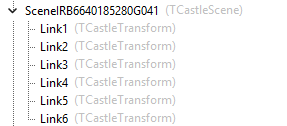
Here is the model
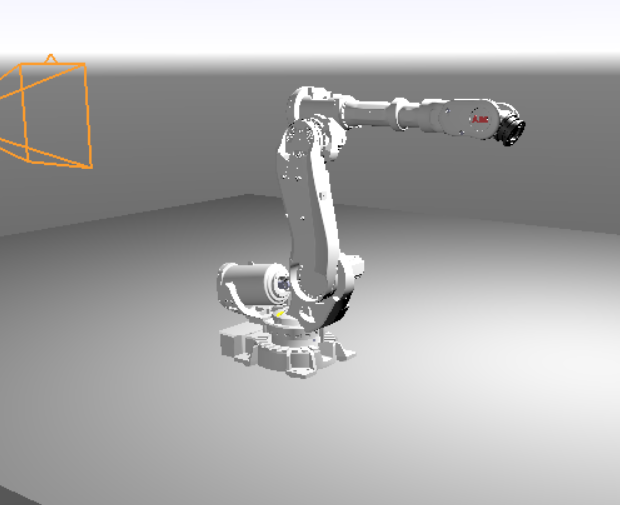
Thanks
/BlueIcaro
---
### Author:  [@DiggiDoggi](https://forum.castle-engine.io/u/DiggiDoggi)
#### Post date: [December 22, 2025, 7:39pm UTC](https://forum.castle-engine.io/t/how-to-get-the-exposetransforms-unde-the-mouse/2068/2 "2025-12-22T19:39:24Z")
I think the best option would be use of `Viewport.PhysicsWorld.SphereCast`. The SphereCast would return a record TPhysicsRayCastResult which has the HitTransform field, and from there you can get the name. **That one I know works.** But you need to add rigid body to the exposed transforms.
Alternatively you could use the older RayCast, but I understand that @michalis encourage people to move to the physics based cast. **This solution may become depreciated.**
* * *
You can do something a bit different, too. Attach another transforms as child to the exposed - for example 1 cube or cylinder per 1 transform - you could get the cube with your `TransformUndermouse`and the cube’s parent name is the exposed transform’s name. These cubes could be transparent (no texture, no color), and when a mouse is over it, you could highlight the box by changing its color, or use wireframe (in cube.RenderOptions), which could be a nice, visible feedback for the user.
**I didn’t test this idea yet** , I just write from my imagination 🙂
---
### Author:  [@michalis](https://forum.castle-engine.io/u/michalis)
#### Post date: [December 24, 2025, 12:58pm UTC](https://forum.castle-engine.io/t/how-to-get-the-exposetransforms-unde-the-mouse/2068/3 "2025-12-24T12:58:47Z")
I just basically wanted to confirm the above answer from @DiggiDoggi 🙂
> [@DiggiDoggi](#):
>
> think the best option would be use of `Viewport.PhysicsWorld.SphereCast`. The SphereCast would return a record TPhysicsRayCastResult which has the HitTransform field, and from there you can get the name. **That one I know works.** But you need to add rigid body to the exposed transforms.
Attaching physics colliders + rigid bodies to the “exposed transforms” is my recommended solution indeed.
Make sure to set
- `TCastleRigidBody.Dynamic` = `false`
- and `TCastleRigidBody.Animated` = `true`
This way physics engine knows that _your code_ (or _your animation_) will move/rotate the transformations (and _not physics simulation_). So it will remain fast. See [" Transforming various objects" section in physics manual](https://castle-engine.io/physics#_transforming_various_objects).
Then use any physics query to see what rigid body / collider was hit. The mentioned “sphere cast” is one way, the “ray cast” may be simpler (and will similar to what `Viewport1.TransformUnderMouse` is doing except it doesn’t look at physics colliders). It would be like `MyViewport.Items.PhysicsRayCast(...)`. I just extended our [“Querying For Collision (ray-casting, sphere-casting)” section in physics manual](https://castle-engine.io/physics#query_collisions) to mention sphere casting.
Future plans: I’ll add I have a plan to make a demo that will show this, this is a TODO in [Skinned animation using the Skin node | Manual | Castle Game Engine](https://castle-engine.io/skin#_todo) mentioned as “”" Prepare a demo showing the _“Collisions that detect which body part is hit, using physics”_ to detect headshots on an animated model.“”". It will actually be useful also for people not using skinned animation, it will show how to combine exposed transforms + physics + raycast.