# How to convert Blender bone rotation (quaternion) Value to CGE format
**URL:** https://forum.castle-engine.io/t/how-to-convert-blender-bone-rotation-quaternion-value-to-cge-format/1961
**Category:** 3D
**Created:** [June 30, 2025, 9:28pm UTC](https://forum.castle-engine.io/t/how-to-convert-blender-bone-rotation-quaternion-value-to-cge-format/1961 "2025-06-30T21:28:04Z")
**Posts on this page:** 6
**Page:** 1
### Author:  [@hal09](https://forum.castle-engine.io/u/hal09)
#### Post date: [June 30, 2025, 9:28pm UTC](https://forum.castle-engine.io/t/how-to-convert-blender-bone-rotation-quaternion-value-to-cge-format/1961/1 "2025-06-30T21:28:04Z")
Hello,
I’m trying to export bone animation rotation **value** from Blender to Castle Game Engine (CGE).
I use Python script in Blender to export all keyframe values (rotation and translation) of a selected bone into Pascal arrays, then I use those arrays in CGE to manually apply animation to a bone.
but rotation gives incorrect results.
**Example:**
In Blender, the first keyframe rotation (quaternion) is:
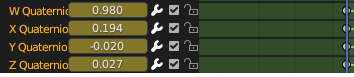
same bone Rotation First keyframe in **cge editor** is
**-0.43393 0.29042 0.85286 deg(174.88354)**
Question:
How should I convert or adjust Blender’s quaternion values to match the expected result in CGE?
Do I need to adjust for coordinate system differences (e.g. Z-up vs Y-up), or apply a matrix transformation?
python script get blender keyframe value as pascal code
The script it only copies the generated Pascal code to the **clipboard**
```auto
import bpy
import mathutils
import io
armature = bpy.context.object
pose_bone = bpy.context.active_pose_bone
action = armature.animation_data.action if armature.animation_data else None
if not pose_bone or not action:
print("❌ يجب تحديد عظمة وحركة فعالة")
else:
parent_bone = pose_bone.parent
scene = bpy.context.scene
frame_start = int(action.frame_range[0])
frame_end = int(action.frame_range[1])
key_times = []
key_loc_x = []
key_loc_y = []
key_loc_z = []
key_rot_x = []
key_rot_y = []
key_rot_z = []
key_rot_w = []
for frame in range(frame_start, frame_end + 1):
scene.frame_set(frame)
scene.frame_current = frame
mat = pose_bone.matrix
if parent_bone:
mat = parent_bone.matrix.inverted() @ mat
loc = mat.to_translation()
rot = pose_bone.rotation_quaternion.normalized() # <-- maybe this is the problem?
key_times.append(float(frame))
key_loc_x.append(round(loc.x, 7))
key_loc_y.append(round(loc.y, 7))
key_loc_z.append(round(loc.z, 7))
key_rot_x.append(round(rot.x, 7))
key_rot_y.append(round(rot.y, 7))
key_rot_z.append(round(rot.z, 7))
key_rot_w.append(round(rot.w, 7))
result = io.StringIO()
result.write("const\n")
def write_array(name, values):
result.write(f" {name}: array[0..{len(values)-1}] of Single = (")
result.write(", ".join(str(v) for v in values))
result.write(");\n\n")
write_array("KeyTimes", key_times)
write_array("KeyValues_Location_X", key_loc_x)
write_array("KeyValues_Location_Y", key_loc_y)
write_array("KeyValues_Location_Z", key_loc_z)
write_array("KeyValues_Rotation_X", key_rot_x)
write_array("KeyValues_Rotation_Y", key_rot_y)
write_array("KeyValues_Rotation_Z", key_rot_z)
write_array("KeyValues_Rotation_W", key_rot_w)
bpy.context.window_manager.clipboard = result.getvalue()
print(f"✅ Extracted keyframes for bone '{pose_bone.name}' from action '{action.name}'")
```
proc to Apply Bone Animation
```auto
procedure TViewPlay.ApplyAnimation(const Node: TTransformNode;
var ElapsedTime: Single;
const KeyTimes: array of Single;
const KeyLocX, KeyLocY, KeyLocZ: array of Single;
const KeyRotX, KeyRotY, KeyRotZ, KeyRotW: array of Single
);
var
I: Integer;
Q: TQuaternion;
V: TVector3;
begin
if Length(KeyTimes) = 0 then Exit;
for I := 0 to High(KeyTimes) - 1 do
begin
if (ElapsedTime >= KeyTimes[I]) and (ElapsedTime < KeyTimes[I + 1]) then
begin
Q := Quaternion(
Vector4(KeyValues_Rotation_X[i],
KeyValues_Rotation_Y[i],
KeyValues_Rotation_Z[i],
KeyValues_Rotation_W[i]));
Node.Rotation := Q.Data.Vector4;
V := Vector3(KeyLocX[I], KeyLocY[I], KeyLocZ[I]);
Node.Translation := V;
Exit;
end;
end;
Q := Quaternion(Vector4(KeyValues_Rotation_X[High(KeyTimes)], KeyValues_Rotation_Y[High(KeyTimes)],
KeyValues_Rotation_Z[High(KeyTimes)], KeyValues_Rotation_W[High(KeyTimes)]));
Node.Rotation := Q.Data.Vector4;
V := Vector3(KeyLocX[High(KeyTimes)], KeyLocY[High(KeyTimes)], KeyLocZ[High(KeyTimes)]);
Node.Translation := V;
if ElapsedTime > KeyTimes[High(KeyTimes)] then
ElapsedTime := 0;
end;
```
---
### Author:  [@hal09](https://forum.castle-engine.io/u/hal09)
#### Post date: [July 1, 2025, 5:44am UTC](https://forum.castle-engine.io/t/how-to-convert-blender-bone-rotation-quaternion-value-to-cge-format/1961/2 "2025-07-01T05:44:01Z")
Problem Solved: 100% Matching Bone Animation Between Blender and Castle Game Engine
Minor Update to the Python Script in Blender:
```auto
import bpy
import mathutils
import io
import math
armature = bpy.context.object
pose_bone = bpy.context.active_pose_bone
action = armature.animation_data.action if armature.animation_data else None
if not pose_bone or not action:
print("❌ يجب تحديد عظمة وحركة فعالة")
else:
parent_bone = pose_bone.parent
scene = bpy.context.scene
frame_start = int(action.frame_range[0])
frame_end = int(action.frame_range[1])
key_times = []
key_loc_x = []
key_loc_y = []
key_loc_z = []
key_rot_x = []
key_rot_y = []
key_rot_z = []
key_rot_w = []
for frame in range(frame_start, frame_end + 1):
scene.frame_set(frame)
scene.frame_current = frame
mat = pose_bone.matrix
if parent_bone:
mat = parent_bone.matrix.inverted() @ mat
loc = mat.to_translation()
rot = mat.to_quaternion()
#rot = mathutils.Quaternion((1, 0, 0), math.radians(-90)) @ rot
key_times.append(float(frame))
key_loc_x.append(round(loc.x, 7))
key_loc_y.append(round(loc.y, 7))
key_loc_z.append(round(loc.z, 7))
key_rot_x.append(round(rot.x, 7))
key_rot_y.append(round(rot.y, 7))
key_rot_z.append(round(rot.z, 7))
key_rot_w.append(round(rot.w, 7))
# 📝 إخراج النتائج بصيغة Pascal
result = io.StringIO()
result.write("const\n")
def write_array(name, values):
result.write(f" {name}: array[0..{len(values)-1}] of Single = (")
result.write(", ".join(str(v) for v in values))
result.write(");\n\n")
write_array("KeyTimes", key_times)
write_array("KeyValues_Location_X", key_loc_x)
write_array("KeyValues_Location_Y", key_loc_y)
write_array("KeyValues_Location_Z", key_loc_z)
write_array("KeyValues_Rotation_X", key_rot_x)
write_array("KeyValues_Rotation_Y", key_rot_y)
write_array("KeyValues_Rotation_Z", key_rot_z)
write_array("KeyValues_Rotation_W", key_rot_w)
# 📋 نسخ إلى الحافظة
bpy.context.window_manager.clipboard = result.getvalue()
print(f"✅ تم استخراج حركة العظمة '{pose_bone.name}' من الحركة '{action.name}' ونسخها إلى الحافظة.")
```
In Castle Game Engine
should use ToAxisAngle method
**How to Use:**
In Blender:
Enter Pose Mode.
Select the bone you want to export.
In the Dope Sheet, make sure the correct Action (animation) is selected.
Run the updated script.
The animation data (keyframes) will be copied to the clipboard in Pascal const array format
**In Castle Game Engine:**
Paste the Pascal arrays into your code.
Use this function to apply the rotation correctly:
```auto
function AdjustQuaternionForCGE(const Q: TQuaternion): TQuaternion;
var
Axis: TVector3;
Angle: Single;
begin
Q.ToAxisAngle(Axis, Angle);
Result := Quaternion(Vector4(Axis, Angle));
end;
procedure TViewPlay.ApplyAnimation(const Node: TTransformNode;
var ElapsedTime: Single;
const KeyTimes: array of Single;
const KeyLocX, KeyLocY, KeyLocZ: array of Single;
const KeyRotX, KeyRotY, KeyRotZ, KeyRotW: array of Single);
var
I: Integer;
Q: TQuaternion;
V: TVector3;
begin
if Length(KeyTimes) = 0 then Exit;
for I := 0 to High(KeyTimes) - 1 do
begin
if (ElapsedTime >= KeyTimes[I]) and (ElapsedTime < KeyTimes[I + 1]) then
begin
Q := Quaternion(Vector4(KeyRotX[I], KeyRotY[I], KeyRotZ[I], KeyRotW[I]));
Q := AdjustQuaternionForCGE(Q);
Node.Rotation := Q.Data.Vector4;
V := Vector3(KeyLocX[I], KeyLocY[I], KeyLocZ[I]);
Node.Translation := V;
Exit;
end;
end;
Q := Quaternion(Vector4(KeyRotX[High(KeyTimes)], KeyRotY[High(KeyTimes)],
KeyRotZ[High(KeyTimes)], KeyRotW[High(KeyTimes)]));
Q := AdjustQuaternionForCGE(Q);
Node.Rotation := Q.Data.Vector4;
V := Vector3(KeyLocX[High(KeyTimes)], KeyLocY[High(KeyTimes)], KeyLocZ[High(KeyTimes)]);
Node.Translation := V;
if ElapsedTime > KeyTimes[High(KeyTimes)] then
ElapsedTime := 0;
end;
```
On update event call it
```auto
if Assigned(TransformNode) then
begin
ElapsedTime := ElapsedTime + SecondsPassed * 30 (* anim speed 30 *);
ApplyAnimation(
TransformNode,
ElapsedTime,
KeyTimes,
KeyValues_Location_X,
KeyValues_Location_Y,
KeyValues_Location_Z,
KeyValues_Rotation_X,
KeyValues_Rotation_Y,
KeyValues_Rotation_Z,
KeyValues_Rotation_W
);
end;
```
like demo :
```auto
exemples skinned gpu\examples\animations\animate_bones_by_code
```
---
### Author:  [@hal09](https://forum.castle-engine.io/u/hal09)
#### Post date: [July 1, 2025, 8:33am UTC](https://forum.castle-engine.io/t/how-to-convert-blender-bone-rotation-quaternion-value-to-cge-format/1961/3 "2025-07-01T08:33:27Z")
with the same method,
it’s possible to export all keyframes for all bones into a single array and use them for all players — without loading the full animation (glTF or other formats) multiple times
**Benefits**
Lower memory usage, especially useful in multiplayer scenarios
Full control over animation blending and timing, directly by code
I’m currently trying to do this in Castle Game Engine 🙂
---
### Author:  [@michalis](https://forum.castle-engine.io/u/michalis)
#### Post date: [July 1, 2025, 8:45am UTC](https://forum.castle-engine.io/t/how-to-convert-blender-bone-rotation-quaternion-value-to-cge-format/1961/4 "2025-07-01T08:45:23Z")
As for conversion:
- Whether you need to convert axis (Z up in Blender versus Y up in CGE, glTF,
X3D) depends on the situation. Often, rotations are local transformations inside a model that is already “rotated as a whole” to change Z up to Y up.
- Note that Blender and CGE are both right-handed coordinate systems, so no need to worry about this.
As for quaternion vs axis angle:
- CGE offers to express rotations in various ways.
- Our properties generally get/set rotation as a 4D axis+angle vector, details in [Castle Game Engine: CastleTransform: Class TCastleTransform](https://castle-engine.io/apidoc/html/CastleTransform.TCastleTransform.html#Rotation) .
- You can convert quaternions (from Blender or any other input) to axis+angle using [TQuaternion](https://castle-engine.io/apidoc/html/CastleQuaternions.TQuaternion.html) type in CGE.
- If you want to do this in Python, at Blender export moment, you can likely use Python and Blender’s Python API to do something equivalent. [Blender’s Quaternion has to\_axis\_angle method](https://docs.blender.org/api/current/mathutils.html#mathutils.Quaternion) that probably does something similar to our Pascal code.
---
### Author:  [@michalis](https://forum.castle-engine.io/u/michalis)
#### Post date: [July 1, 2025, 9:00am UTC](https://forum.castle-engine.io/t/how-to-convert-blender-bone-rotation-quaternion-value-to-cge-format/1961/5 "2025-07-01T09:00:11Z")
Note:
- To be clear, to get animation from [Blender](https://castle-engine.io/blender) to CGE, just export it to glTF.
- Castle Game Engine will automatically be able to play it.
- Rotation animation is then expressed as `TOrientationInterpolatorNode` which is a sequence of rotations for each joint, already in format CGE handles.
- This is all already ready and in proper format and you don’t need to write any special Pascal or Python code to use this 🙂
Upcoming change to skinned animation handling (see [Skinned animation using the Skin node | Castle Game Engine](https://castle-engine.io/skin) , not yet merged to engine master!) will also mean that:
- Skinned animation from glTF is done at run-time on GPU
- and you can modify joints at run-time freely. Our example [animate\_bones\_by\_code](https://github.com/castle-engine/castle-engine/tree/skinned-animation-gpu/examples/animations/animate_bones_by_code) is updated to showcase this (but this is also not yet merged to master; follow our [news](https://castle-engine.io/wp/) to be notified when it will be merged).
- our animation cross-fading (see [TCastleSceneCore.DefaultAnimationTransition](https://castle-engine.io/apidoc/html/CastleSceneCore.TCastleSceneCore.html#DefaultAnimationTransition) or [TPlayAnimationParameters.TransitionDuration](https://castle-engine.io/apidoc/html/CastleSceneCore.TPlayAnimationParameters.html#TransitionDuration) ) work out-of-the-box with such animation then too, joints animations will be cross-faded.
---
### Author:  [@hal09](https://forum.castle-engine.io/u/hal09)
#### Post date: [July 1, 2025, 9:24am UTC](https://forum.castle-engine.io/t/how-to-convert-blender-bone-rotation-quaternion-value-to-cge-format/1961/6 "2025-07-01T09:24:35Z")
> [@michalis](#):
>
> - Skinned animation from glTF is done at run-time on GPU
> - and you can modify joints at run-time freely. Our example [animate\_bones\_by\_code](https://github.com/castle-engine/castle-engine/tree/skinned-animation-gpu/examples/animations/animate_bones_by_code) is updated to showcase this (but this is also not yet merged to master; follow our [news](https://castle-engine.io/wp/) to be notified when it will be merged).
Yes, I saw the demo — great feature!
GPU skinning is a big improvement!