# Highlighting a 3D model
**URL:** https://forum.castle-engine.io/t/highlighting-a-3d-model/2096
**Category:** 3D
**Created:** [February 5, 2026, 12:38pm UTC](https://forum.castle-engine.io/t/highlighting-a-3d-model/2096 "2026-02-05T12:38:02Z")
**Posts on this page:** 8
**Page:** 1
### Author:  [@Hamid](https://forum.castle-engine.io/u/Hamid)
#### Post date: [February 5, 2026, 12:38pm UTC](https://forum.castle-engine.io/t/highlighting-a-3d-model/2096/1 "2026-02-05T12:38:02Z")
How do I highlight a 3D object as shown in the image?
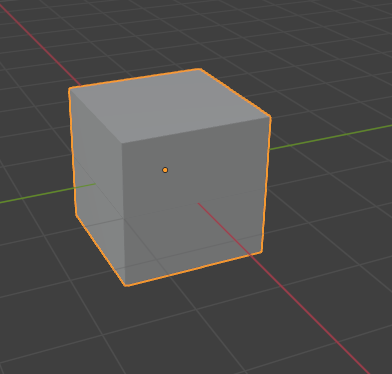
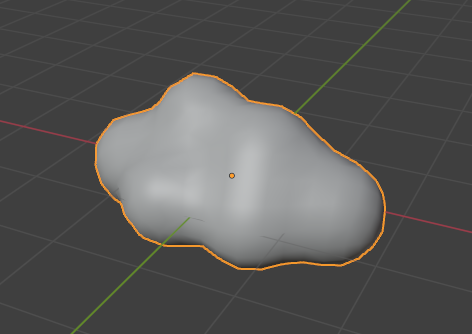
---
### Author:  [@phomm](https://forum.castle-engine.io/u/phomm)
#### Post date: [February 5, 2026, 2:14pm UTC](https://forum.castle-engine.io/t/highlighting-a-3d-model/2096/2 "2026-02-05T14:14:49Z")
> **[Castle Game Engine: CastleRenderOptions](https://castle-engine.io/apidoc/html/CastleRenderOptions.html#TWireframeEffect)**
did you try WireFrameEffect with weSilhouette mode ?
---
### Author:  [@Hamid](https://forum.castle-engine.io/u/Hamid)
#### Post date: [February 5, 2026, 3:34pm UTC](https://forum.castle-engine.io/t/highlighting-a-3d-model/2096/3 "2026-02-05T15:34:45Z")
No.
It’s hard for me to explain it in words, but it’s clear in the images above what I mean.
Imagine a three-dimensional object drawn in two dimensions, and its outer boundary (in the 2D representation) is defined.
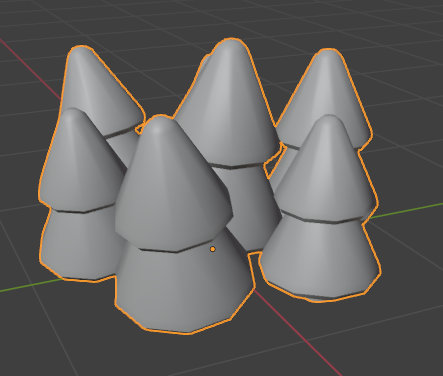
3D Object is :
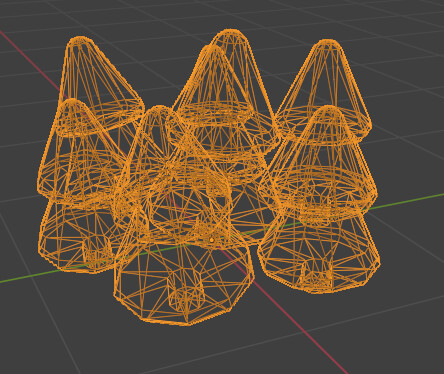
---
### Author:  [@phomm](https://forum.castle-engine.io/u/phomm)
#### Post date: [February 5, 2026, 3:49pm UTC](https://forum.castle-engine.io/t/highlighting-a-3d-model/2096/4 "2026-02-05T15:49:10Z")
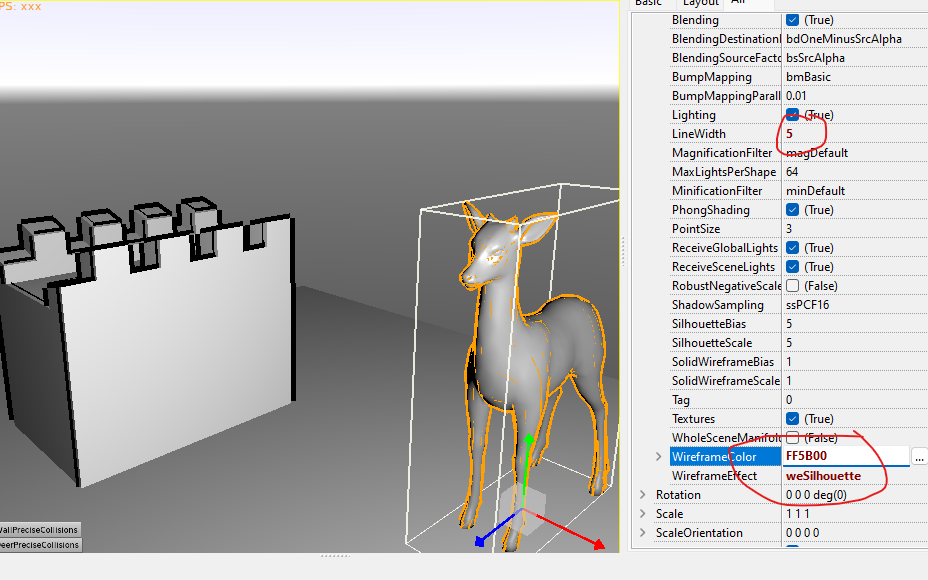
---
### Author:  [@Hamid](https://forum.castle-engine.io/u/Hamid)
#### Post date: [February 5, 2026, 4:54pm UTC](https://forum.castle-engine.io/t/highlighting-a-3d-model/2096/5 "2026-02-05T16:54:59Z")
@phomm Thanks.🙏
It’s very close to what I’m looking for.
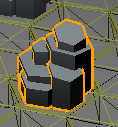
A lot of extra lines are being displayed, but I think it’s good enough for my purposes.
---
### Author:  [@michalis](https://forum.castle-engine.io/u/michalis)
#### Post date: [February 9, 2026, 3:20am UTC](https://forum.castle-engine.io/t/highlighting-a-3d-model/2096/6 "2026-02-09T03:20:38Z")
See also our tutorial “bad chess” where we discuss / show this way of highlighting 3D objects, [Tutorial: 3D physics fun (aka "the bad way to play chess") | Castle Game Engine](https://castle-engine.io/bad_chess) 🙂
---
### Author:  [@phomm](https://forum.castle-engine.io/u/phomm)
#### Post date: [February 9, 2026, 11:26am UTC](https://forum.castle-engine.io/t/highlighting-a-3d-model/2096/7 "2026-02-09T11:26:49Z")
There are also SilhouetteBias and SilhouetteScale parameters to adjust the inner lines, but they don’t seem consistent in this sense on different zooms. Not sure if it helps, but you could try if some values like x10 or x100 from default 5 would make difference. I didn’t find any good explanation [Castle Game Engine: CastleRenderOptions: Class TCastleRenderOptions](https://castle-engine.io/apidoc/html/CastleRenderOptions.TCastleRenderOptions.html#SilhouetteScale)
You could also try and see how it work on an example project in my topic [[ISSUE] 3D complex models hittest](https://forum.castle-engine.io/t/issue-3d-complex-models-hittest/2084/1)
---
### Author:  [@michalis](https://forum.castle-engine.io/u/michalis)
#### Post date: [February 9, 2026, 11:10pm UTC](https://forum.castle-engine.io/t/highlighting-a-3d-model/2096/8 "2026-02-09T23:10:12Z")
> [@phomm](#):
>
> I didn’t find any good explanation [Castle Game Engine: CastleRenderOptions: Class TCastleRenderOptions](https://castle-engine.io/apidoc/html/CastleRenderOptions.TCastleRenderOptions.html#SilhouetteScale)
Fixed 🙂
I added documentation for them in [this commit](https://github.com/castle-engine/castle-engine/commit/75b6cd6190b276e005a17f3fb260eb0b6a7a964f). See [API docs of TCastleRenderOptions.SilhouetteScale](https://castle-engine.io/apidoc/html/CastleRenderOptions.TCastleRenderOptions.html#SilhouetteScale).
Admittedly, while I hope these docs will help, I’m afraid there’s no clear guideline what these values should be – finding them out experimentally (and _not_ depending that they will work exactly the same on all systems) is unfortunately the only way. This comes from how the OpenGL [glPolygonOffset](https://registry.khronos.org/OpenGL-Refpages/gl4/html/glPolygonOffset.xhtml) works, the `SilhouetteScale` / `SilhouetteBias` are just passed to it. So our documentation explains how does it work in our engine, but ultimately… what [glPolygonOffset](https://registry.khronos.org/OpenGL-Refpages/gl4/html/glPolygonOffset.xhtml) does is not precisely specified and may (and does!) vary between GPUs.