# Gem Islands - first playable version
**URL:** https://forum.castle-engine.io/t/gem-islands-first-playable-version/1093
**Category:** Show Your Projects
**Created:** [February 20, 2024, 8:43am UTC](https://forum.castle-engine.io/t/gem-islands-first-playable-version/1093 "2024-02-20T08:43:52Z")
**Posts on this page:** 11
**Page:** 1
### Author:  [@Didi](https://forum.castle-engine.io/u/Didi)
#### Post date: [February 20, 2024, 8:43am UTC](https://forum.castle-engine.io/t/gem-islands-first-playable-version/1093/1 "2024-02-20T08:43:52Z")
Hi everyone,
my project “Gem Islands” is now on [itch.io](http://itch.io).
[https://didisoft.itch.io/gem-islands-v10](https://didisoft.itch.io/gem-islands-v10)
Feel free to rate the game and leave a comment. Let me know what’s good and what’s bad or could be improved. 🙂
---
### Author:  [@valterb](https://forum.castle-engine.io/u/valterb)
#### Post date: [February 20, 2024, 2:25pm UTC](https://forum.castle-engine.io/t/gem-islands-first-playable-version/1093/2 "2024-02-20T14:25:51Z")
Congratulations! I’m not a fan of this genre, I prefer adventure games like Syberia or Broken Sword, but not many independent developers manage to complete a game or make it playable, whatever it is.
---
### Author:  [@michalis](https://forum.castle-engine.io/u/michalis)
#### Post date: [February 21, 2024, 4:45am UTC](https://forum.castle-engine.io/t/gem-islands-first-playable-version/1093/3 "2024-02-21T04:45:21Z")
So cool! It’s great to see how the engine is used to build an actual world and explore it! Thank you.
The gameplay and graphics work for me nicely. Placing the game in islands is a nice idea to separate scenes to load, and water makes a natural borders to explore. Fog, distance culling, shadows work for environment. The gameplay loop works – you fight, you can die, you can heal, you know what to do to progress (get coins, rubies, travel to next island).
I’m playing and I’m on 2nd island. I got to see the sharks, and they killed me 🙂 It’s great that 2nd island is visually distinct.
I’ll mention this in one of the future news posts and add to [Games using Castle Game Engine | Castle Game Engine](https://castle-engine.io/gallery_games.php) as well.
Random suggestions to consider:
- Maybe minimap should be displayed with partial transparency (e.g. Alpha 0.75), to see through it a bit? When initially exploring the island, I find myself consulting the map a lot, so I keep it open. But having it open all the time obscures significant part of the view.
- After I finish conversation with NPC, like one of the shopkeepers, the mouse look is not immediately active. I.e. I can see the mouse cursor and moving the mouse doesn’t rotate the view, as if MouseLook was temporarily false. It activates after I move with AWSD. If this is in any way a shortcoming of CGE, then of course I can help – if you can provide a sample testcase I’d be happy to look into it.
- If I run with “Shift”, there seems to be no animation (only a stil frame). You can maybe put there a walking animation, just faster?
- Pressing “Escape”, instead of going back to main menu (which means you have to start the game from last reached island), could display a menu over a paused game. This menu could feature “Controls”, “Options” – to look at them and tweak without leaving the game. See how CGE “examples/fps\_game” or “examples/platformer” do it, using views ( [Managing Views | Manual | Castle Game Engine](https://castle-engine.io/views) ).
- Perhaps some low-effort “tutorial system” would be useful to introduce the less obvious shortcuts – e.g. show a text “Press P to pickup” at the first coin, “Press C to start a conversation” at the first shopkeeper. Doesn’t have to be anything fancy or complicated, just a hint for players who don’t read the “Controls” screen 🙂
- You may want to show a “loading” screen when the game starts. Can be a completely static screen with just a text “loading” and some simple graphics (e.g. a blurred screenshot, or something generated with DALL-E 🙂 ). See e.g. CGE “examples/user\_interface/zombie\_fighter” how to display a loading view between menu and game.
---
### Author:  [@Didi](https://forum.castle-engine.io/u/Didi)
#### Post date: [February 21, 2024, 10:04am UTC](https://forum.castle-engine.io/t/gem-islands-first-playable-version/1093/4 "2024-02-21T10:04:41Z")
Thanks a lot for your suggestions. I will think about all the points.
Sometimes the programmer gets blind for all the things that he learned by heart.
To point 3:
> [@michalis](#):
>
> If I run with “Shift”, there seems to be no animation (only a stil frame). You can maybe put there a walking animation, just faster?
I don’t understand what is “run with Shift”. Run is key W. If I press W+Shift the avatar animation plays running. If I press Shift nothing happens.
Maybe there will come the version 1.1 in some weeks. 🙂
---
### Author:  [@michalis](https://forum.castle-engine.io/u/michalis)
#### Post date: [February 21, 2024, 10:44am UTC](https://forum.castle-engine.io/t/gem-islands-first-playable-version/1093/5 "2024-02-21T10:44:58Z")
> [@Didi](#):
>
> I don’t understand what is “run with Shift”. Run is key W. If I press W+Shift the avatar animation plays running. If I press Shift nothing happens.
Oh, indeed I meant “to run by holding both Shift and W”. For some reason, the running animation seems like “stuck on 1 frame” for me. Or maybe it isn’t looping while it should loop?
Here’s a video.
---
### Author:  [@Didi](https://forum.castle-engine.io/u/Didi)
#### Post date: [February 21, 2024, 11:44am UTC](https://forum.castle-engine.io/t/gem-islands-first-playable-version/1093/6 "2024-02-21T11:44:03Z")
Unfortunately I can’t reproduce this.
For me the animation continues to play even when I press Shift.
A look into CastleThirdPersonNavigation makes it clear.
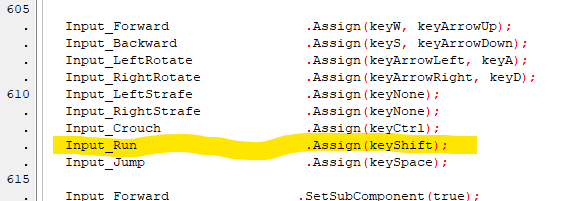
I don’t use “Shift” for run. I want the avatar to run with W. No “Shift” is needed.
```auto
tpn.Input_Forward.Assign(keyW);
tpn.Input_Run.Assign(keyW);
```
Maybe this double assignment triggers the error? But on my side it works correct.
---
### Author:  [@valterb](https://forum.castle-engine.io/u/valterb)
#### Post date: [February 21, 2024, 11:38pm UTC](https://forum.castle-engine.io/t/gem-islands-first-playable-version/1093/7 "2024-02-21T23:38:27Z")
> [@michalis](#):
>
> I got to see the sharks, and they killed me
ahah I too have been eaten by sharks 😀
However, I tested the movement of the character and I can confirm that for me too the W key makes the character run, whether with shift pressed or not, without any loss of frames.
I downloaded the compiled version.
---
### Author:  [@Didi](https://forum.castle-engine.io/u/Didi)
#### Post date: [February 29, 2024, 12:30pm UTC](https://forum.castle-engine.io/t/gem-islands-first-playable-version/1093/8 "2024-02-29T12:30:21Z")
Hi everyone,
an improved version is now available for download from [itch.io](http://itch.io).
I was able to implement the points mentioned.
[https://didisoft.itch.io/gem-islands](https://didisoft.itch.io/gem-islands)
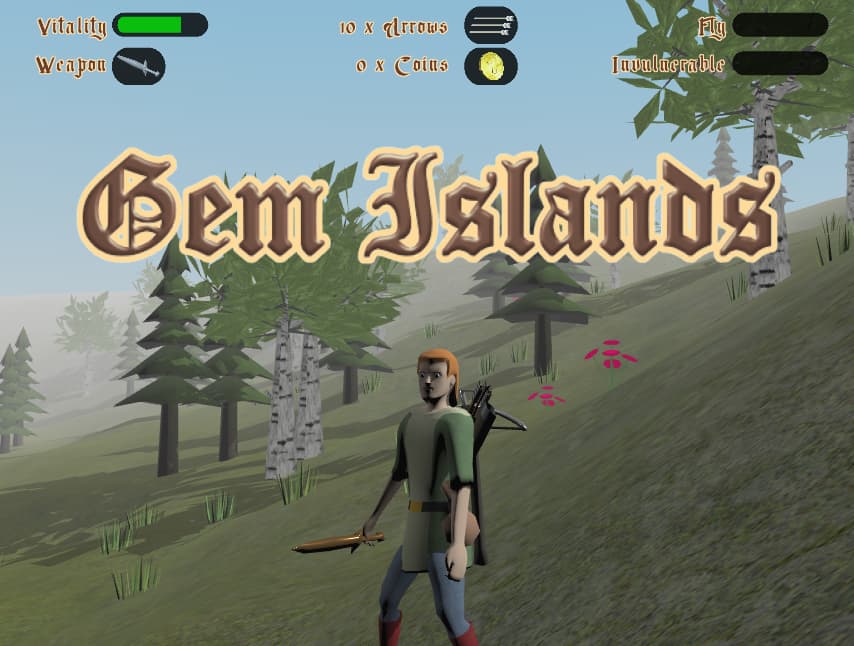
Feel free to rate the game and leave a comment. Let me know what’s good and what’s bad or could be improved. 🙂
---
### Author:  [@tudarcat](https://forum.castle-engine.io/u/tudarcat)
#### Post date: [March 2, 2024, 3:52pm UTC](https://forum.castle-engine.io/t/gem-islands-first-playable-version/1093/9 "2024-03-02T15:52:41Z")
Congratulations. I’m sure that it will be a remarkable one.
---
### Author:  [@tudarcat](https://forum.castle-engine.io/u/tudarcat)
#### Post date: [March 8, 2024, 3:40pm UTC](https://forum.castle-engine.io/t/gem-islands-first-playable-version/1093/10 "2024-03-08T15:40:39Z")
The slidein animation fits minimap well.but the inventory slidein seems a little superfluous.
---
### Author:  [@tudarcat](https://forum.castle-engine.io/u/tudarcat)
#### Post date: [March 8, 2024, 3:44pm UTC](https://forum.castle-engine.io/t/gem-islands-first-playable-version/1093/11 "2024-03-08T15:44:07Z")
Anyway,i love it!