# GameController support Windows11 vs. LinuxMint
**URL:** https://forum.castle-engine.io/t/gamecontroller-support-windows11-vs-linuxmint/2172
**Category:** Bugs
**Created:** [June 29, 2026, 7:27am UTC](https://forum.castle-engine.io/t/gamecontroller-support-windows11-vs-linuxmint/2172 "2026-06-29T07:27:56Z")
**Posts on this page:** 3
**Page:** 1
### Author:  [@Didi](https://forum.castle-engine.io/u/Didi)
#### Post date: [June 29, 2026, 7:27am UTC](https://forum.castle-engine.io/t/gamecontroller-support-windows11-vs-linuxmint/2172/1 "2026-06-29T07:27:56Z")
Hi everyone,
I’m using the same game controller (Logitech Gaming F310 Controller Gamepad) in Windows11 and LinuxMint. In Windows all Buttons ar handled, but in LinuxMint some Buttons are not.
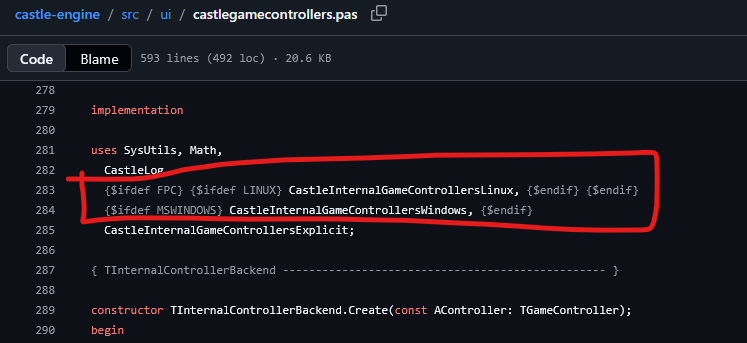
Looking into CGE code I can see, that ther are different units for win and linux.
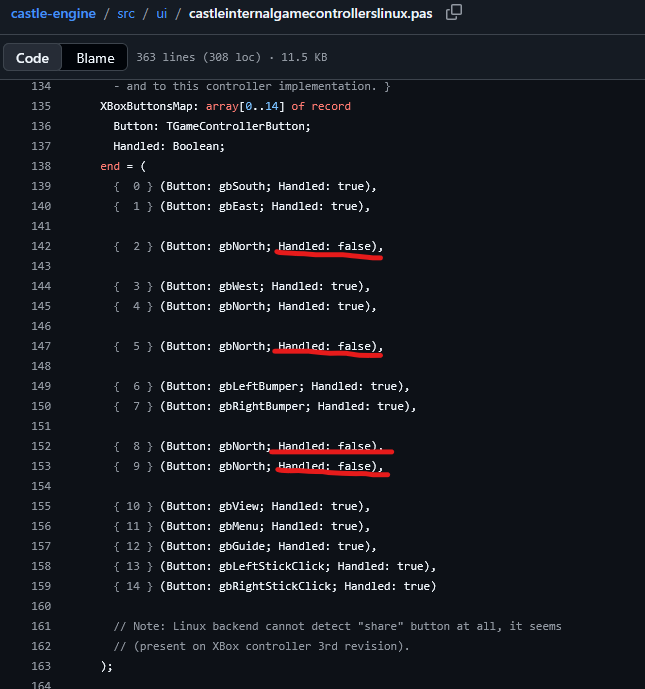
In CastleInternalGameControllersLinux are exactly those buttons handled to false.
There is also a test program in LinuxMint for controllers and there I can see every button is handled correct.
Why is this restriction on Linux? Is it really necessary?
Regards Dieter
---
### Author:  [@michalis](https://forum.castle-engine.io/u/michalis)
#### Post date: [June 29, 2026, 3:51pm UTC](https://forum.castle-engine.io/t/gamecontroller-support-windows11-vs-linuxmint/2172/2 "2026-06-29T15:51:15Z")
On my test XBox gamepads, these numbers were not possible to produce. I.e. I didn’t find any button that would actually make these numbers. That’s why they are marked `Handled:false`.
I suspect _“Logitech Gaming F310 Controller Gamepad”_ is not compatible with what _“XBox controller”_ does, which is unfortunately common. Each controller’s manufacturer tends to do something a bit different. Maybe on Windows, by chance, they are compatible but not on Linux.
See [Current Controller and Platform Support](https://castle-engine.io/controllers#current_support) and TODOs there :
1. One solution is to detect Logitech controllers, and have a different mapping for them, not
`XBoxButtonsMap`. This is unfortunately both Logitech-specific and Linux-specific, and no way around it, when controllers are so incompatible.
2. It is also possible to define different “controllers backends”, and in particular define a backend relying on Steam. They had to solve this in Steam too, and they probably have the best “controller database” now, and there should also be a Steam UI to configure your gamepad.
Contributions to both are welcome:)
---
### Author:  [@Didi](https://forum.castle-engine.io/u/Didi)
#### Post date: [June 30, 2026, 3:16pm UTC](https://forum.castle-engine.io/t/gamecontroller-support-windows11-vs-linuxmint/2172/3 "2026-06-30T15:16:27Z")
Thank you very much for the explanation. I think the planned PlayStation mapping is what I need.
Yesterday, I tried the Logitech G29 wheel. This is for PlayStation and PC and shows exact the same behave, but it works out of the box.