# Excerpts from WEB-build and Itch.io deploy of CGE Project journey
**URL:** https://forum.castle-engine.io/t/excerpts-from-web-build-and-itch-io-deploy-of-cge-project-journey/2125
**Category:** Uncategorized
**Created:** [February 24, 2026, 11:22pm UTC](https://forum.castle-engine.io/t/excerpts-from-web-build-and-itch-io-deploy-of-cge-project-journey/2125 "2026-02-24T23:22:37Z")
**Posts on this page:** 20
**Page:** 1
### Author:  [@phomm](https://forum.castle-engine.io/u/phomm)
#### Post date: [February 24, 2026, 11:22pm UTC](https://forum.castle-engine.io/t/excerpts-from-web-build-and-itch-io-deploy-of-cge-project-journey/2125/1 "2026-02-24T23:22:37Z")
Following the topic of my game [Tower Fight, Samurai Arcade for testing math Skills - #4 by michalis](https://forum.castle-engine.io/t/tower-fight-samurai-arcade-for-testing-math-skills/2124/4)
and stealing a good topic naming from topic [Excerpts from the Shooter development journey :) - #14 by hal09](https://forum.castle-engine.io/t/excerpts-from-the-shooter-development-journey/2074/14)
Here what I have to say. First about the hard parts, the next post in this topic - for requests on WEB platform.
1. Do not use MessageYesNo and probably all other dialogs/dialog functions from CastleMessages unit, they contain Blocking of app flow with Application.ProcessMessages, also don’t use ProcessMessages itself, it hangs the Web-page, you even have troubles to close the page. I was using it for sample questions to the user, but had to switch to my custom view-based dialog approach: [Remade messagedialog to custom one · phomm/Towerfight@cf6f623 · GitHub](https://github.com/phomm/Towerfight/commit/cf6f6235518e3a4fec22dfa868ccb14a764148ae)
2. Do not use Keyboard key like Escape, Space, Tab, PgUp, PgDn, maybe even arrow keys, they switch the focus of html-canvas or scroll the page, which makes playing uncomfortable, I knew about Escape, but others I had myself to bump into 😅, for example I added a Backspace to duplicate “exiting” function, which on desktop is done by Escape
3. Use ApplicationProperties.ShowUserInterfaceToQuit from CastleApplicationProperties unit everywhere you can to hide various controls, it make sense not only on mobile, but web as well, I use it to disable Exit button and corresponding controls, also Fullscreen selector, as on Web it is controlled outside: by canvas.requestFullScreen if you use castle standard html-template, or by Itch special fullscreen button, if you post game to itch.
4. I have a thing that bothers me on Android build, you need to disable orientation-lock to be able to rotate cge-window to landscape. But if you post the game to itch , there is a setting to setup landscape-always, which works even in mobile browser and you don’t need to disable lock.
5. The standard html-template of cge-web project is not compatible with itch (iframe shows only part of canvas, and in itch-fullscreen-mode the button from castle html template for fullscreen isn’t working), I had to adjust the template, I think @michalis would add such a template as an option. The changes you need - remove the style attribute from canvas element, comment/remove all other elements (button and hrefs), except canvas, bc they could capture the focus from canvas and break the gameplay. Itch kinda requires bare canvas for 100% of iframe and controls fullscreen by its own mechanism and button. for this you need CSS (separate or embedded into style attribute) :
6. `#castle-canvas {`
`position:fixed;`
`left:0;`
`top:0;`
`width:100%;`
`height:100%;`
`}`
---
### Author:  [@phomm](https://forum.castle-engine.io/u/phomm)
#### Post date: [February 24, 2026, 11:37pm UTC](https://forum.castle-engine.io/t/excerpts-from-web-build-and-itch-io-deploy-of-cge-project-journey/2125/2 "2026-02-24T23:37:23Z")
What I wanted to discuss/request for web platform 🙂
obviously I wait WebAudio 😅 as a game without it is really different as designed
Also would be nice to have UserConfig flow to store basic settings in user’s storage in browser
My personal (maybe not so important for other devs) is TCastleDownload, because one of soon to be implemented features for the web-game is leaderboard based on server and requests from game-app
As a lazy programmer, I’m always down for automations and really love CI templates provided by Castle to automatically build and publish artifacts to castle releases, and I use this feature for both my games. And even more - I have a custom step in pipeline to upload artifact to google drive. So AFAIK, Itch supports automation, and uploading new build is doable thru the pipeline, which I would love to have. But as I know it is not yet fully prepared in CI template (as requires updating docker image with crossfpc and pas2js). Would be cool to have it eventually.
Those are my expectations/favorites 😅 Let’s maybe discuss 🙂
From my side - I’m not a JS developer (i’m a .net backend), however I have some experience with JS, and I think with the help of AI something could be achieved. Or , for example the Docker part seems doable to me, as I work with docker from time to time, and also building fpc stuff from sources sometimes.
---
### Author:  [@michalis](https://forum.castle-engine.io/u/michalis)
#### Post date: [February 25, 2026, 12:43am UTC](https://forum.castle-engine.io/t/excerpts-from-web-build-and-itch-io-deploy-of-cge-project-journey/2125/3 "2026-02-25T00:43:39Z")
> [@phomm](#):
>
> Do not use MessageYesNo and probably all other dialogs/dialog functions from CastleMessages unit, they contain Blocking of app flow with Application.ProcessMessages, also don’t use ProcessMessages itself, it hangs the Web-page, you even have troubles to close the page. I was using it for sample questions to the user, but had to switch to my custom view-based dialog approach: [Remade messagedialog to custom one · phomm/Towerfight@cf6f623 · GitHub](https://github.com/phomm/Towerfight/commit/cf6f6235518e3a4fec22dfa868ccb14a764148ae)
Indeed, on web `Application.ProcessMessages` will not work, and routines relying on it, like `MessageYesNo` will also fail.
This is the same situation as with [iOS known problems](https://castle-engine.io/ios#_known_problems).
Note that you can still use our dialogs, by using views:
- You can use unit `CastleDialogViews` (which define views, which are the underlying things inside `MessageXxx`) and create related views yourself. Like this:
```delphi
var
Dlg: TViewDialogOK;
begin
// open new view with dialog
Dlg := TViewDialogOK.Create(Self);
Dlg.Caption := 'Some content to display';
Container.PushView(Dlg);
end;
```
This is what e.g. [castle-model-viewer-mobile uses, and it works on iOS and web too](https://github.com/castle-engine/castle-model-viewer-mobile/blob/293863321cfe956b92c64a3a60cdfcb416f9e5a4/code/gameviewabout.pas#L87).
- You can set [MessageOKPushesView](https://castle-engine.io/apidoc/html/CastleMessages.html#MessageOKPushesView) to actually make `MessageOK(...)` do something like above. But naturally it cannot work for routines like `MessagesYesNo`, so my simpler advise for iOS and web is just to not use `CastleMessages` unit at all, and not use `MessageXxx` at all.
Basically, I confirm your advise 🙂 I will update [known limitations section in “web” docs](https://castle-engine.io/web#_known_limitations) shortly.
> [@phomm](#):
>
> Do not use Keyboard key like Escape, Space, Tab, PgUp, PgDn, maybe even arrow keys, they switch the focus of html-canvas or scroll the page, which makes playing uncomfortable, I knew about Escape, but others I had myself to bump into 😅, for example I added a Backspace to duplicate “exiting” function, which on desktop is done by Escape
Indeed, browsers capture various keys for their purpose. Our control still receives (some) of them, but the UX is bad when both our game and the browser do some action on these keys.
As above: I will update [known limitations section in “web” docs](https://castle-engine.io/web#_known_limitations) shortly.
> [@phomm](#):
>
> Use ApplicationProperties.ShowUserInterfaceToQuit from CastleApplicationProperties unit everywhere you can to hide various controls, it make sense not only on mobile, but web as well, I use it to disable Exit button and corresponding controls, also Fullscreen selector, as on Web it is controlled outside: by canvas.requestFullScreen if you use castle standard html-template, or by Itch special fullscreen button, if you post game to itch.
Also confirmed 🙂 `ShowUserInterfaceToQuit` is `false` on web and one should honor it, by not showing the UX (buttons etc.) to user to “Quit” the application, since on web → there’s no quit, users just close their tab / browser window etc.
> [@phomm](#):
>
> I have a thing that bothers me on Android build, you need to disable orientation-lock to be able to rotate cge-window to landscape. But if you post the game to itch , there is a setting to setup landscape-always, which works even in mobile browser and you don’t need to disable lock.
Hm, you mean in a web browser on Android? There is a way to request that full-screen is forced to landscape? Thank you – added to TODO, we should find it and use too. We could then make [screen\_orientation from manifest](https://castle-engine.io/project_manifest) work on web too, so using `screen_orientation="landscape"` would work on the web.
> [@phomm](#):
>
> The standard html-template of cge-web project is not compatible with itch (iframe shows only part of canvas, and in itch-fullscreen-mode the button from castle html template for fullscreen isn’t working)
Thank you – we should indeed introduce some way to provide custom templates, and maybe just provide a ready template to do out-of-the-box something proper for [itch.io](http://itch.io) as you show.
Your post is a great reference for people who want to upload their [web](https://castle-engine.io/web) games on [itch.io](http://itch.io), thank you!
> [@phomm](#):
>
> obviously I wait WebAudio 😅 as a game without it is really different as designed
>
> Also would be nice to have UserConfig flow to store basic settings in user’s storage in browser
>
> My personal (maybe not so important for other devs) is TCastleDownload, because one of soon to be implemented features for the web-game is leaderboard based on server and requests from game-app
I have 2 of above, WebAudio and a TCastleDownload-web backend already in progress 🙂
They work – but WebAudio needs review (parts of it have been generated by Claude Code) and TCastleDownload-web needs rework to be cleaner (here also Claude Code helped, but what it did must be now fixed). You will like our next update :), hopefully this weekend.
> [@phomm](#):
>
> So AFAIK, Itch supports automation, and uploading new build is doable thru the pipeline, which I would love to have. But as I know it is not yet fully prepared in CI template (as requires updating docker image with crossfpc and pas2js). Would be cool to have it eventually.
Indeed, exactly as you say. [Itch.io](http://Itch.io) has [butler](https://itch.io/docs/butler/) to upload builds from the command-line (so also from any automated work, CI/CD). We use it e.g. to [upload platformer to itch.io](https://github.com/castle-engine/castle-engine/tree/master/examples/2d_games/platformer/itch.io).
As you say, to use this from CI/CD, we miss easy way to get [all web prerequisites](https://castle-engine.io/web#_usage_building_examples_and_your_own_projects) (FPC cross-compiler for WebAssembly, pas2js) in a CI runner (ideally, both in [our Docker image](https://castle-engine.io/docker) and in [through our castle-build-ci scripts](https://castle-engine.io/ci) ).
I want to solve it by zipping the prerequisites in [castle-fpc](https://github.com/castle-engine/castle-fpc) releases. Then the “web prerequisites” could be:
- placed in Docker image,
- downloaded by castle-build-ci scripts,
- but also downloaded easily by CGE editor, so that building for web is just “a simple button press from our editor”.
I agree 100% with all your feature requests. I think they actually match perfectly the things I see as “most priority” for web! 🙂 So, this makes me happy, we’re going in a good direction.
---
### Author:  [@michalis](https://forum.castle-engine.io/u/michalis)
#### Post date: [February 25, 2026, 12:56am UTC](https://forum.castle-engine.io/t/excerpts-from-web-build-and-itch-io-deploy-of-cge-project-journey/2125/4 "2026-02-25T00:56:27Z")
> [@michalis](#):
>
> > [@phomm](#):
> >
> > I have a thing that bothers me on Android build, you need to disable orientation-lock to be able to rotate cge-window to landscape. But if you post the game to itch , there is a setting to setup landscape-always, which works even in mobile browser and you don’t need to disable lock.
>
> Hm, you mean in a web browser on Android? There is a way to request that full-screen is forced to landscape? Thank you – added to TODO, we should find it and use too. We could then make [screen\_orientation from manifest](https://castle-engine.io/project_manifest) work on web too, so using `screen_orientation="landscape"` would work on the web.
Looks like JS [ScreenOrientation.lock](https://developer.mozilla.org/en-US/docs/Web/API/ScreenOrientation/lock) is the key to do this. Mentioned also [here (Managing screen orientation)](https://developer.mozilla.org/en-US/docs/Web/API/CSS_Object_Model/Managing_screen_orientation). Added to TODO in [our web docs](https://castle-engine.io/web).
---
### Author:  [@phomm](https://forum.castle-engine.io/u/phomm)
#### Post date: [February 25, 2026, 1:01am UTC](https://forum.castle-engine.io/t/excerpts-from-web-build-and-itch-io-deploy-of-cge-project-journey/2125/5 "2026-02-25T01:01:02Z")
> [@michalis](#):
>
> Hm, you mean in a web browser on Android? There is a way to request that full-screen is forced to landscape?
This is my observation. I configured the game config panel (on itch) , among others there is a selector for Forced landscape mode. When I opened the game on Android inside browser in fullscreen mode (via itch fullscreen button), it preserves landscape despite phone setting to enable/disable rotation of orientation.
> [@michalis](#):
>
> I have 2 of above, WebAudio and a TCastleDownload-web backend already in progress 🙂
>
> They work – but WebAudio needs review (parts of it have been generated by Claude Code) and TCastleDownload-web needs rework to be cleaner (here also Claude Code helped, but what it did must be now fixed). You will like our next update :), hopefully this weekend.
Great ! Lovely ! I will proceed with my features so maybe even in sync with cge updates 😅
---
### Author:  [@michalis](https://forum.castle-engine.io/u/michalis)
#### Post date: [February 25, 2026, 1:37am UTC](https://forum.castle-engine.io/t/excerpts-from-web-build-and-itch-io-deploy-of-cge-project-journey/2125/6 "2026-02-25T01:37:28Z")
> [@michalis](#):
>
> I will update [known limitations section in “web” docs](https://castle-engine.io/web#_known_limitations) shortly.
Done. I added to “Known Limitations” on web notes about `Application.ProcessMessage`, `CastleMessages`, keys, and `ShowUserInterfaceToQuit`.
---
### Author:  [@michalis](https://forum.castle-engine.io/u/michalis)
#### Post date: [March 11, 2026, 7:21pm UTC](https://forum.castle-engine.io/t/excerpts-from-web-build-and-itch-io-deploy-of-cge-project-journey/2125/7 "2026-03-11T19:21:09Z")
> [@michalis](#):
>
> I have 2 of above, WebAudio and a TCastleDownload-web backend already in progress 🙂
Sorry this is still not finished + merged. I have definitely too many tasks and too little time lately 🙂
I also made [similar apology in this PR](https://github.com/castle-engine/castle-engine/pull/636#issuecomment-4041563991): I have a big delay, with pretty much everything, in February and in March likely too, due to personal stuff and the need to finish one job in March. I should have a lot more time working on CGE since April 2026, so in ~3 weeks 🙂 Bear with me please until then 🙂 So I just wanted to make a note that these, WebAudio and TCastleDownload+http on web, is very much on TODO list.
---
### Author:  [@michalis](https://forum.castle-engine.io/u/michalis)
#### Post date: [April 19, 2026, 4:20am UTC](https://forum.castle-engine.io/t/excerpts-from-web-build-and-itch-io-deploy-of-cge-project-journey/2125/9 "2026-04-19T04:20:53Z")
@phomm Downloading HTTP(S) on web is almost ready 🙂
You can already try the engine from branch [web-download](https://github.com/castle-engine/castle-engine/tree/web-download) where `TCastleDownload` on web should work. I noticed one problem (testing `examples/network/asynchronous_download/`, where 2 downloads seem to go OK, 1 weirdly fails) – will investigate and fix ASAP, to merge this to `master`.
Note: CORS will prevent our application on web from downloading things from other domains. This is the same problem as all JS application face.
- For development, you can disable it e.g. on Firefox with [CORS Everywhere – Get this Extension for 🦊 Firefox (en-US)](https://addons.mozilla.org/en/firefox/addon/cors-everywhere/) . Chrome (but sadly not Vivaldi) has `--disable-web-security` flag.
- For real usage, the server should be configured to allow downloading from it, by returning appropriate headers. See [Cross-Origin Resource Sharing (CORS) - HTTP | MDN](https://developer.mozilla.org/en-US/docs/Web/HTTP/Guides/CORS) .
Stay tuned for finishing and merging this. But if you’re brave, you can try it already with your game and let me know how it goes:)
---
### Author:  [@michalis](https://forum.castle-engine.io/u/michalis)
#### Post date: [April 19, 2026, 11:22pm UTC](https://forum.castle-engine.io/t/excerpts-from-web-build-and-itch-io-deploy-of-cge-project-journey/2125/10 "2026-04-19T23:22:38Z")
Important fix done, and at least basic downloading works correctly!
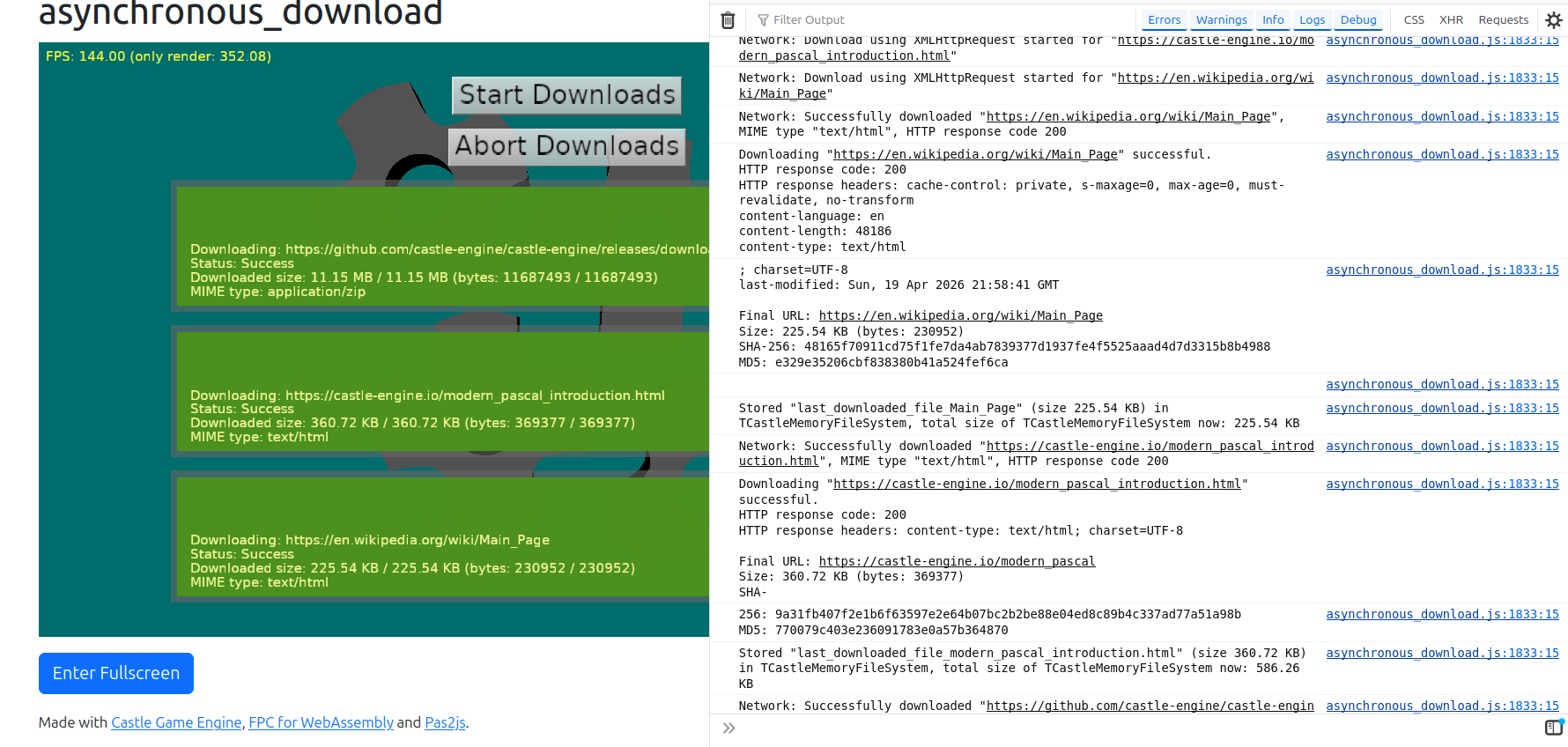
This is a screenshot of `examples/network/asynchronous_download/` from branch [web-download](https://github.com/castle-engine/castle-engine/tree/web-download). I added to that example also showing MD5 and SHA-256 checksums of the downloaded contents, to I could easily see in the console that indeed they download 100% correct data.
---
### Author:  [@michalis](https://forum.castle-engine.io/u/michalis)
#### Post date: [April 19, 2026, 11:45pm UTC](https://forum.castle-engine.io/t/excerpts-from-web-build-and-itch-io-deploy-of-cge-project-journey/2125/11 "2026-04-19T23:45:46Z")
Works cool, merging to master – so, we have `TCastleDownload` on web:)
Below screenshots from:
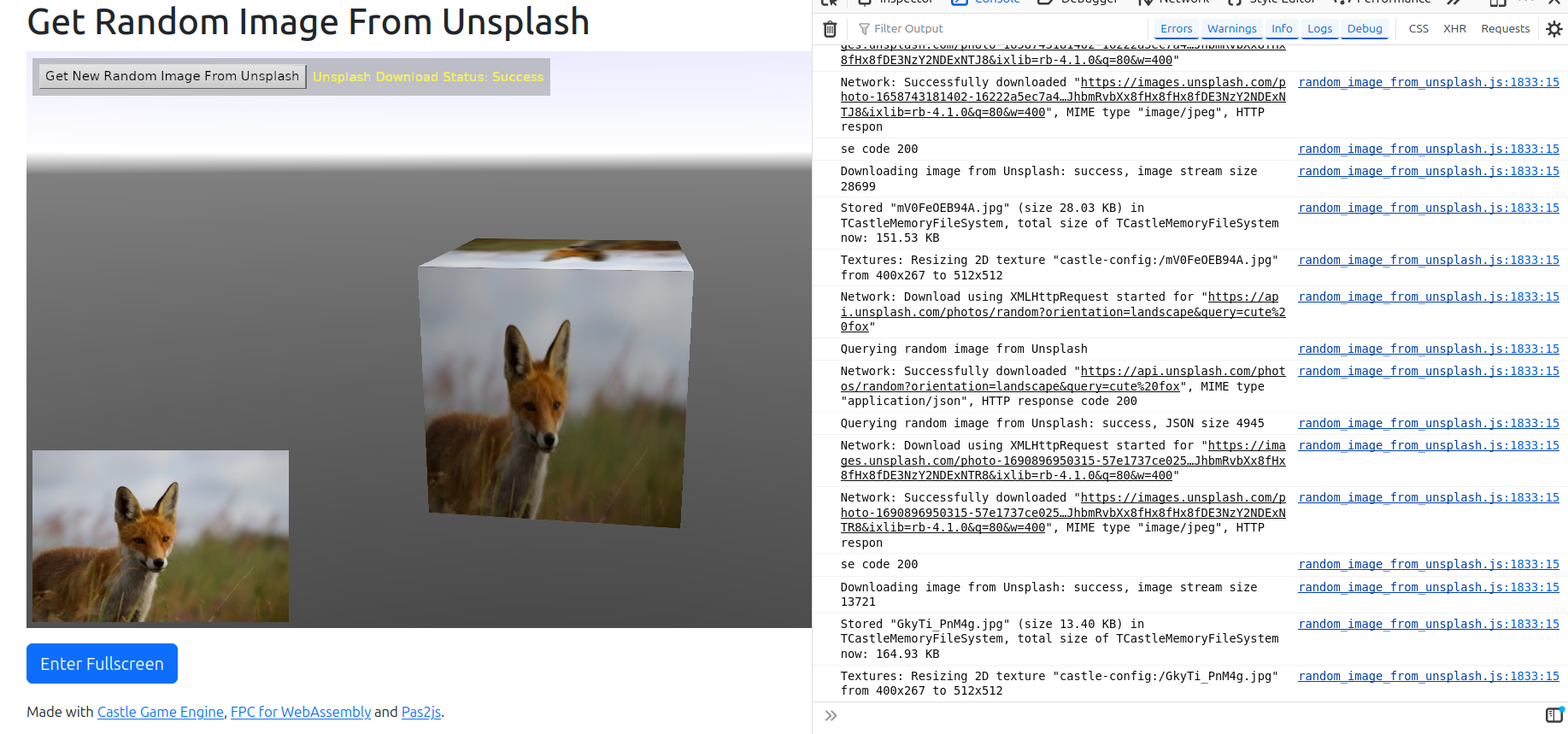
- [examples/network/random\_image\_from\_unsplash/](https://github.com/castle-engine/castle-engine/tree/master/examples/network/random_image_from_unsplash) - communicate using REST with Unsplash API. Shows that, beyond simple downloading, also `TCastleDownload.HttpHeader` works.
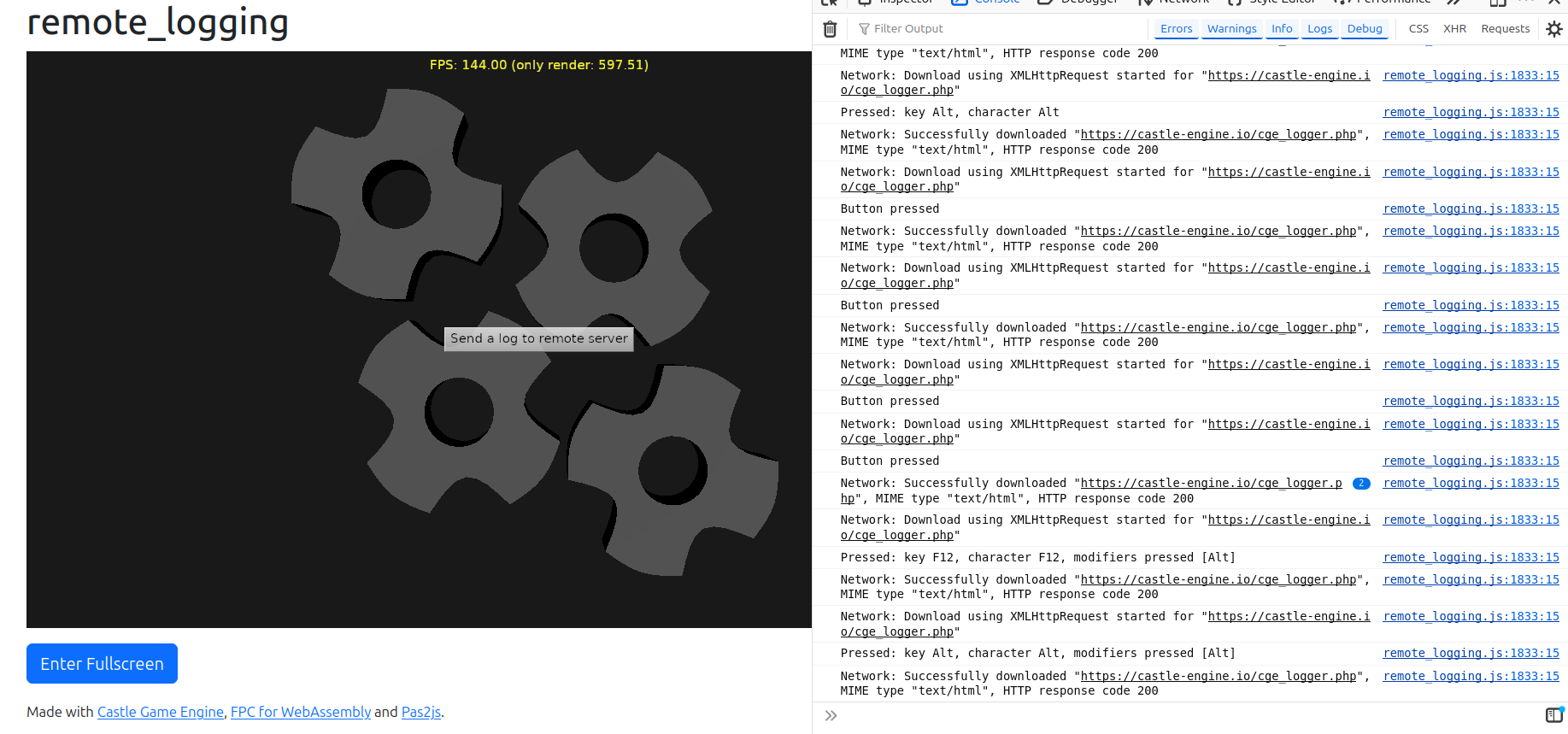
- [examples/network/remote\_logging/](https://github.com/castle-engine/castle-engine/tree/master/examples/network/remote_logging) - send using POST (`Request.HttpMethod := hmPost`, `Request.HttpPostData.Values[ParameterKey] := ParameterValue`). I verified on the server (that receives data using [simplest PHP script that logs POST parameter](https://github.com/castle-engine/cge-www/blob/master/htdocs/cge_logger.php)) that it received correct data.
---
### Author:  [@phomm](https://forum.castle-engine.io/u/phomm)
#### Post date: [April 20, 2026, 2:54pm UTC](https://forum.castle-engine.io/t/excerpts-from-web-build-and-itch-io-deploy-of-cge-project-journey/2125/12 "2026-04-20T14:54:31Z")
Started checking the changes. Also noted a compilation error in Android, I fixed it and pushing it along with my Android Request error handling fix PR
>
>
> Corrected Android error handling, Requests with Http response status 400+ are tr…eated as TCastleDownload.DownloadStatus = dsError
>
> also a small compilation fix after Web HttpRequests branch changes
regarding web requests - a bit later
---
### Author:  [@phomm](https://forum.castle-engine.io/u/phomm)
#### Post date: [April 22, 2026, 11:35am UTC](https://forum.castle-engine.io/t/excerpts-from-web-build-and-itch-io-deploy-of-cge-project-journey/2125/13 "2026-04-22T11:35:44Z")
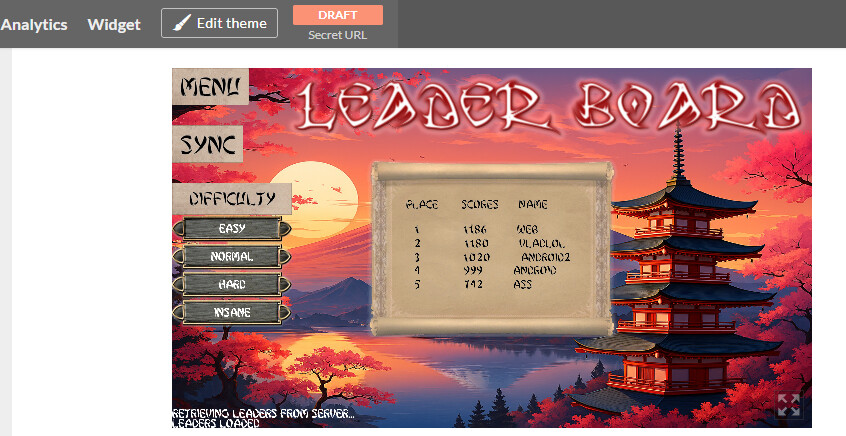
behold ! 🤣
Here is working workflow for server-side leader board for the game on itch!
The data is loaded fine and also posted properly (“WEB” name of a leader and by luck on the top of leaderboard on easy difficulty, was sent from web-version of game)
technical details: GET and POST requests are used, for POST httpbody with json content and httpHeader ‘Content-Type: application/json’ are included
Thanks a lot, @michalis !
A small side-note, I implemented easily the CORS support on server (as noted by Michalis earlier), with .net it is quite simple. then I just rebuild the docker image from latest master and rerun the container on a server (bc there was a question in game topic about why .net 🙂 ). Can be seen in server repo on github
---
### Author:  [@michalis](https://forum.castle-engine.io/u/michalis)
#### Post date: [April 30, 2026, 12:34am UTC](https://forum.castle-engine.io/t/excerpts-from-web-build-and-itch-io-deploy-of-cge-project-journey/2125/14 "2026-04-30T00:34:33Z")
Audio playback on the web is also close to being done:)
Right now on [branch webaudio (not master)](https://github.com/castle-engine/castle-engine/tree/webaudio).
Initial notes:
- Underneath we use [WebAudio API](https://developer.mozilla.org/en-US/docs/Web/API/Web_Audio_API) but you don’t really need to know anything about it – just use [Castle Game Engine sound API and components](https://castle-engine.io/sound) and everything will work on the web.
- Note that the audio playback will be in a _suspended_ state when loading the page in modern web browsers. This is a feature, [the idea is that user should manually enable audio because it would be annoying if newly opened page could automatically play some sound](https://developer.mozilla.org/en-US/docs/Web/API/Web_Audio_API/Best_practices#autoplay_policy). So we can only start audio in response to _user interaction_ with a page, which in practice means: after a press (touch, mouse press, key press on focused canvas). Our engine handles the activation automatically, but you need to design your UX to encourage player to click on anything to start the playback. A button like “Start the game” will do the trick.
- Note the OggVorbis suppport depends on the browser (we rely that the browser can decompress OggVorbis on the web), but it’s commonly supported. See about supported media (including audio) formats: [Media types and formats for image, audio, and video content - Media | MDN](https://developer.mozilla.org/en-US/docs/Web/Media/Guides/Formats) , [Web audio codec guide - Media | MDN](https://developer.mozilla.org/en-US/docs/Web/Media/Guides/Formats/Audio_codecs) .
Tested on examples:
- platformer game
- ~~(SOLVED) though note initial menu music doesn’t play~~
- audio/doppler\_demo
- though note TODOs: Doppler effect is not done by WebAudio
Some TODOs before I merge this:
- ~~(DONE) Playing non-WAV formats (like OggVorbis) right when the buffer was loaded (e.g. playing iniital game music) will fail with `Cannot play sound "%s" because it is still decoding.` . We must handle this better, start playback once the OggVorbis finished decoding, instead of aborting.~~
- ~~(DONE) We use JS promises in naive way but that’s not good: We need to make sure that we cancel the promise (building a mechanism on top of JS to cancel any promise, maybe just ignoring result), as we must cancel a promise if the Pascal instance interested in the promise no longer exists (which may happen e.g. if you switch views before a promise was realized).~~
- ~~(DONE) platformer weird `shot.wav` playback must be investigated and fixed.~~
- ~~(WORKAROUNDED, issue not related to audio) game\_3d\_sound crashes (for reasons unrelated to audio, it seems?).~~
- ~~(DONE) play\_sounds crashes.~~
- (POSTPONED after merge in the end) Support other audio formats, like MP3. Also FMOD supports them. IOW, we are not limited to WAV / OggVorbis formats on some audio backends, and we should expose more audio formats, just with warning (that they are not cross-platform supported by CGE).
---
### Author:  [@phomm](https://forum.castle-engine.io/u/phomm)
#### Post date: [May 6, 2026, 5:14pm UTC](https://forum.castle-engine.io/t/excerpts-from-web-build-and-itch-io-deploy-of-cge-project-journey/2125/15 "2026-05-06T17:14:52Z")
I have tested audio from webaudio branch.
It worked for me with Wav files. unfortunately, as mentioned with Ogg files it was throwing errors (about decoding). Ofc, it would be great to have ogg files support, as wav files make data.zip really bloated, I was thinking that they are at least well compressible, but seems not 🙂 it increased the size of data.zip by 3+ times, ~20→~70
I didn’t try MP3, as didn’t want to add more dependencies (FMOD)
What I noticed, that with Wav files (the only option I have), this detail about “preparing” user for audio and not auto-starting sounds right away, it was actually working, sounds started without any need for adjustments. Not sure if it is my browser setup, or wav-specifics, or smth, just noticed.
Also maybe I did smth wrong when I was converting ogg→wav, it resulted in mono-channel sound on web-page(I hear it in headphones), but the file itself is played as stereo (in media-player). I will try to convert with attention to channels details and retry
---
### Author:  [@michalis](https://forum.castle-engine.io/u/michalis)
#### Post date: [May 6, 2026, 5:43pm UTC](https://forum.castle-engine.io/t/excerpts-from-web-build-and-itch-io-deploy-of-cge-project-journey/2125/16 "2026-05-06T17:43:01Z")
> [@phomm](#):
>
> It worked for me with Wav files. unfortunately, as mentioned with Ogg files it was throwing errors (about decoding). Ofc, it would be great to have ogg files support, as wav files make data.zip really bloated, I was thinking that they are at least well compressible, but seems not 🙂 it increased the size of data.zip by 3+ times, ~20→~70
Indeed. I’ll get OggVorbis working (fix that `Cannot play sound "%s" because it is still decoding` error) ASAP, hopefully today in the evening 🙂
> [@](#):
>
> I didn’t try MP3, as didn’t want to add more dependencies (FMOD)
Note that I think that we can get MP3 support also with WebAudio. So we would have _two_ sound backends supporting MP3 (and other audio formats, beyond Wav and OggVorbis): FMOD and WebAudio,
More possibilities 🙂
Although the recommendation will remain to limit to Wav and OggVorbis, to work with OpenAL + VorbisFile libraries (which we distribute with CGE out-of-the-box, on Windows, as DLLs).
> [@](#):
>
> What I noticed, that with Wav files (the only option I have), this detail about “preparing” user for audio and not auto-starting sounds right away, it was actually working, sounds started without any need for adjustments. Not sure if it is my browser setup, or wav-specifics, or smth, just noticed.
So sound played for you without the need for any clicks? Huh, interesting. It is depending on the browser, and may be per-website.
For me, both latest FireFox and Vivaldi (Chrome-based) did require initial click to play anything.
> [@](#):
>
> Also maybe I did smth wrong when I was converting ogg→wav, it resulted in mono-channel sound on web-page(I hear it in headphones), but the file itself is played as stereo (in media-player). I will try to convert with attention to channels details and retry
You can set global `LogSoundLoading` to `true` from unit `CastleInternalSoundFile` to see in the log some details about loaded sounds, in particular whether they are loaded as mono or stereo. Maybe this will help in investigation 🙂
---
### Author:  [@michalis](https://forum.castle-engine.io/u/michalis)
#### Post date: [May 10, 2026, 2:57am UTC](https://forum.castle-engine.io/t/excerpts-from-web-build-and-itch-io-deploy-of-cge-project-journey/2125/17 "2026-05-10T02:57:00Z")
I pushed to the `webaudio` branch more work – I’m close to finishing this 🙂
- No more `Cannot play sound ... because it is still decoding` errors, playing OggVorbis works now reliably.
- Minor sound API improvements: `Channels:Cardinal` (we are ready for sounds with \> 2 channels), more hidden `SampleFormat` (we are ready for formats decompressed + played without CGE needing to look at them, like more FMOD and WebAudio formats)
- Using JS promises in safe way, through utilities in [CastleInternalWebUtils](https://github.com/castle-engine/castle-engine/blob/webaudio/src/base/wasi/castleinternalwebutils.pas).
- Tested mostly on `examples/2d_games/platformer/` and `examples/audio/play_sounds/` examples.
---
### Author:  [@phomm](https://forum.castle-engine.io/u/phomm)
#### Post date: [May 11, 2026, 12:45pm UTC](https://forum.castle-engine.io/t/excerpts-from-web-build-and-itch-io-deploy-of-cge-project-journey/2125/18 "2026-05-11T12:45:23Z")
I Tested the web-build from updated webaudio branch. I removed wav files and kept only ogg.
[Tower-fight by phomm](https://phomm.itch.io/tower-fight?secret=Evr2iLjpvTifjI2YWDWKvVReA) same link to the game
It works fine! Tried in incognito on chrome and edge on windows to test it fresh, works without any need of clicking something. Same on incognito chrome on android, works good with music sounding right when app is loaded and menu shown !
I’m happy and grateful, thanks a lot, @michalis !
---
### Author:  [@michalis](https://forum.castle-engine.io/u/michalis)
#### Post date: [May 12, 2026, 3:23am UTC](https://forum.castle-engine.io/t/excerpts-from-web-build-and-itch-io-deploy-of-cge-project-journey/2125/19 "2026-05-12T03:23:29Z")
Thank you for testing, I’m happy it’s all good!
And it’s now merged to engine’s `master` branch:)
Changes since my last post:
- Fixed WebAudio `TCastlePlayingSound.Offset` when you change `TCastlePlayingSound.Pitch` while playback (can be tested with play\_sounds example)
- Fixed WebAudio playback of 8-bit PCM data (play\_sounds example has examples)
- Fix displaying duration of loaded OggVorbis in play\_sounds
- API improvement: `TCastleSound.Frequency` is now float (both FMOD and WebAudio may report there fractional parts)
- Docs added to [Web Target | Manual | Castle Game Engine](https://castle-engine.io/web#audio)
- examples/audio/game\_3d\_sound works now (workarounded unrelated rendering issue on web: 16-bit PNG textures don’t work; this will be fixed properly, for now just workarounded as unrelated to sound support)
- Fixed edge-cases when sound stops playing, we should reliably know about this on engine side now
The [page about web target](https://castle-engine.io/web) links to ready builds of 2 audio examples ([play\_sounds](https://castle-engine.io/web-demos/examples/audio/play_sounds/), [game\_3d\_sound](https://castle-engine.io/web-demos/examples/audio/game_3d_sound/)), also the linked [platformer](https://castle-engine.io/web-demos/examples/2d_games/platformer/) build there is updated – all 3 demos should play audio nicely now.
I left one task post-merge: enabling MP3 and other formats playback on WebAudio and FMOD backends, Since this is kind of “bonus”, and not recommended anyway (for cross-platform apps, stick with Wav and OggVorbis that we guarantee to support everywhere), I’ll tackle it later.
---
### Author:  [@michalis](https://forum.castle-engine.io/u/michalis)
#### Post date: [May 12, 2026, 3:30am UTC](https://forum.castle-engine.io/t/excerpts-from-web-build-and-itch-io-deploy-of-cge-project-journey/2125/20 "2026-05-12T03:30:37Z")
> [@phomm](#):
>
> [Tower-fight by phomm](https://phomm.itch.io/tower-fight?secret=Evr2iLjpvTifjI2YWDWKvVReA) same link to the game
>
> It works fine! Tried in incognito on chrome and edge on windows to test it fresh, works without any need of clicking something.
For me, your game also plays sound immediately, without the need for any special clicks. Although the audio context is initially suspended (log shows `Web Audio context is suspended....`) but then it just plays immediately. Something / somehow must resume the audio context in your case magically:)
Maybe the `
### Author:  [@phomm](https://forum.castle-engine.io/u/phomm)
#### Post date: [June 10, 2026, 4:07pm UTC](https://forum.castle-engine.io/t/excerpts-from-web-build-and-itch-io-deploy-of-cge-project-journey/2125/21 "2026-06-10T16:07:39Z")
Ok, some more time has passed, less intense work on the project bc of job and reality 😅
however I was able to prepare new big feature (interactive tutorial) , quite important for future public release.
And here what’s seen from the my progress so far:
1 for this workflow/feature I somewhat rely on the Castle User Config feature, bc I save the fact of completing tutorial to the device-stored-config (same as with sound volume level and others, but those are not so critical for UX), and leaving the implementation as is will bring inconvenience, as every page restart would propose to run tutorial again. For now I’ve overcome this by assigning triggering tutorial to other button than main-game-start-button (this will allow to start game normally, not bumping into tutorial every time page reloaded, but still some users will be confused with “how-to-play” question, bc they wouldn’t know they need to click some other button for tutorial).
So, the feature of storing userconfigs to local storage in browser is patiently awaited 😇
2. Couple of issues found : as long as the game is provided on itch, I would say it is naturally possible that players will play the variety of browsers, incl. mobile. The tests on mobile browsers shown most things work well, That’s great! However couple of things would be nice to address:
most important: android keyboard is not activated for textboxes( for my game , for example it is rather important, as user inputs the name for the record table), ofc I set it up for android target and it is tested and working.
less important (to my view): I mentioned earlier that I use ShowUserInterfaceToQuit and IFDEF WASI conditional, but it is kinda tricky to separate the logic (for example I use it to hide some UI block), as both mobile and desktop browsers behave the same way for any of combination of these means, disallowing to configure granularly, i.e. I’m hiding a block about keyboard controls for mobile, but show it for web (as on desktop it is also ok to play with keys), but for mobile web would be nice to hide as well.
I’m describing this not as a bug, but a thing to consider 🙂 it might be not so wide use case to worry about.
one more not important thing, I noted when I tried to debug android keyboard (I was trying to launch web build on pc locally from editor, while attempting to connect from android phone to the IP:port). I got an error for line this.RegisterGlobalObject(caches,“cashes”); in the resulting game.js, that caches is not defined, it resulted the game to stop loading (so it works when you access localhost:3000 or 127.0.0.1:3000, but fails for local\_network\_device\_IPv4:3000), I searched entire js file, didn’t find any other mention of caches, commented it, relaunched the game without recompile and it started working with IP:port . I’m not sure if that Register line comes from pas2js or somehow controlled from castle, just a thing I found, maybe not even worth to consider 😅
[Next page](https://forum.castle-engine.io/t/excerpts-from-web-build-and-itch-io-deploy-of-cge-project-journey/2125.md?page=2)