# Excerpts from the Shooter development journey :)
**URL:** https://forum.castle-engine.io/t/excerpts-from-the-shooter-development-journey/2074
**Category:** Show Your Projects
**Created:** [January 4, 2026, 2:19am UTC](https://forum.castle-engine.io/t/excerpts-from-the-shooter-development-journey/2074 "2026-01-04T02:19:03Z")
**Posts on this page:** 15
**Page:** 2
### Author:  [@Valhl88](https://forum.castle-engine.io/u/Valhl88)
#### Post date: [May 16, 2026, 4:06am UTC](https://forum.castle-engine.io/t/excerpts-from-the-shooter-development-journey/2074/21 "2026-05-16T04:06:03Z")
What if you use the same TCastleRootTransform or TCacheAbstractTransform for the server side of the game? This object is located in Items, which has a physics update method called UpdateIntersectTime. The scene for the server could be assembled in the editor or in a separate castle-design, and it could also be tested in the window. In a server build, it would run in a loop without a window — just this object. Have you tested this approach? It seems to me like the simplest and cleanest option for the server.
---
### Author:  [@hal09](https://forum.castle-engine.io/u/hal09)
#### Post date: [May 17, 2026, 12:00am UTC](https://forum.castle-engine.io/t/excerpts-from-the-shooter-development-journey/2074/22 "2026-05-17T00:00:53Z")
> [@Valhl88](#):
>
> What if you use the same TCastleRootTransform or TCacheAbstractTransform for the server side of the game? This object is located in Items, which has a physics update method called UpdateIntersectTime. The scene for the server could be assembled in the editor or in a separate castle-design, and it could also be tested in the window. In a server build, it would run in a loop without a window — just this object. Have you tested this approach? It seems to me like the simplest and cleanest option for the serve
**thanks**
yes it could work I haven’t tested it but I think it’s fine only for small player counts.
Imagine 20 matches each with 20-30 players TCastleRootTransform FPS would drop badly even with armature only (no mesh, no texture),
and physics calculation would be wrong compared to client smooth FPS because the scene graph update rate would be inconsistent.
My current approach:
-No 3D model loading on server
-One TKraft instance per match - just for raycasting
-GetBoneWorldTransform = pure math, microseconds - full bone world position simulation
-Already tested and working!! - 0% CPU per match
Maybe I’ll try TCastleRootTransform approach after I finish what I’m working on - but I think the real bottleneck with that approach would be CPU from scene graph overhead …
With my current approach, I think the bottleneck is bandwidth, not CPU - which is a much better problem to have 🙂
---
### Author:  [@hal09](https://forum.castle-engine.io/u/hal09)
#### Post date: [July 3, 2026, 7:02pm UTC](https://forum.castle-engine.io/t/excerpts-from-the-shooter-development-journey/2074/23 "2026-07-03T19:02:42Z")
Hello
Just uploaded my first test build for a small online TDM shooter I’m working on.
It’s in early development and the server is only online during certain hours.
Game Link: [online shooter game (TDM) by hanipino87](https://hanipino87.itch.io/online-shooter-game-tdm)
Server Time:16:00 – 00:00 (GMT+1)
Thanks for checking it out!
---
### Author:  [@hal09](https://forum.castle-engine.io/u/hal09)
#### Post date: [July 4, 2026, 6:42pm UTC](https://forum.castle-engine.io/t/excerpts-from-the-shooter-development-journey/2074/24 "2026-07-04T18:42:10Z")
Hey everyone,
I just uploaded a test build of my online shooter game (Team Deathmatch mode) to [itch.io](http://itch.io).
You can download it here: [online shooter game (TDM) by hanipino87](https://hanipino87.itch.io/online-shooter-game-tdm)
Notes:
The server is NOT always online. It typically runs from 16:00 to 00:00 (GMT+1).
The server may also open randomly at other times. This is a work-in-progress test build – expect bugs and changes. Your feedback helps shape the game!
Download, play.
---
### Author:  [@michalis](https://forum.castle-engine.io/u/michalis)
#### Post date: [July 5, 2026, 2:35am UTC](https://forum.castle-engine.io/t/excerpts-from-the-shooter-development-journey/2074/25 "2026-07-05T02:35:30Z")
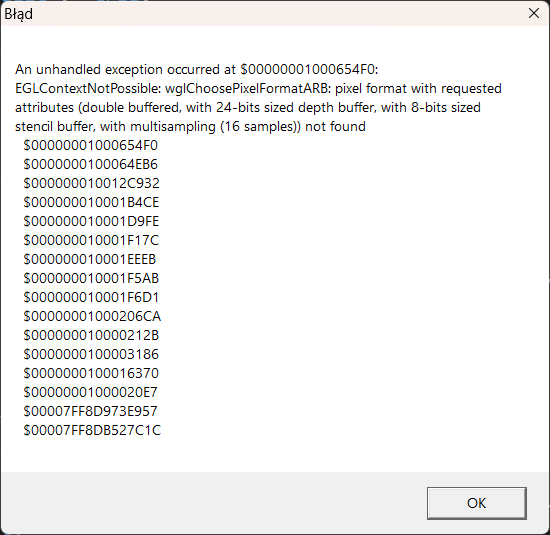
On my Windows system, it shows me that it cannot allocate context with 16 samples.
This is something we try to handle on the engine side, at least by default: if you use `TCastleWindow` with the `Open` (or just let the default call `Application.MainWindow.OpenAndRun` from the main program do it), then we gracefully fallback to “no anti-aliasing”. Tested it now on the same system, using `Window.AntiAliasing := aa16SamplesNicer` in the `initialization` of `examples\3d_games\walking_adventure` → and the game runs, and I see in log `OpenGL context: OpenGL context cannot be initialized. Multi-sampling (anti-aliasing) turned off, trying to initialize once again.`.
It seems you initialize context in a different way, so it doesn’t fallback in case we cannot get the requested number of samples for multi-sampling? If you describe how do you initialize the context (using `TCastleWindow`? anything non-standard?) I can see is there anything on the engine side I could improve to avoid this problem 🙂
---
### Author:  [@hal09](https://forum.castle-engine.io/u/hal09)
#### Post date: [July 5, 2026, 2:52pm UTC](https://forum.castle-engine.io/t/excerpts-from-the-shooter-development-journey/2074/26 "2026-07-05T14:52:54Z")
hellow 🙂
My current initialization code (GameInitialize.pas):
```auto
initialization
DecimalSeparator := ‘.’;
Application.OnInitialize := @ApplicationInitialize;
Window := TCastleWindow.Create(Application);
Application.MainWindow := Window;
Window.Width := 800; //1600
Window.Height := 450;
Window.AntiAliasing := aa16SamplesNicer;
Window.DepthBits := 24{16}{24};
Window.StencilBits := 8{0,8};
Window.ParseParameters;
```
What I do in ApplicationInitialize: I run background tasks like PingServer in a thread and synchronize UI updates back to the main thread.
Could this also be causing the issue!
* * *
_I’ll comment out these lines for now:_
`Window.AntiAliasing := aa16SamplesNicer;`
`Window.DepthBits := 24{16}{24};`
`Window.StencilBits := 8{0,8};`
Then I’ll recompile and upload the EXE without 16x anti-aliasing. This should work !
Thanks for the help
[ShooterGameHTE.zip](https://forum.castle-engine.io/uploads/short-url/egC9UhOTv3QLsTqVZlBekNtEqFg.zip) (3.8 MB)
---
### Author:  [@michalis](https://forum.castle-engine.io/u/michalis)
#### Post date: [July 5, 2026, 5:28pm UTC](https://forum.castle-engine.io/t/excerpts-from-the-shooter-development-journey/2074/27 "2026-07-05T17:28:54Z")
> [@hal09](#):
>
> Then I’ll recompile and upload the EXE without 16x anti-aliasing. This should work !
Thank you – I confirm the new exe starts flawlessly for me, I see the screen to join, character animates cool:)
I admit I don’t know why the past version failed – what you show is standard,
- you set `aa16SamplesNicer` and the standard way to create a window should fallback on non-anti-aliased window.
- the 24 and 8 values for depth and stencil are our engine defaults, `DefaultDepthBits` and `DefaultStencilBits`, so setting them doesn’t break change anything,
- doing things in threads (the usual disclaimer for anyone reading: [call engine from one thread](https://castle-engine.io/threads)) should not cause any issues here.
So, I don’t know why your original code didn’t do automatic fallback on non-anti-aliasing. Is your main program code standard, just calling `Application.MainWindow.OpenAndRun` ?
To give background how does the engine make “fallback, in case GPU doesn’t support requested AntiAliasing”:
- `TCastleWindow.Open` without parameters executes `Open(@DefaultRetryOpen)`
- `TCastleWindow.Open` with `Retry: TGLContextRetryOpenFunc` parameter first tries to create context, catches `EGLContextNotPossible`, and if `Retry` callback returns `true` – it means we have downgraded our requirements and should try again, so `Open(Retry)` calls itself recursively,
- `DefaultRetryOpen` has a few rules how to “downgrade” the context, and the first is that if `AntiAliasing <> aaNone` then set `AntiAliasing := aaNone`.
This mechanism worked with our `examples\3d_games\walking_adventure\` example yesterday when I tested, it could fallback from `AntiAliasing` 16 to none on my current system.
I described above so that possibly you can debug if the flow goes like this in your full application.
If you want to stay with the current workaround, that’s of course cool, though I’m happy to debug it more and get you back to “use anti-aliasing with 16 samples on GPUs that can do it”, we would have to debug what goes wrong in your particular application. You can share more of your code, either pubilcly or privately with me, maybe I can spot the mistake. The first thing I would check is that main program – does it look like [standard engine main program](https://github.com/castle-engine/castle-engine/blob/31f86f430acd97d55e2cfc64b870fef82825e308/tools/build-tool/data/standalone/program_template.dpr), basically just doing `Application.MainWindow.OpenAndRun`?
Naturally, if there’s a bug in engine and we don’t do the fallback when we should – then I want to fix it:)
---
### Author:  [@hal09](https://forum.castle-engine.io/u/hal09)
#### Post date: [July 6, 2026, 12:10am UTC](https://forum.castle-engine.io/t/excerpts-from-the-shooter-development-journey/2074/28 "2026-07-06T00:10:48Z")
Hi Michalis
> [@michalis](#):
>
> that main program – does it look like [standard engine main program](https://github.com/castle-engine/castle-engine/blob/31f86f430acd97d55e2cfc64b870fef82825e308/tools/build-tool/data/standalone/program_template.dpr), basically just doing `Application.MainWindow.OpenAndRun`?
Yes, my main program is standard engine main program - it just calls Application.MainWindow.OpenAndRun.
* * *
I disabled my dedicated GPU and used only the integrated GPU. I got the same error as in the screenshot.
I also tested the example examples\3d\_games\walking\_adventure\ and got the same error.
Maybe it’s because I’m using an older version of the engine (I’ll explain why later).
Maybe there is a small bug in the engine.
Thanks!
---
### Author:  [@michalis](https://forum.castle-engine.io/u/michalis)
#### Post date: [July 6, 2026, 12:53am UTC](https://forum.castle-engine.io/t/excerpts-from-the-shooter-development-journey/2074/29 "2026-07-06T00:53:29Z")
> [@hal09](#):
>
> I also tested the example examples\3d\_games\walking\_adventure\ and got the same error.
>
> Maybe it’s because I’m using an older version of the engine (I’ll explain why later).
Oh, so your experience with `walking_adventure` was different than my test. Then likely indeed using the old engine version was a culprit.
If the newer version of the engine is causing you trouble, let me know 🙂 I want our engine to keep [good backward compatibility](https://castle-engine.io/coding_conventions#backward_compatibility) and encourage everyone to upgrade often:) If we have a regression, I’m happy to fix it.
---
### Author:  [@phomm](https://forum.castle-engine.io/u/phomm)
#### Post date: [July 6, 2026, 7:35am UTC](https://forum.castle-engine.io/t/excerpts-from-the-shooter-development-journey/2074/30 "2026-07-06T07:35:24Z")
Hi, guys, a small reminder, if the engine code was obtained before this patch [removed dupe EGLContextNotPossible, it caused wrong reinit flow by phomm · Pull Request #704 · castle-engine/castle-engine · GitHub](https://github.com/castle-engine/castle-engine/pull/704) then it definitely would fail, as there was a small issue with the fallback mechanism, which was not “falling back” properly to the GL context without antialiasing.
So a possible solution if you still need old engine code/version, @hal09 , just include this tiny patch
---
### Author:  [@Valhl88](https://forum.castle-engine.io/u/Valhl88)
#### Post date: [July 6, 2026, 3:54pm UTC](https://forum.castle-engine.io/t/excerpts-from-the-shooter-development-journey/2074/31 "2026-07-06T15:54:21Z")
What version of effekseer are you using?
---
### Author:  [@hal09](https://forum.castle-engine.io/u/hal09)
#### Post date: [July 6, 2026, 5:29pm UTC](https://forum.castle-engine.io/t/excerpts-from-the-shooter-development-journey/2074/32 "2026-07-06T17:29:48Z")
Yes, the problem in the old version is exactly that.
In procedure TCastleWindow.Open(const Retry: TGLContextRetryOpenFunc);
We should use:
(E is **CastleInternalContextBase**.EGLContextNotPossible)
Because EGLContextNotPossible is declared in both CastleWindow and CastleInternalContextBase.
I tested this and it works.
Thanks guys!
---
### Author:  [@hal09](https://forum.castle-engine.io/u/hal09)
#### Post date: [July 6, 2026, 5:33pm UTC](https://forum.castle-engine.io/t/excerpts-from-the-shooter-development-journey/2074/33 "2026-07-06T17:33:20Z")
There is only one version supported by Castle Game Engine, and that is the one used. I made only small modifications.
---
### Author:  [@phomm](https://forum.castle-engine.io/u/phomm)
#### Post date: [July 6, 2026, 7:08pm UTC](https://forum.castle-engine.io/t/excerpts-from-the-shooter-development-journey/2074/34 "2026-07-06T19:08:56Z")
Second one is not used at all and could be safely removed. bc otherwise, when you would need to update engine (if you use git, and not redownloading whole package), it would conflict.
But ofc, your way works as well, by providing unit-scoped name of exception type
---
### Author:  [@kagamma](https://forum.castle-engine.io/u/kagamma)
#### Post date: [July 8, 2026, 3:21am UTC](https://forum.castle-engine.io/t/excerpts-from-the-shooter-development-journey/2074/35 "2026-07-08T03:21:45Z")
I will probably add support for newest version of effekseer soon, mainly for it’s new GPU-based particles feature.
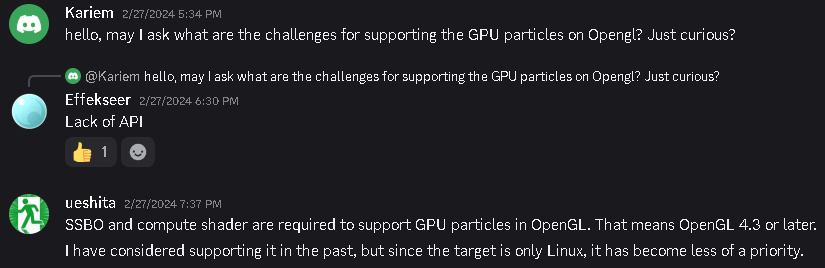
Edit: I just take a quick look and sadly effekseer supports GpuParticles on pretty much every graphics APIs except OpenGL ☹
[Previous page](https://forum.castle-engine.io/t/excerpts-from-the-shooter-development-journey/2074.md?page=1)