# Error compilling CGE Editor on Windows 11
**URL:** https://forum.castle-engine.io/t/error-compilling-cge-editor-on-windows-11/1491
**Category:** Editor
**Created:** [December 23, 2024, 9:31am UTC](https://forum.castle-engine.io/t/error-compilling-cge-editor-on-windows-11/1491 "2024-12-23T09:31:25Z")
**Posts on this page:** 16
**Page:** 1
### Author:  [@NiunioMartinez](https://forum.castle-engine.io/u/NiunioMartinez)
#### Post date: [December 23, 2024, 9:31am UTC](https://forum.castle-engine.io/t/error-compilling-cge-editor-on-windows-11/1491/1 "2024-12-23T09:31:25Z")
Now I’m on Windows 11 trying to re-compile the editor (version 7.0-alpha3.snapshot) with custom components but it ends with this error (and a few related more):
> C:\prog\motores\CastleGameEngine\tools\common-code\toolmanifest.pas(144,29) Error: (5000) Identifier not found “TProjectDependencies”
I’m using FPC 3.2.2 and Lazarus 3.4. On Linux I’m using FPC 3.2.0 and Lazarus 3.4 and it compiles without error but a few warnings.
I was about to upgrade Lazarus but the site is down right now.
---
### Author:  [@michalis](https://forum.castle-engine.io/u/michalis)
#### Post date: [December 24, 2024, 11:18am UTC](https://forum.castle-engine.io/t/error-compilling-cge-editor-on-windows-11/1491/2 "2024-12-24T11:18:20Z")
It seems you have multiple engine versions, old and new, and they get mixed up.
( This issue seems unrelated to Windows, FPC, Lazarus versions. )
In new CGE version,
1. `TProjectDependencies` is defined in `src/files/castleinternaltools.pas` ( [castle-engine/src/files/castleinternaltools.pas at master · castle-engine/castle-engine · GitHub](https://github.com/castle-engine/castle-engine/blob/master/src/files/castleinternaltools.pas#L140) ).
2. And it is used by `tools/common-code/toolmanifest.pas` ( [castle-engine/tools/common-code/toolmanifest.pas at master · castle-engine/castle-engine · GitHub](https://github.com/castle-engine/castle-engine/blob/master/tools/common-code/toolmanifest.pas#L144) ).
It seems in your case AD 2 is true, but AD 1 is not.
Likely, Lazarus remembers the package (lpk) location from older CGE.
Make sure to recompile lpk (from new CGE) using Lazarus first. Our [Compiling from source | Manual | Castle Game Engine](https://castle-engine.io/compiling_from_source.php) shows various ways that avoid this issue:
- if you build the “build tool” from Lazarus, then before `castle-engine/tools/build-tool/castle-engine.lpi` rebuild `packages/castle_base.lpk` .
- or there are other ways of building the “build tool”.
---
### Author:  [@NiunioMartinez](https://forum.castle-engine.io/u/NiunioMartinez)
#### Post date: [December 27, 2024, 10:41am UTC](https://forum.castle-engine.io/t/error-compilling-cge-editor-on-windows-11/1491/3 "2024-12-27T10:41:37Z")
Actually I actualized CGE but I didn’t remove the old version.
Maybe the best option is to uninstall, clean and install it again.
Thanks.
---
### Author:  [@michalis](https://forum.castle-engine.io/u/michalis)
#### Post date: [December 27, 2024, 9:51pm UTC](https://forum.castle-engine.io/t/error-compilling-cge-editor-on-windows-11/1491/4 "2024-12-27T21:51:21Z")
> [@NiunioMartinez](#):
>
> Actually I actualized CGE but I didn’t remove the old version.
>
> Maybe the best option is to uninstall, clean and install it again.
Hm, you generally do not need to uninstall previous engine version if you “update in place”. Our Windows installer (if you download binaries from [Download | Castle Game Engine](https://castle-engine.io/download) ) has been specifically tested to ensure smooth upgrades (without the need to uninstall old version first).
Maybe there’s something we should fix – can you describe in more details
- how did you install CGE originally? I can see that old version (known to Lazarus) is in `C:\prog\motores\CastleGameEngine` .
- how did you update CGE?
Your messages did indicate you had 2 versions of CGE sources, one old (`C:\prog\motores\CastleGameEngine`) and one new.
( I understand you solved the issue anyway on your system. But in any case more info would be appreciated – we want to ensure “smooth upgrades” for people, without the need to uninstall. So if there’s some bug there, I’d like to fix it 🙂 )
---
### Author:  [@NiunioMartinez](https://forum.castle-engine.io/u/NiunioMartinez)
#### Post date: [January 16, 2025, 6:00pm UTC](https://forum.castle-engine.io/t/error-compilling-cge-editor-on-windows-11/1491/5 "2025-01-16T18:00:50Z")
Sorry for the late answer. It’s a busy month.
> - how did you install CGE originally?
I don’t remember actually. I think I downloaded a zip or a tarball and unzipped.
> - how did you update CGE?
I downloaded the installer from the site and installed over it.
**[Edit]**
I’ve fixed this way:
1. I’ve uninstalled CGE.
2. I’ve removed the CGE directory because it had some files.
3. I’ve removed CGE configuration files from `C:/Users//AppData/Local`
4. I’ve installed CGE again.
5. I’ve registered packages on Lazarus again.
This seems to work for me.
---
### Author:  [@NiunioMartinez](https://forum.castle-engine.io/u/NiunioMartinez)
#### Post date: [January 18, 2025, 1:43pm UTC](https://forum.castle-engine.io/t/error-compilling-cge-editor-on-windows-11/1491/7 "2025-01-18T13:43:56Z")
I think the issue was that the first time I installed CGE I didn’t use the Windows installer, I just downloaded a zip and uncompressed it (iirc). Using the installer from the first install should allow clean updates, but Michalis would confirm that.
---
### Author:  [@michalis](https://forum.castle-engine.io/u/michalis)
#### Post date: [January 20, 2025, 8:44am UTC](https://forum.castle-engine.io/t/error-compilling-cge-editor-on-windows-11/1491/9 "2025-01-20T08:44:37Z")
> [@NiunioMartinez](#):
>
> Using the installer from the first install should allow clean updates, but Michalis would confirm that.
Yes, using the installer (i.e. exe on Windows) to install the new version should behave OK, and it will update from previous version smoothly (correctly removing or replacing all files from the old version). InnoSetup that we use guarantees it, I checked it long time ago.
If you installed the previous version from zip/tar.gz, then installer doesn’t know about it, there is no central information about it. So installer cannot remove/replace it, and it’s your responsibility to remove it manually before using the new version. Some people may also use this way (installing from zip) like to keep multiple engine versions installed in parallel, with the obvious caveat that you need to be aware always which one do you use, and make sure all IDEs/environment variables ($PATH, Lazarus, Delphi, VS Code config) point to the same CGE version, and not have a “mix” .
---
### Author:  [@NiunioMartinez](https://forum.castle-engine.io/u/NiunioMartinez)
#### Post date: [January 20, 2025, 3:56pm UTC](https://forum.castle-engine.io/t/error-compilling-cge-editor-on-windows-11/1491/10 "2025-01-20T15:56:16Z")
I’ve found another issue:
In one of the projects it compiles the game, but it doesn’t find unit `CastleWindows` when compilling the CGE Editor. The unit is referenced in one of the views (to close the application when pressing `Esc`).
The weird thing is that another (newer) project it compiles both without any problem and it also uses unit `CastleWindows`.
---
### Author:  [@michalis](https://forum.castle-engine.io/u/michalis)
#### Post date: [January 20, 2025, 5:08pm UTC](https://forum.castle-engine.io/t/error-compilling-cge-editor-on-windows-11/1491/11 "2025-01-20T17:08:17Z")
> [@NiunioMartinez](#):
>
> In one of the projects it compiles the game, but it doesn’t find unit `CastleWindows` when compilling the CGE Editor. The unit is referenced in one of the views (to close the application when pressing `Esc`).
>
> The weird thing is that another (newer) project it compiles both without any problem and it also uses unit `CastleWindows`.
Hm, I’m not sure what happens, we need more information what/how you’re doing 🙂
- We have no unit named `CastleWindows`. Only `CastleWindow`. I guess you mean `CastleWindow`.
- But the CGE editor doesn’t use `CastleWindow`. CGE editor also doesn’t have any views.
- And it’s not clear how do you build the editor, how it fails.
Please show _exactly_ the error message. Best to make screenshots of what you’re doing, or record a short movie.
And show where do you have _Castle Game Engine_ installed (in the explorer), and show whether you configured the _“Castle Game Engine Path”_ in _“Preferences → General”_ and did you set `$CASTLE_ENGINE_PATH`.
---
### Author:  [@NiunioMartinez](https://forum.castle-engine.io/u/NiunioMartinez)
#### Post date: [January 22, 2025, 5:59pm UTC](https://forum.castle-engine.io/t/error-compilling-cge-editor-on-windows-11/1491/12 "2025-01-22T17:59:24Z")
This is the error, with the ´Running` line at the beginning:
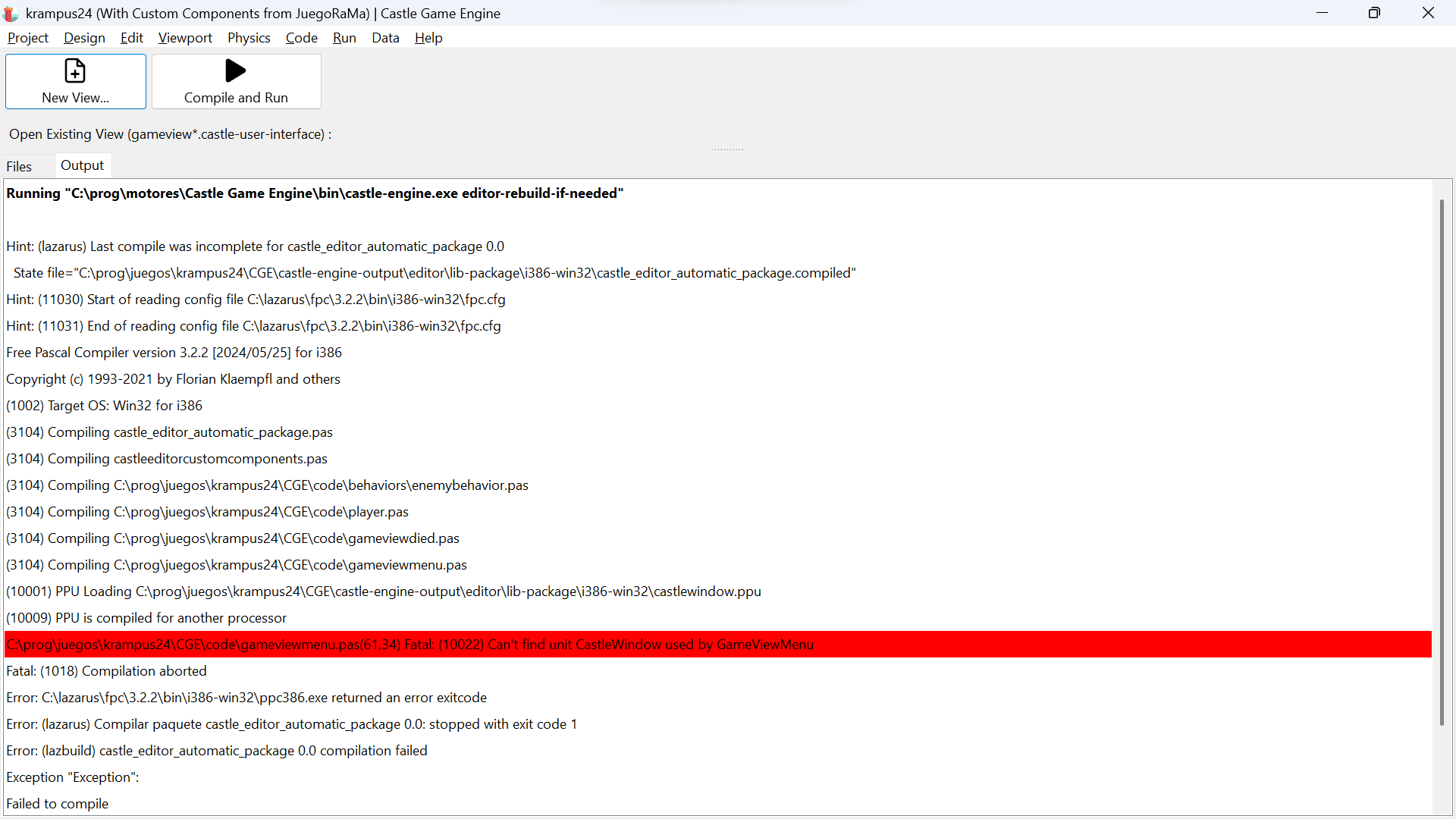
This is the line error. As you see, Lazarus is able to find the required unit.
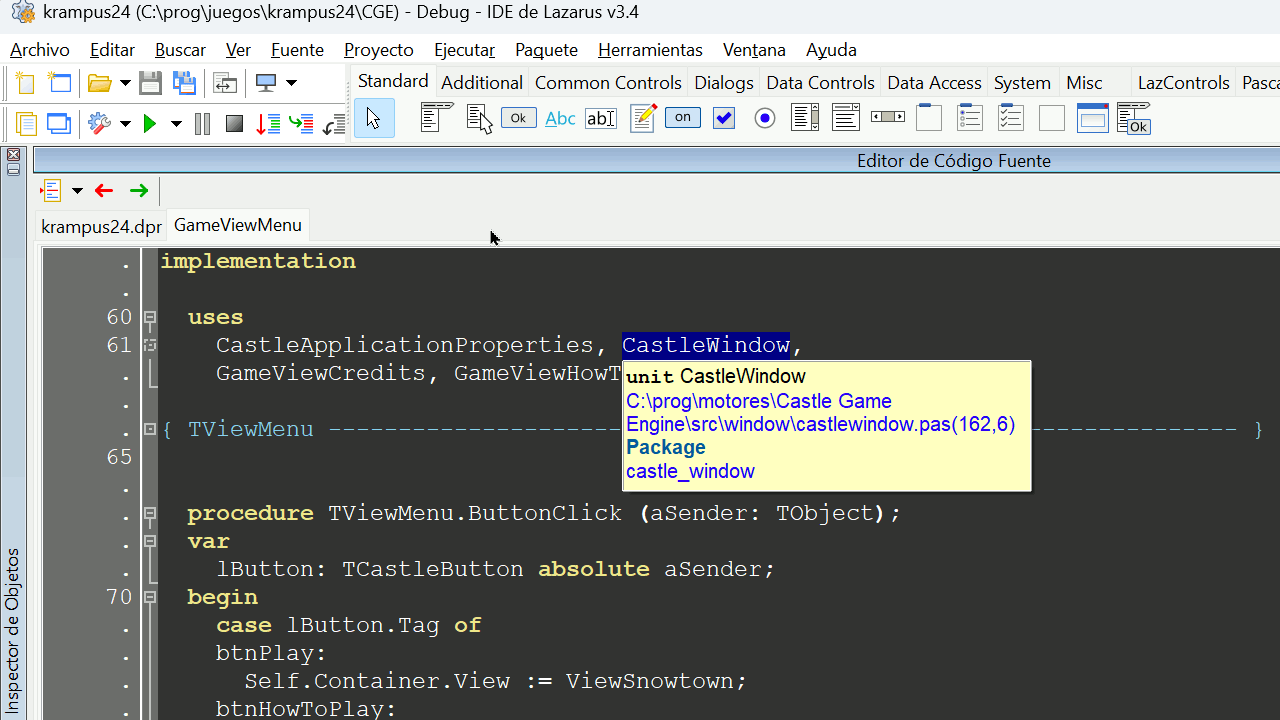
CGE is installed in `C:\prog\motores\Castle Game Engine`, using windows Installer, and it’s correctly auto-detected by CGE, as shown in _“Preferences → General”_. As far as I can see, `$CASTLE_ENGINE_PATH` isn’t set.
---
### Author:  [@BlueIcaro](https://forum.castle-engine.io/u/BlueIcaro)
#### Post date: [January 22, 2025, 6:19pm UTC](https://forum.castle-engine.io/t/error-compilling-cge-editor-on-windows-11/1491/13 "2025-01-22T18:19:07Z")
Hello, Did you register the components in Lazarus?. Did you compile the CGE packed from Lazarus?. I use “most\_important\_lazarus\_packages\_and\_tools.lpg” project group?
/BlueIcaro
---
### Author:  [@michalis](https://forum.castle-engine.io/u/michalis)
#### Post date: [January 23, 2025, 8:10am UTC](https://forum.castle-engine.io/t/error-compilling-cge-editor-on-windows-11/1491/14 "2025-01-23T08:10:54Z")
Hm, _“PPU is compiled for another processor”_ points to something weird happening with CPU. Maybe compiler artifacts for Win32 (i386) and Win64 (x86\_64) got mixed. I’m not sure why does it seem like it tries to compile for i386 – editor is x86\_64 and should compile for x86\_64.
It seems you installed FPC and Lazarus independently, in `c:/lazarus/fpc/3.2.2/`, maybe it doesn’t have the Win64 installed?
Ideas:
- Can you change the “Preferences → FPC and Lazarus” to use “bundled FPC” installed along with CGE? Just delete the custom FPC path there. The FPC we provide can build Win64 applications.
- If you installed FPC / Lazarus yourself, did you choose “Windows 64-bit” version? Lazarus downloads on [https://www.lazarus-ide.org/](https://www.lazarus-ide.org/) should provide Windows 64-bit versions. You can also install Win64 versions of FPC / Lazarus using [fpcupdeluxe | Manual | Castle Game Engine](https://castle-engine.io/fpcupdeluxe) . ( The FPC downloads from [Free Pascal Compiler - Browse Files at SourceForge.net](https://sourceforge.net/projects/freepascal/files/) contain Win32 compiler with Win64 cross-compilers, last time I checked. ) Try installing / adding Win64 FPC version.
---
### Author:  [@NiunioMartinez](https://forum.castle-engine.io/u/NiunioMartinez)
#### Post date: [March 9, 2025, 2:29pm UTC](https://forum.castle-engine.io/t/error-compilling-cge-editor-on-windows-11/1491/16 "2025-03-09T14:29:01Z")
Sorry for the silence but I was not working in this issue because I had to move forward, and it wasn’t critical since Linux (which is my main platform) worked without problems.
Until now.
I was learning about Android development and suddently, after installing the cross-platform compiler using fpcupdeluxe, the Editor doesn’t compile anymore and has the exact same error, except it doesn’t include the _“PPU is compiled for another processor”_ message.
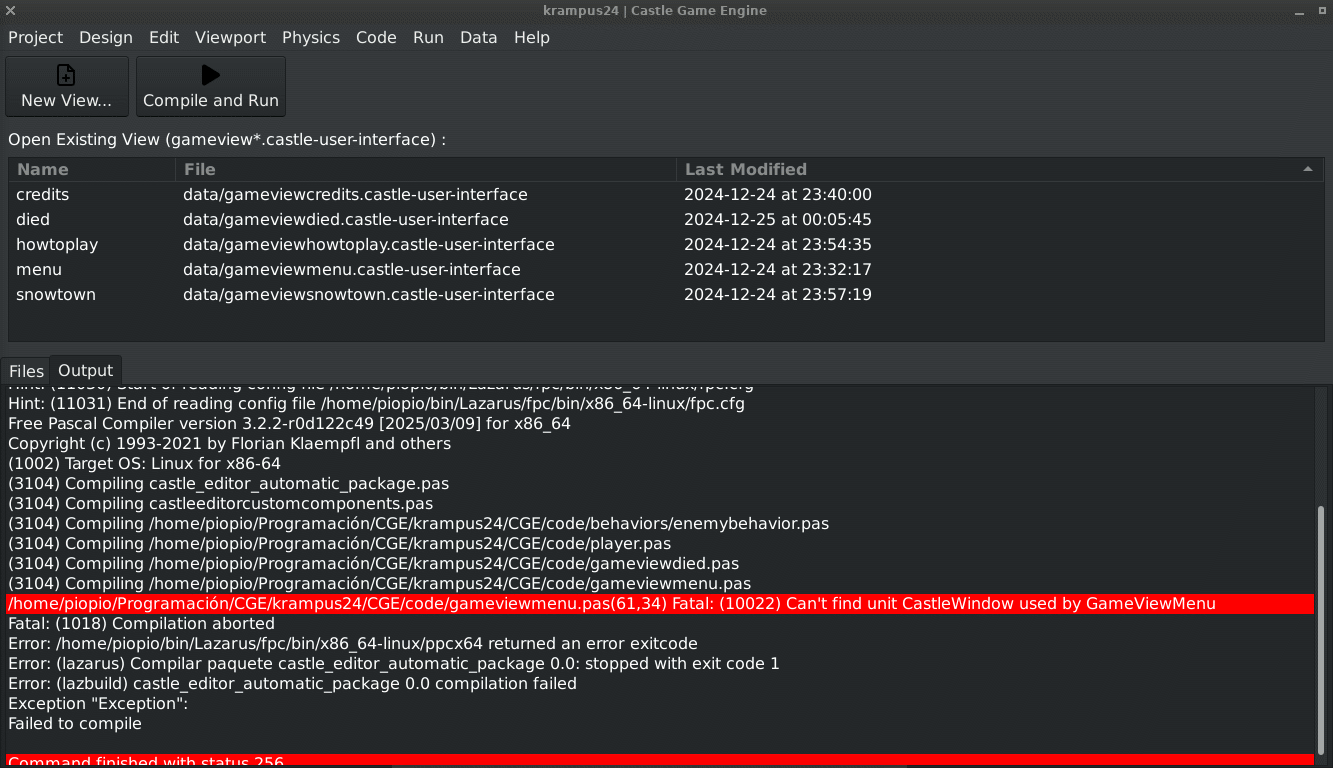
The project compiles correctly though.
I’ve found **a workaround** : remove the `GameViewWindow` unit from the `uses`, add the `CustApp` unit and replace `Application` by `CustomApplication`. Then, on the `dpr` code, add also `CustApp` and the line `CustomApplication := Application` just before `Application.OpenAndRun`.
---
### Author:  [@michalis](https://forum.castle-engine.io/u/michalis)
#### Post date: [March 9, 2025, 5:17pm UTC](https://forum.castle-engine.io/t/error-compilling-cge-editor-on-windows-11/1491/17 "2025-03-09T17:17:06Z")
> [@NiunioMartinez](#):
>
> I was learning about Android development and suddently, after installing the cross-platform compiler using fpcupdeluxe, the Editor doesn’t compile anymore and has the exact same error, except it doesn’t include the _“PPU is compiled for another processor”_ message.
>
> 
>
> The project compiles correctly though.
>
> I’ve found **a workaround** : remove the `GameViewWindow` unit from the `uses`, add the `CustApp` unit and replace `Application` by `CustomApplication`. Then, on the `dpr` code, add also `CustApp` and the line `CustomApplication := Application` just before `Application.OpenAndRun`.
The lack of _“PPU is compiled for another processor”_ may mean it’s a different error. (I am not sure, I would have to see exact code and environment of everything :), but at least in this case the error is clear. )
In this case, esp. after reading your workaround, the issue is: you use custom component ( [Custom Components | Manual | Castle Game Engine](https://castle-engine.io/custom_components) ) and use `editor_units=...` in `CastleEngineManifest.xml` that use the `CastleWindow` unit. You cannot do this – Lazarus IDE cannot use `CastleWindow` unit. The package `castle_window.lpk` is deliberately only run-time, not design-time. See [castle-engine/packages at master · castle-engine/castle-engine · GitHub](https://github.com/castle-engine/castle-engine/tree/master/packages) for explanation.
I do not 100% understand your workaround (I do not know what is `CustomApplication` in this case), but basically:
- you have to arrange your code such that the units listed in `editor_units=...` (and the units used by them) do not use `CastleWindow`.
- This also means that they cannot use `CastleWindow.Application`.
- You can refactor your code, separating the “custom component” in a suitable unit only with this component, like [castle-engine/examples/advanced\_editor/custom\_component/code/gamecontrols.pas at d0813949e72884741740a8f092e730206b815c3c · castle-engine/castle-engine · GitHub](https://github.com/castle-engine/castle-engine/blob/d0813949e72884741740a8f092e730206b815c3c/examples/advanced_editor/custom_component/code/gamecontrols.pas) .
- You can also use `CASTLE_DESIGN_MODE` for conditional compilation, like `uses ... {$ifndef CASTLE_DESIGN_MODE} , CastleWindow {$endif}` .
---
### Author:  [@phomm](https://forum.castle-engine.io/u/phomm)
#### Post date: [March 10, 2025, 12:38pm UTC](https://forum.castle-engine.io/t/error-compilling-cge-editor-on-windows-11/1491/18 "2025-03-10T12:38:48Z")
looks that not only the flow for editor component(s) is using CastleWindow (which is traceable from error log, where units get compiled in order of appearance in uses clause and recursively compiling sub-dependent units) , rather editor component depends on player, which in turn depends on view, and view depends on CastleWindow , the latter is actually ok, but editor component should not depend on internals (dependency-inversion violation), it should be isolated in general, and for the functionality you would probably need to pass params to constructor or smth like this. Player is also weirdly depending on view, should be vice versa.
---
### Author:  [@NiunioMartinez](https://forum.castle-engine.io/u/NiunioMartinez)
#### Post date: [April 4, 2025, 9:22am UTC](https://forum.castle-engine.io/t/error-compilling-cge-editor-on-windows-11/1491/19 "2025-04-04T09:22:26Z")
Finally, I’ve found where the problem is.
The project was made for a Jam, so no planification was done. At a moment I decided to change a class in to a behavior. That class referenced two of the views, but when transforming it in to a behavior I moved that code to another place more suitable for it. The problem was I forgot to remove the view references from the `USES` section. Once removed it compiled and behaved as it should.
So guys, plan your code organization as much as you can before to start to code, even if it’s a prototype or a fast Jam entry.