# Creation of sprite 3D scenes
**URL:** https://forum.castle-engine.io/t/creation-of-sprite-3d-scenes/671
**Category:** Creating data (models, textures...)
**Created:** [October 26, 2022, 6:34pm UTC](https://forum.castle-engine.io/t/creation-of-sprite-3d-scenes/671 "2022-10-26T18:34:16Z")
**Posts on this page:** 7
**Page:** 1
### Author:  [@Noscow](https://forum.castle-engine.io/u/Noscow)
#### Post date: [October 26, 2022, 6:34pm UTC](https://forum.castle-engine.io/t/creation-of-sprite-3d-scenes/671/1 "2022-10-26T18:34:16Z")
Good day everyone.
I want to make 3D scenes for game world regions, which will be constructed in game process. Because it will be my first experience, i want to ask about possible nuances, which i can meet.
Player position will be static, but camera will be able to rotate step to step with fixation on eight world sides to interact with objects. It will be like eight 3D interactive scenes with smooth scrolling like in scheme below:
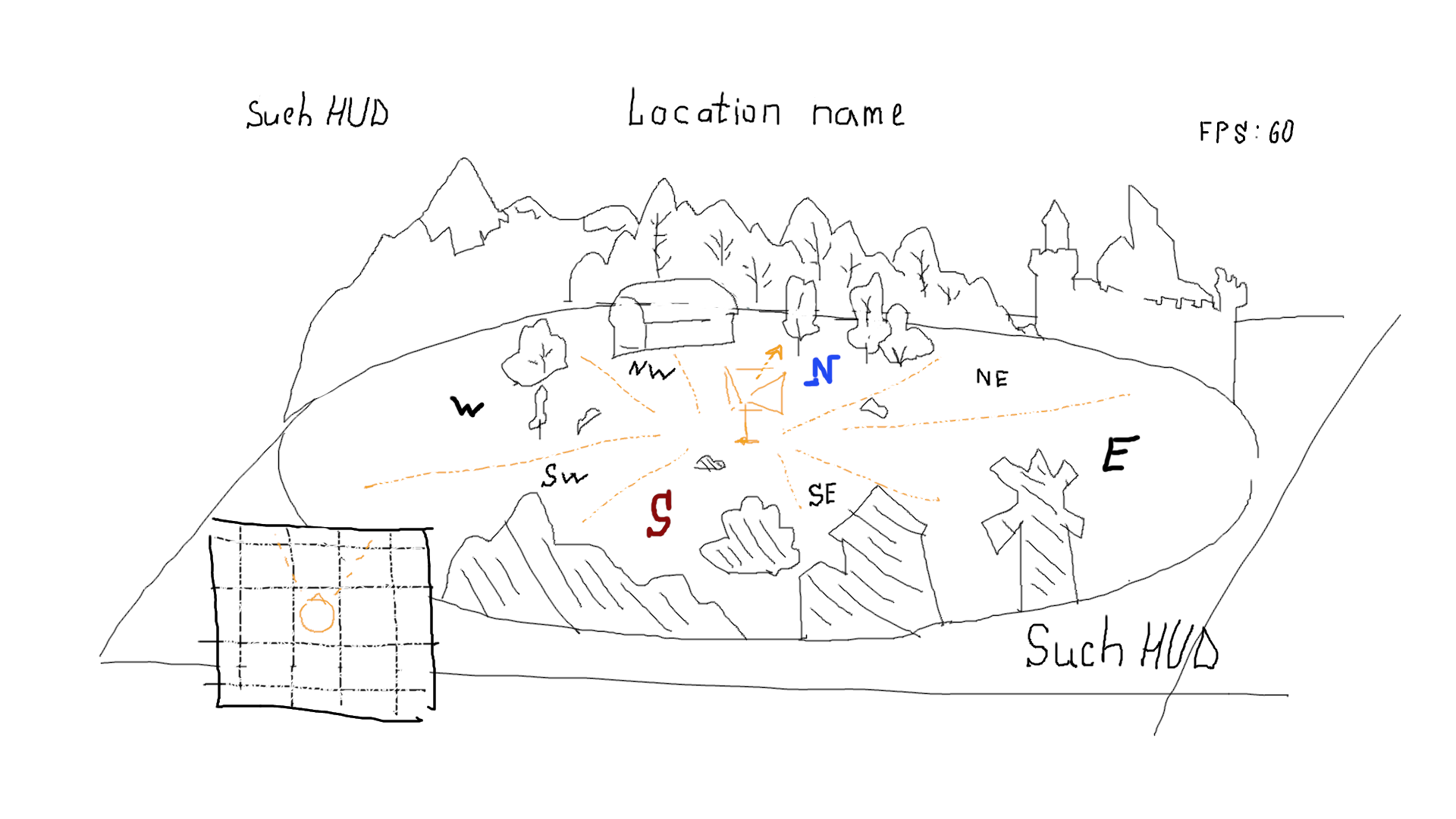
I will use pixel sprites and primitive 3D objects, there it really needed.
What optimal size of scene i can choose to better look pixel art sprites? Is TCastleImageTransform with right space orientation enough instrument to draw sprite objects? What difficulties i don’t take into account?
Or 3D primitives with non-pixel textures more easy way (i can try to learn work with real 3D)?
Important feature - scenes must create gradually from code, and they will be like net to add objects on cells. World will be generated partially handy, but on ~80% random. Maybe i will need some math to set right surrounding sprites position to face to player, but in seems not so hard.
I will be glad to see different opinions, not just specific advice. My main idea - will programed beautiful and comfortable scene constructor with option of space orientation and interaction with objects and characters.
---
### Author:  [@michalis](https://forum.castle-engine.io/u/michalis)
#### Post date: [October 27, 2022, 11:30am UTC](https://forum.castle-engine.io/t/creation-of-sprite-3d-scenes/671/2 "2022-10-27T11:30:49Z")
> [@Noscow](#):
>
> Is TCastleImageTransform with right space orientation enough instrument to draw sprite objects?
You can use `TCastleImageTransform` with `TCastleBillboard` behavior to not worry about the image rotation. It will be automatically set to match the camera.
See the last ~15 seconds of this video, [https://www.youtube.com/watch?v=QTd8LvJDoRY](https://www.youtube.com/watch?v=QTd8LvJDoRY) , where I add exactly this to design – `TCastleImageTransform` with `TCastleBillboard` . It was part of my presentation on GIC, [Slides, movies and thoughts from my GIC 2022 presentation – Castle Game Engine](https://castle-engine.io/wp/2022/10/12/slides-movies-and-thoughts-from-my-gic-2022-presentation/) .
> [@Noscow](#):
>
> Or 3D primitives with non-pixel textures more easy way (i can try to learn work with real 3D)?
In the end, all the ways to render images in 3D achieve the same effect. Whether you place TCastleImageTransform with image, or you make a Blender model with a plane with a texture and use TCastleScene – this is actually the same, i.e. TCastleImageTransform internally just creates a textured plane for you.
So, it all looks good.
My general recommendation is as always: start small, start simple 🙂 Just design your scene in CGE editor. See how it looks if you rotate the camera. Don’t go into procedular generation or complex interactions at start – first see how to do the thing static, and achieve the graphic effect you want.
---
### Author:  [@Noscow](https://forum.castle-engine.io/u/Noscow)
#### Post date: [October 28, 2022, 5:56pm UTC](https://forum.castle-engine.io/t/creation-of-sprite-3d-scenes/671/3 "2022-10-28T17:56:59Z")
> [@michalis](#):
>
> You can use `TCastleImageTransform` with `TCastleBillboard` behavior to not worry about the image rotation. It will be automatically set to match the camera.
>
> See the last ~15 seconds of this video, [GIC 2022 - 3D game - YouTube](https://www.youtube.com/watch?v=QTd8LvJDoRY) , where I add exactly this to design – `TCastleImageTransform` with `TCastleBillboard` . It was part of my presentation on GIC, [Slides, movies and thoughts from my GIC 2022 presentation – Castle Game Engine](https://castle-engine.io/wp/2022/10/12/slides-movies-and-thoughts-from-my-gic-2022-presentation/) .
Thanks, it seems helpful for me.
---
### Author:  [@Noscow](https://forum.castle-engine.io/u/Noscow)
#### Post date: [October 28, 2022, 6:14pm UTC](https://forum.castle-engine.io/t/creation-of-sprite-3d-scenes/671/4 "2022-10-28T18:14:14Z")
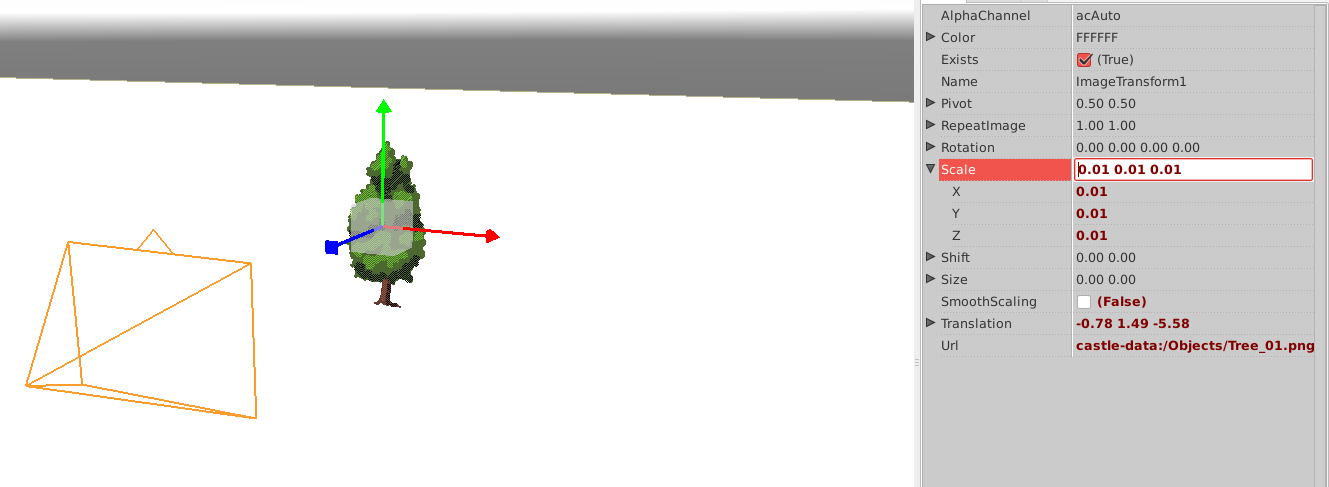
If i add image with standard scale 1.00 1.00 1.00 it looks gigantic.
It means, my Plane size 100.0 100.0 too small? Because example object only 120x180 pixels.
What measures uses to set size in CGE?

---
### Author:  [@michalis](https://forum.castle-engine.io/u/michalis)
#### Post date: [October 28, 2022, 7:49pm UTC](https://forum.castle-engine.io/t/creation-of-sprite-3d-scenes/671/5 "2022-10-28T19:49:25Z")
Indeed, by default the size of `TCastleImageTransform` is huge, as it matches 1 unit = 1 pixel of the image.
And by convention, in 3D, 1 unit = 1 meter.
The advised way to counter this is to just adjust `Size` of the `TCastleImageTransform` after adding it. See [Viewport with scenes, camera, navigation | Manual | Castle Game Engine](https://castle-engine.io/viewport_and_scenes#_image_tcastleimagetransform) that also links to API docs of `TCastleImageTransform` properties.
Here are docs for `Size`: [Castle Game Engine: CastleScene: Class TCastleImageTransform](https://castle-engine.io/apidoc/html/CastleScene.TCastleImageTransform.html#Size) .
Adjusting it using `Scale` (as you show on screenshot) will also work. Though I would advise a bit more adjusting using `Size` as it will work most reliably with physics, just in case you will use it in the future. Though we have quite a lot of logic to make `Scale` also work on physics objects… but the advise is still to avoid `Scale` on physics bodies when it’s easily possible, as it makes things simpler.
We have this admittedly weird default huge size for `TCastleImageTransform`, because it makes sense for 2D. In 2D, you typically have much larger world, and there the default 1 unit = 1 pixel makes sense. And we work hard to make 2D and 3D in CGE behave just the same, wherever possible – this allows in turn to make mixed 2D/3D games a no-problem in CGE.
---
### Author:  [@michalis](https://forum.castle-engine.io/u/michalis)
#### Post date: [October 28, 2022, 7:50pm UTC](https://forum.castle-engine.io/t/creation-of-sprite-3d-scenes/671/6 "2022-10-28T19:50:30Z")
P.S. At the end of [GIC 2022 - 3D game - YouTube](https://www.youtube.com/watch?v=QTd8LvJDoRY) , you can observe I changed the `Size` of `TCastleImageTransform` 🙂
---
### Author:  [@Noscow](https://forum.castle-engine.io/u/Noscow)
#### Post date: [October 30, 2022, 3:44pm UTC](https://forum.castle-engine.io/t/creation-of-sprite-3d-scenes/671/7 "2022-10-30T15:44:25Z")
Understood. Thanks 🙃