# Convenient way to determine exact point under mouse
**URL:** https://forum.castle-engine.io/t/convenient-way-to-determine-exact-point-under-mouse/791
**Category:** 3D
**Created:** [April 9, 2023, 6:03pm UTC](https://forum.castle-engine.io/t/convenient-way-to-determine-exact-point-under-mouse/791 "2023-04-09T18:03:33Z")
**Posts on this page:** 20
**Page:** 1
### Author:  [@Hertsog](https://forum.castle-engine.io/u/Hertsog)
#### Post date: [April 9, 2023, 6:03pm UTC](https://forum.castle-engine.io/t/convenient-way-to-determine-exact-point-under-mouse/791/1 "2023-04-09T18:03:33Z")
I am trying to find the best way to determine the exact point coordinates under mouse cursor in 3D world. My current solution was the following.
I created a new function **TCastleViewport.HitUnderMouse** based on **TCastleViewport.TransformUnderMouse** to return not just the transform but the whole **PRayCollisionNode** (defined the new pointer type to be able to return nil) containing also hit point coordinates:
```pascal
function TCastleViewport.HitUnderMouse: PRayCollisionNode;
var
I: Integer;
begin
if MouseRayHit <> nil then
for I := 0 to MouseRayHit.Count - 1 do
begin
if not (csTransient in MouseRayHit[I].Item.ComponentStyle) then
begin
New(Result);
Result^ := MouseRayHit[I];
Exit;
end;
end;
// Return nil if all items on MouseRayHit list are csTransient, or MouseRayHit = nil
Result := nil;
end;
```
To test it I modified the detect\_scene\_hit demo Update method and it seems to work OK:
```pascal
procedure TViewMain.Update(const SecondsPassed: Single; var HandleInput: Boolean);
var
SceneName: String;
Hit: PRayCollisionNode;
begin
inherited;
{ This virtual method is executed every frame (many times per second). }
LabelFps.Caption := 'FPS: ' + Container.Fps.ToString;
Hit := MainViewport.HitUnderMouse;
if Hit <> nil then
begin
SceneName := Hit^.Item.Name + ', ' + Hit^.Point.ToString;
Dispose(Hit);
end
else
SceneName := 'none';
LabelSceneUnderMouse.Caption := 'Scene Under Mouse/Touch Position: ' + SceneName;
end;
```
My question is that is there a better way to do this or maybe could this new function (or similar functionality) be added to CastleViewport unit for all projects to be able to use it?
---
### Author:  [@michalis](https://forum.castle-engine.io/u/michalis)
#### Post date: [April 11, 2023, 10:18pm UTC](https://forum.castle-engine.io/t/convenient-way-to-determine-exact-point-under-mouse/791/2 "2023-04-11T22:18:32Z")
> [@Hertsog](#):
>
> My question is that is there a better way to do this or maybe could this new function (or similar functionality) be added to CastleViewport unit for all projects to be able to use it?
That’s a good use-case and completely valid usage of `MouseRayHit`.
Indeed we may consider adding such thing to CGE `TCastleViewport`. I wanted to see how people will use it, so for now I exposed:
- super-simple `TransformUnderMouse`
- full-featured but also complicated to use `MouseRayHit`
Your method `HitUnderMouse` is something in-between, nice 🙂
Note:
- ~~I would advise to iterate over `MouseRayHit` in `downto` fashion, this way you first check the deepest node in the TCastleTransform hierarchy.~~ (Edit: This was a mistake on my side, actually you should iterate upward, “to”, to first check the deepest node.)
- It’s a matter of style, but I would probably not bother using a pointer allocated with “New”. I would instead return a Boolean, and have a “out Hit: TRayCollisionNode” parameter. That’s a bit easier to use (a bit like `TDictionary<>.TryGetValue`), so:
```auto
function TCastleViewport.HitUnderMouse(out Hit: TRayCollisionNode): Boolean;
var
I: Integer;
begin
if MouseRayHit <> nil then
for I := 0 to MouseRayHit.Count - 1 do
begin
if not (csTransient in MouseRayHit[I].Item.ComponentStyle) then
begin
Hit := MouseRayHit[I];
Exit(true);
end;
end;
// Return false if all items on MouseRayHit list are csTransient, or MouseRayHit = nil
Result := false;
end;
```
---
### Author:  [@Carring](https://forum.castle-engine.io/u/Carring)
#### Post date: [April 12, 2023, 9:52am UTC](https://forum.castle-engine.io/t/convenient-way-to-determine-exact-point-under-mouse/791/3 "2023-04-12T09:52:16Z")
@michalis Is it also possible with TransformUnderMouse to detect if part of the underlying transform part is transparant? So that it only reacts if mouse is moving over a part that is not transparant?
---
### Author:  [@michalis](https://forum.castle-engine.io/u/michalis)
#### Post date: [April 12, 2023, 9:19pm UTC](https://forum.castle-engine.io/t/convenient-way-to-determine-exact-point-under-mouse/791/4 "2023-04-12T21:19:19Z")
It is possible. Albeit we would employ some assumptions/epsilons but yes, you can do this. It means you need to query for collision repeatedly – because the collision routines consider the geometry (ignoring whether the texture at them is transparent or not). So you need to make a collision query, then look if you hit a transparent pixel on a texture, and if yes – make a new collision query from a new origin.
To do this:
- You need to use a more general method `MyViewport.CameraRayCollision(RayOrigin, RayDirection)` . It returns `TRayCollision`, just like `MouseRayHit` (so it can be processed in the same way as above to detect the particular point). It takes as input ray position and direction.
- Use it in a loop.
---
### Author:  [@Carring](https://forum.castle-engine.io/u/Carring)
#### Post date: [April 15, 2023, 8:01am UTC](https://forum.castle-engine.io/t/convenient-way-to-determine-exact-point-under-mouse/791/5 "2023-04-15T08:01:08Z")
@michalis Thanks, looks difficult though.
I only use png images as scenes that always have transparant color black around them (RGB 0,0,0).
So the TransformUnderMouse should only give result if the underlying color is not RGB 0,0,0.
Do you have an example how to do this?
---
### Author:  [@Noscow](https://forum.castle-engine.io/u/Noscow)
#### Post date: [April 20, 2023, 6:51pm UTC](https://forum.castle-engine.io/t/convenient-way-to-determine-exact-point-under-mouse/791/6 "2023-04-20T18:51:11Z")
Good day! There is a addition to question about detection of transparent objects…
Sometimes i don’t need to detect some specific TCastleTransforn in the current scene. And I use parameter `Exists := False` to him.
This code run around all items in scene and hide "empty"cells in scene. There is a simple way, maybe it will work in Carring;s case.
> ```
> for i := 0 to SectorsCount - 1 do
> for j := 0 to SectorDeep - 1 do
> begin
> GridOfEssences[i][j].Exists := False;
> case GlobalMap[Point.WorldPosition.Z, Point.WorldPosition.Y,
> Point.WorldPosition.X].RegionObjects[i][j].EssenceID of
> 1: begin
> GridOfEssences[i][j].Exists := True;
> GridOfEssences[i][j].Url := 'castle-data:/Objects/Tree_01.png';
> end;
> 11: begin
> GridOfEssences[i][j].Exists := True;
> GridOfEssences[i][j].Url :=
> 'castle-data:/Objects/Building_01.png';
> end;
> end;
> end;
>
> ```
And question for all - is this solution is sane?
---
### Author:  [@michalis](https://forum.castle-engine.io/u/michalis)
#### Post date: [April 21, 2023, 8:24am UTC](https://forum.castle-engine.io/t/convenient-way-to-determine-exact-point-under-mouse/791/7 "2023-04-21T08:24:15Z")
> [@Carring](#):
>
> I only use png images as scenes that always have transparant color black around them (RGB 0,0,0).
> So the TransformUnderMouse should only give result if the underlying color is not RGB 0,0,0.
We don’t really need to look at RGB, if the alpha already indicates that it is transparent. There is no difficulty is reading the alpha channel and testing that 🙂
I’ll try to prepare a sample implementation of what I described, i.e. testing ray collision that avoids transparent objects (feel free to ping me if I forget, or even better: add this to [Issues · castle-engine/castle-engine · GitHub](https://github.com/castle-engine/castle-engine/issues) so that I don’t forget 🙂 ).
> [@Noscow](#):
>
> And question for all - is this solution is sane?
Toggling `Exists` is very cheap, I made sure of it – it literally just toggles a boolean field. So toggling `Exists` “on and off” around some collision query is completely sane. We even have code in engine e.g. to query what does a creature “see” (is the enemy in line of sight of the creature) that effectively does this:
```delphi
Creature.Exists := false;
try
// do raycast from Creature eye, thanks to above we know we'll not collide with ourselves
finally
Creature.Exists := true;
end;
```
So toggling `Exists` on and off is really instant, no need to worry 🙂
That said, changing scene `Url` is not cheap. It will load the scene (even if it’s in cache, it will have to instantiate scene nodes). So you should not do something that potentially changes `Url` of a scene e.g. every frame.
Unless of course in practice these URLs always stay the same as previously, then setting them to the same value is harmless and ignored.
---
### Author:  [@Carring](https://forum.castle-engine.io/u/Carring)
#### Post date: [April 21, 2023, 12:28pm UTC](https://forum.castle-engine.io/t/convenient-way-to-determine-exact-point-under-mouse/791/8 "2023-04-21T12:28:55Z")
A working example of how to avoid/ignore hitting detection of the transparant color of a scene would be great. Another thing I would like is that all colors of the png image light up a bit when moving the mouse over it, except the transparant color.
---
### Author:  [@michalis](https://forum.castle-engine.io/u/michalis)
#### Post date: [April 21, 2023, 12:44pm UTC](https://forum.castle-engine.io/t/convenient-way-to-determine-exact-point-under-mouse/791/9 "2023-04-21T12:44:17Z")
> [@Carring](#):
>
> Another thing I would like is that all colors of the png image light up a bit when moving the mouse over it, except the transparant color.
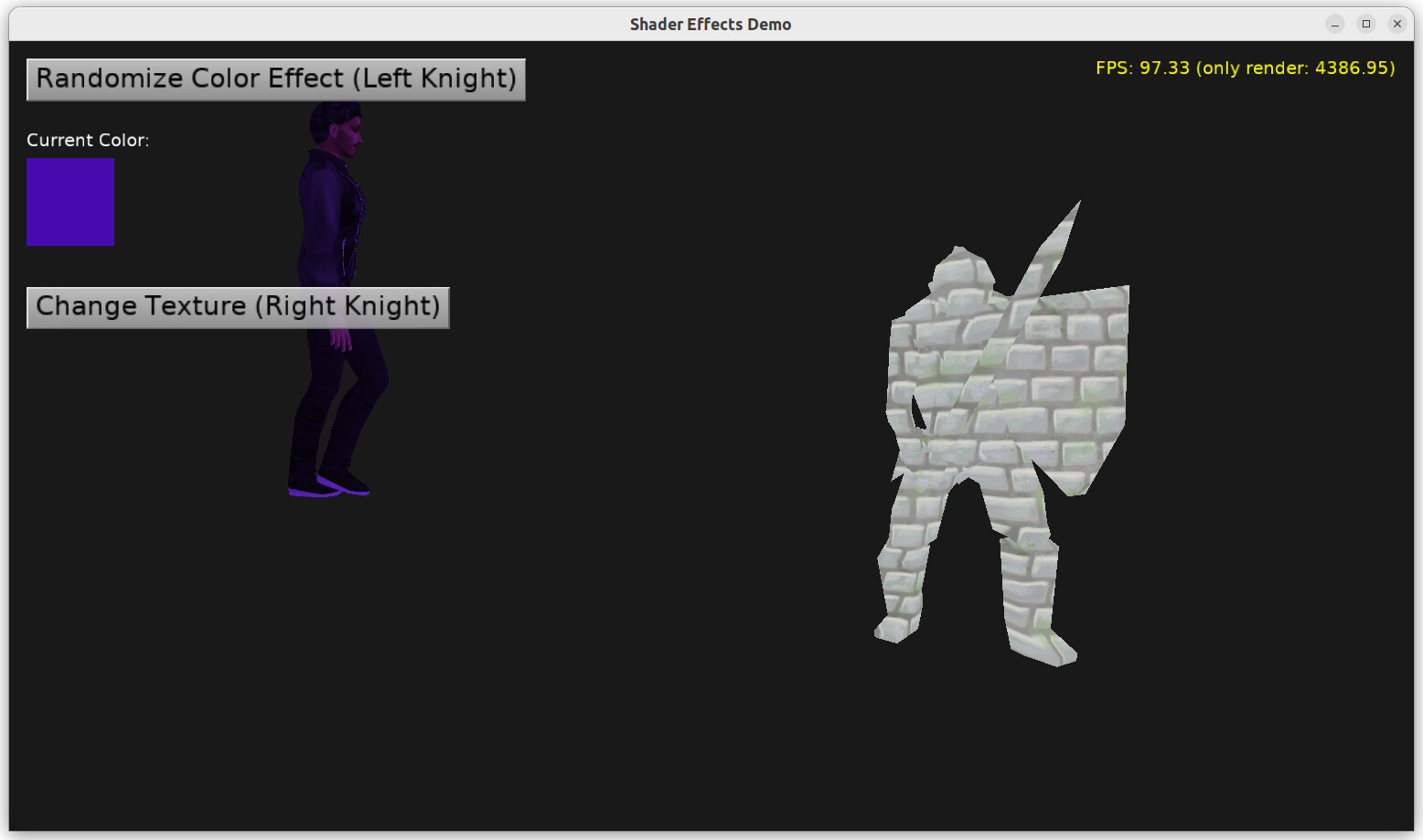
To “light up” colors you can use shader effect, like on `examples/viewport_and_scenes/shader_effects/` . This shows how to add an effect changing color (using really any function) on a TCastleScene.
( If you put PNG in a TCastleImageTransform, access the internal scene using `MyImageScene := MyImageTransform.Lis[0] as TCastleScene`. )
This will be even simpler once we implement our new material components, one of them will allow to add shader effects to various components, and also test in CGE editor, see [Roadmap | Manual | Castle Game Engine](https://castle-engine.io/roadmap#materials) .
---
### Author:  [@Noscow](https://forum.castle-engine.io/u/Noscow)
#### Post date: [April 21, 2023, 12:56pm UTC](https://forum.castle-engine.io/t/convenient-way-to-determine-exact-point-under-mouse/791/10 "2023-04-21T12:56:41Z")
> [@michalis](#):
>
> That said, changing scene `Url` is not cheap. It will load the scene (even if it’s in cache, it will have to instantiate scene nodes). So you should not do something that potentially changes `Url` of a scene e.g. every frame.
>
> Unless of course in practice these URLs always stay the same as previously, then setting them to the same value is harmless and ignored.
Thanks. So, if I need to change picture in TCastleTransform sometimes, can I load to memory all images after start game. And, after that, do aproximally this:
`Current_Object-TCastleTransform := Preloaded_Image-TCastleTransform;`
Is it faster then change URL?
At now it works like this:
1. Player change location, for example, he came to the town from the forest.
2. Next all TCastleTransform objects get them new files (.png or 3D in the future, maybe…), location refreshed like scene in the theater, but with new decorations (for now it happen literally in one moment, but I don’t use many different objects to render yet).
3. And, after scene constructed, when player interact with this area, all TCastleTransform remain unchanged until player change global location again. In my plan, player will didn’t change location every few seconds, but will explore every scene some time. So, I can afford short loading of scene, i think (if it will be necessary)…
---
### Author:  [@michalis](https://forum.castle-engine.io/u/michalis)
#### Post date: [April 21, 2023, 1:23pm UTC](https://forum.castle-engine.io/t/convenient-way-to-determine-exact-point-under-mouse/791/11 "2023-04-21T13:23:45Z")
If the scene URLs only change when switching locations, then it’s likely not an issue.
And the images have a cache anyway. So the cost of changing URL, if the same image is loaded elsewhere already, is small. And you can “warmup” cache with your predicted scene contents using [Customize look by CastleSettings.xml | Manual | Castle Game Engine](https://castle-engine.io/manual_castle_settings.php) .
So you probably don’t need to do anything 🙂 based on what you describe.
Though to make things ultra-fast (to have really zero cost of switching)… you can reuse the same image reference multiple times (following " 10. Multiple instances of the same scene" on [Writing code to modify scenes and transformations | Manual | Castle Game Engine](https://castle-engine.io/viewport_and_scenes_from_code#_multiple_instances_of_the_same_scene) ). So you could do something like this at initialization:
```delphi
MyImage[1] := TCastleImageTransform.Create(...);
MyImage[1].Url := 'castle-data:/1.png';
MyImage[2] := TCastleImageTransform.Create(...);
MyImage[2].Url := 'castle-data:/2.png';
....
```
And then reuse the `MyImage[...]` instances for tiles:
```delphi
for X := 0 to ...
for Y := 0 to ...
NewTileImage := MyImage[TileType[X, Y]];
if (TileTransformation[X, Y].Count = 0) or
(TileTransformation[X, Y][0] <> NewTileImage) then
begin
TileTransformation[X, Y].Clear;
TileTransformation[X, Y].Add(NewTileImage);
end;
```
---
### Author:  [@Carring](https://forum.castle-engine.io/u/Carring)
#### Post date: [April 21, 2023, 4:07pm UTC](https://forum.castle-engine.io/t/convenient-way-to-determine-exact-point-under-mouse/791/12 "2023-04-21T16:07:13Z")
> [@michalis](#):
>
> To “light up” colors you can use shader effect, like on `examples/viewport_and_scenes/shader_effects/` . This shows how to add an effect changing color (using really any function) on a TCastleScene.
I just tried this example and for testing I replaced the left url knight.gltf with a starling xml pointing to a png but it is not shown, only the position arrows?
---
### Author:  [@michalis](https://forum.castle-engine.io/u/michalis)
#### Post date: [April 21, 2023, 9:19pm UTC](https://forum.castle-engine.io/t/convenient-way-to-determine-exact-point-under-mouse/791/13 "2023-04-21T21:19:13Z")
I’d have to see what exactly you did to help 🙂 Can you send the testcase?
---
### Author:  [@Carring](https://forum.castle-engine.io/u/Carring)
#### Post date: [April 22, 2023, 5:08pm UTC](https://forum.castle-engine.io/t/convenient-way-to-determine-exact-point-under-mouse/791/14 "2023-04-22T17:08:51Z")
Here it is.
So I replaced the left knight with a starling file. It looks as if the png file occupies the whole viewport now but is not visible.
[shader\_effects.zip](https://forum.castle-engine.io/uploads/short-url/rwWifonPkgql0UI9DFZOjjktM9O.zip) (63.4 MB)
---
### Author:  [@michalis](https://forum.castle-engine.io/u/michalis)
#### Post date: [April 25, 2023, 9:15pm UTC](https://forum.castle-engine.io/t/convenient-way-to-determine-exact-point-under-mouse/791/15 "2023-04-25T21:15:37Z")
> [@Carring](#):
>
> Here it is.
> So I replaced the left knight with a starling file. It looks as if the png file occupies the whole viewport now but is not visible.
Ir works OK, clicking on “Randomize Color Effect (Left Knight)” works exactly as it should for me.
You don’t initially see the sprite sheet, because it is big, and you really see just one big dark pixel of it. The sprite sheet default size is quite big, which usually makes sense in 2D. In 3D you either want to move camera away from it, or make image smaller.
- So simply move away from it. At runtime, just use mouse scroll wheel to move away (there’s an “Examine” navigation component in that example, which makes mouse wheel do that).
- Or adjust `Scale` on image to e.g. 0.001, to bring your sprite sheet to a size that is similar to 3D knight.
I played with both options to confirm they are fine. “Randomize Color Effect (Left Knight)” works OK either way.


---
### Author:  [@Carring](https://forum.castle-engine.io/u/Carring)
#### Post date: [April 26, 2023, 12:01pm UTC](https://forum.castle-engine.io/t/convenient-way-to-determine-exact-point-under-mouse/791/16 "2023-04-26T12:01:21Z")
Thanks, got it working now. 😀
Using this example and changing color when transform is under mouse (instead button clicking), how can I reset the colors to the original sprite colors of the image when the mouse is not over the image anymore?
---
### Author:  [@michalis](https://forum.castle-engine.io/u/michalis)
#### Post date: [April 26, 2023, 3:32pm UTC](https://forum.castle-engine.io/t/convenient-way-to-determine-exact-point-under-mouse/791/17 "2023-04-26T15:32:59Z")
In this simple case, just send color to white (RGB 1,1,1), so
```delphi
EffectColorField.Send(WhiteRGB);
// equivalent: EffectColorField.Send(Vector3(1, 1, 1));
```
The shader will keep running but essentially doing nothing. This is such a simple operation that it should be OK 🙂
Alternatively you could set `Enabled` to `true` or `false` on the `TEffectNode` instance. It is created in `CreateColorEffect(const Scene: TCastleScene);`, you’d have to save it to a field like `ColorEffect: TEffectNode` and then later do `ColorEffect.Enabled := true / false`.
---
### Author:  [@Carring](https://forum.castle-engine.io/u/Carring)
#### Post date: [April 29, 2023, 10:13am UTC](https://forum.castle-engine.io/t/convenient-way-to-determine-exact-point-under-mouse/791/18 "2023-04-29T10:13:35Z")
Thanks.
I now have this for testing but there is no lighting up when mouse is over the character (scene1). I also don’t see it in the design. What do I do wrong here?
[Rescue\_Island.zip](https://forum.castle-engine.io/uploads/short-url/aRWxTsjopk1CWN0eCXIQn5PPfNC.zip) (70.6 MB)
---
### Author:  [@Carring](https://forum.castle-engine.io/u/Carring)
#### Post date: [May 6, 2023, 7:35am UTC](https://forum.castle-engine.io/t/convenient-way-to-determine-exact-point-under-mouse/791/19 "2023-05-06T07:35:36Z")
@michalis
> [@michalis](#):
>
> I’ll try to prepare a sample implementation of what I described, i.e. testing ray collision that avoids transparent objects (feel free to ping me if I forget
So a reminder? Here it is. 🙂
---
### Author:  [@michalis](https://forum.castle-engine.io/u/michalis)
#### Post date: [June 10, 2023, 1:44am UTC](https://forum.castle-engine.io/t/convenient-way-to-determine-exact-point-under-mouse/791/20 "2023-06-10T01:44:07Z")
> [@Carring](#):
>
> I now have this for testing but there is no lighting up when mouse is over the character (scene1). I also don’t see it in the design. What do I do wrong here?
Thanks for the reproduction!
Testing:
- Your model is correctly “lighten up”. So `ViewMain.LightupColor` correctly executes.
- But then, it is never brought back to the default lighting. Because you compare `Viewport.TransformUnderMouse <> nil`, so whenever mouse is over _anything_ (not necessarily your character), the model is lit up.
So you never see any change, because the `EffectColorField.Send(Vector3(1, 1, 1));` from `TViewMain.Update` never executes. The color is always (1.3,1.3,1.3).
As a simple test to confirm this, I propose to change `NewColor` in `TViewMain.LightupColor` implementation to something drastically different, like saturated red, `NewColor := Vector3(1, 0, 0);`. When you do this, you will notice that character turns red immediately when you move the mouse, and just stays red all the time.
Solution: to make a “highlight”, what you want is to compare `Viewport.TransformUnderMouse` with your character, so
```delphi
if Viewport.TransformUnderMouse <> nil then
```
→
```delphi
if Viewport.TransformUnderMouse = Scene1 then
```
P.S. (Notes not directly related to your problem, but just mentioning in case they are useful):
- Note that the `Sender` in `procedure TViewMain.LightupColor(Sender: TObject)` is not used. At least in this testcase – I realize that you probably cut it down before sending to me, so maybe you want to ignore this note, I just mention it in case it will be helpful.
- You don’t need to run it as `ViewMain.LightupColor(Scene1);` (through the instance variable), you can just call it as `LightupColor(...);` when you’re already within another method `TViewMain.Update`.
All in all, in this simple testcase, I would implement `TViewMain.Update` in more obvious way, without `LightupColor` helper:
```auto
procedure TViewMain.Update(const SecondsPassed: Single; var HandleInput: Boolean);
begin
inherited;
if Viewport.TransformUnderMouse <> nil then
Label1.Caption := Viewport.TransformUnderMouse.Name
else
Label1.Caption := ' ';
if Viewport.TransformUnderMouse = Scene1 then
EffectColorField.Send(Vector3(1.3, 1.3, 1.3))
else
EffectColorField.Send(Vector3(1, 1, 1));
end;
```
Note that I completely separated setting `Label1.Caption` from setting EffectColorField. They are independent, need different conditions.
[Next page](https://forum.castle-engine.io/t/convenient-way-to-determine-exact-point-under-mouse/791.md?page=2)