# Border appears around transparent images
**URL:** https://forum.castle-engine.io/t/border-appears-around-transparent-images/760
**Category:** Uncategorized
**Created:** [March 8, 2023, 10:27pm UTC](https://forum.castle-engine.io/t/border-appears-around-transparent-images/760 "2023-03-08T22:27:32Z")
**Posts on this page:** 11
**Page:** 1
### Author:  [@Noscow](https://forum.castle-engine.io/u/Noscow)
#### Post date: [March 8, 2023, 10:27pm UTC](https://forum.castle-engine.io/t/border-appears-around-transparent-images/760/1 "2023-03-08T22:27:32Z")
Good day!
I got strange effect when use map tiles with transparency. It is seems like thin border around it. I uploaded pictures:
First. This tile:

And result:
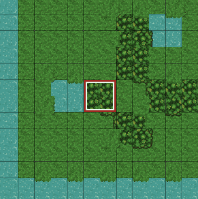
Same code, but this tile:

And result:
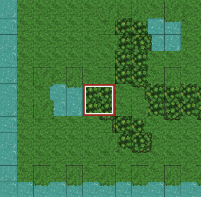
You can see: where new tile is, no ugly lines more.
I decided to make a map with tile overlay and I use tile map 24 x 24.
I need this transparency for unification of tiles by size. I can make code for work with tiles with different sizes, but it worst way in my case.
Thanks for attention!
---
### Author:  [@michalis](https://forum.castle-engine.io/u/michalis)
#### Post date: [March 9, 2023, 6:55am UTC](https://forum.castle-engine.io/t/border-appears-around-transparent-images/760/2 "2023-03-09T06:55:09Z")
There are 2 possible reasons for such thin lines. It probably is issue AD 1 for you, but if my explanation doesn’t help – please upload a testcase to reproduce the problem, so that I can tell for sure 🙂
1. Lack of alpha bleeding on tileset image. See [Alpha Bleeding | Manual | Castle Game Engine](https://castle-engine.io/manual_alpha_bleeding.php) about what is “alpha bleeding”. Long story short, you want to have some spacing between tileset images (both CGE and Tiled support such spacing) and fill this space with RGBA colors from adjacent pixels.
2. We’ve had another issue that could cause seams to appear at some zoom levels. It is fixed in PR [Making TCastleTiledMap support rendering animations. by Freedomax · Pull Request #445 · castle-engine/castle-engine · GitHub](https://github.com/castle-engine/castle-engine/pull/445) that brings a _lot_ of good improvements to Tiled rendering and I hope to merge it really soon (this weekend) 🙂
---
### Author:  [@Noscow](https://forum.castle-engine.io/u/Noscow)
#### Post date: [March 9, 2023, 5:25pm UTC](https://forum.castle-engine.io/t/border-appears-around-transparent-images/760/3 "2023-03-09T17:25:09Z")
Thanks!
I reed in manual what turning SmoothScaling off is option too, and it worked.
What way is better/faster?
---
### Author:  [@Noscow](https://forum.castle-engine.io/u/Noscow)
#### Post date: [March 9, 2023, 8:21pm UTC](https://forum.castle-engine.io/t/border-appears-around-transparent-images/760/4 "2023-03-09T20:21:50Z")
I think I see, with SmoothScaling pixels look better 🙂
But i read in manual what “The algorithm implemented here, for now, is really slow (but also really correct)”.
Is this important for a small 2D picture?
---
### Author:  [@eugeneloza](https://forum.castle-engine.io/u/eugeneloza)
#### Post date: [March 9, 2023, 8:42pm UTC](https://forum.castle-engine.io/t/border-appears-around-transparent-images/760/5 "2023-03-09T20:42:11Z")
> [@Noscow](#):
>
> “The algorithm implemented here, for now, is really slow (but also really correct)”.
You need to run this procedure once per image and then save it and subsequently load a corrected image. You shouldn’t do this often or even just once every time during loading of the game.
---
### Author:  [@Noscow](https://forum.castle-engine.io/u/Noscow)
#### Post date: [March 10, 2023, 6:55am UTC](https://forum.castle-engine.io/t/border-appears-around-transparent-images/760/6 "2023-03-10T06:55:37Z")
> [@eugeneloza](#):
>
> You need to run this procedure once per image and then save it and subsequently load a corrected image. You shouldn’t do this often or even just once every time during loading of the game.
I need redraw minimap every few seconds or one time it the minute, aproximally… So, I finish alghoritms to map drawing soon and test this methods more thoroughly, thanks for explain.
🙃
---
### Author:  [@michalis](https://forum.castle-engine.io/u/michalis)
#### Post date: [March 10, 2023, 7:09am UTC](https://forum.castle-engine.io/t/border-appears-around-transparent-images/760/7 "2023-03-10T07:09:20Z")
> [@Noscow](#):
>
> But i read in manual what “The algorithm implemented here, for now, is really slow (but also really correct)”.
To be clear, you just perform this operation once, before the game runs. It shouldn’t affect the game performance, as you shouldn’t do it during the actual game 🙂
Turning off `SmoothScaling` indeed also avoids the problem, but then your result looks different. `SmoothScaling=false` results in pixel-art look.
---
### Author:  [@Noscow](https://forum.castle-engine.io/u/Noscow)
#### Post date: [March 10, 2023, 7:59am UTC](https://forum.castle-engine.io/t/border-appears-around-transparent-images/760/8 "2023-03-10T07:59:07Z")
> [@michalis](#):
>
> To be clear, you just perform this operation once, before the game runs. It shouldn’t affect the game performance, as you shouldn’t do it during the actual game 🙂
For now i use .Url to load map tile everytime.
But, because i need to change tiles sometimes, I must download all of they into the program with AlphaBleed option at game start and after that set they as i need, yes?
For example, i can create array of TCastleImageTransform and load tiles with AlphaBleed into it. And after that I will use images from there. Right?
---
### Author:  [@eugeneloza](https://forum.castle-engine.io/u/eugeneloza)
#### Post date: [March 10, 2023, 11:00am UTC](https://forum.castle-engine.io/t/border-appears-around-transparent-images/760/9 "2023-03-10T11:00:41Z")
Sorry, I must admit I don’t understand the question 100%. Your normal flow would be:
1. Create several images with map tileset (like terrain) or map objects (like monsters).
2. Drag-n-drop them into `castle-view-image` (or any other tool capable of fixing the issue, I’ve made myself a command-line utility just for this one specific task as I run into this issue for every asset in my game), run “fix alpha bleeding” on them.
3. Drop them into `data` folder of your game.
4. Forget about the problem forever 🙂 Unless you need to update your tilesets, just repeat the procedure then.
---
### Author:  [@Noscow](https://forum.castle-engine.io/u/Noscow)
#### Post date: [March 10, 2023, 1:16pm UTC](https://forum.castle-engine.io/t/border-appears-around-transparent-images/760/10 "2023-03-10T13:16:42Z")
It turns out that AlphaBleeding is property of the `castle-view-image` and don’t necessary depend of code, if this property already added for picture?
---
### Author:  [@eugeneloza](https://forum.castle-engine.io/u/eugeneloza)
#### Post date: [March 10, 2023, 2:57pm UTC](https://forum.castle-engine.io/t/border-appears-around-transparent-images/760/11 "2023-03-10T14:57:43Z")
I believe you already have seen [Castle Game Engine: CastleImages: Class TCastleImage](https://castle-engine.io/apidoc/html/CastleImages.TCastleImage.html#AlphaBleed-string) — so the idea is that while indeed you _can_ run this on some images when loading them and it will give the desired effect, you don’t have to - it will reduce performance, even if it’s just during the loading process.
What I’ve meant is that you can simply run it once on the image and inside of `data` folder store “already fixed images”. This way you don’t need to do any additional processing when your game runs. You can do this through `castle-view-image` tool, or you can do this through any other tool that can “fix alpha bleed”. I’ve made myself a command-line tool [alphableeder · master · EugeneLoza / Shifted Image Control · GitLab](https://gitlab.com/EugeneLoza/shifted-image-control/-/tree/master/alphableeder) so I just drag-n-drop all the files to be processed on it, and in a few seconds get the result.